Inspiration
Every support organization has the same buried treasure: resolutions that live only in old conversations. A case comes in, the team scrambles, and someone who solved the exact issue eight months ago is never asked - because nobody remembers that thread exists. Case swarming brings the right people together, but the swarm still starts from zero every time. We built SwarmIQ to make sure no swarm ever starts from zero again.
What it does
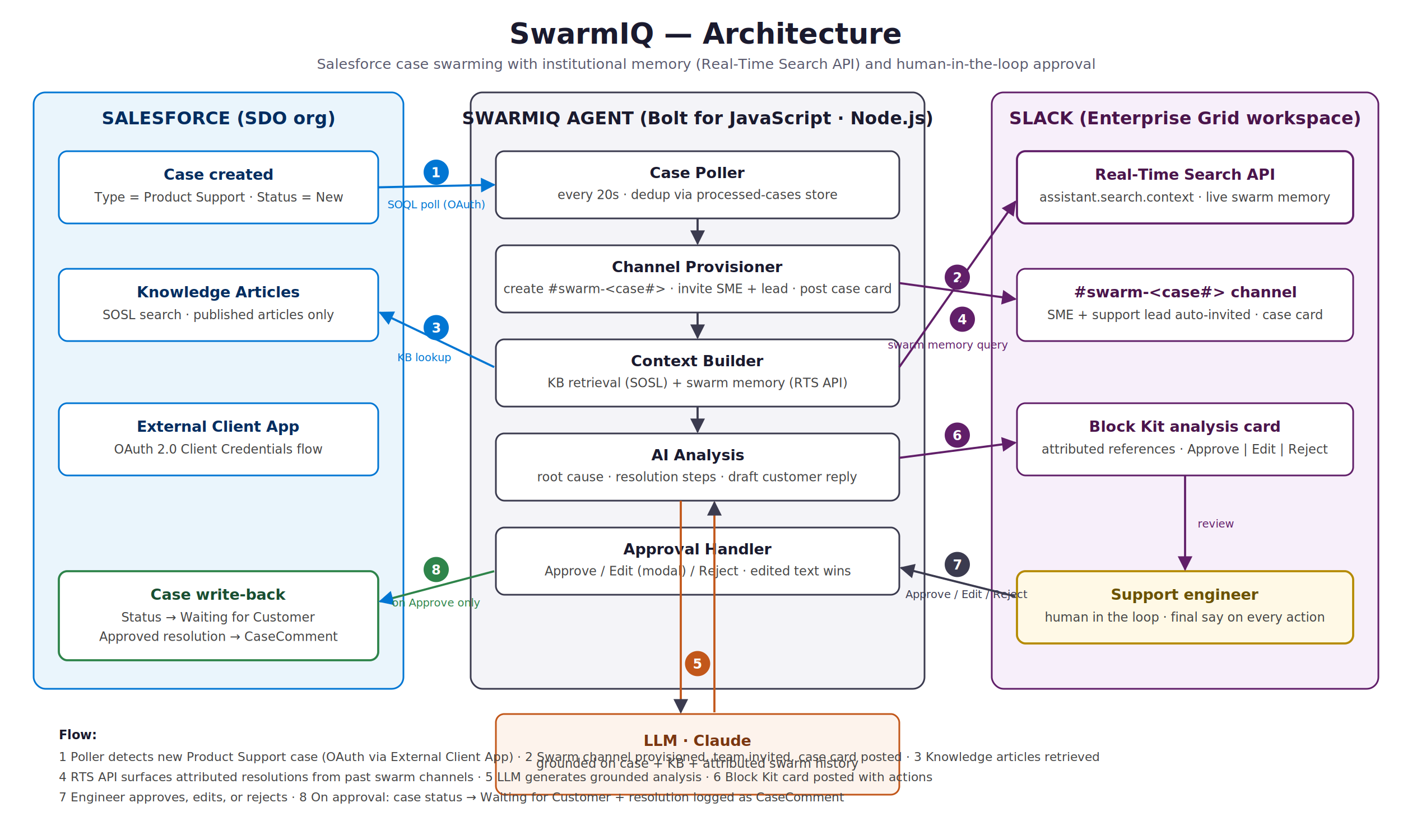
SwarmIQ is a Slack agent that gives Salesforce case swarms institutional memory, with a human approving every action.
Auto swarm provisioning: The moment a Product Support case is created in Salesforce, SwarmIQ creates a dedicated Slack channel, adds the right team members (product SME, support lead), and posts a formatted case card - within seconds, zero manual coordination.
Swarm memory (Real-Time Search API): Before recommending anything, SwarmIQ searches the workspace's past swarm conversations in real time and surfaces prior resolutions with attribution: "#swarm-00001027 - resolved by regenerating the integration user certificate." This knowledge exists in no KB article - only in conversations - and RTS makes it retrievable at the exact moment it matters.
AI-powered analysis: The agent combines the case details, matching Salesforce Knowledge articles (linked, clickable), and past swarm findings to generate a probable root cause, recommended resolution steps, and a draft customer response.
Human-in-the-loop approval: Engineers can Approve, Edit (via a Slack modal), or Reject the recommendation. Nothing touches the customer record without human sign-off.
Automated write-back: On approval, SwarmIQ updates the Salesforce case - status moves to Waiting for Customer and the approved resolution is logged as a case comment - without anyone leaving Slack.
How we built it
1. Slack: Bolt for JavaScript scaffolded via the Slack CLI's AI Agent template; Block Kit for the case card, analysis message, and approval actions; modals for the edit flow; Real-Time Search API (assistant.search.context) for swarm memory (adjust if fallback was used).
2. Salesforce: External Client App with OAuth 2.0 Client Credentials flow; a poller detects new Product Support cases; SOSL retrieves published Knowledge articles; jsforce handles case status updates and comments.
3. AI: Claude generates the structured analysis, grounded in case data, KB snippets, and attributed swarm history (adjust to your live LLM).
4. Engineering discipline: every module unit-tested via dependency injection (72+ tests), graceful per-step degradation - if KB or memory lookup fails, analysis proceeds with available context and says so.
Challenges we ran into
Enterprise Grid quirks: org-level installs require explicit team_id on workspace-scoped API calls - a subtle failure mode we debugged from raw API responses Modern Salesforce auth: SOAP login is disabled by default in new orgs, so we implemented the OAuth Client Credentials flow via the new External Client App framework Grounding without hallucination: getting the LLM to only cite genuinely relevant references required both retrieval-side filtering (error-code extraction) and prompt-side relevance instructions
What we learned
The highest-value context for support AI isn't in knowledge bases - it's in conversations. RTS turns that dark knowledge into a first-class input. And AI in customer-facing workflows earns trust through visible human control: the Edit-then-Approve pattern was the single most appreciated feature in testing.
What's next
Severity-based escalation paths, SLA-aware routing, auto-generating draft KB articles from resolved swarms (closing the knowledge loop), sentiment-aware prioritization, and a resolution-effectiveness dashboard.
Built With
- artificial-intelligence
- case-management
- no-code
- salesforce
- slac-workflow-builder
- slack
- slack-ai
- slack-api

