The problem
Every new hire is the same paperwork exercise wearing a different name. A manager fills out a form, then spends the next two weeks pinging IT for a laptop, pinging the recruiter for a Jira ticket, pinging Slack to introduce the person to their team, and hoping nobody forgets the security training deadline. None of it is hard. All of it is tedious, and it depends entirely on a human remembering eleven different steps for eleven different roles.
OnboardFlow started from a simple bet: what if the agent didn't need a script for each role? What if it just looked at "Software Engineer, Engineering" versus "Sales Representative, Sales" and reasoned its way to the right dozen actions, the same way a good office manager would?
What it does
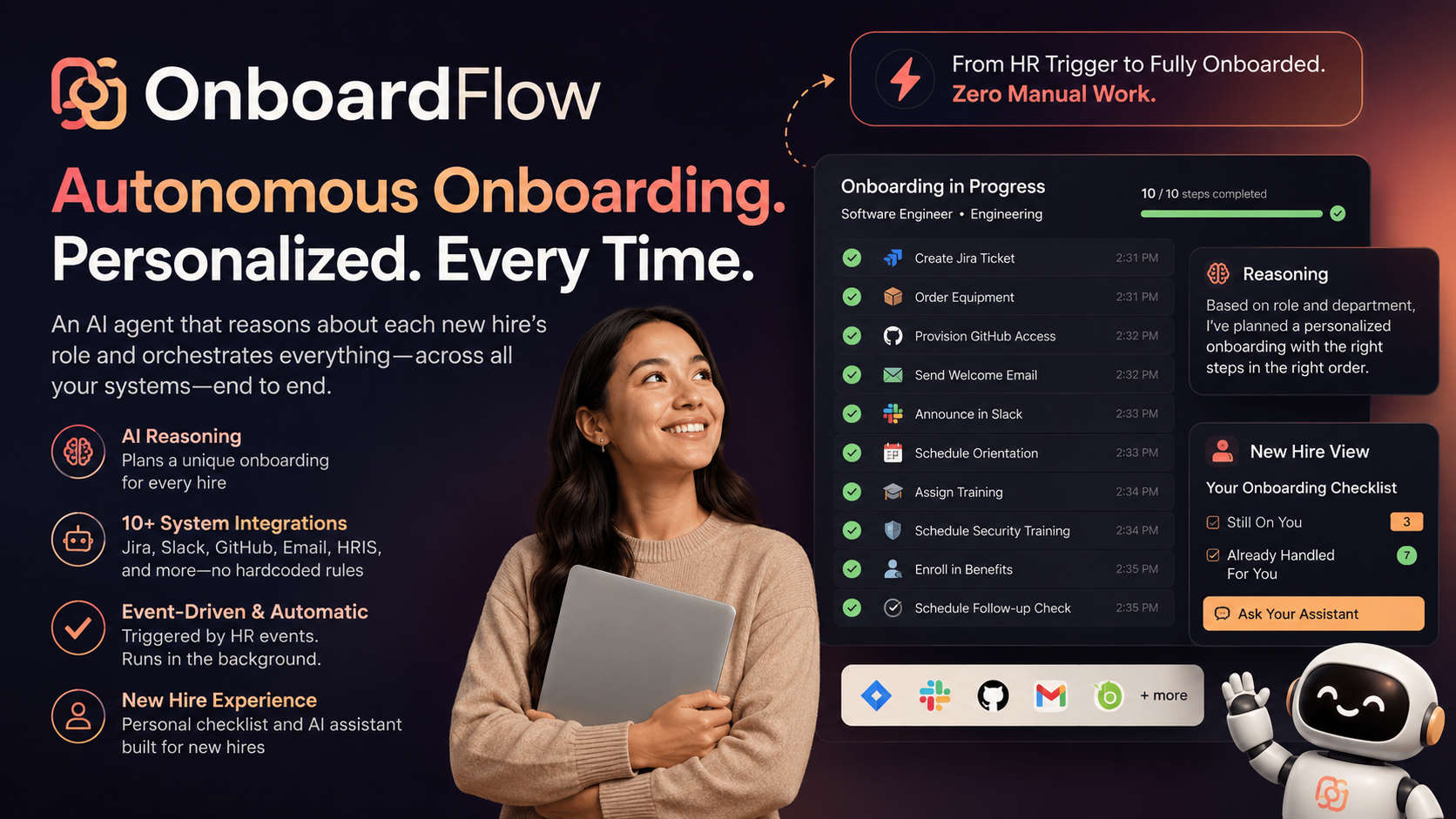
You fill out one form: name, role, department, start date, manager, preferred name and pronouns. Gemini reads that and decides, live, which of its 12 tools apply and in what order: equipment provisioning, GitHub access, CRM setup, Asana projects, Jira tickets, Slack welcome messages, calendar scheduling, personalized email, role-based training assignments, mandatory security training, benefits enrollment, and a 7/30-day follow-up check. A Server-Sent Events stream shows that reasoning and every tool call as it happens, not after the fact. Every run is written to Firestore, so there's a real audit trail and a "Past Onboardings" history you can page back through.
The app splits into two actual views, not one screen wearing two hats. HR sees the reasoning trace, the tool-by-tool results, and a timeline built from the tools' own deadline data. The new hire sees a plain checklist, "Still On You" versus "Already Handled For You," pulled from the same run, plus a chatbot behind a button for anything that isn't obvious from the checklist.
How I built it
FastAPI backend, the Gemini API called directly through Google's google-genai SDK (no agent framework in between, more on why below), a React/TypeScript frontend on Vite, Firestore for state, and Cloud Run plus Netlify for deployment. The agent doesn't have a rulebook mapping "Engineer" to a fixed tool list. It gets the new hire's details and a description of each tool's parameters, and it decides.
Challenges I ran into
This is the part that's actually interesting, because almost none of it went the way the first draft assumed.
The demo path was broken before it ever ran. The very first real test found a live Gemini API key sitting in a .gitignore-bypassing commit made through GitHub's web UI, and a transport mismatch that meant the "golden path" demo could never have worked in the first place. The frontend's EventSource can only send GET requests, but the streaming endpoint was declared as POST. Every submission was silently returning a 405. Neither of those was visible from reading the code casually; they only showed up once someone actually clicked submit and watched it fail.
The agent's own reasoning wasn't reliable about following instructions. A full test run against a live Gemini call found 3 of 20 tool-call steps failing, not because the tools were broken, but because Gemini was passing parameters under names my tools didn't expect (employee_email instead of email), or skipping required fields entirely. The fix that actually held wasn't a bigger prompt or a longer list of examples. It was inspecting each tool's own function signature at runtime and resolving parameters against that, instead of maintaining a hand-written list that inevitably fell out of date the moment a new tool was added. The same instruction-following gap showed up again later with preferred names and pronouns: telling Gemini to use someone's preferred name in generated messages worked most of the time, and "most of the time" isn't good enough when the message it forgets is the one a new hire actually reads. That got force-applied in code instead of trusted to the prompt.
A clean success looked like a failure on screen. After a workflow finished with every step green, the UI would flash a red "Connection lost to server" banner over it. The browser's native EventSource fires an onerror event whenever a server closes a stream, including a completely successful close; there's no separate "done cleanly" signal. The frontend had been treating every onerror as a failure. The fix was tracking whether a real terminal event had already arrived before the connection closed, and ignoring the onerror if so. It's a two-line fix, but it took a full watch of the actual UI, not a read of the code, to notice it was wrong at all.
I had to decide, more than once, between an honest diagram and a real feature. Early on, the architecture diagram claimed Google ADK and Pub/Sub integration that the live code didn't actually use yet. My first instinct was to fix the diagram: delete the claims. Reviewing the finished demo later, it was clear the honest fix wasn't good enough. The Firestore persistence the diagram no longer claimed was actually a feature worth having, so I built it for real. Every run, whether triggered by the form or by a Pub/Sub push, now writes its state, and the diagram reflects exactly what runs, no more and no less.
The deploy tooling itself didn't work on the machine I was building on. The gcloud CLI failed outright: a security tool on my dev machine injects a root certificate that Python's OpenSSL rejects even after merging it into a custom trust bundle. My app's own runtime code could work around this with a targeted patch; the separate gcloud binary couldn't inherit that fix. My workaround was deploying through the Cloud Run console UI directly, via GitHub's Developer Connect auto-deploy, rather than losing more time fighting a CLI that was never going to cooperate on this network.
The app almost stayed a chatbot demo. After the first backend pass, the whole thing was one screen: submit a form, watch the agent think, done. Reviewing it side by side with what an actual new hire experiences made it obvious that wasn't the product. An HR admin dashboard is not the same thing as "what does onboarding feel like for the person going through it." That's what forced the HR/New Hire split: a real toggle between "here's what the system did" and "here's what you, the new hire, actually need to know right now," with the chatbot demoted from the whole screen to a button you press when you have a question.
Editing the demo video by hand wasn't going to happen. The final recording was one continuous seven-minute take, out of script order, with some sections sped through faster than the narration assumed. Rather than hand-syncing eight separately generated narration tracks to that footage in a timeline editor, I built a small ffmpeg pipeline: extract labeled contact-sheet frame grids from the raw video to find every scene's timestamp without watching it start to finish, match each narration track to its footage window, retime every segment to its track's exact length (freeze-framing the last frame rather than stretching video or leaving dead air), and generate two title-card bookends. What would have been an afternoon of manual editing became a scripted, repeatable process.
What I learned
The interesting bugs were never in the AI reasoning itself; Gemini was generally good at deciding what a Software Engineer versus a Sales Rep needs. The interesting bugs were at every seam: the transport between frontend and backend, the gap between what a prompt asks for and what a model reliably does, the difference between a diagram that looks honest and a feature that's actually built, and the difference between "the code runs" and "a person watching the screen sees the right thing." Autonomous reasoning is the headline feature, but almost every real bug I hit was a plumbing problem around it, not a reasoning problem in it.
What's next
Swap the mock tool layer for real API integrations (Jira, GitHub, Slack, an actual HRIS), add approval gates for anything that touches money or access control, and build the analytics view the audit trail already has the data for.
Built With
- docker
- fastapi
- gemini-3.6-flash
- google-cloud-firestore
- google-cloud-pubsub
- google-cloud-run
- google-gemini
- google-genai-sdk
- netlify
- python
- react
- server-sent-events
- typescript
- uvicorn
- vite

Log in or sign up for Devpost to join the conversation.