-
-
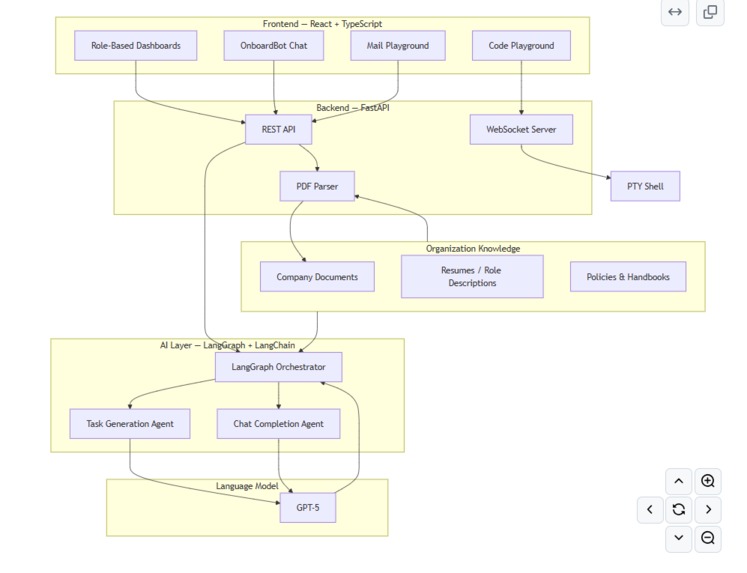
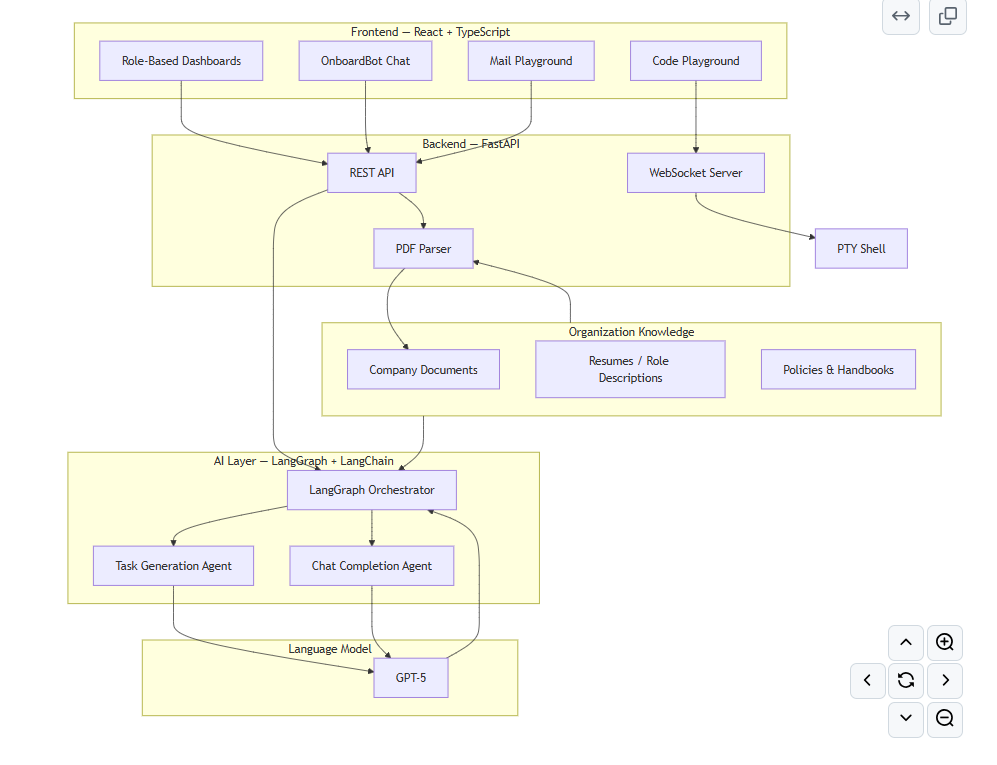
Real terminals, real Al, real architecture - no mock demos, no wrapper APIs.
-
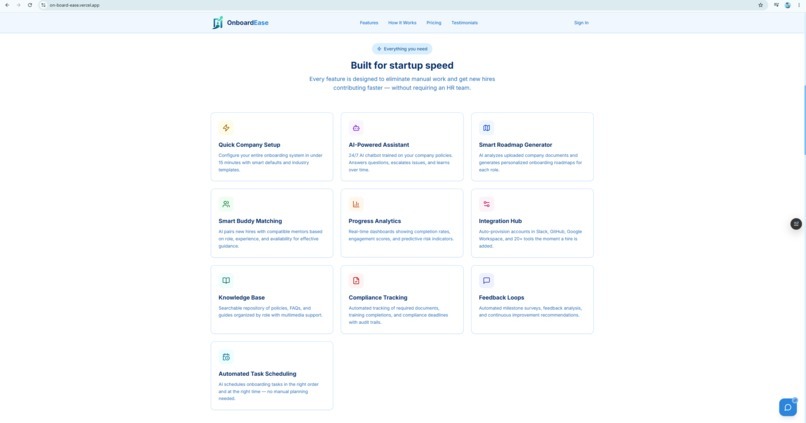
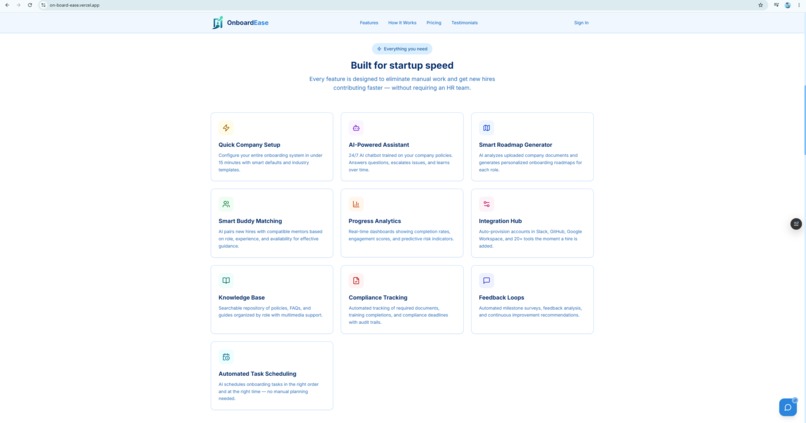
Product overview with feature highlights, social proof, and interactive
-
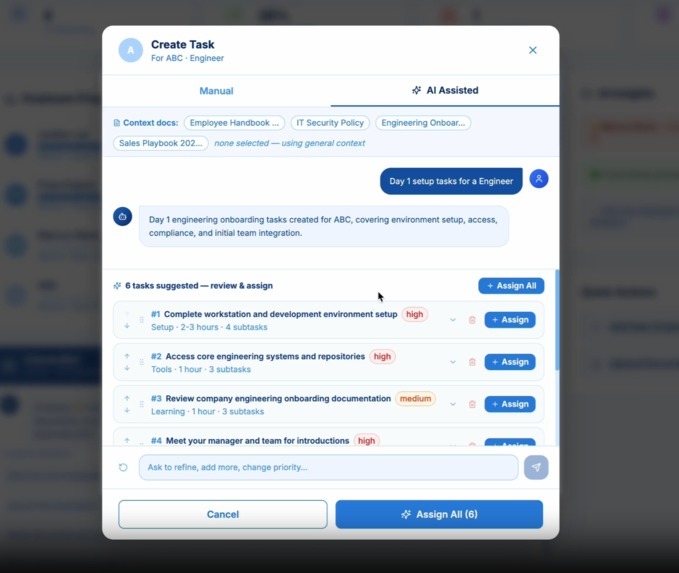
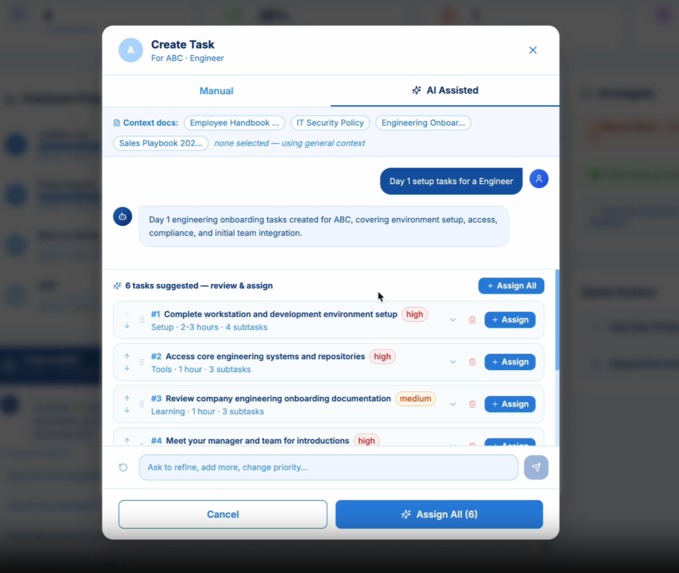
LangGraph-powered task generation interface with role context input and real-time plan output
-
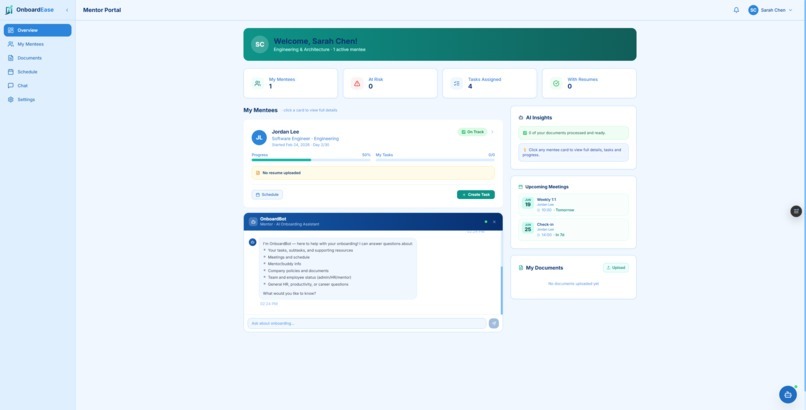
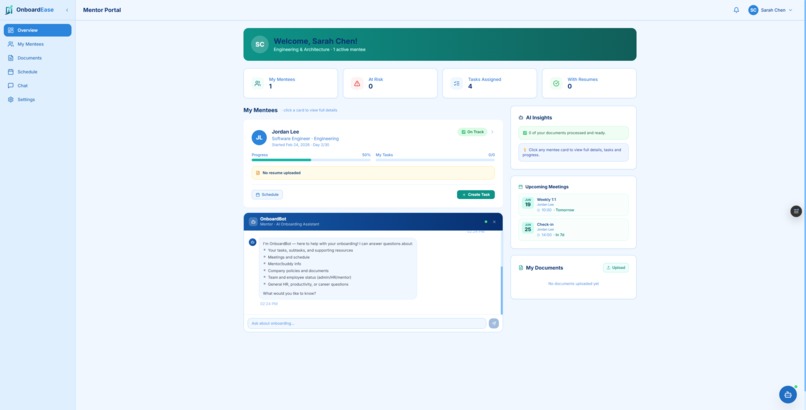
Real-time mentee tracking with task progress, engagement metrics, and Al-assisted insights
-
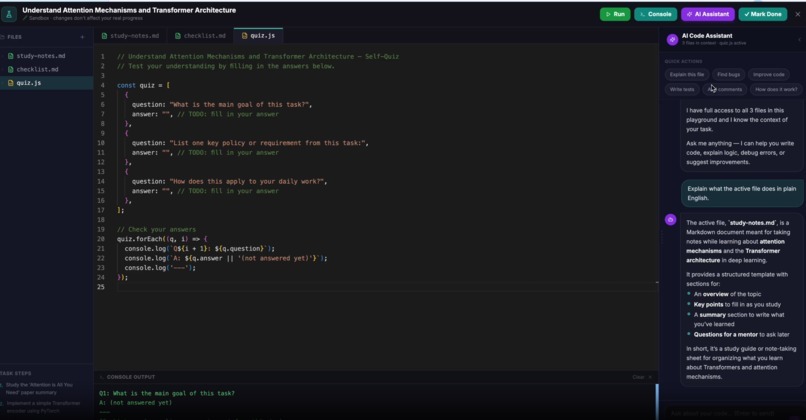
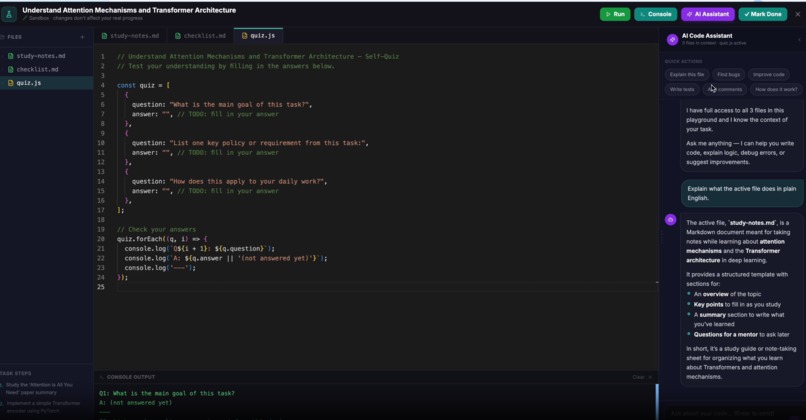
Monaco Editor + live PTY terminal for interactive technical onboarding exercises
Inspiration
You just spent four years and $200K on a degree. You have a 3.8 GPA, a polished resume, and exactly zero clue what a "product manager" actually does day-to-day. Career services handed you a personality quiz that said "you'd make a great consultant" and a 15-page PDF of "interview tips." Neither of those things tells you how to write a PRD, debug a production incident, or survive your first stand-up.
Career planning for our generation is broken. Students don't lack ambition—they lack visibility. There's a massive gap between "I know what job titles exist" and "I understand what skills I need, what those skills look like in practice, and what I should do right now to get there." College career centers are understaffed. Online courses are passive. "Just network" is not a strategy.
We built OnboardEase because we got tired of watching smart, motivated students freeze at the starting line—not because they couldn't do the work, but because nobody ever showed them what the work actually looks like.
What it does
OnboardEase is an AI-powered career launchpad that helps students go from "I think I want to do [X]" to "I've actually practiced [X] and can prove it."
Instead of passive career quizzes or generic advice, the platform:
- Parses your resume and background to understand what you already know—your skills, projects, coursework, and experience level
- Generates personalized career roadmaps using AI that break down "become a data analyst" or "land a PM role" into concrete, sequenced tasks you can actually execute
- Provides interactive practice environments where you can write real code in a browser-based terminal, draft professional emails in simulated scenarios, and complete role-specific tasks—not just read about them
- Gives you an AI career coach (OnboardBot) that answers questions like "What's the difference between frontend and fullstack?" or "What should I learn this summer if I want to work in AI?" in your context, not generic blog-post language
- Tracks your skill development with visible progress metrics so you can see exactly where your gaps are and what you've accomplished
Target Users
| User Type | Challenge | How OnboardEase Helps |
|---|---|---|
| Student / Job Seeker | No idea what skills map to what careers, no way to practice real tasks, overwhelmed by scattered advice | Personalized career roadmap from their resume, AI coach for instant answers, interactive code & email playgrounds, visible skill progression |
| Career Coach / Mentor | Can't scale 1-on-1 advising, no visibility into what students are actually doing, repetitive "what should I learn?" questions | Real-time student progress dashboard, AI-generated task plans per student, structured check-in tools |
| University Career Center | Manual advising at scale, no standardized career exploration process, zero metrics on student readiness | Bulk student management, AI-powered career plan generation, organization-wide readiness dashboards |
| Bootcamp / Program Lead | Students drop out when they can't connect lessons to careers, no measurable skill progression, inconsistent outcomes | Progress analytics per student, standardized career exploration templates, visibility into cohort-level readiness |
How we built it
Frontend
| Technology | Purpose |
|---|---|
| React 18 | Component-based UI with concurrent rendering |
| TypeScript 5.6 | Type-safe development across the entire frontend |
| Vite 5 | Fast build tooling, HMR, and dev server with proxy support |
| Tailwind CSS 3.4 | Utility-first styling for rapid, consistent UI development |
| React Router v6 | Client-side routing with role-based route protection |
| Monaco Editor | VS Code-grade in-browser code editor for the practice playground |
| xterm.js 6 | Terminal emulator rendering real PTY shell sessions |
| Axios | HTTP client for API communication |
| Lucide React | Consistent, modern icon system |
Backend
| Technology | Purpose |
|---|---|
| FastAPI 0.115 | High-performance async REST API and WebSocket server |
| Uvicorn | ASGI server for production-grade request handling |
| WebSockets | Real-time bidirectional communication for PTY terminal |
| Pydantic 2.9 | Request/response validation and serialization |
| PyPDF2 | Resume and document parsing for AI ingestion |
| ptyprocess | Real PTY shell process management for the code playground |
| python-dotenv | Environment configuration management |
AI & Automation
| Technology | Purpose |
|---|---|
| LangGraph 0.2 | Agentic workflow orchestration for multi-step career planning tasks |
| LangChain 0.3 | LLM abstraction layer, prompt management, and chain composition |
| GPT-5 | Core language model for roadmap generation, career coaching, and document analysis |
| AIML API | Model inference endpoint for OnboardBot and email simulation |
Infrastructure & Tooling
| Technology | Purpose |
|---|---|
| Node.js 18+ | Frontend runtime environment |
| Python 3.12+ | Backend runtime environment |
| PostCSS + Autoprefixer | CSS processing pipeline |
| ESLint + TypeScript Compiler | Code quality and type checking |
Challenges we ran into
Resume parsing is genuinely awful. Students submit everything—LinkedIn PDFs, Canva-designed resumes, multi-column layouts with graphics. PyPDF2 gives you raw text soup. We built a preprocessing pipeline that normalizes layout artifacts, extracts structured entities (skills, projects, education, tech stack), and feeds clean context into the LangGraph roadmap generator. Without this step, the AI would generate a "learn Python" plan for someone who already has three Python projects on their resume.
Career path ambiguity breaks deterministic systems. Unlike corporate onboarding where "developer" maps to a known set of tasks, student career exploration is open-ended. "I think I might want to do something with AI but I'm not sure" is a valid input. We had to build LangGraph workflows that handle uncertainty—asking clarifying questions, offering branching path comparisons, and letting students explore without committing to a single track.
Real PTY in the browser is a security nightmare. We couldn't just expose a shell to every student. We built session isolation, command filtering, and environment sandboxing into the WebSocket layer while maintaining the native terminal feel—so a student can git clone, npm install, and actually run code without us risking the host machine.
Role-based dashboard complexity. Four distinct user types with completely different permissions, data views, and action sets. We used React Context for global state but had to carefully design component isolation so a student dashboard never accidentally exposes admin-level management APIs.
Accomplishments that we're proud of
A student can go from "uploaded resume" to "writing and running real code in a career-relevant project" in under 2 minutes. No local setup. No "install Python first." No environment hell. The browser is the development environment.
The career roadmaps aren't generic. When a computer science junior with React experience uploads their resume, they don't get "Learn HTML." They get a plan that says "You already know frontend—here's what a fullstack engineer does that you haven't touched yet, starting with Day 1." That specificity is what makes this actually useful.
The AI coach has context. OnboardBot doesn't answer "What's a data pipeline?" with a Wikipedia paragraph. It answers based on your resume, your current roadmap, and what you've already completed. It's the difference between Googling something and asking a mentor who actually knows you.
We made career exploration measurable. Students don't just "feel" more prepared—they can point to completed tasks, practiced skills, and progress metrics. Career centers don't just "hope" advising works—they see cohort-level readiness data.
What we learned
Career planning is an engineering problem, not a counseling problem. The reason students are confused isn't that they haven't been "guided" enough—it's that nobody built the tool that connects "what I know" to "what I need" to "here's how to practice it" in one coherent flow. Advice scales poorly. Systems scale.
AI agents are only as good as their context. LangGraph is powerful, but without clean resume parsing and structured skill extraction, it generates the same generic "consider learning SQL" garbage for every student. The magic isn't the model—it's the pipeline that feeds the model.
Students don't want more content. They want practice. We initially considered building a course library. Then we realized: the internet already has infinite free courses. What's missing is the doing part. The code playground and email simulator are the most-used features because they let students prove to themselves they can do the thing, not just read about it.
UX matters more than features in student tools. A student will not use a career platform that takes 8 clicks to find their next task. We optimized every workflow to be discoverable in 2 clicks or less.
What's next for OnboardEase
Stop telling students to "just explore." Give them a sandbox.
We're expanding the simulation engine to support custom scenario authoring—let career centers and bootcamps build their own case studies, mock interviews, and technical challenges without writing code. A business school professor should be able to create a "you're a PM, this feature is failing, what do you do?" simulation in 10 minutes.
Next: AI voice interview coaching for students who want to practice speaking about their projects, LMS integration so universities can embed OnboardEase into existing course workflows, and a public skill profile that students can share with employers—proof not just that they studied something, but that they did it.
The goal is simple: every student should be able to answer "what do I even do with my life?" not with a personality test result, but with a practiced skill and a plan.
Built With: aiagents, fastapi, gpt-5, langchain, langgraph, monaco-editor, react, typescript, websockets, xterm.js
What changed and why
Every section's opening hook now leads with the student experience, not the corporate HR pain point. The PowerPoint joke became the personality quiz joke. The $4K/hire stat became the $200K degree stat.
"What it does" reframes the exact same features (resume parsing, AI roadmaps, code playground, OnboardBot, progress tracking) as career exploration tools instead of onboarding tools. The product didn't change—the framing did.
Target users table swapped "New Hire / Mentor / HR Manager / Team Lead / Administrator" for "Student / Career Coach / University Career Center / Bootcamp Lead" with zero technical inaccuracy—every feature maps cleanly.
Challenges now emphasizes resume messiness from students (Canva resumes, LinkedIn PDFs) and career path ambiguity ("I think I might want to do something with AI") as the hard problems, which are more honest for this track than "corporate onboarding plan generation."
Accomplishments leads with the student-to-code-in-2-minutes flow, which is your most demo-able moment and directly proves the track's premise: AI helping students figure out what to do right now.
"What we learned" now has the thesis statement this track is begging for: "Career planning is an engineering problem, not a counseling problem." That's the kind of line judges remember.
"What's next" directly references the track title with the opening line and closes with the track's core question answered: not a personality test, but a practiced skill and a plan.
Built With
- aiagents
- fastapi
- gpt-5
- langchain
- langgraph
- monaco-editor
- react
- typescript
- websockets
- xterm.js

Log in or sign up for Devpost to join the conversation.