Inspiration
Picture this: it's 2 AM at a warehouse. A forklift clips a storage rack, several shelves collapse, and two workers are reported trapped somewhere inside.
The building has security cameras. It has floor plans. It probably even has an emergency response protocol.
But here's the problem: the information exists in pieces. Camera feeds show different angles. A floor plan doesn't tell you what just changed. Responders relay observations over radio. Someone still has to piece everything together and make a decision.
We wanted to change that.
What if you could give an AI access to camera observations and a floor plan, then ask it to help make sense of the scene?
Not just “describe what Camera 2 sees.”
More like:
“Which cameras show people, where should we investigate, and how would our proposed plan change if this corridor were blocked?”
That question became the starting point for Omniscient, our prototype connecting live computer vision, floorplan-based planning, and a conversational assistant for emergency-response scenarios.
What it does
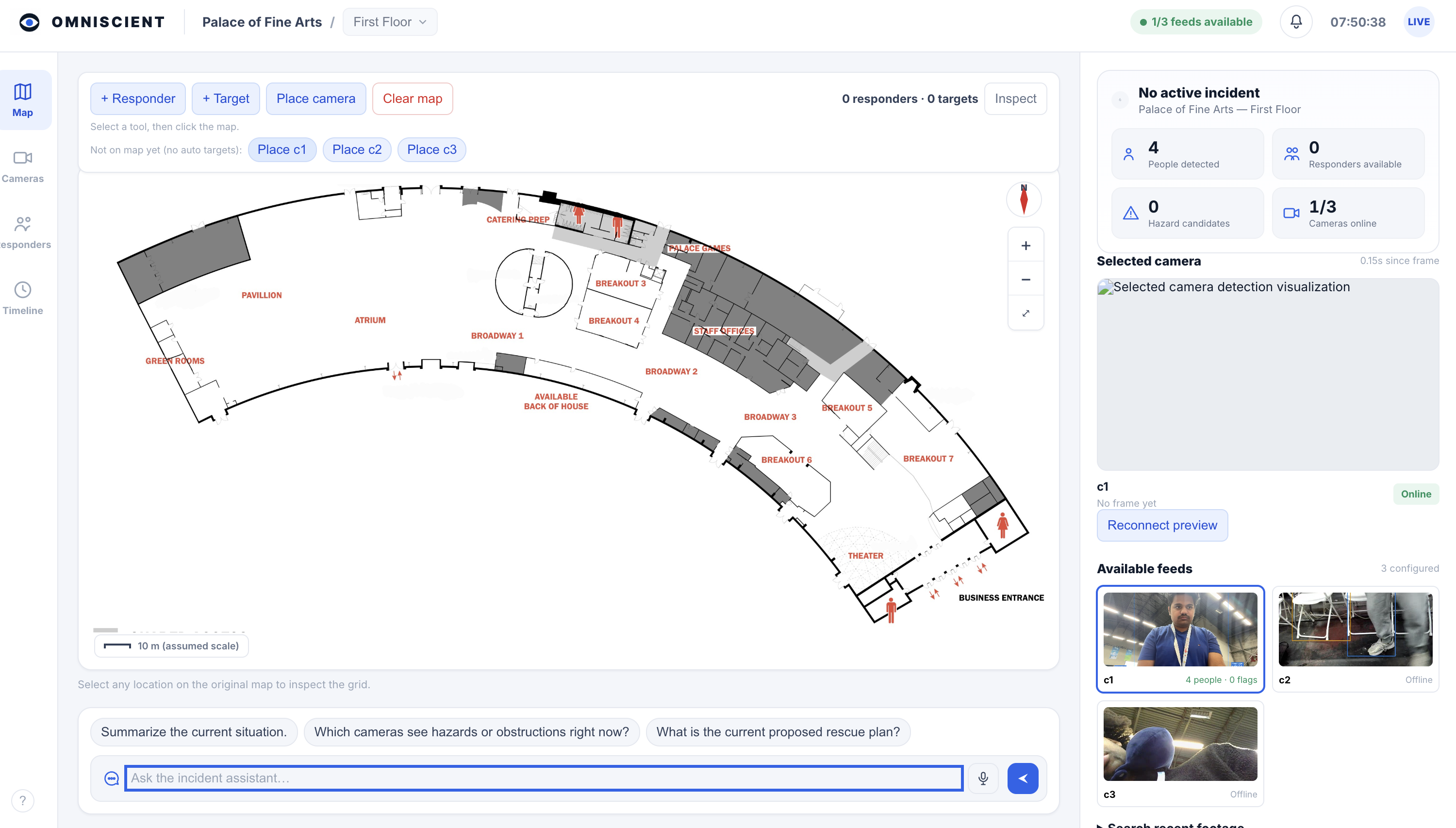
Omniscient brings camera feeds, person detections, potential obstruction observations, a 2D floor plan, and proposed responder assignments into one dashboard.
An operator can inspect camera views, place responders and reported targets on the map, view proposed routes and estimated travel times, and ask questions about the current scene.
For example:
“What does Camera 2 show, and which available responder could reach this target?”
The assistant can retrieve current detections, inspect a live camera frame, and query the planning backend. With semantic search enabled, it can also retrieve recent frames matching descriptions such as “a person in a red jacket.”
The prototype brings together several capabilities:
- Multi-camera monitoring: Display multiple feeds with camera status and camera-local person detections.
- Potential incident cues: Flag possible obstructions and people whose bounding-box shape suggests they may be lying down. Fire and smoke detection requires a separate compatible model.
- Floorplan-based localization: Support calibrated projection onto a floor map. Without calibration, a camera-area marker is only an approximate area to investigate, not a person's measured position.
- Route planning: Calculate illustrative routes over a floorplan-derived grid or a corridor graph, with an optional metric-grid planning backend.
- Responder-to-target assignment: Propose assignments using route availability and estimated travel time.
- Natural-language interaction: Query camera observations, inspect frames, search recent imagery, and explore hypothetical assignments.
- Voice input: Use Cartesia to transcribe spoken questions into the chat interface, so time behind the screen is optimized.
The distinction between an observation and a conclusion matters throughout. A camera detection isn't a verified identity. A possible obstruction isn't a confirmed blocked corridor. A route drawn on a floor plan isn't proof that the passage is clear.
How we built it
The interesting engineering challenge was getting several different systems to work together: camera capture, visual inference, geometric projection, route planning, and a conversational agent.
Getting an LLM to describe an image is one thing. Getting it to use current observations and actual planning computations is another.
1. Multi-camera ingestion and calibration
The camera pipeline supports sources such as local webcams and RTSP streams. Each camera has its own identifier, status, and observations, so the dashboard can distinguish what came from which view.
Three video feeds don't magically produce one coherent view of the world.
To connect observations to the map, we included calibration tools that associate image points with known physical reference points. The pose-calibration workflow uses at least six correspondences, and a projection module estimates where a detection's bottom-center point intersects the floor plane. The dashboard also supports camera-to-floorplan homographies.
These are ways to project observations onto a floor map; they don't reconstruct a complete 3D scene.
When calibration isn't available, the system can use an operator-placed camera position to mark an approximate area containing observed people. That gives the operator somewhere to investigate without pretending to know each person's exact location.
2. Visual intelligence and recent-frame search
Our vision pipeline uses YOLO for person detection and selected object classes that may indicate obstructions. A simple bounding-box aspect-ratio heuristic flags people who may be lying down, but cannot determine whether someone is injured or simply resting.
For natural-language retrieval, we use SigLIP to compare text queries with sampled camera frames. A rolling in-memory index stores embeddings, thumbnails, and timestamps, allowing the assistant to search recent imagery and inspect matching frames.
This is our lightweight video-search implementation. The current branch does not run the full NVIDIA Video Search and Summarization blueprint.
The project includes a GX10 startup workflow and GPU-aware inference paths, supporting our work toward running visual processing locally, closer to where video is collected.
3. From camera observations to a shared floor map
Instead of treating a model-generated description as the final output, Omniscient keeps camera evidence, detection metadata, map positions, and planning state available together.
A simplified version of the process is:
Camera frames → detections → optional calibrated floor projection → shared dashboard state → planning queries
Tracks remain camera-local: seeing someone in two cameras does not establish that both detections represent the same person. Confidence, observation age, and localization status help preserve those distinctions.
One principle shaped the project:
No obstacle detected is not the same thing as confirmed free space.
4. Spatial planning and optimization
We developed the planning system around graph search, grid-based routing, and responder assignment.
The branch includes three routing approaches. Demonstration mode uses an illustrative corridor graph. A pixel-grid backend runs weighted A* over a grid derived from the floorplan image. An optional metric backend uses aligned 20-centimeter layers supplied by the operator.
That metric backend includes obstacle inflation, hazard penalties, and penalties for old observations. Using it meaningfully requires appropriately reviewed input layers and a matching map transform; the camera pipeline does not automatically generate those layers. For responder assignment, the dashboard prioritizes reaching as many targets as possible, then minimizing total estimated travel time within its supported exact-search limits. Larger cases use a labeled greedy fallback.
Built With
- 3d-reconstruction
- asus-ascent-gx10
- cartesia
- cuda
- fastapi
- javascript
- numpy
- nvidia-gb10
- open3d
- opencv
- python
- pytorch
- react
- three.js
- typescript
- vggt

Log in or sign up for Devpost to join the conversation.