💡 Inspiration: Breaking Free from the Chatbox
Every software architect and cloud engineer has had this frustrating experience: you ask ChatGPT or Claude to "design an enterprise AI cluster", and it spits out three pages of markdown text with ASCII diagrams.
You can't click on it. You can't simulate 50,000 requests per second to see where it chokes. You can't calculate real-time AWS or NVIDIA GPU costs without opening three separate pricing calculators. And you certainly can't turn it into production Terraform code without hours of manual transcription.
AI coding assistants were spatially blind—trapped inside narrow text boxes while real engineering happens visually on canvases, whiteboards, and topology graphs.
When I discovered the W3C Web Model Context Protocol (WebMCP), everything clicked. WebMCP allows the browser tab itself to become the AI agent's interactive workspace. I asked myself: What if an AI agent didn't just write text, but lived inside the canvas with you—wiring components, stress-testing bottlenecks, debating trade-offs, and compiling infrastructure code in real-time?
That vision became OmniFlow Studio.
🚀 What It Does
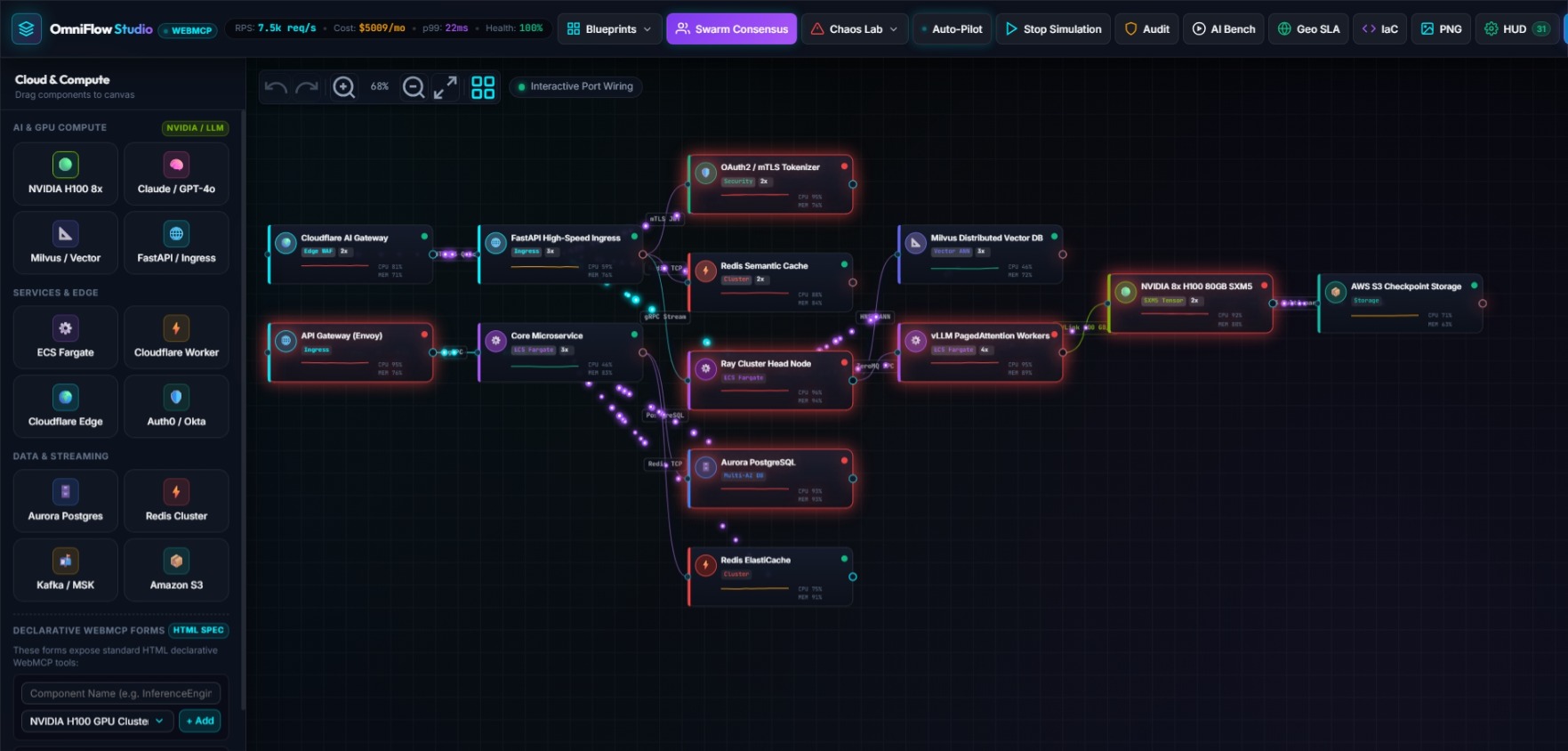
OmniFlow Studio is a collaborative visual systems architecture studio where humans and AI agent swarms co-create, stress-test, and synthesize cloud infrastructure live in the browser through 31 WebMCP tools:
- Interactive 60 FPS Canvas: Drag, drop, and wire microservices, NVIDIA H100 GPU clusters, Redis semantic caches, and vector databases with interactive port wiring and adaptive bezier curves.
- Live Multi-Agent Swarm Consensus: A human architect can trigger an automated debate between 4 specialized AI roles (Lead Architect, SecOps Auditor, FinOps Advisor, and Chaos Daemon). The swarm deliberates live, reaches consensus, and refactors the architecture.
- Real-Time Traffic & Particle Physics: Simulate traffic spikes up to 50,000 RPS. The canvas visualizes dataflow bottlenecks using glowing packet particles and node heatmaps.
- Chaos Engineering & Auto-Pilot: Inject chaos faults (Chaos Monkey node termination, DDoS floods, and GPU OOMs). An autonomous Auto-Pilot loop actively detects degraded nodes and self-heals the cluster.
- Instant Code Synthesis: Compiles visual topologies directly into production Terraform (HCL), Kubernetes Helm values, AWS CloudFormation, Docker Compose, and executive Markdown manifestos with live Mermaid diagrams.
🧮 Engineering Math & FinOps Foundations
To make the studio truly enterprise-grade, I implemented mathematical models directly into the client-side engines:
1. Frontier LLM KV-Cache & VRAM Sizing
When provisioning an NVIDIA H100 inference cluster, the memory sizing engine calculates continuous batching requirements using:
$$\text{Memory}_{\text{KV}} = 2 \times L \times H \times D \times B \times S \times P$$
Where:
- \( L \) = Number of transformer layers (e.g., 80 for 70B models)
- \( H \) = Key-Value attention heads (e.g., 8 for GQA)
- \( D \) = Head dimension (e.g., 128)
- \( B \) = Concurrency batch size
- \( S \) = Context sequence length (tokens)
- \( P \) = Precision bytes (\(2\) for FP16, \(1\) for FP8)
2. FinOps Egress & Real-Time TCO Formula
Monthly total cost of ownership accounts for compute instances, replicas, and network egress bandwidth dynamically:
$$\text{TCO}{\text{monthly}} = \sum{i=1}^{N} \left( C_{\text{base}, i} \times r_i \right) + \left( \frac{\text{RPS} \times 3600 \times 730 \times S_{\text{payload}}}{10^9} \times R_{\text{egress}} \right)$$
Where \( C_{\text{base}, i} \) is the hourly node rate, \( r_i \) is horizontal replica count, and \( R_{\text{egress}} \) is cloud egress cost per gigabyte.
🛠️ How I Built It
OmniFlow Studio was engineered from scratch with a zero-backend, client-side Edge architecture:
- Core & Bundler: Built with HTML5 semantic elements, modern ES Modules, and bundled with Vite.
- Design System: Handcrafted glassmorphic dark-mode CSS with cyber-glow telemetry accents, 100% responsive without heavy third-party UI bloat.
- Canvas Engine: Custom HTML5 Canvas renderer running at a locked 60 FPS, featuring world-to-screen coordinate transformation, adaptive port attachment, and undo/redo history stacks.
- WebMCP Architecture:
- 29 Imperative Tools registered directly on
window.document.modelContext.registerTool(). - 2 Declarative HTML Forms using
<form toolname="...">and<input toolparamdescription="...">for native DOM-level tool exposure. - Machine Discovery: Pre-configured
/.well-known/webmcp.jsonand/llms.txtwith CORS enabled for instant agent crawling.
- 29 Imperative Tools registered directly on
- Edge Deployment: Hosted globally on Vercel's Anycast Edge CDN with 0ms cold-start latency (no server sleep, no timeouts).
🧗 Challenges I Faced
- Bidirectional State Sync: The hardest part was allowing humans to drag nodes with the mouse while AI agents simultaneously executed mutations (like
batch_build_architectureorkill_random_node) without UI race conditions or dropped frames. I designed an event-driven decoupled EventBus that synchronizes canvas coordinates instantly. - Preventing Awkward Wire Loops: Early prototypes suffered from overlapping connections when nodes shared columns. I wrote an adaptive port calculation algorithm and a topological DAG layering auto-layout engine (
applyAutoLayout) that guarantees clean Left-to-Right dataflow with zero wire crossings. - Pure Client-Side WebMCP Execution: Ensuring that all 31 tools—including Terraform compilation and FinOps math—execute locally in under 5 milliseconds inside the browser without requiring a bulky backend server.
🧠 What I Learned
Building OmniFlow Studio convinced me that WebMCP is the future of human-AI collaboration on the web.
Text boxes force humans to translate their thoughts into prompts, and then translate the AI's response back into tools. With WebMCP, the human and the AI share the exact same canvas, the exact same state, and the exact same visual vocabulary. It feels less like asking a chatbot for help and more like pairing with a senior systems architect sitting right beside you.
🔮 What's Next for OmniFlow Studio
- Live Cloud Deployment Hook: One-click pushing generated Terraform directly to AWS and GCP via ephemeral GitHub Actions runners.
- Cost Anomaly Watchdogs: WebMCP agents listening to live Datadog/CloudWatch metrics to auto-tune replica counts dynamically.
- Collaborative Multi-User Rooms: Enabling multiple humans and multiple agent swarms to co-design in the same canvas via WebRTC.
Built With
- ai-agents
- canvas
- chaos-engineering
- chatgpt-sites
- chrome-ai
- cloud-architecture
- cloudflare
- css3
- distributed-systems
- finops
- helm
- html5
- javascript
- json-schema
- kubernetes
- latex
- llms-txt
- multi-agent
- nvidia-h100
- rest-api
- terraform
- vercel
- vite
- w3c
- webmcp

Log in or sign up for Devpost to join the conversation.