-
-
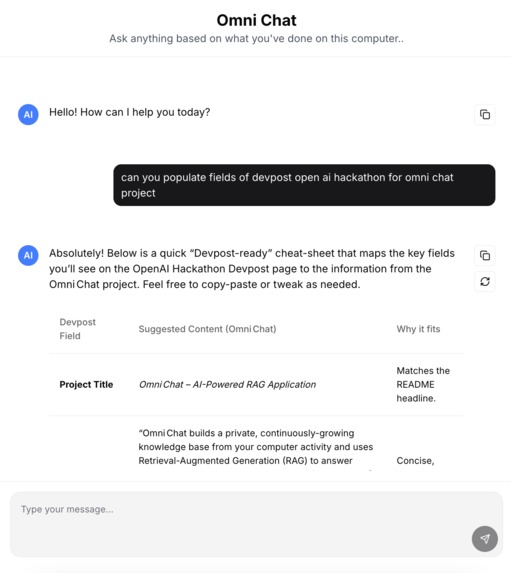
Omnichat with context about user is working on for hackathon.
Inspiration
I’ve always believed that the richer the context you give an LLM, the better the answers you get. Many times, I’ve thought: “The LLM could solve this if only it knew what I was seeing or doing.” That idea pushed me to build a system that provides the right context automatically—by letting the model “see” what I see.
What it does
Omni Chat creates a private, continuously-growing knowledge base from your computer activity. Using Retrieval-Augmented Generation (RAG), it answers context-aware questions based on what you were actually working on. It runs fully locally (model + OCR), captures screenshots intelligently, extracts text, indexes it into a vector store, and delivers chat responses that are grounded in your real activity.
How we built it
Omni Chat combines a local LLM with OCR to intelligently process screenshots of user activity. Extracted text is stored in a vector database (ChromaDB) via LlamaIndex, enabling RAG-powered conversations. The system includes a responsive chat interface for natural interactions.
Tech Stack Highlights
- Backend: Python, FastAPI
- Frontend: Next.js, ChatUI
- Local AI Model: gpt-oss-20b via Ollama
- OCR: Tesseract
- Vector Database: ChromaDB
- Embeddings: HuggingFace BAAI/bge-small-en-v1.5
- Containerization: Docker (optional)
- OS Monitoring: macOS activity client
Challenges we ran into
- The first version directly passed screenshots to the model without OCR. It was painfully slow and drained laptop resources. Adding OCR fixed this.
- Queries requiring large context (e.g., “Summarize what I did yesterday”) don’t work well yet, since they need the entire day’s activity log. I’ll need custom summarization logic for that.
- At one point, I tried sending OCR results to GPT-20B for summarization before storage, but it drained battery and lost context. The final approach was storing raw OCR text in the vector store.
- Even on a 36GB MacBook Pro, running the local model eats up significant resources.
- Multi-monitor support is still unreliable.
Accomplishments we’re proud of
- It’s genuinely useful: it answers many queries correctly and already makes daily work easier.
- I managed to add a full UI layer just a day before the hackathon—thanks to reusing the LlamaIndex chat interface.
What we learned
- Understanding of RAG, beyond theory.
- Hands-on experience with hosting and managing Docker containers.
- How to orchestrate pipelines effectively using the LlamaIndex framework.
What’s next for Omni Chat
- Improving RAG to handle larger, more complex queries and deliver better context-aware responses.
- Launching as a real product beyond the hackathon prototype.
- Aggregate queries, e.g., “Summarize everything I did this week” across multiple days and activities.
- Voice modality: enabling persistent listening through your phone or laptop and feeding that audio context into the vector store.

Log in or sign up for Devpost to join the conversation.