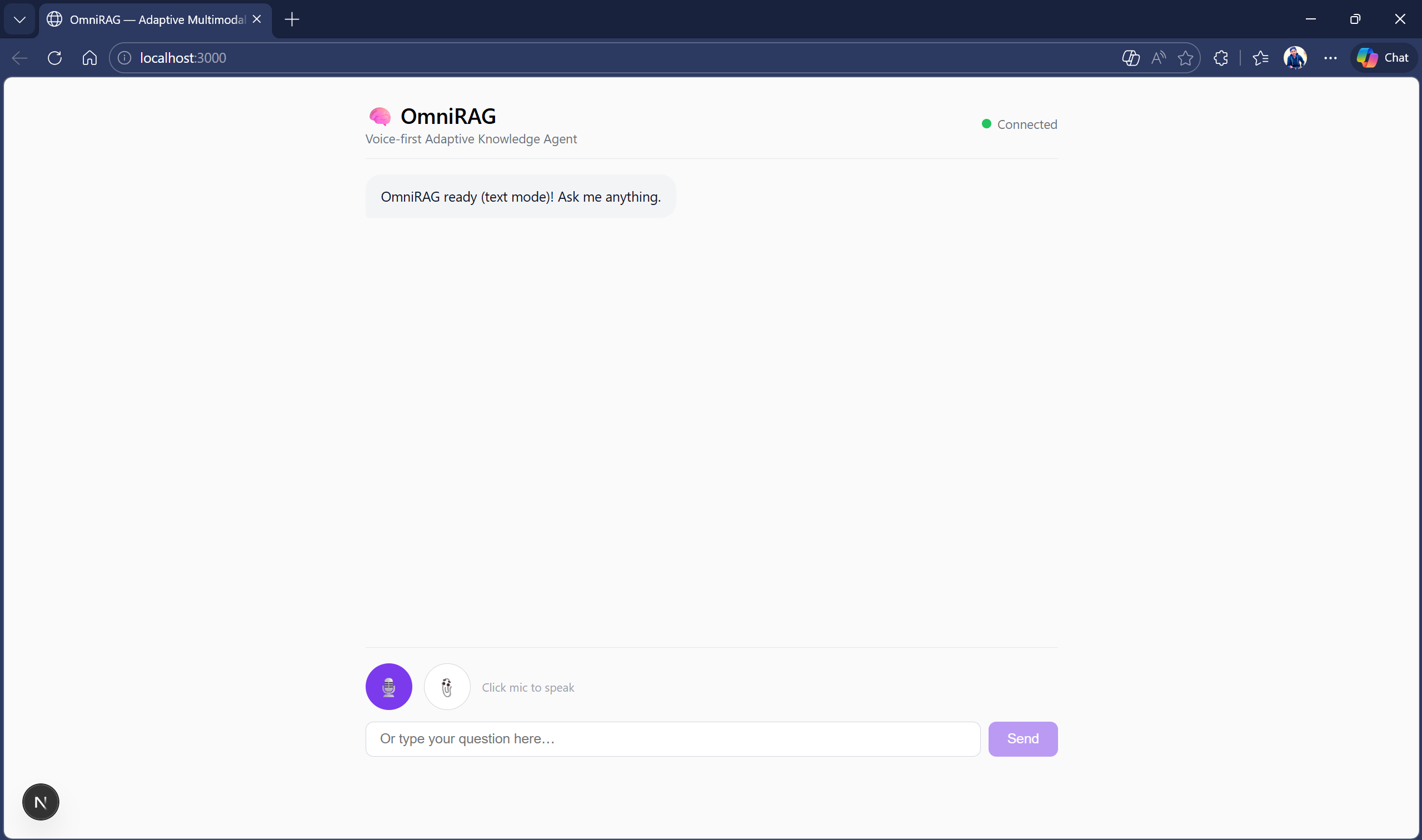
🧠 OmniRAG — Voice-First Adaptive Knowledge Agent
Gemini Live Agent Challenge submission Category: **Live Agents



What is OmniRAG?
OmniRAG is a voice-first, adaptive multimodal RAG (Retrieval-Augmented Generation) agent that lets users talk naturally with their documents. Upload PDFs, images, or text files — then ask questions out loud, share images of whiteboards or diagrams, or type queries. OmniRAG routes each query through the optimal retrieval strategy and responds with both spoken audio and cited text in real time.
The problem it solves
Knowledge workers spend hours digging through documents. Traditional chatbots are text-only and static. OmniRAG makes your entire document library conversational — you can speak to it, show it images, and interrupt mid-response, just like talking to a human expert.
✨ Key features
| Feature | Description |
|---|---|
| 🎙️ Real-time voice | Speak naturally, get spoken answers via Gemini Live API |
| 🖼️ Image understanding | Upload photos, screenshots, or diagrams — Gemini Vision extracts context |
| 🔄 Interruption handling | Interrupt the agent mid-speech, it stops and listens |
| 🧠 Adaptive routing | Queries automatically graded (simple / medium / complex) and routed |
| 📄 PDF ingestion | Upload PDFs and images — chunked, embedded, and indexed automatically |
| 🔗 Source citations | Every answer includes which document it came from |
| ☁️ Fully serverless | Runs on Cloud Run, scales to zero — pay only for what you use |
🏗️ Architecture
User (voice / image / text)
        │
        ▼
Next.js Frontend (Cloud Run)
  • Mic → PCM audio stream
  • Image upload
  • Real-time streaming UI
        │ WebSocket
        ▼
FastAPI Backend (Cloud Run)
  • Gemini Live API session manager
  • Adaptive RAG engine
  • Document ingestion pipeline
        │
   ┌────┴────────────┐
   │                 │
   ▼                 ▼
Gemini Live API    Vertex AI
• gemini-2.0-      • text-embedding-005
  flash-live-001   • Vector search
• STT + TTS        • Model Garden
• Vision
        │
   ┌────┴─────────────────┐
   │                      │
   ▼                      ▼
Firestore              Cloud Storage
• Session memory       • PDFs & images
• Chat history         • Document index
🛠️ Tech stack
| Layer | Technology |
|---|---|
| LLM / Live API | gemini-2.0-flash-live-001 via Google GenAI SDK |
| Embeddings | text-embedding-005 via Vertex AI |
| Backend | Python 3.11, FastAPI, WebSockets |
| Frontend | Next.js 14, TypeScript |
| Hosting | Google Cloud Run (both frontend & backend) |
| Storage | Cloud Storage (documents), Firestore (sessions) |
| IaC | Terraform + Cloud Build + GitHub Actions |
| SDK | google-genai Python SDK |
🚀 Quick start (local)
Prerequisites
- Python 3.11+
- Node.js 20+
- Google Cloud account with billing enabled
gcloudCLI authenticated
1. Clone & set up environment
git clone https://github.com/YOUR_USERNAME/omnirag.git
cd omnirag
cp .env.example .env
# Edit .env with your PROJECT_ID
2. Authenticate with Google Cloud
gcloud auth application-default login
gcloud config set project YOUR_PROJECT_ID
3. Run backend locally
cd backend
pip install -r requirements.txt
python main.py
# Backend running at http://localhost:8080
4. Run frontend locally
cd frontend
npm install
NEXT_PUBLIC_BACKEND_URL=http://localhost:8080 npm run dev
# Frontend at http://localhost:3000
☁️ Deploy to Google Cloud
One-command deployment
chmod +x deploy.sh
./deploy.sh YOUR_PROJECT_ID
This script:
- Enables all required GCP APIs
- Creates Cloud Storage bucket
- Builds and pushes Docker images via Cloud Build
- Deploys both backend and frontend to Cloud Run
- Prints the live URLs
Infrastructure as Code (Terraform)
cd infra
terraform init
terraform plan -var="project_id=YOUR_PROJECT_ID"
terraform apply -var="project_id=YOUR_PROJECT_ID"

### CI/CD (GitHub Actions)

Add these secrets to your GitHub repo:
- `GCP_PROJECT_ID` — your Google Cloud project ID
- `GCP_SA_KEY` — JSON key of a service account with Cloud Run + GCR permissions

Every push to `main` automatically builds, tests, and deploys.


## 📁 Project structure
omnirag/
├── backend/
│   ├── main.py              # FastAPI app, WebSocket endpoint
│   ├── gemini_live.py       # Gemini Live API session handler
│   ├── adaptive_rag.py      # Adaptive RAG engine (core logic)
│   ├── ingestion.py         # PDF/image/text ingestion pipeline
│   ├── requirements.txt
│   └── tests/
│       └── test_omnirag.py  # Unit tests
├── frontend/
│   ├── app/
│   │   ├── page.tsx         # Main chat UI
│   │   ├── layout.tsx
│   │   └── components/
│   │       ├── VoiceButton.tsx
│   │       ├── ImageUpload.tsx
│   │       └── ResponseStream.tsx
│   ├── Dockerfile
│   ├── package.json
│   └── next.config.js
├── infra/
│   ├── main.tf              # Terraform: all GCP resources
│   ├── variables.tf
│   └── cloudbuild.yaml      # Cloud Build pipeline
├── .github/
│   └── workflows/
│       └── deploy.yml       # GitHub Actions CI/CD
├── Dockerfile               # Backend Dockerfile
├── deploy.sh                # One-click deployment script
├── .env.example
└── README.md
🎯 Adaptive RAG routing
OmniRAG automatically grades query complexity and picks the best strategy:
| Complexity | Trigger | Strategy |
|---|---|---|
| Simple | Short query, definition/fact | Direct Gemini answer (no retrieval) |
| Medium | Multi-word query, how/why | Single-hop vector search → generate |
| Complex | Compare, analyze, relationship | Decompose → multi-hop search → synthesize |
| Image-grounded | Image uploaded with query | Gemini Vision extract → RAG fusion |
✅ Hackathon requirements checklist
- [x] Gemini model —
gemini-2.0-flash-live-001+text-embedding-005 - [x] Google GenAI SDK —
google-genaiPython SDK throughout - [x] Multimodal — voice input, image upload, text, audio output
- [x] Live Agent category — real-time voice + interruption via Gemini Live API
- [x] Google Cloud service — Cloud Run + Vertex AI + Firestore + Cloud Storage
- [x] Hosted on GCP — both frontend and backend on Cloud Run
- [x] Bonus: IaC — Terraform + Cloud Build + GitHub Actions
- [ ] Bonus: Blog post — publish with
#GeminiLiveAgentChallenge - [ ] Bonus: GDG profile — sign up at developers.google.com/community/gdg
📹 Demo
[Link to demo video — YouTube/Loom]
🔑 Environment variables
| Variable | Required | Description |
|---|---|---|
PROJECT_ID |
Yes | Google Cloud project ID |
LOCATION |
No | GCP region (default: us-central1) |
GCS_BUCKET |
No | Cloud Storage bucket name |
GOOGLE_API_KEY |
Local dev only | Gemini API key (use ADC on GCP) |
📝 License
MIT — see LICENSE
Built for the Gemini Live Agent Challenge hackathon. Created with Google GenAI SDK and Google Cloud. #GeminiLiveAgentChallenge
Built With
- fastapi
- live-api
- llm
- next.js
- python
- pythonsdk

Log in or sign up for Devpost to join the conversation.