Inspiration
We drove to every dentist office in a 10 mile radius of Princeton and listened to what they had to say. Through all of this, we found one common denominator: the dentist can't do it all during a procedure, and their assistant ends up doing all of the repetitive work.
Let's elaborate by walking through a situation. Would you rather have a complex engine 3D model shown to you by someone else, or be able to spin it around yourself? Dentists feel the same way about tooth CBCT scans, yet they still have their assistant move them around for them because they can't scrub out just to move a mouse.
Because of this disconnect in the flow between doctor and computer, valuable information and understanding is lost.
- Notes about patient treatments and information can get mistranslated.
- The dental assistant's time is wildly unoptimized.
- Any issue that might occur with implants, crowns or bone grafts requires a second CBCT scan (which 81% of these dentists don't have easy access to), which stretches an hour-long procedure over multiple days.
- Any errors caused during surgery can easily lead to TMJ (clicking jaw) disorder.
We realized we could solve all of these problems in one fell swoop and package it as a single product.
What it does
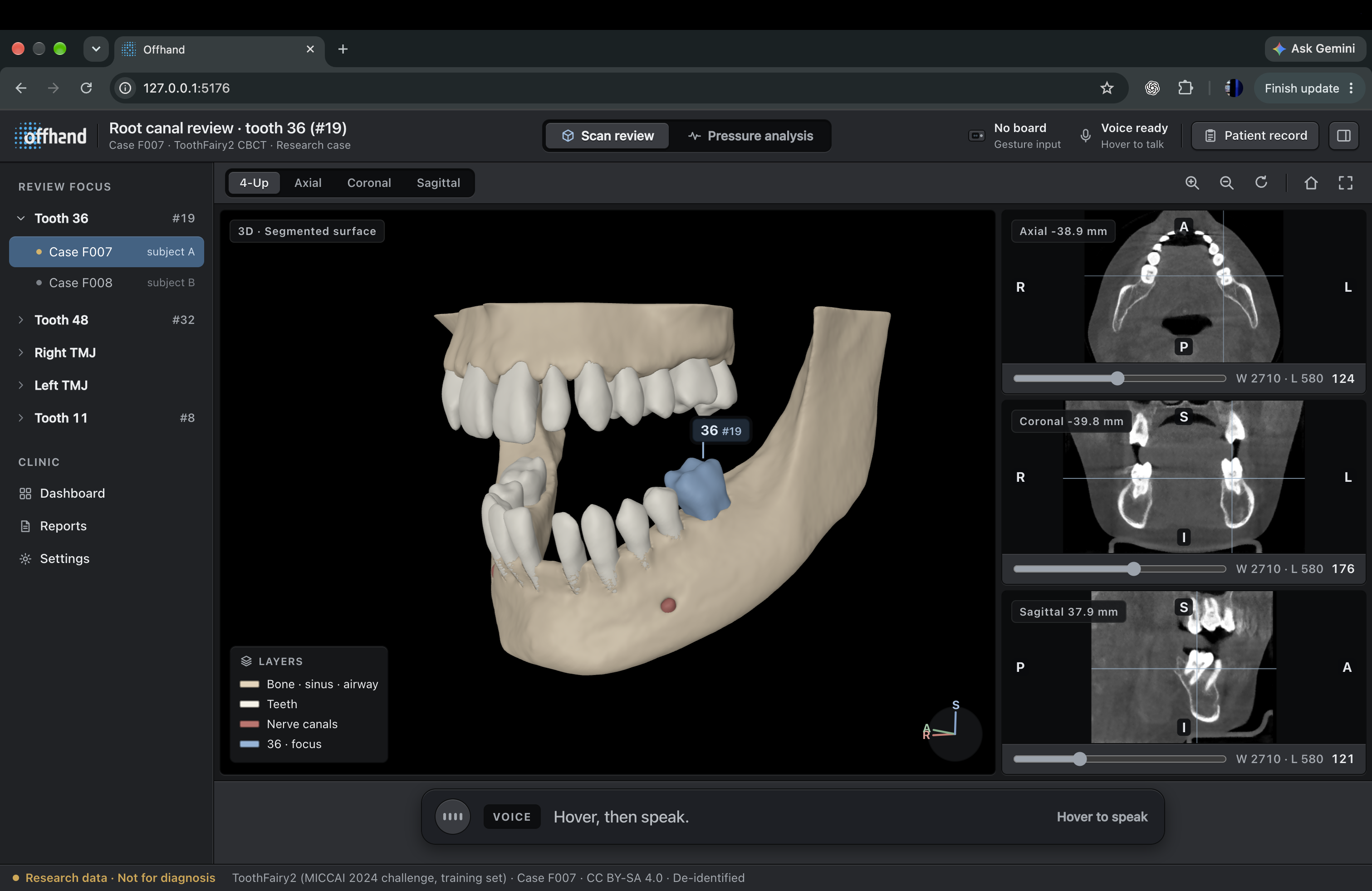
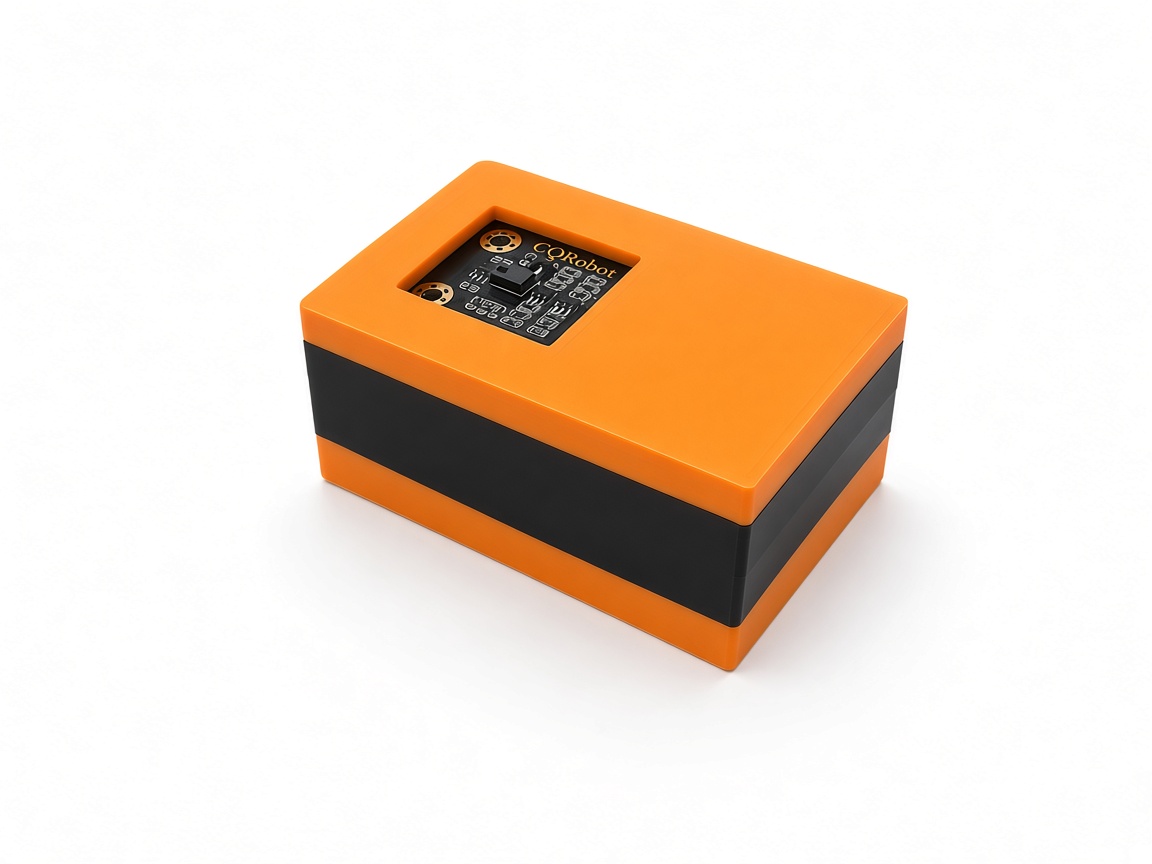
Offhand takes any .MHA (medical imaging) file and splits it into .glb and .nii.gz formats for a browser-based observation tool. The dentist then uses hand gestures over a small sensor module to move, rotate and peel back layers on the 3D model to get the best viewpoint for their task, without touching a mouse. By hovering their hand over the module, the dentist can trigger voice commands, which allow them to:
- leave notes for other people at the angle and peel they're oriented at
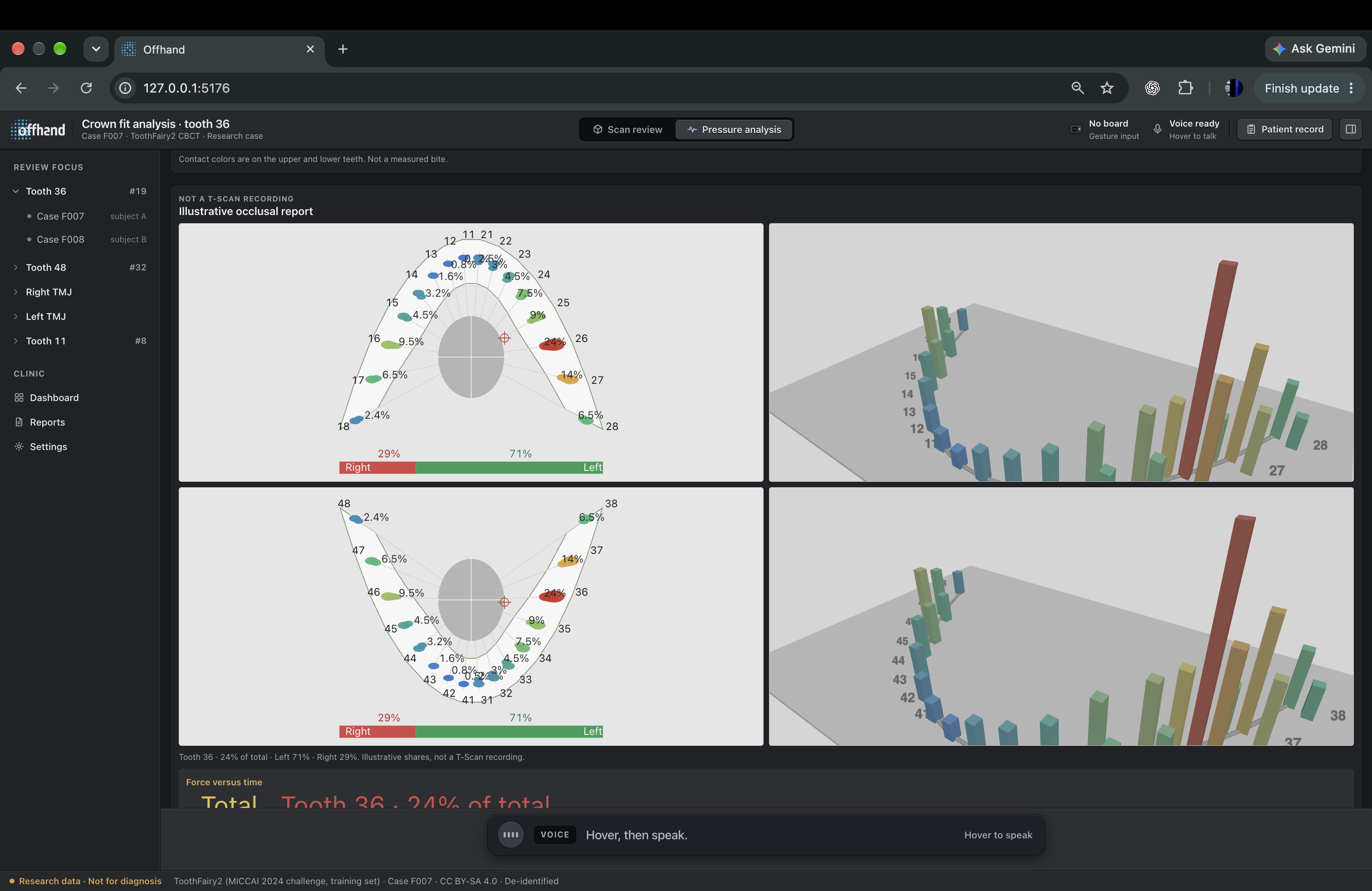
- open bite pressure analysis (explained below)
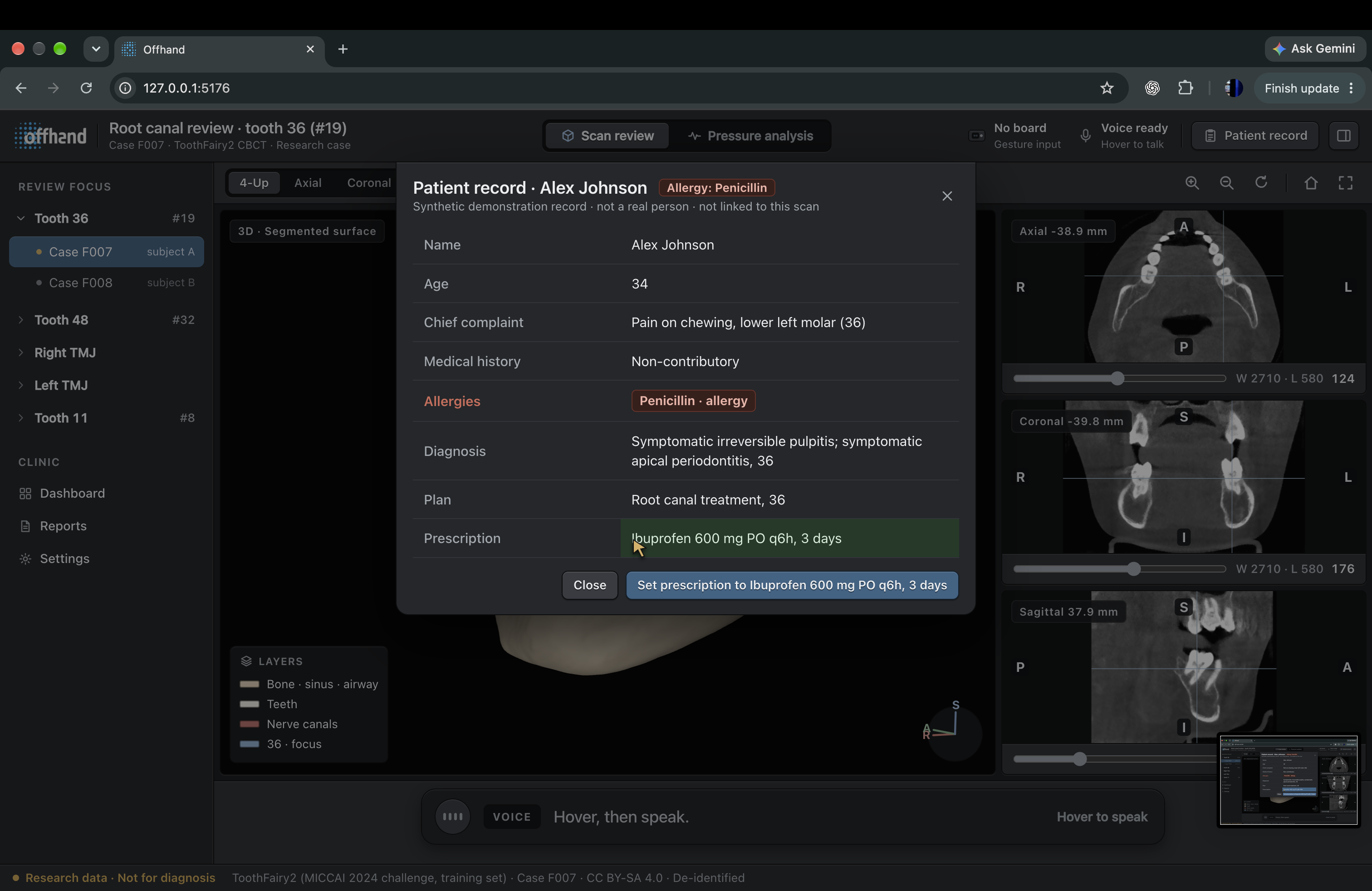
- view and update patient information
- send prescriptions to the pharmacy and patient
- and many other features!
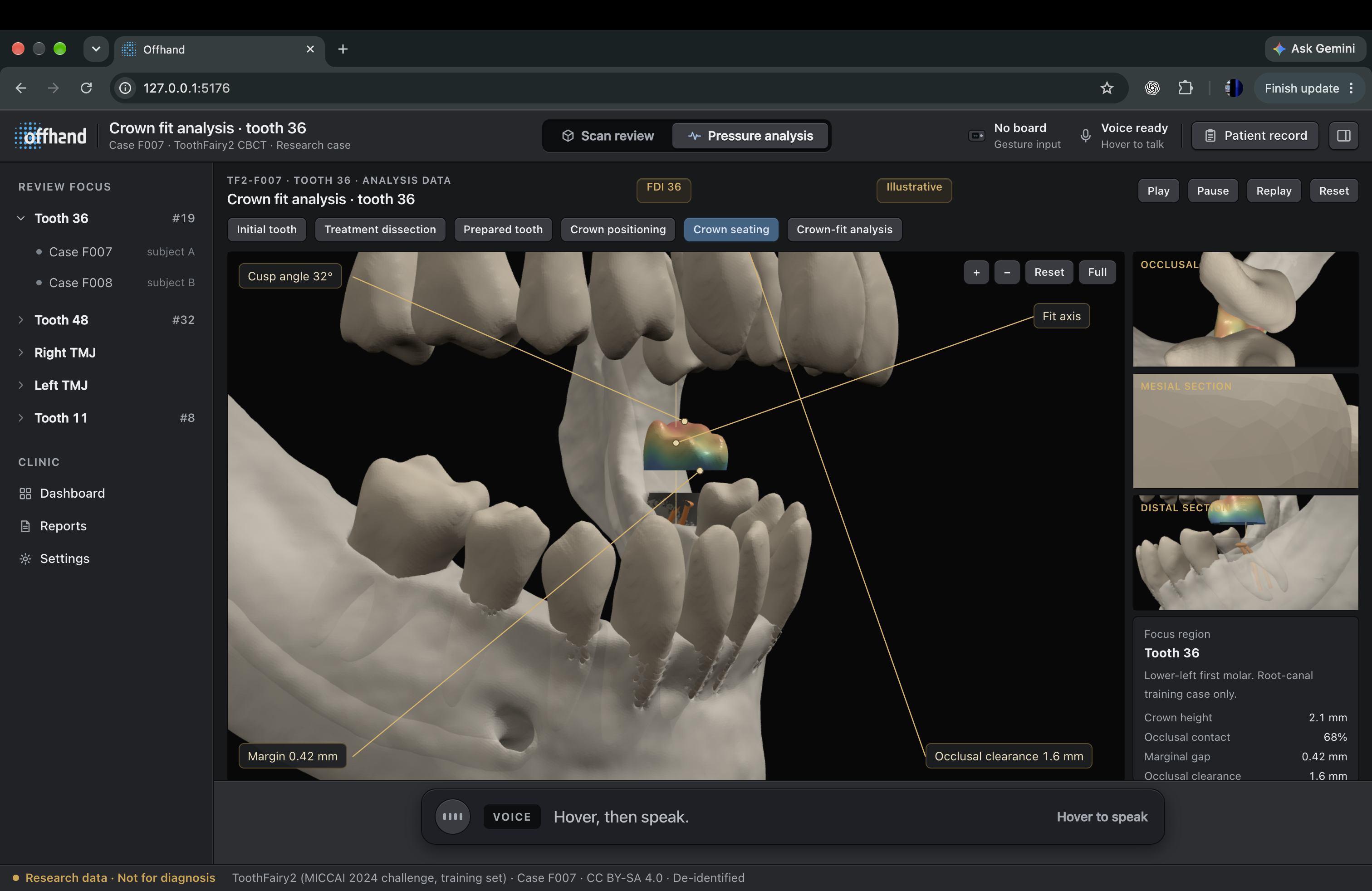
The Bite Analysis page then closes the scanned arches virtually and creates a contact map based on where the opposing enamel surfaces touch. From this contact map, it determines the percentage of bite force, maximum and average pressures, contact surface, left-right balance, and loading on cortical bone, trabecular bone, periodontal ligament, and TMJ. Contact stress is based on Hertzian elastic theory: effective radius and modulus, contact radius a, and peak pressure p0=3F2a2, with mean pressure FA over each patch. The outcome is a physics-based interpretation of occlusion grounded in the patient's own 3D anatomy.
How we built it
Offhand has four parts, and we built them in the order the data flows.
The scan: Everything starts as a raw .MHA file from the ToothFairy2 dataset. Our Python pipeline reads the scan with its segmentation labels and pulls out a separate watertight mesh for every structure, so each tooth is its own object you can peel away or pin a note to. One case comes out as 28 to 39 meshes at the scan's full 0.3 mm resolution, alongside a cropped 16-bit volume for the slice views. We ran 10 cases through it. The first one loaded upside down with left and right swapped, and it turned out every scan in the dataset is stored rotated 180°. The pipeline now checks the anatomy (upper teeth should sit above lower teeth) and fixes the orientation by itself.
The module: An ESP32 reads a PAJ76OU2 infrared gesture sensor and sends gestures plus hand position to the laptop over USB 20 times a second. The raw sensor output was unusable for repeated motions, which we cover in the challenges below. We ended up recording over 700 of our own gestures and writing the recognition logic against that data.
The viewer: The 3D model renders in Three.js and the CBCT slices in NiiVue. Both use the same millimetre coordinates, so a note pinned on a slice shows up at the same spot on the model. We put the camera on a spring: one swipe gives a crisp step, and a run of swipes blends into a continuous glide. Notes show as numbered pins that name the tooth they sit on.
The voice: Holding a hand still over the module for 1.5 seconds starts the microphone. We tried a wave first and it fired by accident too often. Words show on screen as they're recognised, then an LLM maps the sentence to one of a fixed list of actions, such as adding a note or changing a prescription. Anything that leaves the room, like a text to the patient through Photon, waits for a second hover to confirm.
A local Node hub ties these together over a WebSocket. Gestures, voice, mouse and keyboard all get turned into the same typed commands, so the viewer doesn't care where a command came from, and we could keep building with simulated gestures whenever the board was on someone else's desk. About 300 automated tests cover the gesture logic, the camera, the pipeline and the messaging rules.
Challenges we ran into
Rendering the jaws turned out to be the easy part. The hard question was what "pressure" even means on a segmented CBCT mesh. Real teeth aren't perfect spheres: their cusps, fossae, and preparation margins have changing curvature, so there is no single contact value, only a field over many surface points. We also had to get from sparse anatomy (ToothFairy2 labels mapped to GLB meshes) to dense biomechanics: which points actually touch as the arch closes, and how the force is shared among them given enamel stiffness and the curvature of the opposing tooth.
We were able to frame each contact patch with Hertzian elastic contact, reducing two curved enamel surfaces to an effective radius and modulus, then mapping bite force F into contact radius and pressure:
1R*=1R1+1R2
1E*=1-12E1+1-22E2
a=3FR4E1/3
p0=3F2a2=16FE2R21/3
pmean=Fa2
The gesture sensor gave us a second headache. To swipe up twice, your hand has to come back down, and the sensor reports that return trip as a "down". Pushes were worse, since every push arrives paired with a pull as the hand retreats. Blocking the opposite gesture for a moment fixed repeats but broke deliberate reversals. What worked was treating the first stroke as the intent and absorbing exactly one return stroke after it, with the timing learned from each user's own rhythm. Replayed against our recorded gestures, accidental back-and-forth moves dropped from 141 to 36.
Accomplishments that we're proud of
The feature we're most proud of is our pressure analysis tab. Through it, we were able to achieve relatively accurate bone overloading and bite pressure mapping. The biggest issue in dental practices with all forms of pressure analysis is that CBCT models aren't typically able to display accurate data natively, because the scans are taken with a block in the mouth spacing the teeth apart.
Halfway through, we figured out that since we split the .MHA into individual parts, we could simulate the jaw closing and map values with a maximum error of 8% (which is 92% less than anyone else currently does!). Though this couldn't be used with certainty for real procedures, it could act as a surgical error warning. If the mapped tooth displacement values were above a certain threshold, Offhand could reliably alert the surgeon that the tooth needs attention.
We're also proud that the core promise works end to end: a dentist can rotate, peel and annotate a real CBCT scan without touching anything.
What we learned
For the first time, we've built a solution based on a problem that other people came to us with. It's given us a concrete goal to work towards over these 36 hours, and being able to physically see where Offhand would be deployed has been a huge help in keeping the overarching vision in focus the entire time. In a way, we've learned quite a bit about what being forward-deployed actually means.
What's next for Offhand
We have a few concrete goals for Offhand after HackPrinceton's finished:
- Our biggest missing element is making it easily compatible with existing software like Conescan and Slicer, so dentists could actually use this in their day-to-day environment.
- We'd like to make the module out of a sturdier material like metal and power it over WiFi so no cables get in the way.
- Once both of those are done, we'd love to get feedback from the dentist offices we spoke to, so we can iterate based on what other features they're looking for.
Note
offhand.health isn't authorized to be opened on local networks (namely Princeton's WiFi). To try it out, we recommend connecting to a hotspot.
Built With
- c++
- eslint
- esp32
- fastify
- hardware
- javascript
- nibabel
- niivue
- nixpacks
- node.js
- pino
- playwright
- preact
- prettier
- python
- spectrum
- three.js
- toothfairy2
- typescript
- vite
- vitest
- websocket
- zod
