-
-
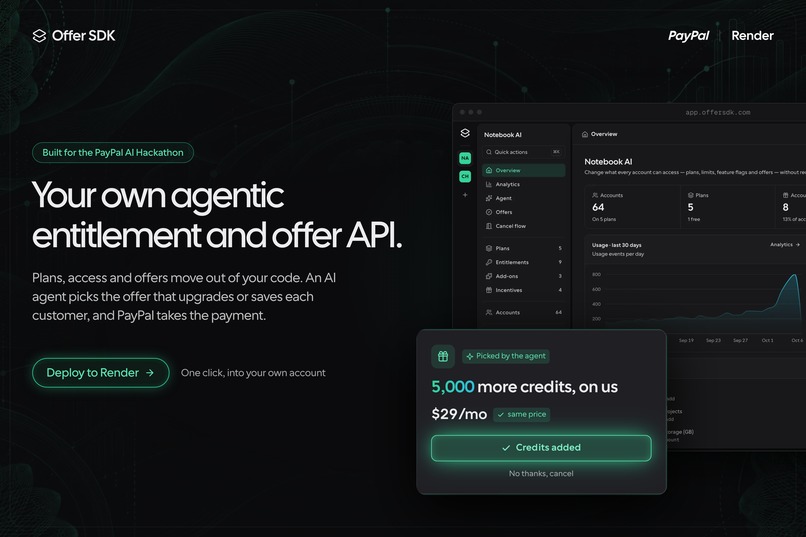
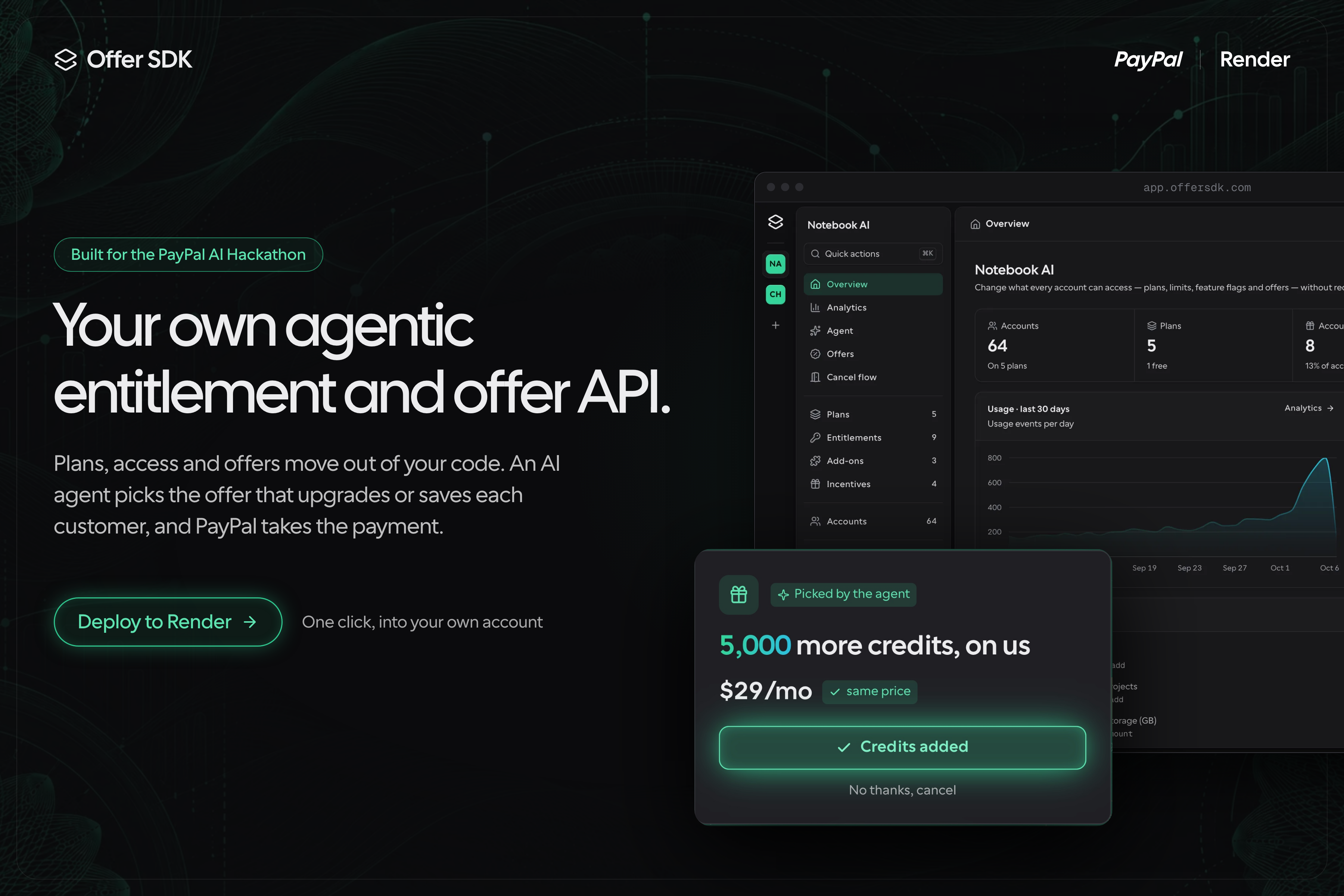
Your own agentic entitlement and offer API. Pay with PayPal, deploy to Render in one click.
-
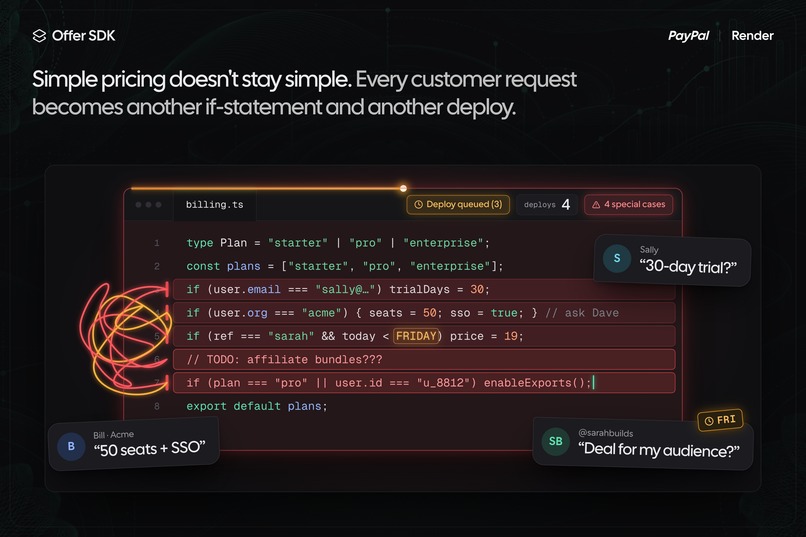
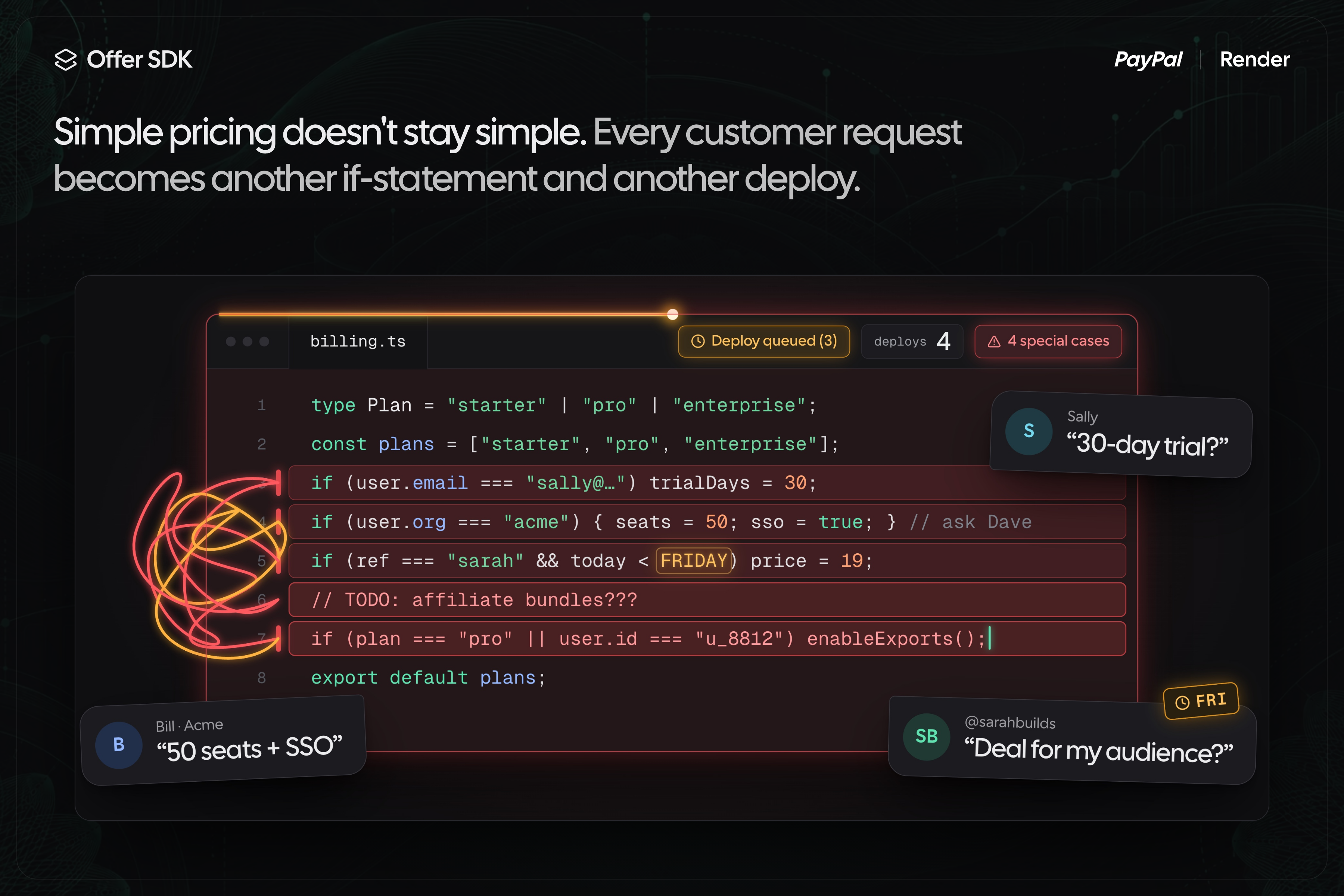
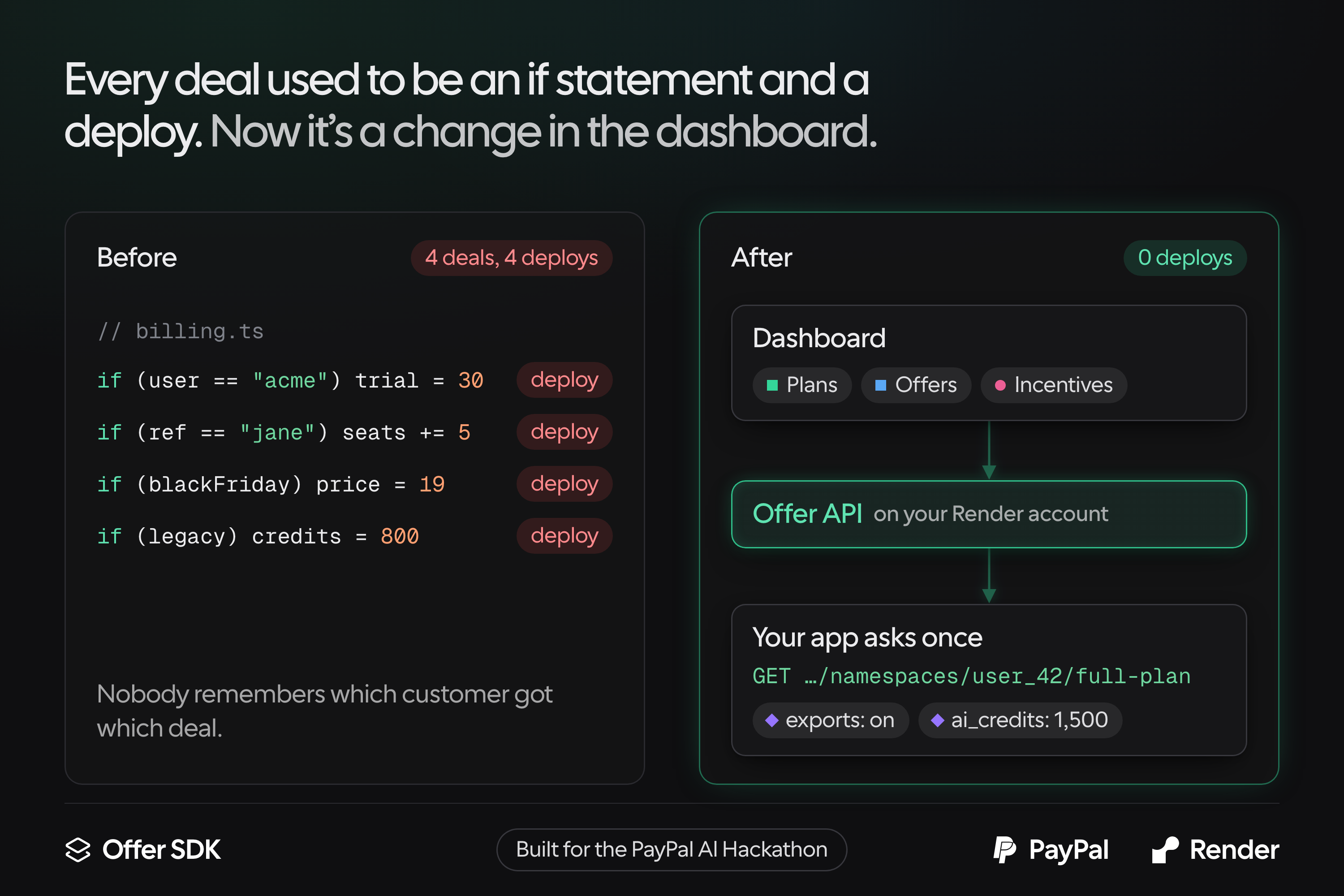
Simple pricing breaks fast: every customer deal becomes an if-statement and a deploy.
-
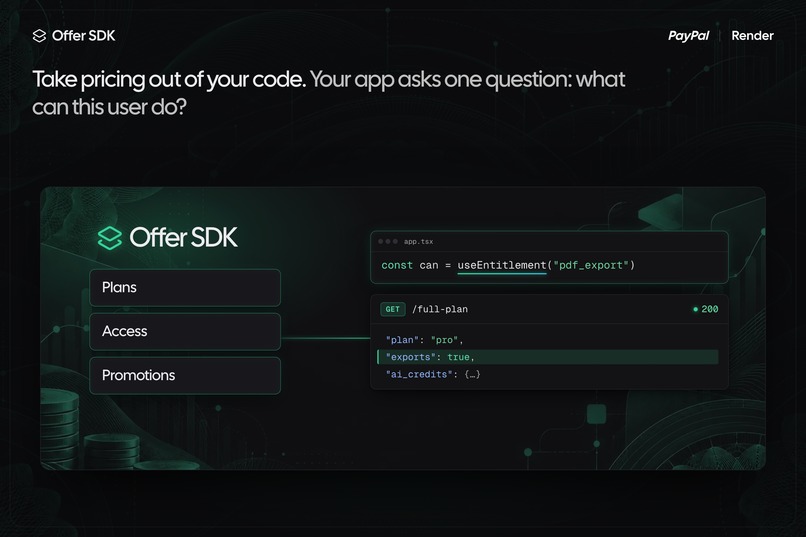
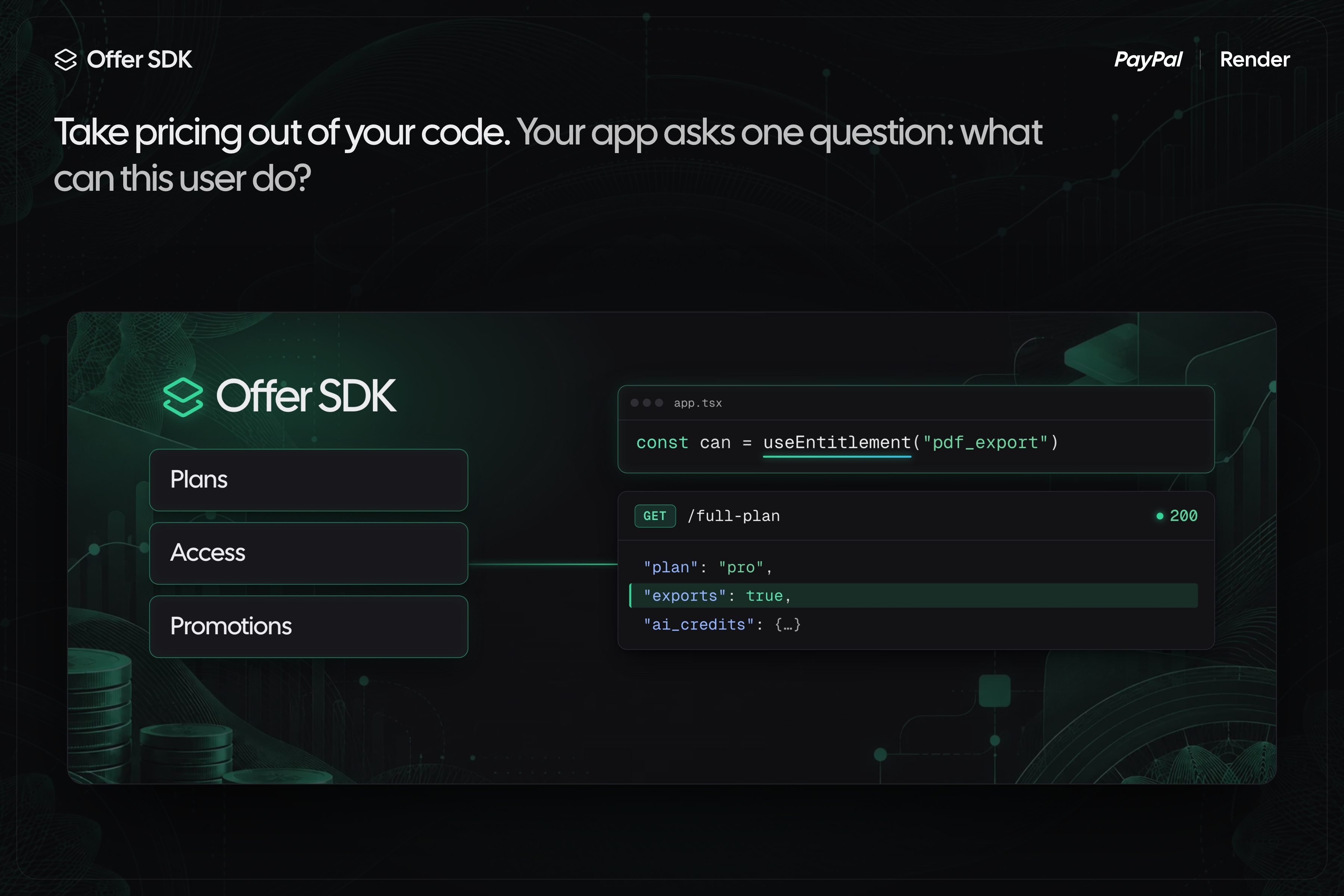
Offer SDK moves plans, access and promotions out of your code.
-
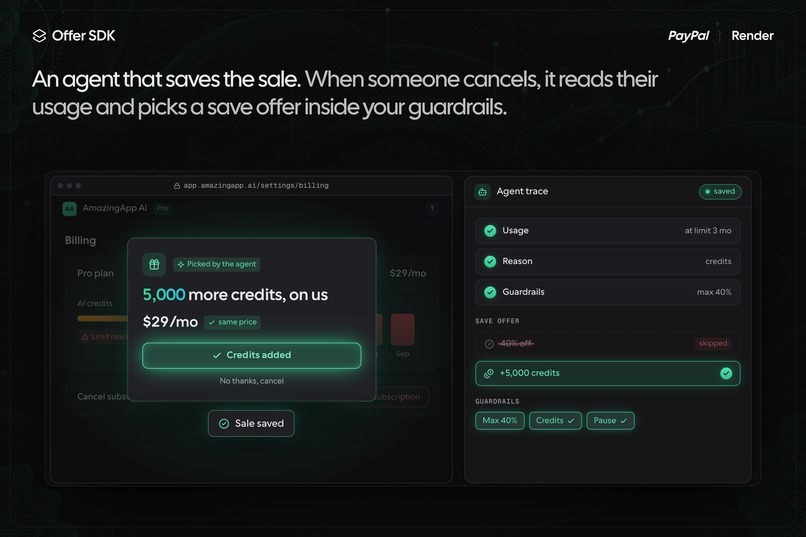
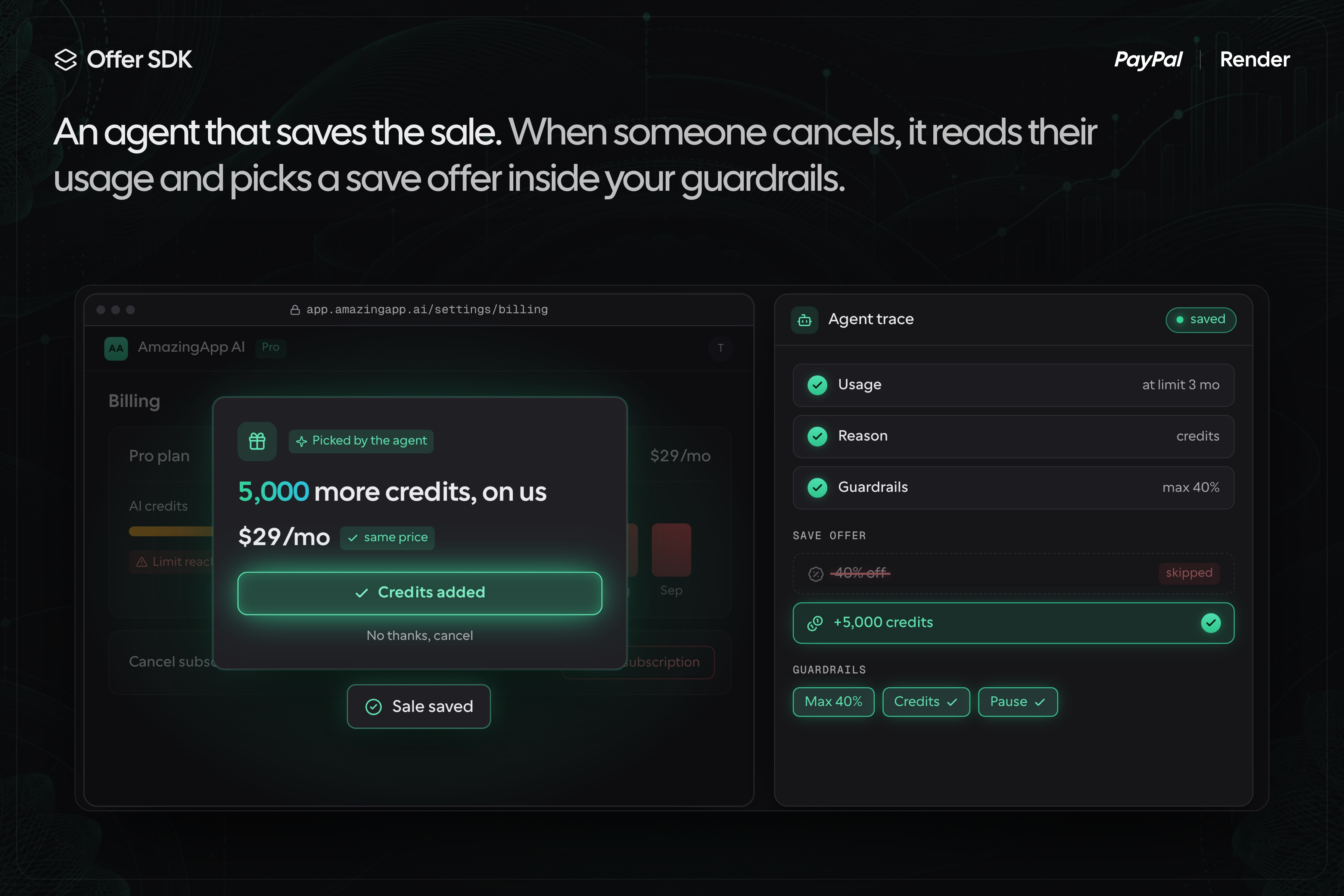
An AI agent picks a save offer when a customer cancels, inside your guardrails.
-
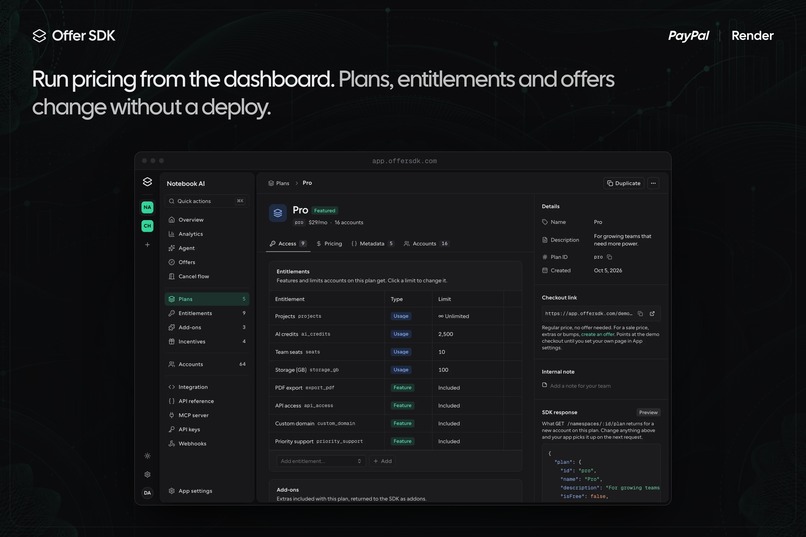
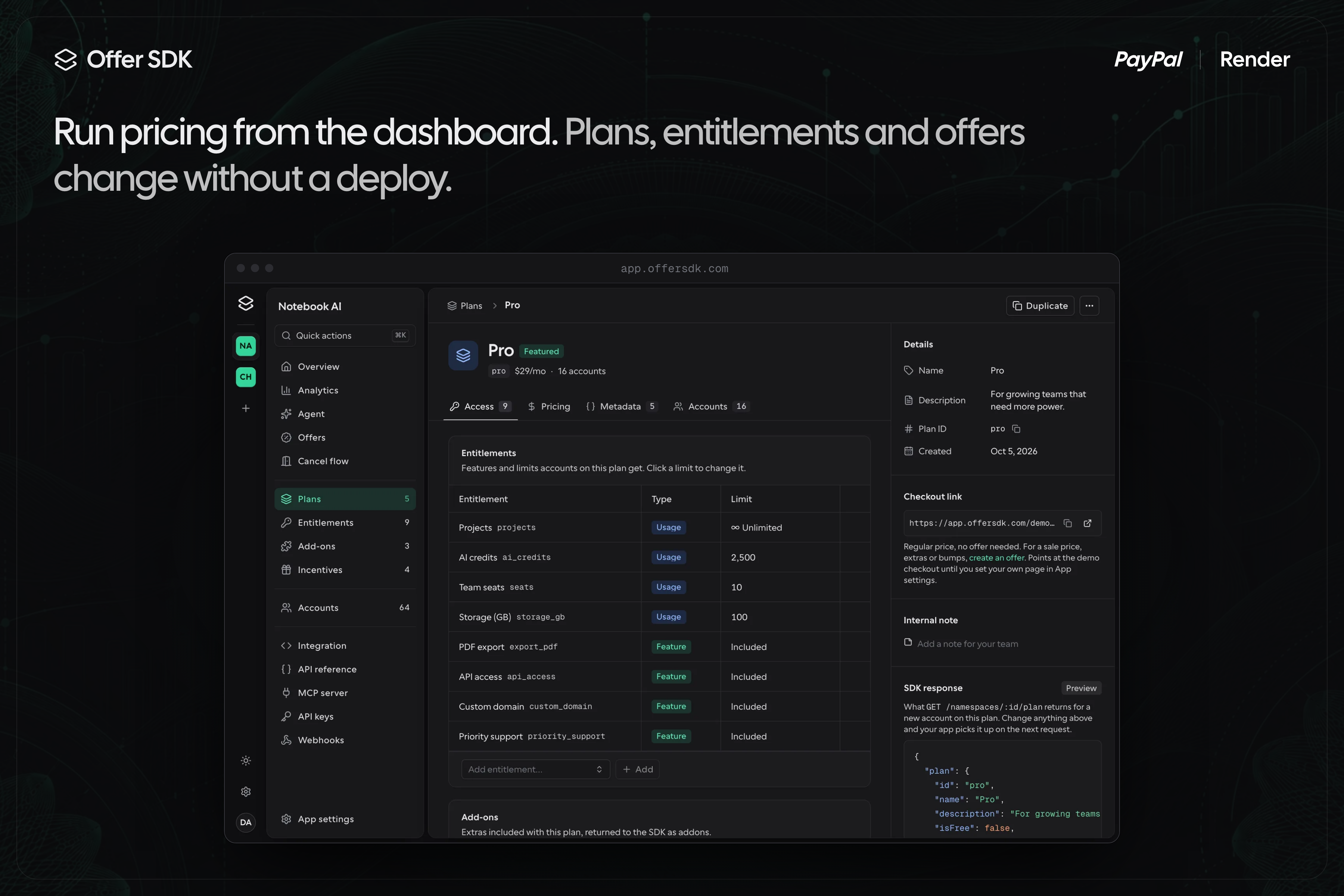
Manage plans, entitlements and offers from the dashboard. No deploy needed.
-
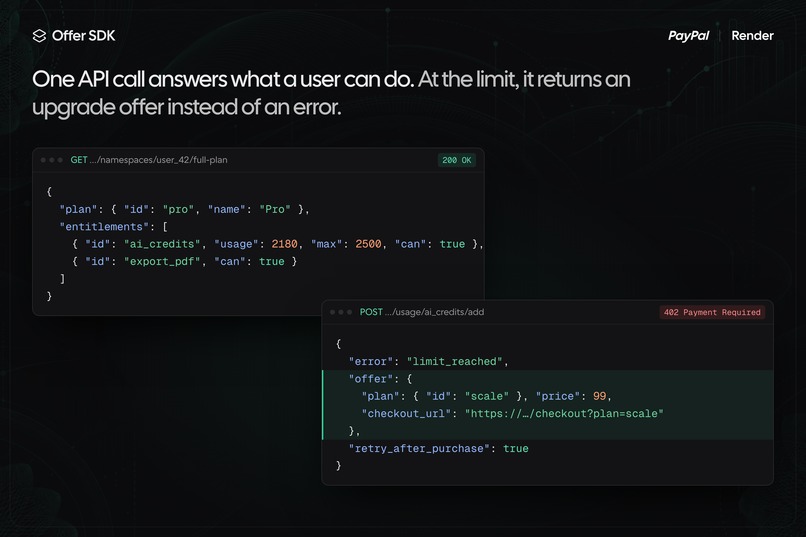
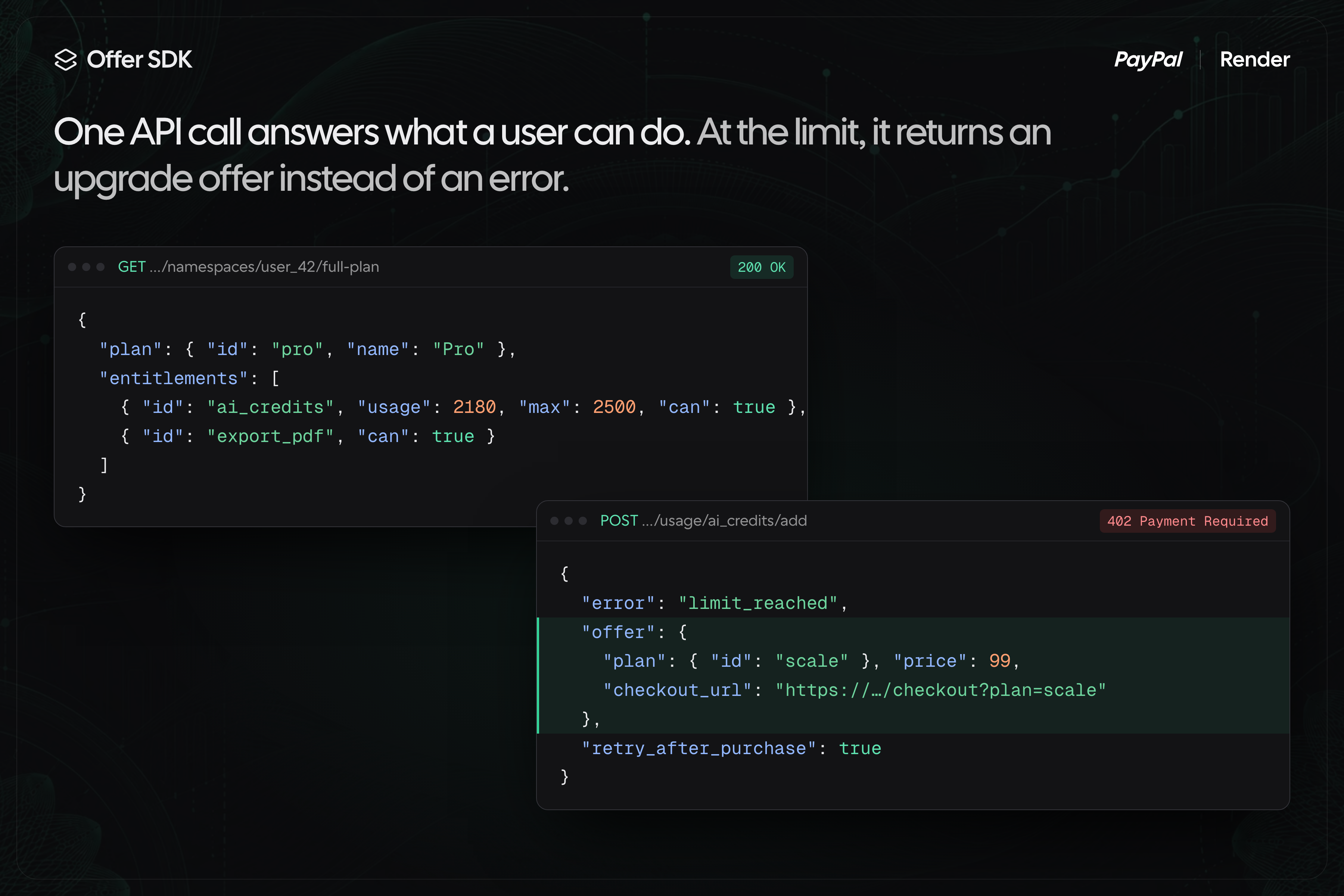
One API call says what a user can do. At the limit, it returns an upgrade offer.
-
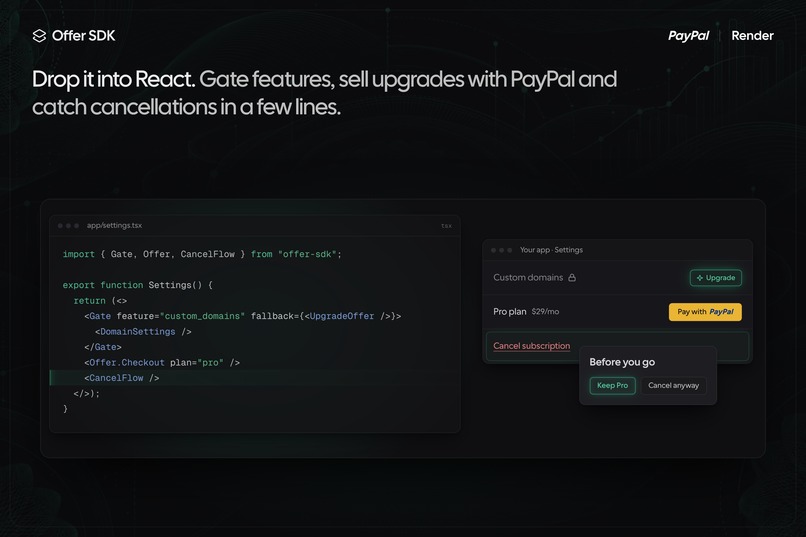
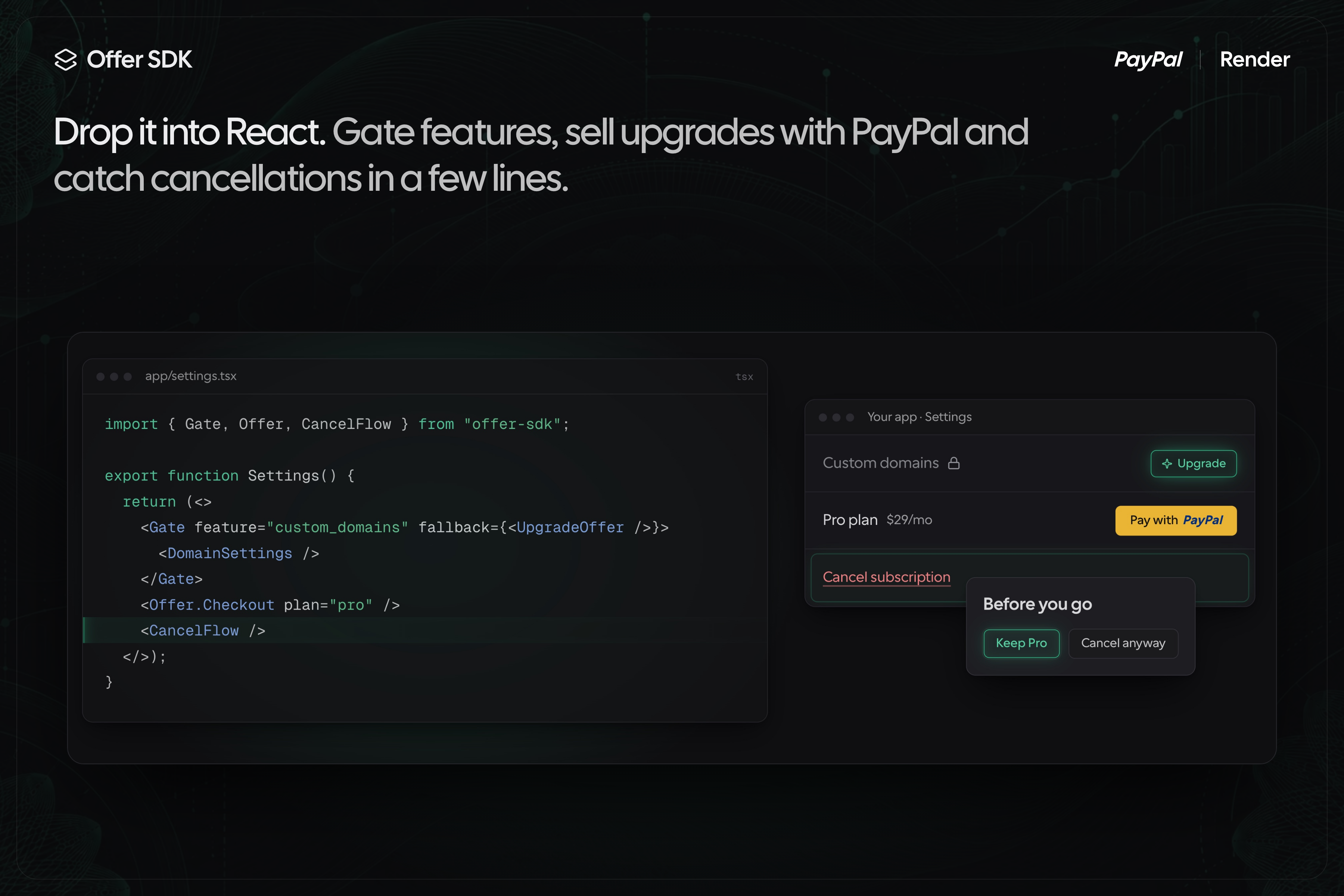
React components for feature gates, PayPal checkout and cancel flows.
-
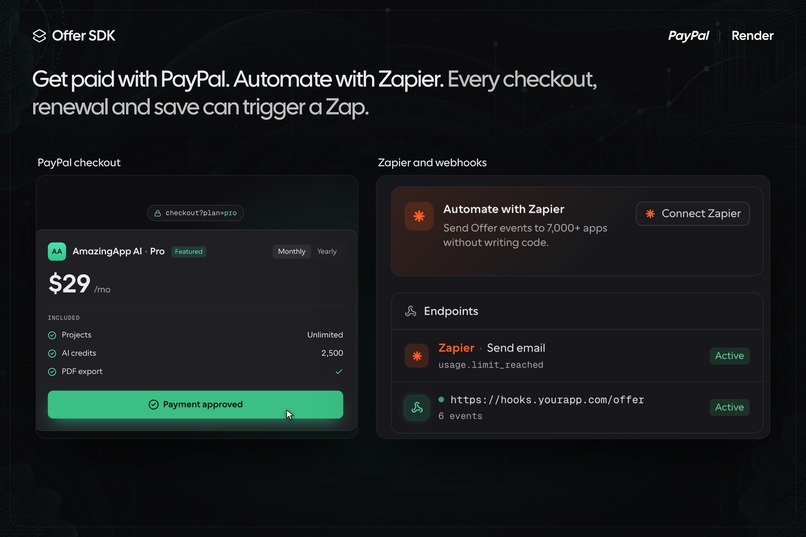
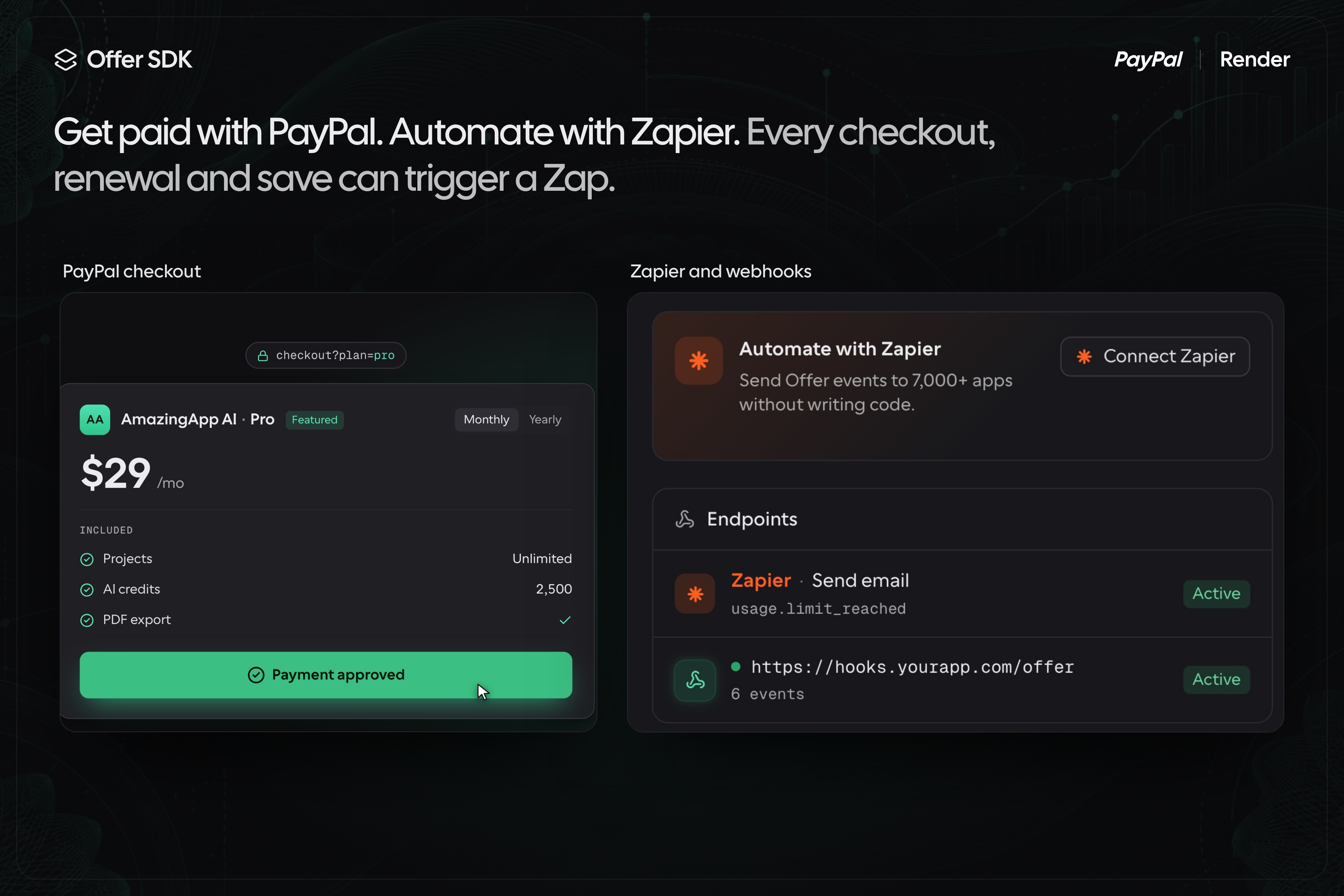
PayPal handles checkout. Every lifecycle event can trigger a Zap or webhook.
-
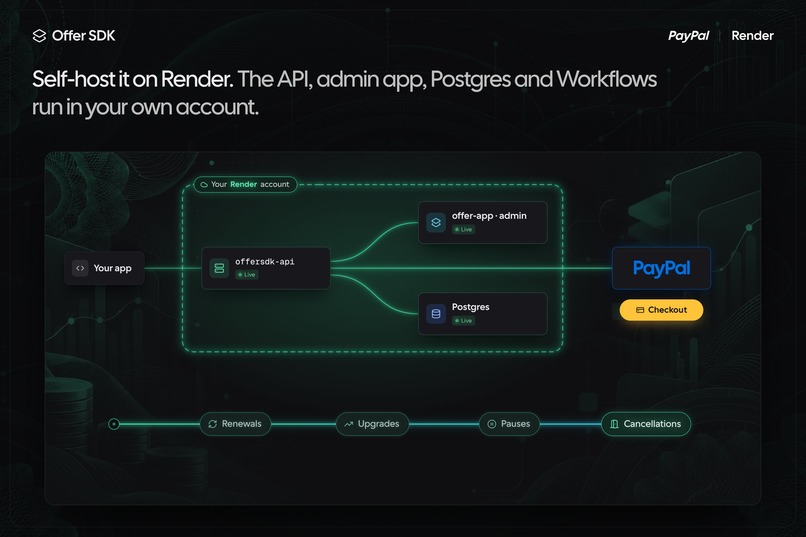
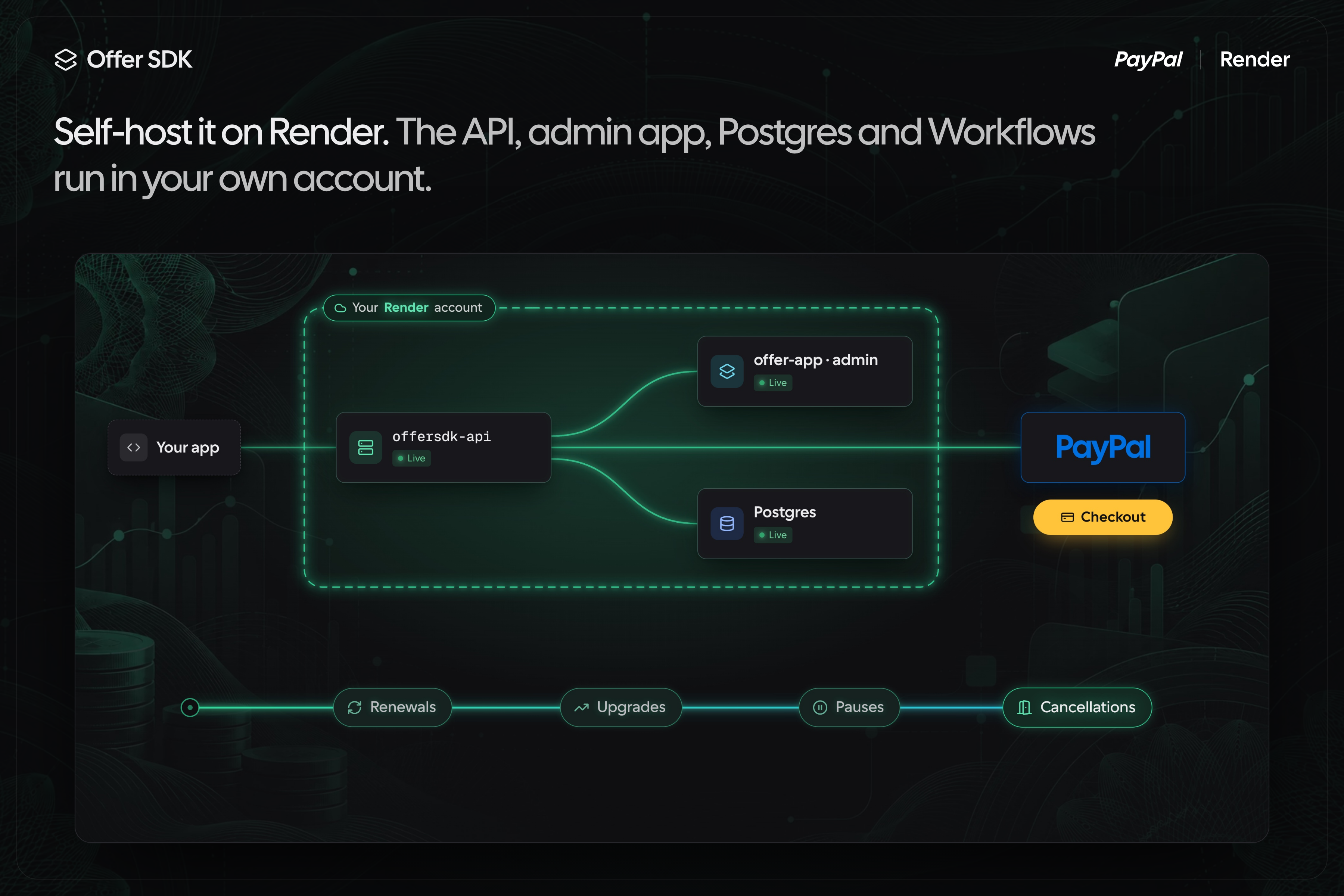
Self-host the API, dashboard, Postgres and Workflows on Render from one render.yaml.
Agentic Entitlement, Access & Offers API for your app
Introducing OfferSDK.com built for the Paypal AI Hackathon
Pricing changes shouldn't need a pull request. Offer SDK pulls plans, access and offers out of your code, runs on your own Render account and bills through PayPal. Launch a deal or test a price from the dashboard, with no deploy.
Website · Try Demo Account · GitHub · Docs
Inspiration
I've built SaaS products for over 20 years, and rigid pricing has limited what I could do the whole time. Every custom deal turned into an if statement. One customer wanted a longer trial, another wanted more seats, an affiliate wanted a package for their audience by Friday. Each yes meant more billing code and another deploy. A few months in, nobody remembered which customer had which deal, and nobody could tell which features actually made money.
I built Offer SDK to decouple the code from offers, packaging and access. The app asks one question, what can this user do, and the answer comes from an API you control.
What it does
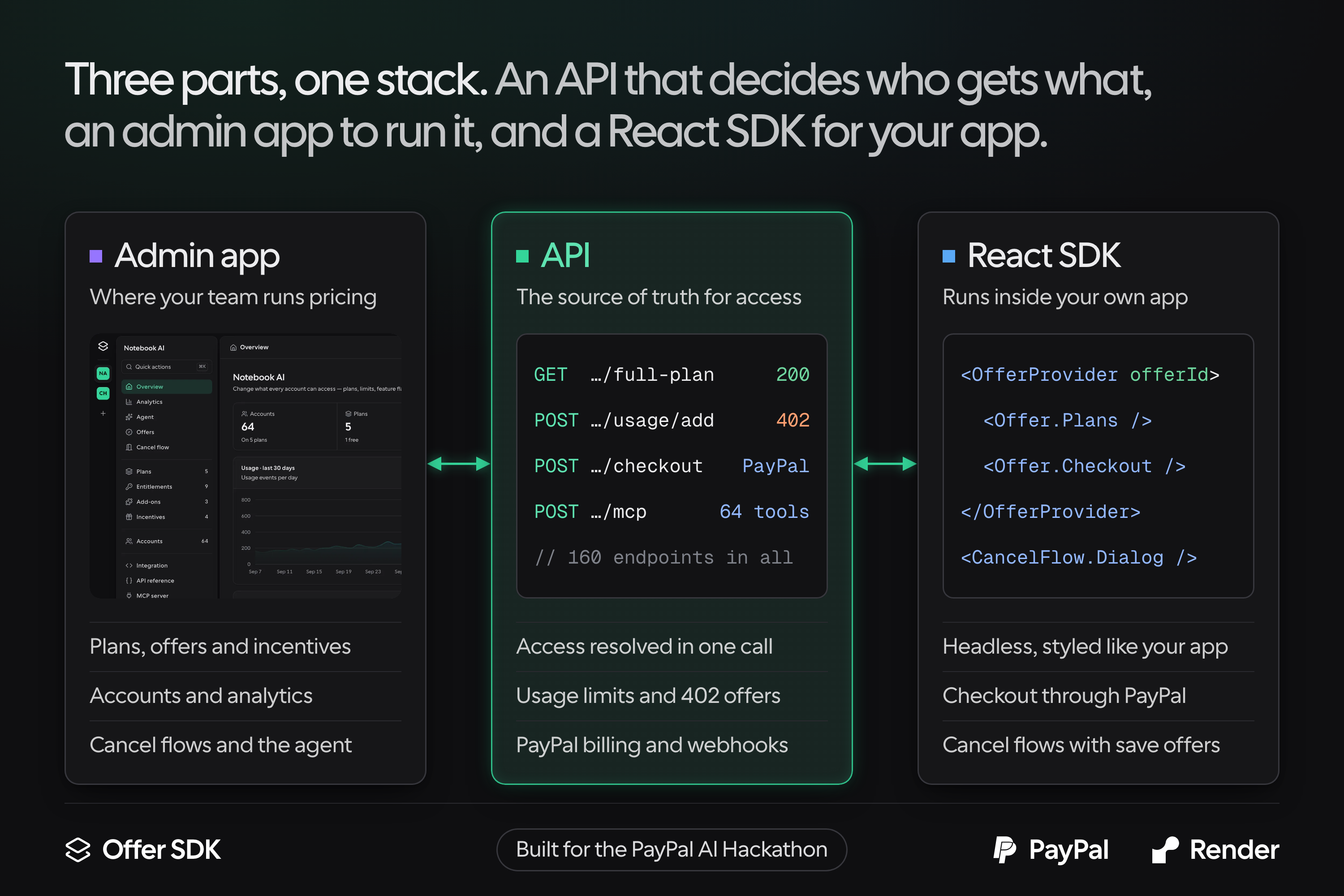
Offer SDK is a self-hosted billing and entitlement API, a React SDK and an admin dashboard. You deploy it to your own Render account in one click, connect your PayPal account, and from then on you change plans, access and prices in the dashboard instead of the code.
- Plans and entitlements. An entitlement is a yes or no, like exports, or a number, like AI credits or API calls. The API counts usage against those numbers, so you can charge by usage.
- Add-ons and incentives. Add-ons are extras on top of a plan. An incentive overrides what one account gets, which works for a promo or an affiliate package.
- Customer accounts. Every customer has an account page that shows their plan, which features they have and how much of each limit they've used. From there you can change their plan or give them an incentive, like extra credits for a loyal customer or an affiliate's package, and the change reaches your app on its next call.
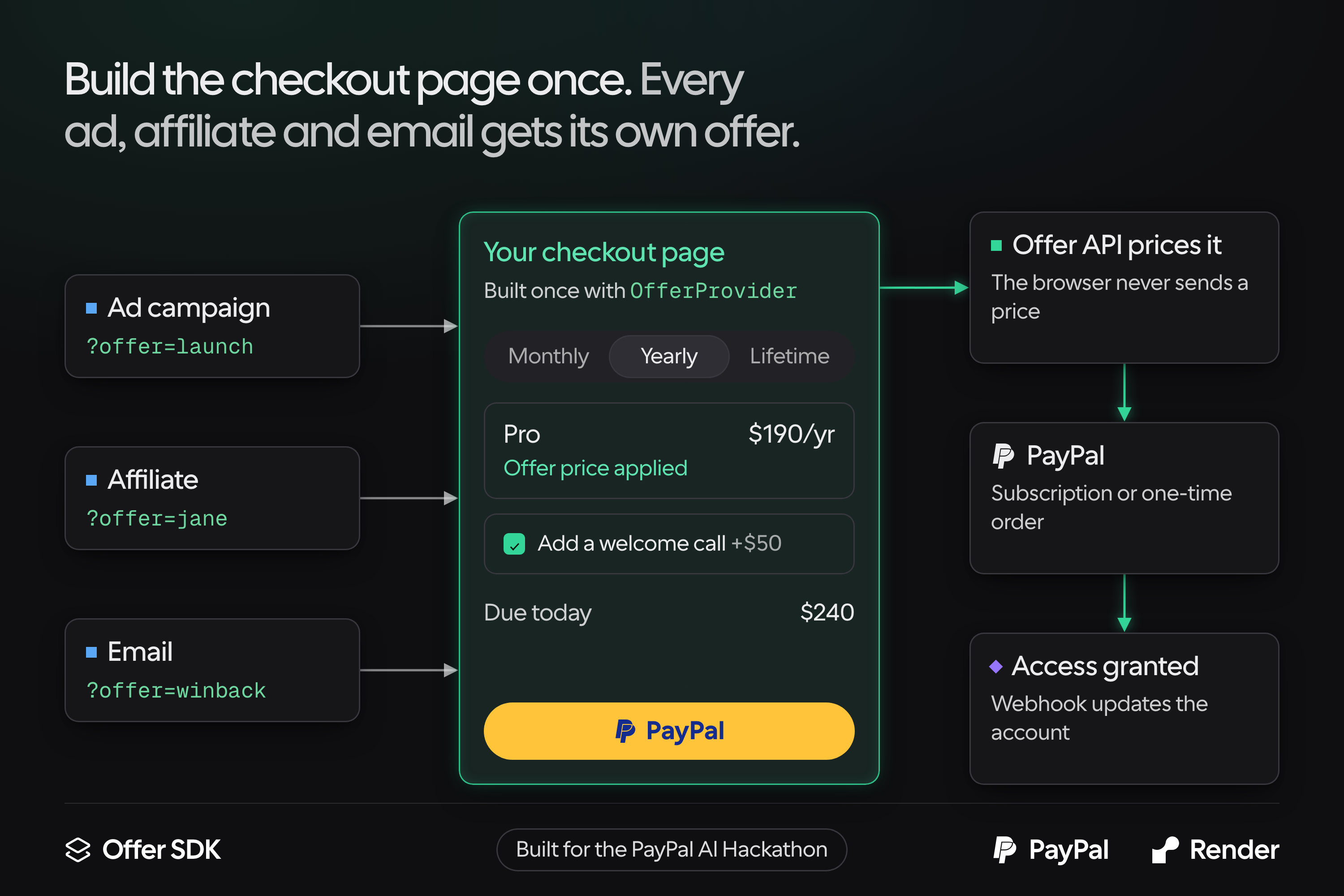
- Offers. An offer sits on top of one or more plans. It can lower the price per billing interval, add entitlements and attach order bumps. You build your checkout page once with the SDK's components, then send each ad, affiliate or audience its own
?offer=link. That's how you run a Black Friday deal, test a new price or split test two offers without a deploy, and each offer gets its own performance page. - PayPal billing. PayPal runs checkout and the whole subscription lifecycle: renewals, upgrades, downgrades, pauses and cancellations. Each app connects its own PayPal account, so buyers pay the founder directly.
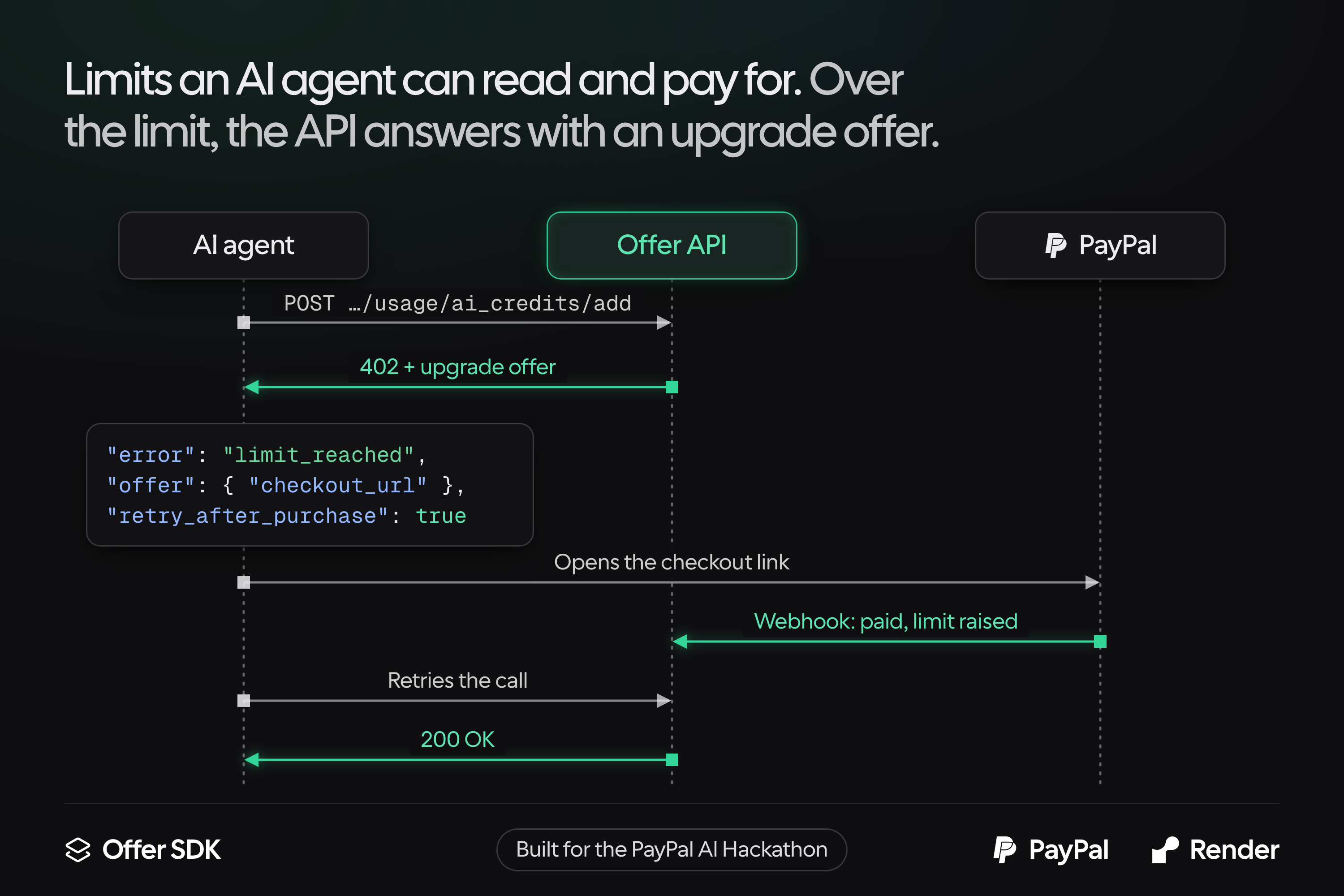
- Limits AI agents can read. When a call goes over a blocking limit, the API answers with a 402 that carries a plain-language message, an upgrade offer and a checkout link. An agent can act on it without a human in the loop.
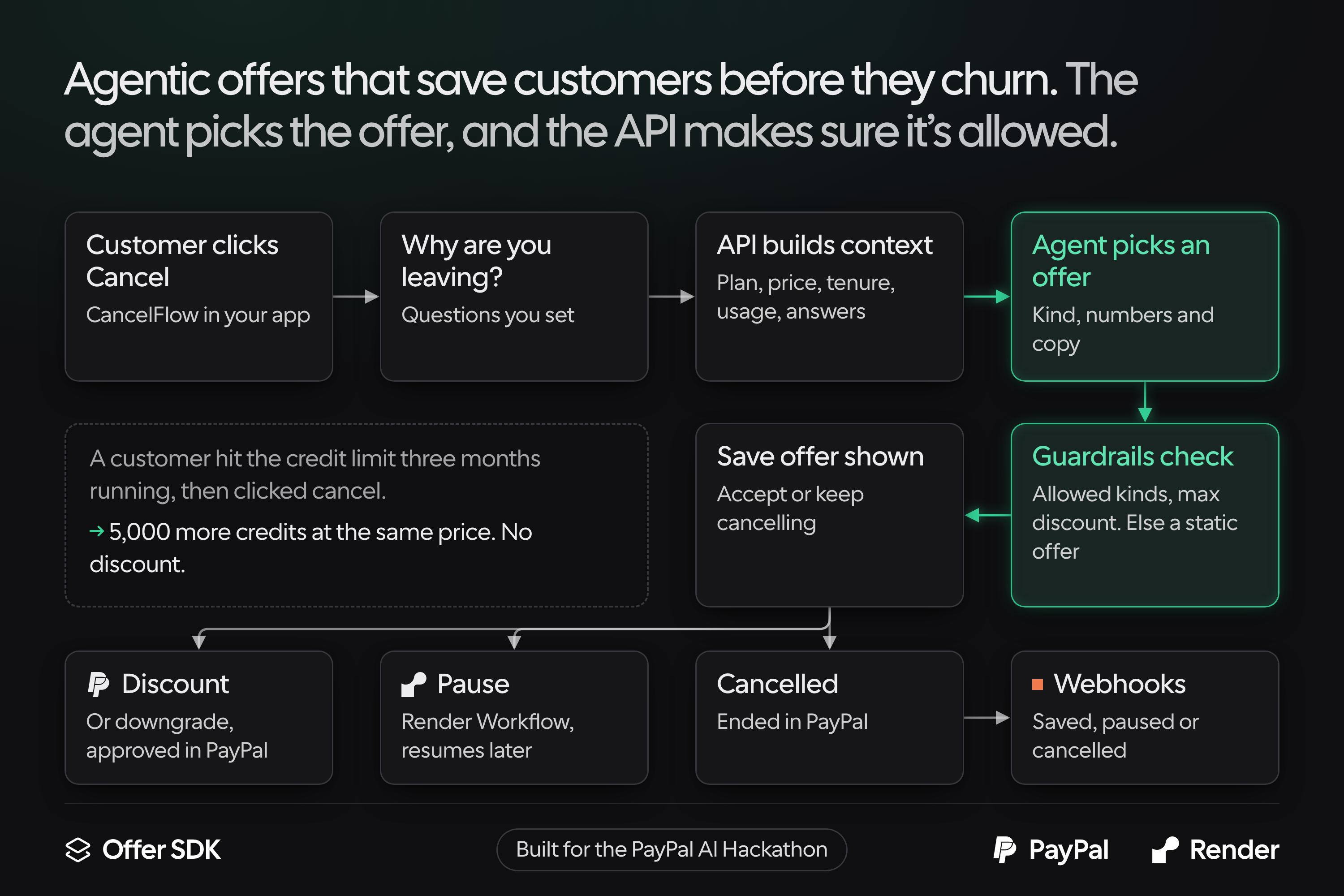
- Agentic cancel flows. The team sets up the cancel questions and steps in the dashboard. When a customer reaches the offer step, the API sends the AI agent what it knows about the account: plan, price, months as a customer, usage against each limit, and why they're leaving. The agent picks one save offer (a discount, a pause, a downgrade or an incentive) and writes the copy. The API checks that answer against the team's limits before the customer ever sees it.
For example, a customer hits their credit limit three months running, then clicks cancel. The AI agent skips the discount and offers 5,000 more credits at the same price, because the problem was the limit and not the price. The sale is saved, and the offer stayed inside the limits the team set.
The dashboard also has an agent that answers questions about usage and proposes catalog changes, each one approved before it runs. Every billing and customer event can trigger a webhook or a Zap. And any MCP client, like Claude, Cursor or ChatGPT, can read usage and change the catalog through the app's own MCP server.
The API
The Offer API is the source of truth for what every customer can do. It runs on your Render account with your own Postgres. It serves 160 endpoints, and every one is in the API reference and the Postman collection.
- One answer per customer.
/full-planmerges the customer's plan, the offer they bought through, any incentive and their add-ons. Your app checks access with one call instead of its own billing logic. - Accounts. Create, update and delete customer accounts, move them between plans, and apply or remove an incentive. List every account on a plan or with a given incentive.
- Usage metering. Add, remove or set usage for any entitlement, so you can charge for AI credits, API calls or seats.
- Limits that sell upgrades. When a blocking limit is used up, the API returns a 402 with a plain-language message, the cheapest plan that raises the limit and a checkout link. People and AI agents can both act on it.
- Checkout the browser can't tamper with. The API prices every selection from the stored offer, then creates the PayPal subscription or order. PayPal's webhooks keep each account in step with billing.
- Cancel flows and pauses. Cancel sessions walk a customer through your questions to a save offer. Pauses suspend billing in PayPal and resume it on a set date.
- Keys for every caller. A secret key for your server, a publishable key that is safe in the browser for reads, usage and checkout, and short-lived account tokens for a single customer's cancel flow.
- Signed webhooks. Every billing and customer event can go to your endpoint or a Zap, with retries and a delivery log.
The admin app
The admin app is where you run pricing day to day, without opening your code.
- Catalog. Create and edit plans, entitlements, add-ons and incentives.
- Offers. A full-page editor with a live checkout preview, a share link per offer and affiliate, and a performance page for each offer.
- Cancel flow. Set the questions and steps, turn on dynamic offers, set the guardrails, and preview the flow as customers will see it.
- Accounts. Search every customer and filter by plan or incentive. Each account page shows:
- Access: every feature and whether they have it, usage against each limit, and their add-ons, with whether each one comes from the plan or the incentive.
- Activity and analytics: each usage call your app sent, and usage per entitlement over time.
- API response: the exact answer your app gets for this customer.
- Actions: change the plan, apply, change or remove an incentive, rename or delete the account. A usage simulator sends the same calls your app makes, so you can test a limit or a 402 by hand.
- Overview and analytics. Usage over time, accounts by plan, top accounts and saved reports.
- Agent. Ask questions about usage, or have the agent propose catalog changes. Each change shows a preview and runs only after you approve it.
- Developers. Copy-paste snippets with your app's real keys, an API reference that sends real requests, key management, webhooks with delivery logs and Zapier, and MCP setup with a log of every AI client's calls.
- Payments. Payments section to connect each app's PayPal account.
The React SDK
The React SDK puts checkout and cancel flows inside your own app, in your own design.
- Headless components. Compound components with no styles of their own, so they match your app.
- Checkout.
OfferProviderandOffer.*render the price selector (monthly, yearly, lifetime), order bumps and the PayPal button. Build the page once and pass a different offer id for each ad or affiliate. - Purchase handling. After PayPal approval, the SDK completes the checkout and waits until access is applied.
- Cancel flow.
CancelFlowProviderandCancelFlow.*run the flow you set up in the admin app. Change the questions or offers there, and your app picks them up with no deploy. - Access and usage. A small client to read what an account can use, record usage, and catch the 402 when a limit is reached.
The MCP server
Every app gets its own MCP server, built into the API, so an AI assistant can run pricing from a chat. Connect Claude, Claude Code, Cursor, VS Code or ChatGPT to /apps/:appId/mcp.
- The whole API as tools. 64 tools cover accounts, plans, entitlements, add-ons, incentives, usage, analytics and webhooks. Each tool calls one API endpoint, so it returns exactly what the API returns.
- Ask about live data. "Which Pro accounts hit their credit limit last month?" gets an answer from your own Postgres, not a CSV export.
- Make changes from the chat. Create an incentive for churned accounts, raise a plan's limit or add a webhook without opening the dashboard.
- Ready-made prompts. Review the catalog, investigate one account, launch an incentive for a goal, or debug failing webhooks. Five resources give the assistant the catalog, pricing cards and recent events as context.
- Access you control. Clients sign in with OAuth and the founder picks an access level per connection: read only, read and write, or full access. The dashboard can switch any tool off, shows every connection and call, and revokes a connection in one click.
- Nothing extra to deploy. The server runs inside the API on Render, so it needs no new service and no new environment variable.
How I built it
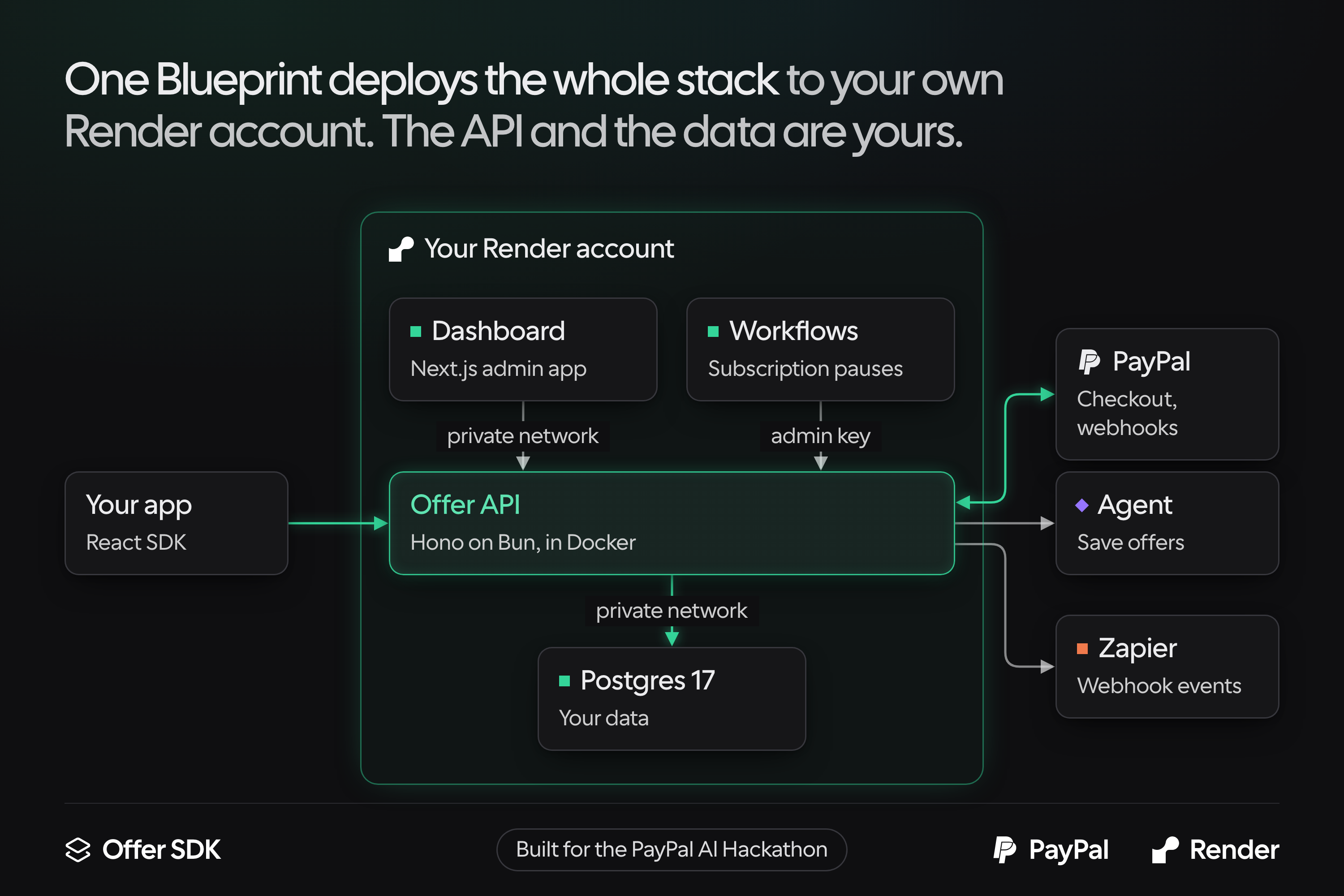
Render hosts the whole stack from one Blueprint. render.yaml creates four resources that are wired together on the first deploy:
offersdk-api, the Offer API (Hono on Bun, in Docker)offer-app, the Next.js dashboardoffersdk-workflows, a Render Workflows service that runs subscription pausesoffersdk-db, Postgres 17, reachable only over the private network
The dashboard calls the API over Render's private network, and the three services share one admin key through fromService. The API registers PayPal's webhook at its own onrender.com address, so billing events arrive with nothing to configure. Because it all runs on the founder's own Render account, the API and every customer record belong to them.
PayPal takes every payment. Each app connects its own PayPal REST app. The API verifies the credentials by requesting an OAuth token, then stores the secret encrypted. The browser never sends a price: it sends the offer, plan, interval and bumps, and the API prices that selection from the offer in Postgres before it creates the PayPal subscription or order. Order bumps are charged as a setup fee. The checkout completes from the SDK and from PayPal's webhook, and the API grants access only once.
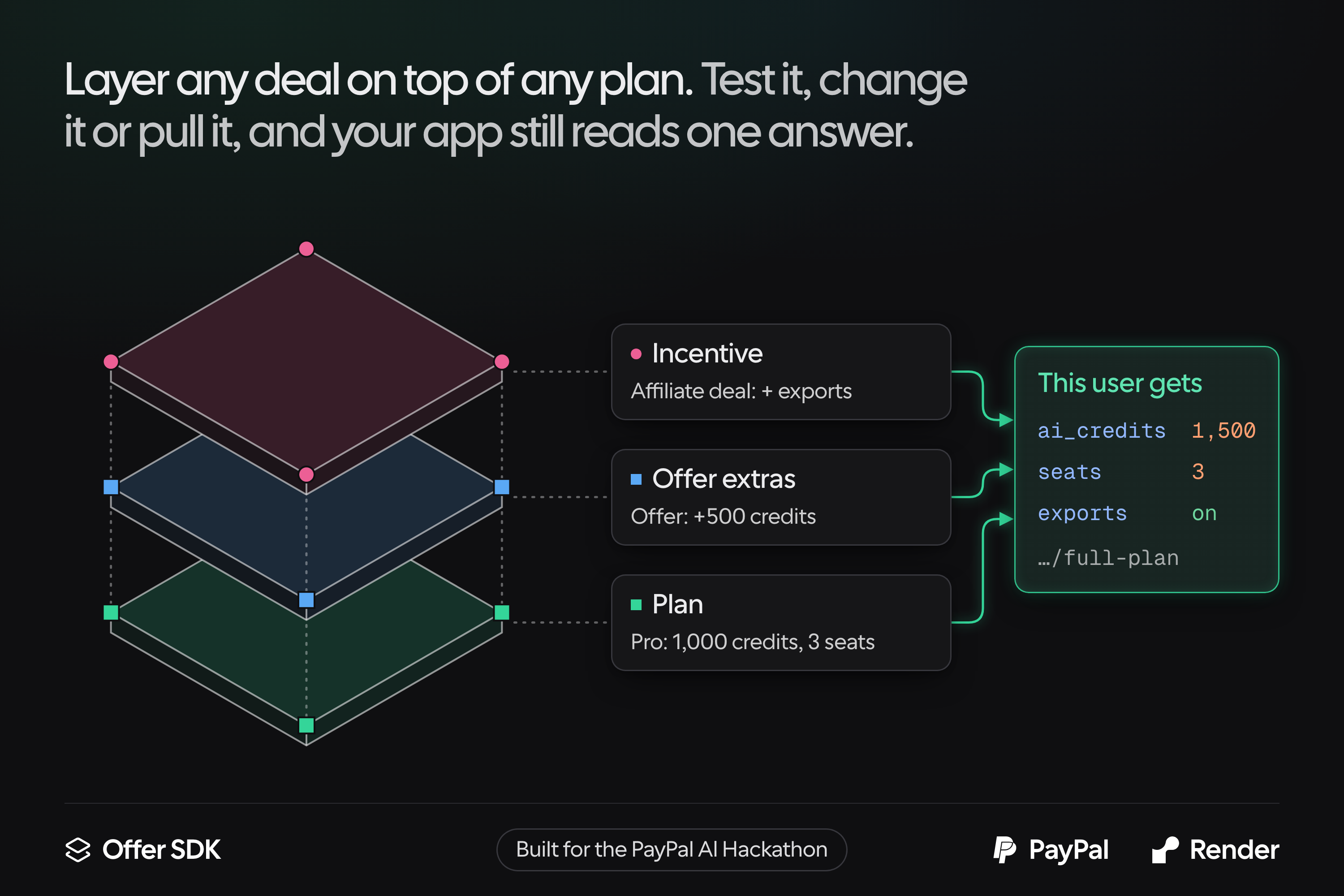
Entitlements resolve in layers. Every account stays on a core plan. The offer it bought through adds its extras, and an incentive goes on top. The SDK reads the result from one endpoint.
The AI agent picks save offers inside hard limits. The cancel flow calls the model with structured output. Plan and incentive ids are enums in the JSON schema, so the agent can only name ones that exist. The team's limits (allowed offer kinds, maximum discount, and so on) go into the prompt and are checked again on the server. Without an API key for the model, the flow falls back to its static offer.
The SDK is headless. OfferProvider with Offer.* components runs checkout, and CancelFlowProvider with CancelFlow.* runs cancel flows. The dashboard's live previews render through the same components.
The MCP server wraps the API. It speaks stateless Streamable HTTP with no MCP SDK, and each tool calls its endpoint with the app's own key, so the API's checks apply to AI clients too. OAuth uses PKCE and dynamic client registration, and the consent screen lives in the dashboard. The tool list is generated from the API reference, and a test fails when it goes stale.
Postman and Zapier. A Postman collection with 182 requests is generated from the API's routes, and a test fails if any of the 160 routes is missing from it. Zapier connects through the same signed webhooks.
Challenges I ran into
- Designing the API's footprint. Working out the parts and pieces, and how they fit together, took a lot of thought. Every new feature had to fit the same small set of building blocks.
- Deciding what a plan is. What does a plan include, and how does an offer sit above it? The difference is subtle. In the end every account stays on a core plan, and an offer changes the price and adds extras on top without becoming a plan of its own.
- Reconciling access in real time. The SDK has to give each customer access to the right things, reliably and right away, even when their plan, their offer and an incentive all apply. The API merges them in a fixed order, plan, then offer, then incentive, and the SDK reads one answer.
- Making it easy for anyone to deploy. I wanted anyone to be able to run it. The Render Blueprint made this simple: one click, and the API and admin app are ready to go, with the database and keys wired up.
Accomplishments that I'm proud of
- The whole stack deploys to the founder's own Render account in one click, with PayPal webhooks registered automatically.
- One checkout page, built once, sells any offer through PayPal, and the server sets every price.
- A cancel flow where an AI agent chooses the save offer but can't step outside the team's limits.
- An over-limit response that an AI agent can read and pay for.
- 160 API endpoints, all documented across 25 pages of docs, with a Postman collection that a test keeps in sync with the API.
- An MCP server with 64 tools, so a founder can check usage or launch an offer from Claude, Cursor or ChatGPT, with an access level on every connection.
- A demo workspace with six months of usage, so judges can click through without setting anything up.
What I learned
- Designing an API where each piece compounds into more flexibility is tricky. It took a lot of testing and playing around with how to design it.
- Entitlements and add-ons are the core primitives. Plans, offers and incentives are all just arrangements of them.
- Giving an agent a customer's usage data and plan, then letting it decide the cancel flow offer, has been really interesting. It came up with solutions I hadn't thought of, like giving more credits instead of a price discount.
What's next for Offer SDK
- Move my own products onto it. Offer SDK started as the billing layer I kept rebuilding for my own SaaS apps. Next is running them on it for real, with live customers, live PayPal subscriptions and real deals set up in the dashboard instead of the code.
- Bring existing subscribers over. Most founders already have paying customers, and they won't ask them to subscribe again. Next is importing existing PayPal subscriptions into accounts, matched to a plan, so an app can switch to Offer SDK without touching anyone's billing.
- Learn which save offers actually work. Today the agent picks a save offer from the account's plan, usage and reason for leaving. Next is tracking whether each saved customer is still paying a few months later, and giving the agent that history, so it learns which offers keep customers and which only delay the cancel.
- Let agents finish the upgrade. The 402 already gives an AI agent a plain-language message, an upgrade offer and a checkout link. Next is letting an agent with a spending limit set by its owner complete that PayPal payment itself, so hitting a limit becomes an upgrade with no human in the loop.
Built With
- bun
- docker
- hono
- next.js
- paypal
- postgresql
- postman
- react
- render
- tailwindcss
- typescript
- zapier


Log in or sign up for Devpost to join the conversation.