-
-
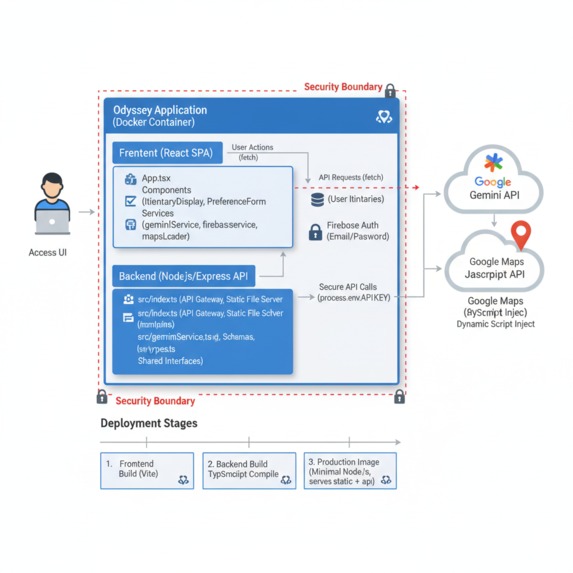
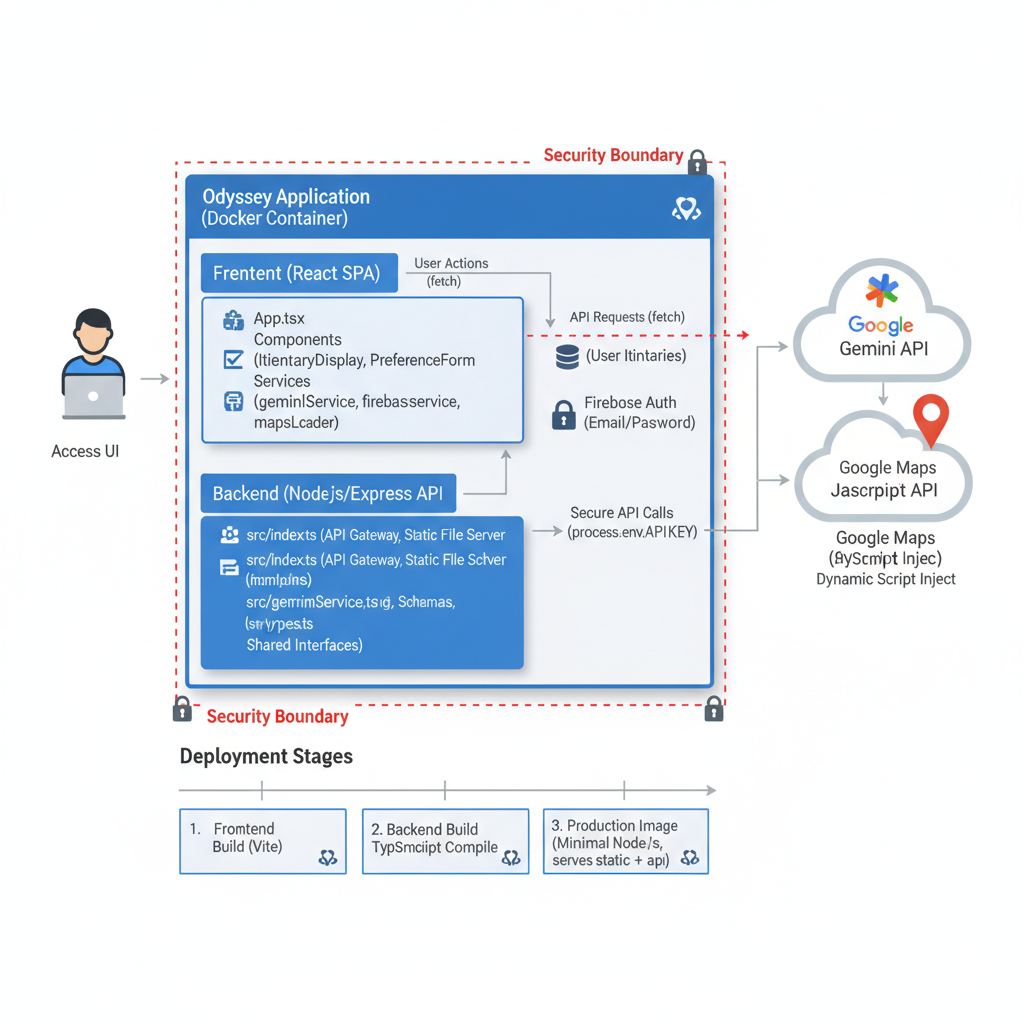
Architecture
-
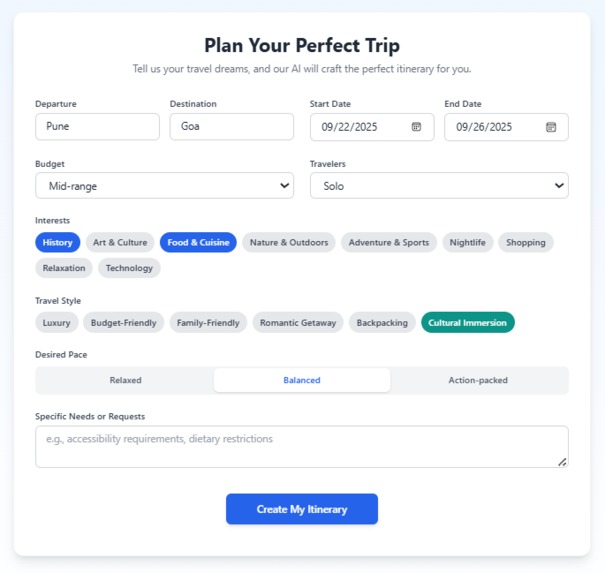
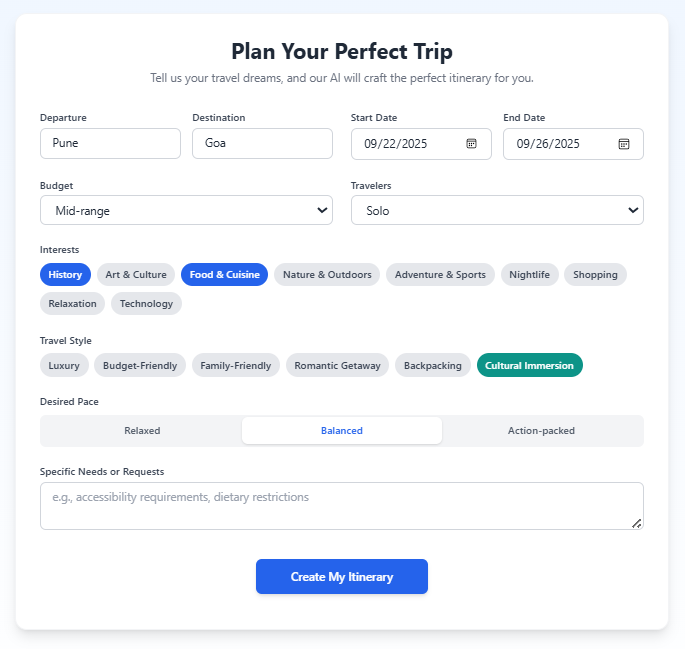
Preference Form
-
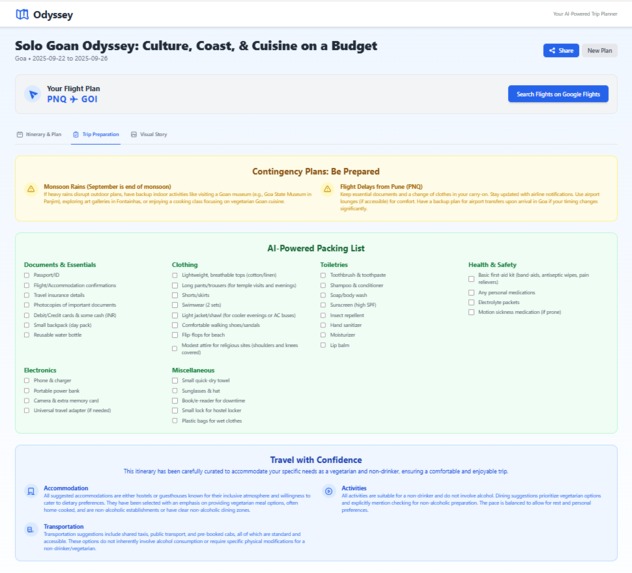
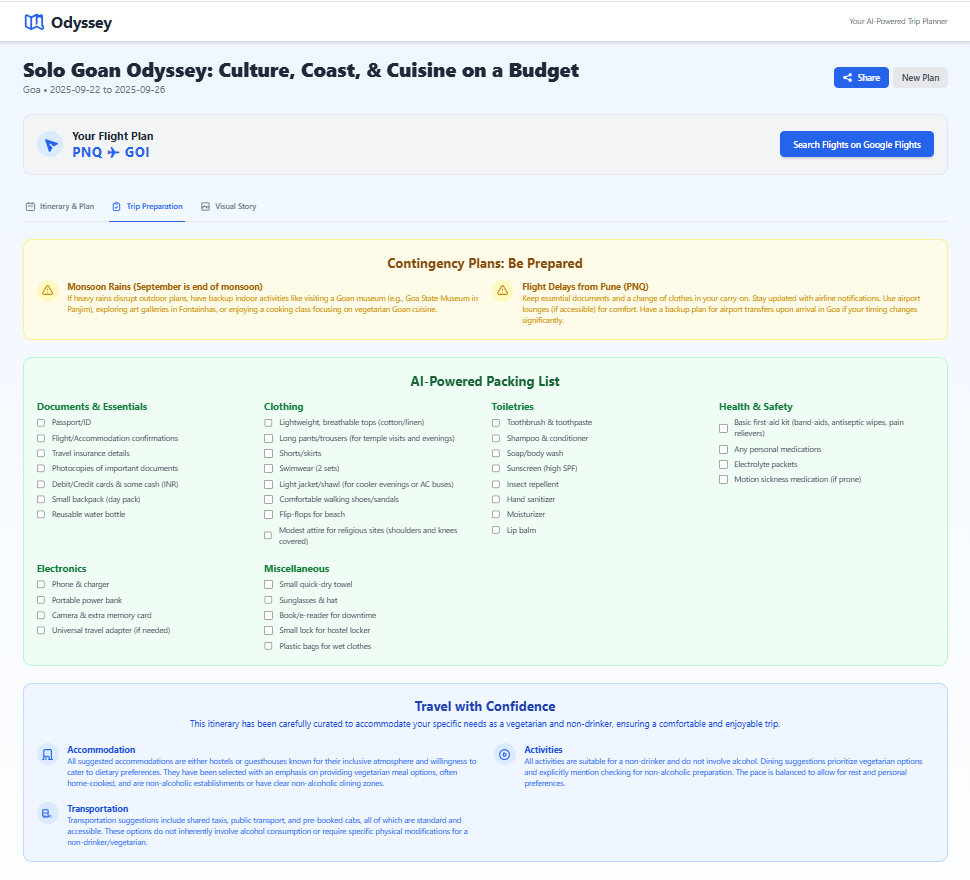
Preparation List Page
-
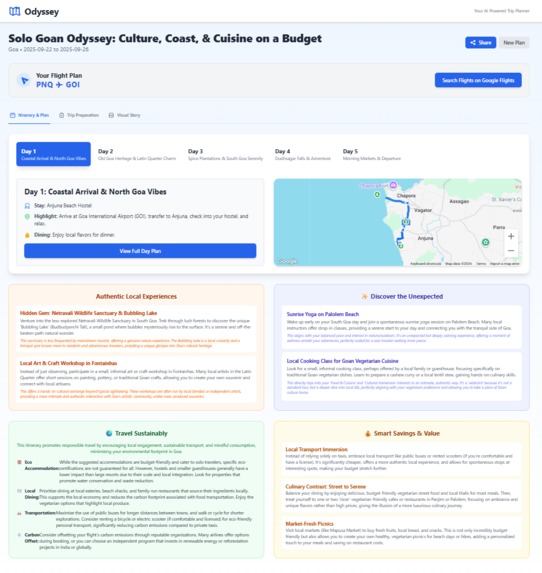
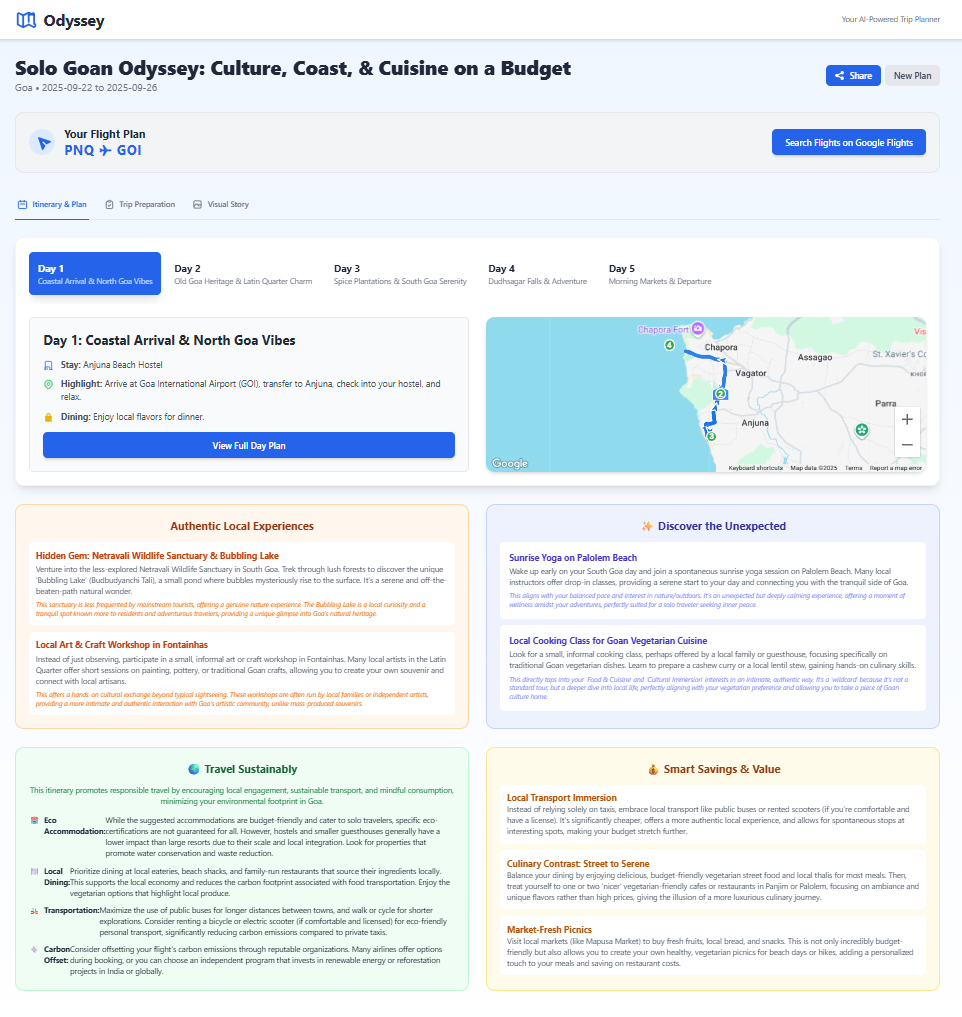
Created Itinerary Display
About Odyssey AI Trip Planner
Inspiration
Cutting Through the Travel Chaos The idea for Odyssey was born from a familiar frustration: the chaotic, tab-filled nightmare of modern travel planning. Like many people, I've spent countless hours juggling dozens of browser tabs—one for flights, several for hotels, a handful of blogs for "hidden gems," maps for locations, and spreadsheets to stitch it all together. The process was overwhelming, disjointed, and often led to decision paralysis. I realized the core problem is a fragmentation of information and a lack of personalization. Generic travel guides don't know my budget, my interest in Brutalist architecture, or that I prefer a relaxed pace. I envisioned a tool that could act as a personal travel agent—an intelligent, empathetic expert that listens to my unique desires and crafts a complete, cohesive plan, freeing me to focus on the excitement of the journey itself. With the advent of powerful generative AI like Google's Gemini, I saw a clear path to making this vision a reality. Odyssey is my answer to that chaos.
What it does
Odyssey is a personal AI travel agent in your pocket. It takes a user's unique preferences—such as destination, budget, travel style, and interests—and uses Google's Gemini AI to dynamically generate a complete, end-to-end travel itinerary.
The generated plan is rich and comprehensive, including:
- Daily Schedules: A day-by-day breakdown with themes, activities, and dining suggestions.
- Logistics: Accommodation recommendations and flight airport codes.
- Interactive Mapping: Each day's plan is visualized on an interactive map, showing routes and points of interest.
- Trip Preparation: On-demand generation of packing lists, language guides, accessibility reports, and contingency plans.
- Cultural Enrichment: AI-powered tips on sustainability, local experiences, cultural etiquette, and cost-saving strategies.
- Visual Storyteller: An innovative multimodal feature where users can upload their travel photos, and the AI generates contextual, evocative captions based on their specific itinerary.
- Personalization: With user accounts, travelers can save, view, and manage their trips for future reference.
How we built it
An Evolutionary Journey Odyssey's development was an iterative process of building, learning, and refactoring. It evolved from a simple client-side experiment into a full-featured, secure web application. Phase 1: The Foundation - A Serverless SPA I started with a simple, rapid-development approach. The initial architecture was a pure Single-Page Application (SPA) built with: React & Vite: For a modern, fast, and component-based frontend. TypeScript: To ensure type safety and catch errors early, which is crucial when dealing with complex data structures like a travel itinerary. Tailwind CSS: For building a clean, responsive, and utility-first UI without writing custom CSS. The initial concept was straightforward: a single form would capture user preferences and make a direct API call to the Gemini API. This allowed me to quickly prototype the core functionality and see if the AI could generate a plausible itinerary. Phase 2: Taming the AI - The Schema-Driven Approach The first major challenge was the unpredictable nature of the AI. Early prompts would sometimes yield beautifully formatted plans, and other times, strangely structured text that would break the UI. Simply asking for "a travel plan" wasn't reliable enough for a real application. This led to the most critical architectural decision of the project: adopting a schema-driven generation strategy. Instead of parsing unstructured text, I provided the Gemini model with a strict JSON responseSchema for every single request. This was a game-changer. By defining the exact shape of the data I needed—from the dailyPlan array down to the latitude and longitude of each activity—I forced the AI to act as a predictable data source. This eliminated fragile string manipulation on the frontend and made the entire application dramatically more robust. Phase 3: Enhancing the User Experience With reliable data flowing, I focused on the user experience. A single API call for a 10-day trip took a long time, leaving the user staring at a loading spinner. To solve this, I implemented a multi-phase generation strategy: Core Itinerary: The initial, blocking call generates the most essential data: the day-by-day plan, accommodation, and key activities. This is what the user waits for. Enrichment Layer: Once the core plan is displayed, a second, non-blocking API call happens in the background. It fetches "enrichment" data like sustainability reports, local experiences, and cultural tips, which then populate the UI as they arrive. Preparation Kit: A third set of data (packing lists, language guides) is only fetched on-demand when the user navigates to the "Trip Preparation" tab, saving unnecessary API calls. This approach significantly improved the perceived performance and made the application feel much more responsive. Phase 4: The Security Pivot - Moving to a Client-Server Model Initially, for simplicity, all API keys (Gemini and Google Maps) were stored in the frontend code. While convenient for development, I knew this was a major security vulnerability, as anyone could inspect the browser's source code and steal the keys. This prompted the biggest architectural refactor of the project. I transitioned Odyssey from a pure client-side app to a client-server architecture: Node.js & Express Backend: I created a lightweight backend server responsible for securely managing all API keys and secrets using environment variables. API Proxy: The frontend no longer calls the Gemini API directly. Instead, it sends requests to my Express backend (e.g., /api/generate-core). The backend then securely attaches the API_KEY and forwards the request to the Gemini API. Configuration Endpoint: I added an /api/firebase-config endpoint on the backend. On startup, the frontend now fetches its Firebase and Google Maps configuration from this endpoint, ensuring no keys are ever hardcoded in the client-side bundle. Asynchronous Initialization: This refactor meant the frontend had to change fundamentally. I introduced a new loading state to the main App component, which now waits to receive the configuration from the backend before initializing Firebase or attempting to render any part of the application. This shift was a significant undertaking but was crucial for building a secure, production-ready application.
Challenges we ran into
Challenge: The non-deterministic output of LLMs. Lesson: For application development, treating LLMs as structured data generators via schemas is far more reliable than treating them as simple text generators. This is the key to building robust AI-powered applications. Challenge: Securing client-side API keys. Lesson: The only truly secure way to handle secrets is on a server you control. This project was a practical, hands-on lesson in building a backend proxy, managing environment variables, and refactoring a frontend for asynchronous, server-provided configuration. Challenge: Providing a good user experience during long API calls. Lesson: Thinking about data delivery in phases can make an application feel faster and more interactive. Lazy-loading non-essential data is a powerful technique. Challenge: Managing growing state complexity in React without a state management library. Lesson: Careful component composition, combined with React hooks like useCallback and useMemo, can effectively manage state in a medium-sized application. It also highlighted when a tool like Redux or Zustand might become necessary in the future.
Accomplishments that we're proud of
Robust, Schema-Driven AI: Instead of parsing unpredictable text, we force the Gemini model to return structured JSON using a strict
responseSchema. This turns the creative power of the AI into a reliable, application-ready data source, which is the cornerstone of our app's stability.Superior User Experience through Phased Generation: We architected the AI to deliver the itinerary in stages. The essential core plan loads first, getting the user engaged immediately, while richer "enrichment" data (like sustainability reports and local gems) loads seamlessly in the background. This makes the app feel fast and responsive, even when performing complex generative tasks.
-Full-Stack, Secure Architecture: We successfully evolved the project from a simple, insecure client-side prototype into a production-ready, full-stack application. By building a Node.js/Express backend, we created a secure proxy that protects all API keys, ensuring they are never exposed to the client browser. The entire application is containerized with Docker for consistent and scalable deployment.
-Asynchronous, Server-Side Configuration: The frontend is built to be truly independent of its configuration. On startup, it fetches its Firebase and Google Maps keys from a dedicated backend endpoint. This is a professional pattern that enhances security and makes managing different environments (development, production) trivial.
What we learned
AI as a Data Source, Not Just a Text Generator: The most significant lesson was learning to control the AI. For building robust applications, providing a strict schema is non-negotiable. This paradigm shift was key to moving from a fun experiment to a reliable tool.
Security is Not an Afterthought: This project was a practical lesson in the criticality of backend proxies. Building the service to handle API secrets taught us invaluable full-stack development skills and reinforced the principle that client-side secrets are never safe.
The Power of Shared Types in Full-Stack TypeScript: By defining our data structures in a
types.tsfile and using it across both the React frontend and the Node.js backend, we eliminated a whole class of potential integration bugs and made the codebase dramatically easier to reason about and maintain.Managing Asynchronous Initialization: Refactoring the app to wait for server-side configuration before initializing services like Firebase was a challenge. It taught us how to manage application-level loading states and handle dependencies that aren't available at compile time.
What's next for Odyssey - AI Trip Planner
We have a clear vision for making Odyssey an even more indispensable travel tool. Our roadmap is broken into several phases:
Short-Term Goals:
- UI/UX Polish: Refactor large components like
ItineraryDisplay.tsxfor better maintainability and add more fluid UI animations. - State Persistence: Use
localStorageto save the last itinerary, so a page refresh doesn't lose the user's plan.
- UI/UX Polish: Refactor large components like
Mid-Term Goals:
- Post-Generation Customization: Allow users to edit their generated itineraries by dragging and dropping activities, replacing suggestions, and personalizing their schedule.
- Real-Time Collaboration: Enable users to share a trip plan with friends or family, allowing them to view and comment on the itinerary.
Long-Term Vision:
- Native Mobile Apps: Develop dedicated iOS and Android applications for a seamless on-the-go experience.
- Offline Mode: Allow users to download their itinerary and maps for use in areas with no connectivity.
- Proactive Travel Assistant: Evolve Odyssey into a real-time companion that provides live suggestions and notifications during the trip itself.
Odyssey has been an incredible learning journey, evolving from a simple idea into a complex and robust application. It taught me not just about the power of generative AI, but also about the foundational principles of secure, scalable, and user-centric web development
Built With
- aistudio
- cloudrun
- css3
- firebase
- gcp
- gemini
- google-maps
- html
- json
- node.js
- promptengineering
- python
- typescript

Log in or sign up for Devpost to join the conversation.