-
-

-
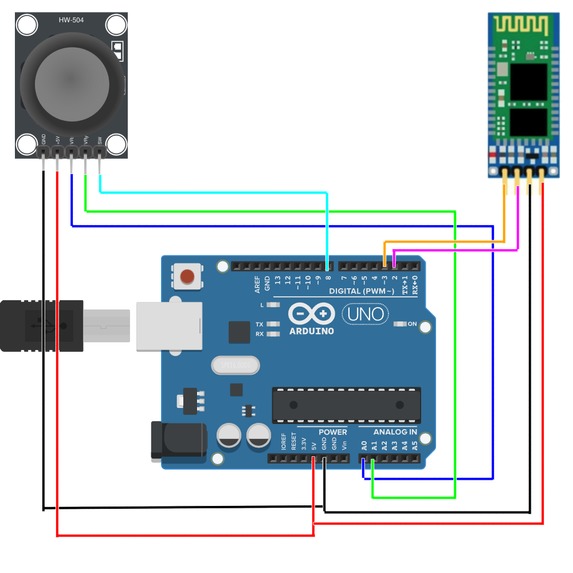
Circuit Diagram


Inspiration 🛡⚔🏹🎮🎶🎧🎼💻
In 2017, I remember first playing Legend of Zelda: Breath of the Wild. I had never played a Legend of Zelda game before, but the visuals, the story, the combat, the puzzles, the atmosphere, and everything together was so magical. But what was even more magical was the music. It perfectly fits every situation in the game and each track merges into the next like a well-made jigsaw puzzle.
As I did further research into the soundtrack, I found out that Breath of the Wild's best tracks were inspired by the Legend of Zelda: Ocarina of Time. My friend had always been telling me to play that game, and the internet has celebrated it ever since the internet existed. In fact, the Legend of Zelda: Ocarina of Time got a perfect 10 by IGN and even placed number 34 in their list of the best video games of all time.
And of course, everyone was right. Ocarina of Time is amazing. I haven't beaten the whole game yet, but I was so excited by the interactive music in the game. To solve some puzzles, you learn and play songs on the Ocarina by pressing the A button or moving your joystick. It was so fun to unlock secrets by playing songs on the Ocarina (and the songs were amazing, too!) and I remember those moments when I really connected with music.
I also have a lot of trouble getting out of bed in the morning and opening up everything for the day. I get up 2 minutes after class starts and then I barely have time to join the meeting. I really wanted to make some sort of remote control that I could use to control my laptop from bed, and recently got the itch to make something using hardware.
What it does 🎮💻
The final project is an electronic Ocarina-shaped controller which connects via Bluetooth to any computer. The joystick allows you to input different commands to your computer. The controls are mapped to the joystick like so:
- Left = Left
- Right = Right
- Down = Down
- Up = Up
- Joystick Press = A
Each unique button press lets you play a note (which is the same note as its Ocarina of Time counterpart), and if you input one of the classic Legend of Zelda: Ocarina of Time songs, you can control your computer. The inputs and songs are as mentioned below.
Left Up Right Left Up Right = Zelda's Lullaby 💤
Zelda's Lullaby puts your computer to sleep!
Up Left Right Up Left Right = Epona's Song 🐴
Epona's Song gets your computer prepped to start a productive day and work like a horse! It opens Google Classroom, Docs, and Gmail.
Right Down Up Right Down Up = Sun's Song 🌞
Sun's Song wakes up your laptop, increasing your screen brightness to 100 (like your parents' phones always are)!
Down Right Left Down Right Left = Saria's Song 🦮
In Ocarina of Time, Saria is almost your guide, and of course, the real-world equivalent is Google!
Right A Down Right A Down = Song of Time ⌚
You literally pause time! (Well, close to that, you pause your music)
A Down Up A Down Up = Song of Storms ⛈☔
Song of Storms allows you to let go of the big storm clouds lingering on your head through music by opening Spotify.
How I built it 🐍💻💙🦷📚🔧
The controller Ocarina is made using an Arduino, an HC-06 Bluetooth module, and an HW-504 Joystick Potentiometer. This was programmed in Arduino's version of C++ and essentially works by sending the joystick inputs via the Bluetooth module to a connected device.
Then, I made a script using Python to connect to the Bluetooth module (using PyBluez), record the inputs sent to it, and based on that, perform certain actions. I used the playsound library to play music and sounds depending on the keys, the webbrowser library to open some web pages, the screen-brightness-control library to control screen brightness, subprocess library to open some apps, and pyautogui to press some keys.
The gray Ocarina-shaped shell was literally built with some old Lego pieces. It carefully holds everything in place and really adds to the Ocarina of Time theme.
Challenges I ran into 🏃♂️
Bluetooth Module
By far, the biggest challenge I faced was working with the Bluetooth module. First, it took me some time to wire the module with the joystick to the power port without a breadboard. I don't solder a lot so this was quite difficult, but in the end, it worked. Then, I had to send data from the module to a connected device. For some reason, most people make projects where they take data from an external source to the module to do tasks on an Arduino. As I was doing the opposite and barely any articles or tutorials were available, I eventually broke down and read the documentation to look at the implementation of the commands.
Additionally, connecting to the module via Python was very difficult and I tried numerous libraries and tools to help. Eventually, I used PyBluez with which I faced multiple errors, and because it is a library primarily designed for Linux, the Windows docs and support is not as developed. I managed to solve this issue after about an hour and a half of research and debugging. Finally, the module has a PIN to connect to it and it was impossible to disable unless I had Custom Firmware on it. On the other side, as well, it was very difficult to connect to a Bluetooth device with a PIN using Python and it took me a long few hours to find a solution.
Joystick Calibration
The joystick outputs X, Y and Switch data where X and Y go from 0 to 1024, and the Switch is either in an on or off state. It was difficult to define boundaries for when the joystick is pushed in a direction, because if the boundaries are too lose, the joystick is overly sensitive, but if it is too harsh, the joystick may not register movement. This took a lot of trial and error to fix, and in the end, it has a comfortable boundary. Furthermore, to determine the direction of the joystick was difficult for me and required some algorithmic thinking and testing (a lot of Serial.println).
Logging Inputs
Logging the inputs was another tough challenge for me. I was originally planning to do the logging in the Arduino program itself, but C++'s restrictive arrays (at least when compared to some other, more modern languages) did not work. I started using queues in the Arduino (which I had just recently learned in my computer science class) but it still didn't have all the methods I wanted. In the end, I had to log inputs in Python which worked out well.
Python Interpreter Problems
It wouldn't be a hack without having like 12 dependency issues. I had some packages too old, some that required Python 3.9 when I had 3.8, and it was a mess. I went through the spaghetti-connected ominous cloud of issues and sorted it out, which finally resolved everything, including an issue with audio playback which would cause several errors.
Git Problems
I accidentally created my git repo in the wrong folder and when I tried to upload to GitHub, I accidentally created an embedded repo or a submodule or something which was very confusing, initially. However, I eventually understood the issue and managed to upload the full code.
Accomplishments that I'm proud of
Controlling my Computer from an Arduino
I've always been interested in being able to control something or transfer data between an Arduino and another device wirelessly. I was super happy to be able to communicate from Arduino to Python and I think that I can use this skill in various other projects.
Working with Joysticks
When I first got my Arduino kit, I hadn't really worked with joysticks before and tried to, immediately failing. I was intimidated by it and didn't decide to try again until now. It took some calibration, but I eventually got it to work and I am happy with that.
Bluetooth Module
The Bluetooth module was difficult to work with, at the very least, but despite whatever errors and annoyances it threw at me, I was able to get it to work.
What I learned 🧠🧠
Joysticks and Bluetooth Modules
Working with both of these components was hard, but I learned the methods, libraries, and connections that are used with these parts and how to use them efficiently.
Queues
While I didn't end up using queues in my final project, I did learn how to use them, including the enqueue and dequeue functions. I think for future projects, the implementations of the queue data structure will be very useful.
Bluetooth Data with Python
Getting data from Bluetooth using Python is something that will be very useful for future hardware projects because I will definitely work with Bluetooth Modules in the future. I think being able to send data from an Arduino to a computer is a skill I am very happy I learned over the weekend.
What's next for Ocarina 🎭
I haven't yet played Majora's Mask, the sequel to the Ocarina of Time (no spoilers), and I think that has even more music and instruments which I can use to add even more functionality to the Ocarina.


Log in or sign up for Devpost to join the conversation.