Inspiration
India has over 40 million pending court cases, and behind a huge chunk of them is the same simple problem: someone got a legal notice — a rental eviction notice, a tax demand, a termination letter — and had no real idea what it meant or what to do about it. They're not lawyers. They don't have Rs. 5,000 to spare for a consultation just to understand one letter. So they panic, ignore it, overpay, or sign something they shouldn't have.
I kept seeing this pattern in real life — relatives getting income tax notices they couldn't decode, tenants getting eviction letters full of section numbers that meant nothing to them. The information about their rights exists; it's written into the Transfer of Property Act, the Income Tax Act, the Constitution. But it's locked behind legal language, and most people don't even know which law applies to their situation, let alone what it says.
I wanted to build the thing that stands between "I just got a scary letter" and "I now know exactly what my rights are and what to do next" — without needing to know a single legal term going in, and without needing English if Tamil or Hindi is easier.
What it does
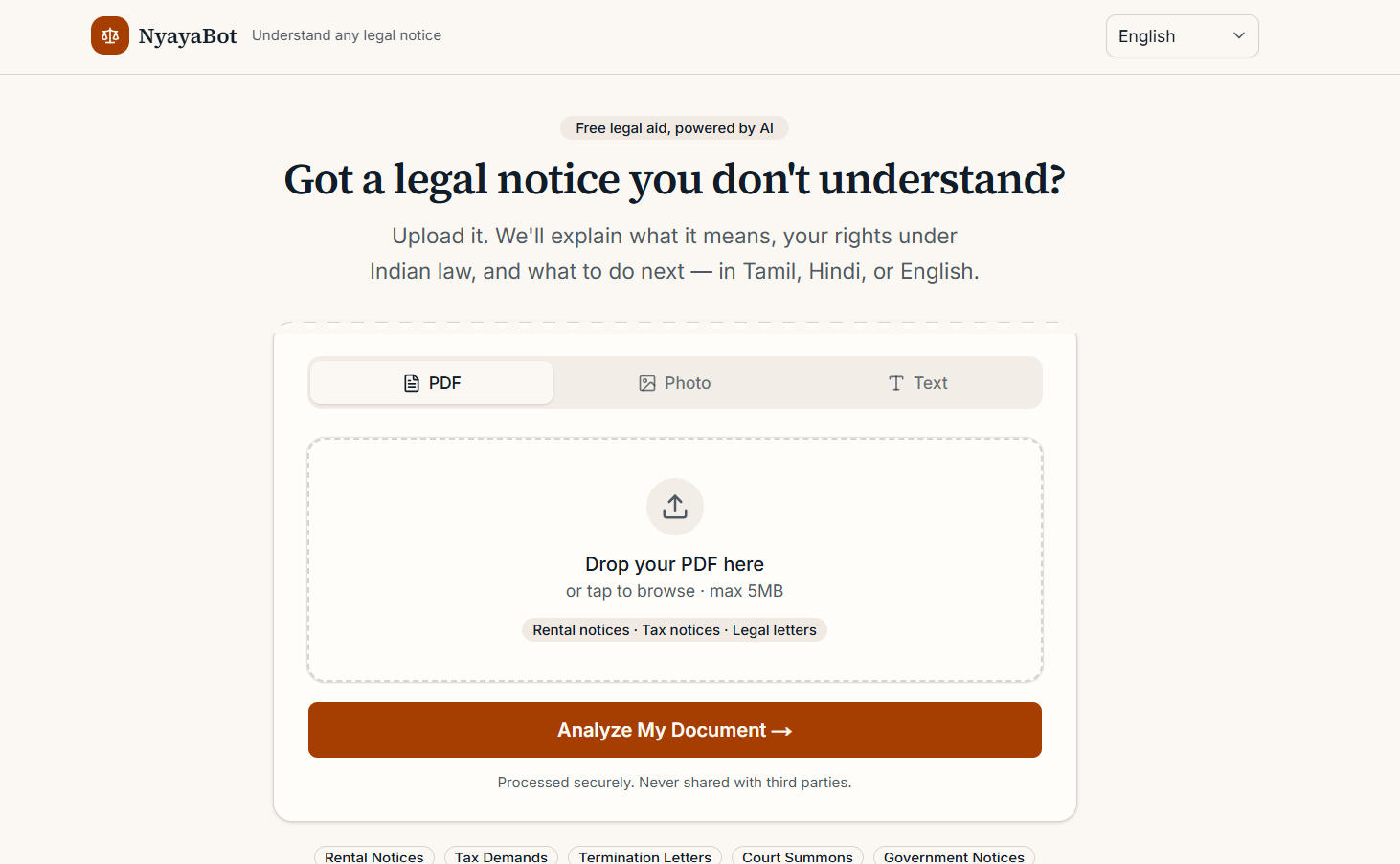
NyayaBot is a multi-agent AI legal aid web app for Indian citizens. You upload any legal document — as a PDF, a photo of a notice, or just pasted text — and three AI agents work through it in sequence to turn it into something you can actually act on:
- Document Review – reads the document, identifies what kind of notice it is, and pulls out the key facts: dates, amounts, demands, and anything procedurally questionable.
- Legal Research – matches those facts against the relevant Indian acts and sections — Transfer of Property Act, Income Tax Act, IPC, CPC — and finds applicable precedent.
- Rights & Next Steps – takes both of those and rewrites them into plain language: what this document means, what rights you have, and a numbered list of exactly what to do next, with an urgency level so you know if you have 7 days or 30.
From there, you can generate a formal response letter in one click (downloadable as PDF or .txt), or ask follow-up questions in a chat that already knows your full document context — with suggested questions that change depending on whether you uploaded a tax notice, a termination letter, or a court summons. Every part of the results page — not just the AI output, but every button and label — works in Tamil, Hindi, or English.
How we built it
The app is built on Next.js with the App Router, styled with Tailwind CSS, using shadcn/ui components, and deployed on Vercel. Supabase (PostgreSQL) handles the database and file storage.
The AI layer is a genuine three-model pipeline rather than one model doing everything: Gemini 2.5 Flash reads and structures the document, Groq running Llama 3.3 70B does the legal research (chosen for speed — research needs to scan a lot of context fast), and Mistral Small synthesizes both into the plain-language rights and next steps. Gemini also handles translation as a final pass — every field from all three agents (not just the final summary) gets translated together in one call, so the whole results page is consistent in whichever language is selected, not just the headline text.
For document ingestion, unpdf extracts text from PDFs, and images go through Tesseract.js OCR first with a Gemini Vision fallback for anything Tesseract can't read cleanly — handwritten or low-quality WhatsApp photos, mostly. The response letter is drafted by Gemini and rendered client-side into a properly formatted PDF using jsPDF.
A good amount of the build was deliberate UX decisions, not just plumbing: the agent names (Gemini/Groq/Mistral) never appear anywhere a user sees — the progress screen shows "Reading your document," "Checking the law," "Working out your rights" instead, because someone holding a scary legal letter shouldn't have to trust an AI vendor name to trust the answer. The visual design avoids the generic dark-mode-SaaS look on purpose — warm paper tones, a serif display font, and a torn-notice-edge detail on the hero card, so it reads like a legal-aid document and not a tech demo.
Challenges we ran into
- Sequential AI calls add up fast. Once translation became a full fourth pass over every agent's output (not just three fields), a single analysis went from a few seconds to 30-40 seconds end to end. The fix wasn't to cut corners on translation coverage — it was to make the progress screen pace itself honestly against real timing instead of a fake fixed countdown, so the wait feels accounted for instead of stuck.
- Dev-mode remounts silently duplicating API calls. Next.js Fast Refresh during development would occasionally remount the analyzing page mid-request, and a naive
useRefguard reset on that remount — kicking off a second/api/analyzecall while orphaning the first one's UI update, so the screen looked frozen even though the network call had actually succeeded. Fixed with asessionStorage-backed dedup that survives the remount and lets a "watching" instance pick up the original call's result instead of restarting it. - A genuinely broken Tailwind v4 custom variant. The tabs component used
data-horizontal:and similar custom variants that were never registered in the theme config, so they silently failed — the upload tabs and their content rendered side-by-side instead of stacked, and no console error pointed at why. Traced it down to the missing@custom-variantregistration and rewrote the component with explicit, guaranteed-working attribute selectors instead. - Making suggested chat questions actually relevant. The first version had one fixed set of suggested questions written for a rental eviction scenario, which made no sense at all on top of an income tax notice. Rebuilt it as a question bank keyed by document type, fully translated, so the prompts you see actually match what you uploaded.
Accomplishments that we're proud of
- A genuine three-agent pipeline where each model does the part it's actually suited for, instead of one model doing everything for a "looks impressive" agent count.
- Full UI translation, not just AI-output translation — selecting Tamil or Hindi changes literally every button, label, and toast in the app, not just the results text.
- A response-letter feature that produces something actually usable: a properly formatted, downloadable PDF a person could print and send, not just a wall of text in a popup.
- Designing the entire experience around someone who is anxious, not someone who is impressed by AI — the language, the pacing, even the color palette were chosen to feel like a calm legal-aid office rather than a flashy AI product.
- Catching and fixing real, non-obvious bugs (the Tailwind variant issue, the dev-mode remount race) that would have shipped invisibly if I'd stopped at "looks fine on screen."
What we learned
- Translation coverage is an all-or-nothing trust signal. Translating only the headline summary while agent detail cards stay in English looks more broken than not translating at all — users notice the inconsistency immediately.
- A loading screen's perceived honesty matters more than its actual speed. A progress screen that visibly tracks real backend stages, even when the wait is 30+ seconds, feels more trustworthy than a fast but fake one that jumps straight to "done."
- Framework-level bugs can hide in plain sight. A missing Tailwind custom-variant registration didn't throw a single error — it just silently dropped classes, which is a reminder to verify the actual rendered DOM rather than trusting that "the code looks right" means "the code works."
- Naming choices are a safety decision, not a branding one. Hiding AI vendor names from the end-user UI wasn't about mystique — it was about not asking someone already anxious about a legal notice to also evaluate which AI company to trust.
What's next for NyayaBot
- Voice input for people who'd rather describe their situation out loud than type or upload, especially useful for users less comfortable typing in English.
- A language selector on the results page itself, so switching languages after analysis doesn't require starting over.
- Expanding document type coverage with more specific legal research per category — labour law specifics for termination letters, RERA-specific handling for property disputes, and so on.
- Partnering with legal aid clinics or law schools so a flagged "high urgency" case can optionally be routed to a real volunteer advocate, not just an AI-generated letter.
- A lightweight mobile-first PWA mode, since most people who'd actually use this are far more likely to photograph a notice on their phone than scan it on a laptop.
