-
-
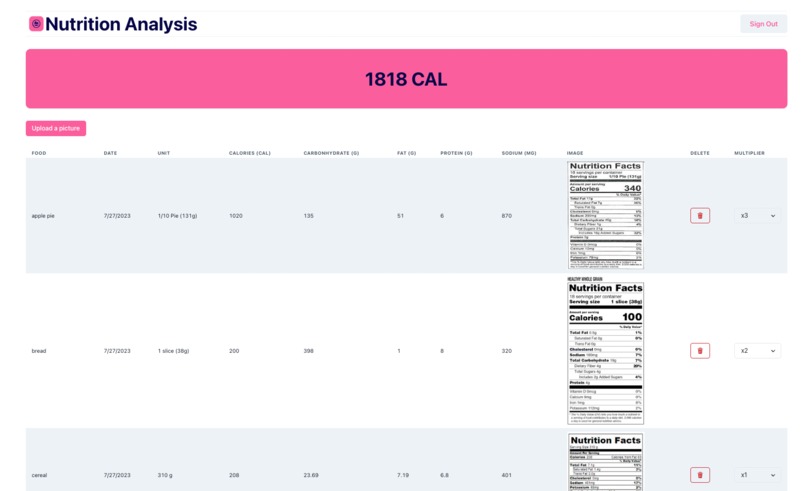
Nutrition Upload History
-
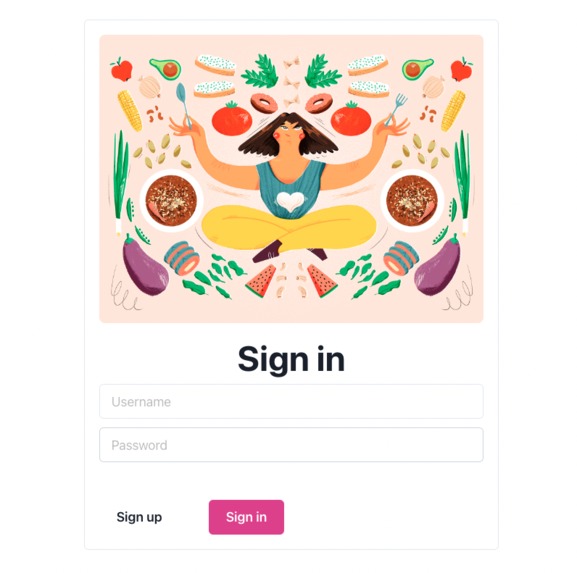
Sign in Page

Inspiration
Many people today are conscious about their dietary habits and are interested in monitoring their nutritional intake to maintain a healthy lifestyle. However, manually inputting nutrition data from labels can be time-consuming and error-prone. The inspiration for this app stems from the combination of emerging technologies (OCR and AI) and the growing interest in health and wellness. By providing an efficient and automated way to track daily nutrition intake.
What it does
It takes user login credentials and automatically recognizes and extracts data from nutrition labels using OCR technology provided by Google Document AI and renders a table that displays the user's uploaded nutrition labels and calculates daily nutrition intake.
How we built it
NutritionGo! was brought to life by harnessing the capabilities of TiDB database, GCP Storage, and Google Document AI. TiDB served as a reliable storage solution for analyzing nutrition label data, while GCP Storage securely managed user-uploaded labels. The integration of Google Document AI allowed us to accurately extract information from these labels. For the front-end, we turned to React and various UI libraries, ensuring a smooth and visually appealing user interface.
Challenges we ran into
We run into challenges when trying to connect to and configure backend services which include TiDB, GCP storage, and document AI. We used multiple services and it is not always guaranteed that pasting API documents would work. Oftentimes, we need to make some adjustments to the code and test it out. While backend testing works fine, we could also run into CORS bugs when testing from the frontend which requires us to reconfigure several settings from the backend service provider. The main challenge we faced while building this app was the lack of native support for nutrition fact labeling in the Google Cloud Platform (GCP) Document AI processor gallery. As a result, we had to train a custom processor to recognize and extract data from nutrition labels. To do this, we obtained a nutrition fact label dataset from Kaggle, but unfortunately, the dataset was limited in size, which could have affected the effectiveness of the training process. Since the dataset was not large enough, it may have led to suboptimal performance in the automatic labeling of the testing set by Document AI. As a result, we had to manually label the key-value pairs that you wanted to extract from the images, which was a time-consuming task. The manual labeling and the subsequent adjustments we had to make to improve accuracy further added to the time and effort required in the development process. This process of manual labeling and adjustment may have been iterative, where we had to fine-tune the model multiple times to achieve satisfactory results.
Accomplishments that we're proud of
Creating a custom OCR processor for nutrition labels is a significant achievement. Overcoming the lack of native support and training a model to accurately extract key-value pairs from nutrition labels demonstrates your dedication and expertise in machine learning and AI technologies. Successfully integrating TiDB database for data analysis and GCP Storage for secure management of user-uploaded labels reflects your skill in working with cloud-based solutions and scalable databases. This ensures the app can handle a growing user base and store data efficiently.
What we learned
We gained experience in working with TiDB, a distributed, scalable, and reliable database. We understand how to store and analyze nutrition label data efficiently, allowing for smooth data retrieval and management. By utilizing GCP Storage, we learned how to securely store and manage user-uploaded nutrition labels. This provided a scalable solution for handling user data in the cloud. Integrating Google Document AI into the app allowed us to explore OCR technology for extracting information from nutrition labels. We learned how to train custom processors and handle challenges related to limited datasets and accuracy improvements.
What's next for NutritionGo!
To improve the accuracy of the custom processor, consider expanding the dataset for training. Look for additional nutrition fact label datasets, or we could even create our own dataset by collecting more nutrition label images from various sources. Increasing the diversity and size of the dataset can lead to better generalization and recognition performance. To implement a feature that allows users to store and track their daily calorie intake. This involves integrating a database to store user data, designing a data model to capture daily calorie intake entries, and associating uploaded images with the current date and time for accurate tracking. Users should be able to view their daily calorie intake history, and optionally, you can include data visualization tools to present calorie intake trends over time.
Built With
- document-ai
- express.js
- google-cloud
- node.js
- react
- tidb


Log in or sign up for Devpost to join the conversation.