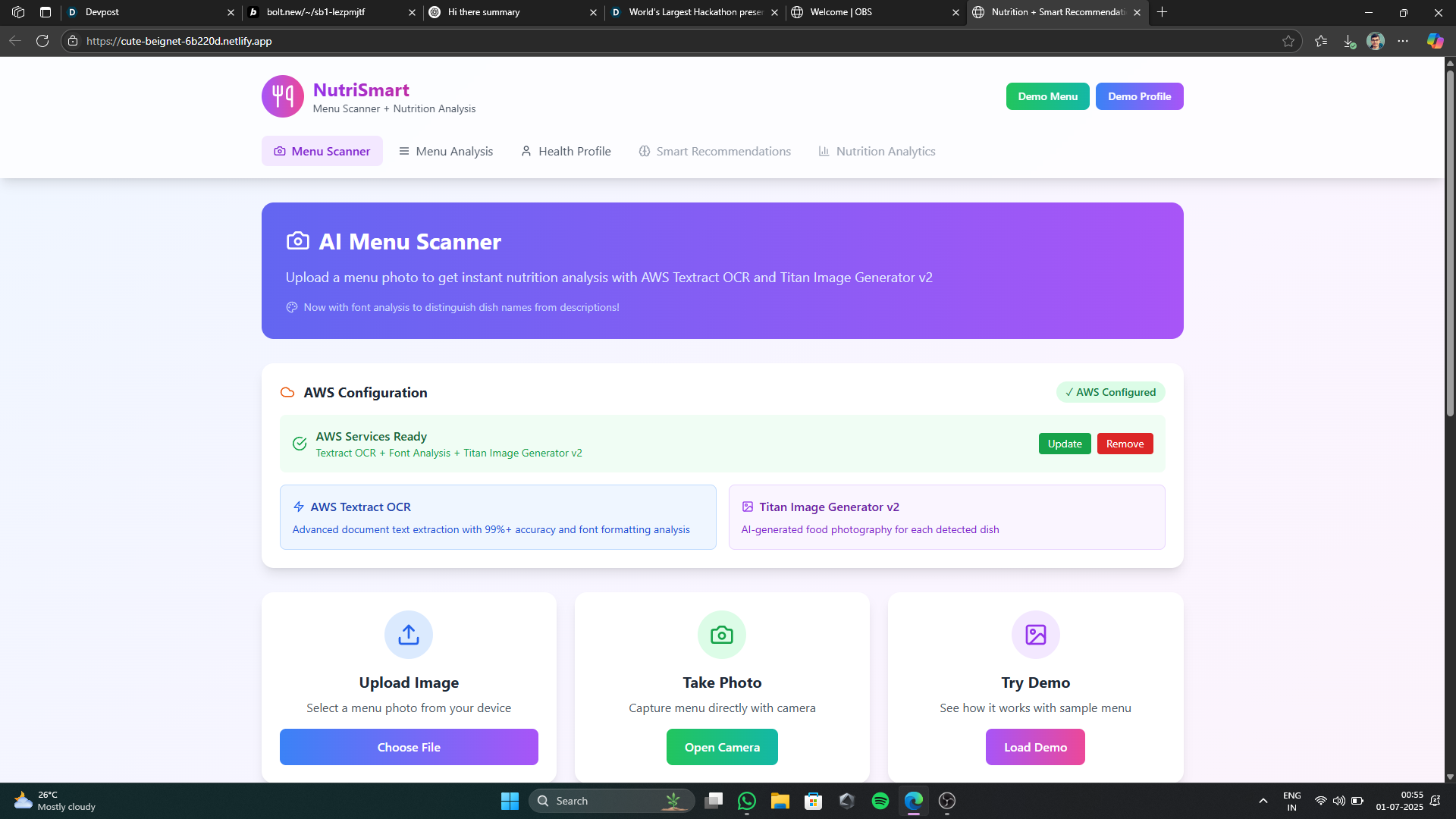
Inspiration
The inspiration for NutriSmart stemmed from a common challenge: making informed, healthy food choices when dining out. Menus often lack detailed nutritional information, and even when available, it can be overwhelming to process.
We envisioned a tool that could bridge this gap, providing instant, personalized insights. The idea was to leverage cutting-edge AI and OCR technologies to transform a simple photo of a menu into a comprehensive nutritional guide, helping users align their meals with their specific dietary goals, allergies, and health conditions.
This project was also a direct response to the Bolt Hackathon's modules on Menu Scanning and Nutrition Analysis, pushing us to integrate these functionalities into a seamless user experience.
What I Learned
Building NutriSmart was a profound learning experience across several domains. I gained deep insights into:
Advanced OCR and Text Processing
Working with AWS Textract was particularly enlightening, especially its ability to provide not just raw text but also detailed formatting information (font size, boldness, bounding boxes). This was crucial for distinguishing dish names from descriptions and other irrelevant text. I also learned about implementing fallback mechanisms with client-side OCR like Tesseract.js.Unstructured Data Parsing
The core challenge was transforming the raw, often messy, text output from OCR into structured menu data. This involved developing sophisticated parsing logic to identify dish names, prices, categories, and descriptions, and then generating plausible nutritional data, allergens, and dietary tags.AI Image Generation
Integrating with AWS Bedrock's Titan Image Generator v2 was fascinating. I learned how to craft effective prompts for generating realistic food images and how to handle the nuances of AI model invocation and potential access limitations.Recommendation Engine Logic
Designing the algorithm for the smart recommendation engine taught me how to weigh various user profile parameters (allergies, dietary goals, health conditions, calorie targets) against dish attributes to provide a meaningful match score and actionable reasons/warnings.Robust Error Handling and User Feedback
Given the complexity of external API calls (AWS) and potential OCR inaccuracies, implementing clear progress indicators, success messages, and detailed error reporting was vital for a good user experience.
How I Built My Project
The project is a React application built with TypeScript, styled using Tailwind CSS for a modern and responsive user interface.
Frontend Architecture
The application is structured into several key components:
App.tsx: Manages the overall application state, including the active tab, user profile, and current menu data.MenuScanner.tsx: Handles image uploads/captures, orchestrates the OCR and image generation processes, and displays scanning progress.MenuNutritionDisplay.tsx: Presents the scanned menu data with filters, search, and detailed nutrition labels for each dish.UserProfile.tsx: Allows users to input and manage their health profile, including dietary goals, allergies, and health conditions.RecommendationEngine.tsx: Takes the user's profile and available dishes to generate and display personalized food recommendations.NutritionLabel.tsx: A reusable component to display detailed nutritional information for a dish.
Core Services
ocrService.ts:
This service is responsible for text extraction. It primarily uses AWS Textract for its advanced capabilities, including font and formatting analysis, which is critical for accurate menu parsing. If AWS credentials are not configured or Textract fails, it falls back to Tesseract.js for client-side OCR.menuParser.ts:
This service takes the OCR results (including formatting information from Textract) and intelligently parses the text to identify restaurant names, menu categories, dish names, descriptions, and prices. It also generates simulated nutritional data, ingredients, allergens, and dietary tags for each dish. The font analysis from Textract significantly enhances its ability to distinguish dish names from other text.imageService.ts:
This service handles image generation for the dishes. It integrates with AWS Bedrock's Titan Image Generator v2 to create unique, AI-generated food images based on the dish name and ingredients. If AWS Bedrock is not configured or access is denied, it falls back to a curated list of stock food images.
Data Management
React’s useState hook is used for local component and application-level state management. User-provided AWS credentials are saved in localStorage for persistence across sessions.
Challenges I Faced
Developing NutriSmart presented several interesting challenges:
Accuracy of OCR and Parsing
The primary hurdle was reliably extracting and structuring data from diverse menu layouts. OCR, especially from images, can be imperfect. The initial versions struggled with distinguishing dish names from descriptions, ingredients, or even restaurant boilerplate text.
This led to the implementation of the font analysis feature, leveraging Textract’s detailed output to identify bolded, larger text as likely dish names, which significantly improved parsing accuracy.Handling AWS Integrations
Integrating with AWS Textract and Bedrock required careful management of credentials and understanding their specific APIs. A particular challenge was ensuring the AWS Bedrock Titan Image Generator v2 model was accessible, as it often requires explicit access requests in the AWS console.
Implementing robust error handling and informative messages for these AWS-specific issues was crucial.Simulating Realistic Nutrition Data
Since the project doesn't connect to a real-time, comprehensive nutrition database, generating plausible nutritional values, allergens, and dietary tags for arbitrary scanned dishes was a creative challenge. TheMenuParseruses heuristics based on dish names and descriptions to simulate this data, aiming for a reasonable approximation.User Experience with Complex Backend
Communicating the multi-step scanning process (OCR, parsing, image generation) to the user in an understandable way, along with progress updates and potential errors, required thoughtful UI design and state management.Performance Optimization
Processing images, performing OCR, and generating AI images can be resource-intensive. Optimizing the flow and providing visual feedback during these operations was important to maintain a responsive feel.
Built With
- amazon-web-services
- bedrock
- bolt
- netlify
- react
- tessarect
- typescript

Log in or sign up for Devpost to join the conversation.