Inspiration
When you're choosing food at a counter or a market, the nutrition information lives somewhere else: on a phone, in an app, behind a search. Your hands are busy and your eyes are on the produce. I wanted to see what it would look like if the information sat on the food itself, and if choosing was just a grab. That's a natural fit for AR glasses, so I built Nutrient Picker for Snap Specs.
What it does
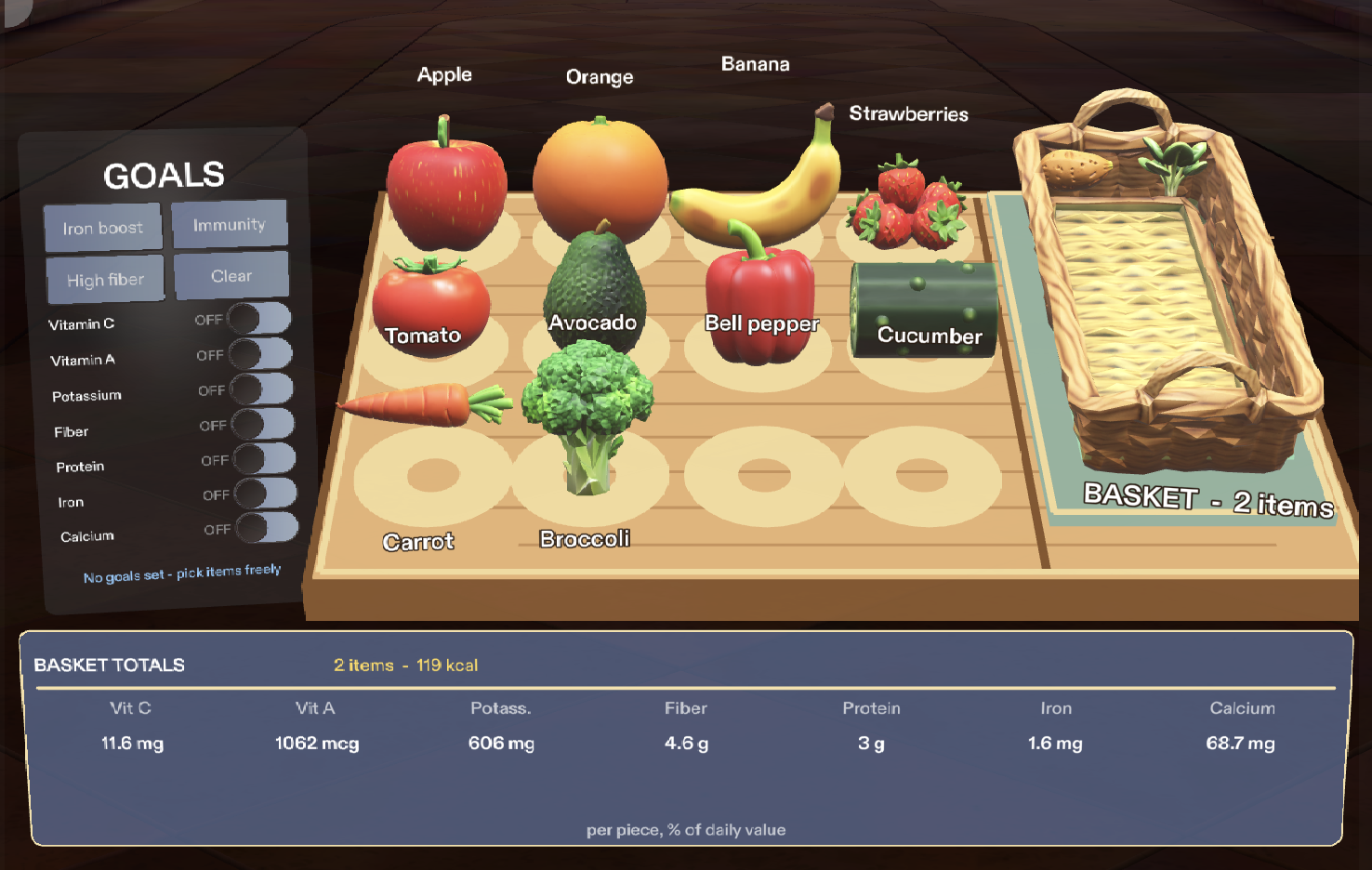
You set the nutrients you're aiming for (Vitamin C, Vitamin A, Potassium, Fiber, Protein, Iron, Calcium), one at a time or with a preset like Iron boost. Items that supply those nutrients glow. Hovering an item shows its top five nutrients right on it. You grab items into a basket, and a totals strip shows calories and every nutrient for what's inside, with progress toward each goal. A suggestion points to the best next item, and a summary card appears once all your goals are covered. Everything also works with no goals set.
Important: this runs in Lens Studio's Interactive Preview, because I didn't have a Specs device. Recognition of real produce is simulated. The table and the 12 items are a virtual stand-in with hard-coded sample data. Everything after recognition (goals, hover details, grabbing, totals, progress) is real code.
How we built it
It's TypeScript in Lens Studio, using the Spectacles Interaction Kit for hover and grab and the Spectacles UI Kit for the panels. The code has three layers:
- Data: the items, their typical weights, and nutrients per 100 g.
- State: a pure logic module that holds the goals and the basket and computes everything derived from them.
- Views: passive panels that only display what the state tells them.
The amount of a nutrient in one piece is
$$\text{amount} = \frac{\text{per 100 g} \times \text{grams}}{100}$$
and a goal's progress is the basket's total divided by that nutrient's daily value:
$$\text{progress}n = \frac{\sum{i \in \text{basket}} \text{amount}_{i,n}}{\text{daily value}_n} \times 100%$$
A goal counts as reached at 10% of the daily value, because 100% is out of reach with single pieces of produce. The produce models were generated with SPECS text-to-3D, and the sound cues with local synthesis. I built it with an AI coding agent from a written design brief, and I verified it with 16 automated LEAF test scenarios that run in the preview.
Challenges we ran into
- Fitting the layout to the preview's field of view. The preview display is only about 53 cm wide at 100 cm, so the table, basket and goals panel couldn't sit side by side at the brief's sizes. I lowered the table, shrank the scene, and moved the goals panel to the left of the table.
- A hover flicker. Hovering an item in the basket made the tooltip flash on and off. The cause was the tooltip's backing plate catching the pointer ray in front of the item. I fixed it by making the tooltip, totals and sign panels non-raycast, and adding a short hover-exit delay.
- Realistic data. With data per 100 g, adding one apple counted as 100 g and an iron goal looked impossible. I switched to typical piece weights, and that made me choose the 10% goal target.
- Tooling. Lens Studio's sign-in stopped working on version 5.24.1, so I moved to 5.23.2. That required reinstalling the Spectacles packages for that version.
- Generated models. Text-to-3D rejected a whole cucumber twice with its image safety filter, so the cucumber is a half-cucumber piece.
Accomplishments that we're proud of
- A complete interaction loop that works end to end: set goals, hover, grab, totals, progress, suggestion, summary, clear.
- 16 of 16 automated scenarios pass, including one for every done criterion in the design brief.
- A clear separation between real logic and the simulated recognition, so recognition can be swapped in later without rewriting the rest.
- 12 items with generated 3D models and a basket you can actually grab into.
What we learned
- Keeping data, logic and display separate made the app easy to test and easy to change, even as the layout changed many times.
- Automated tests prove the logic, not the look or feel. The things that looked wrong (the clumsy layout, the plain-shape items) only showed up when I looked at the preview.
- The preview's field of view and display shape strongly constrain spatial layout. Designing for the real display matters from the start.
- Being honest about what's simulated makes it clear what the demo proves and what it doesn't.
What's next for Nutrient Picker
- Real recognition: send camera frames through a remote vision model to identify produce and where it is, then reuse the existing data, state and UI code unchanged.
- Gaze-based selection: replace mouse hover with where you're actually looking.
- Placement on real surfaces: anchor the picker to a real counter.
- Real hands and display testing: try it on real glasses to check comfort, reach and how the colors look on an additive display.
- More data: a larger nutrient table, or a food database.
Built With
- ar
- augmented-reality
- claude-code
- glb
- leaf
- lens-studio
- snap-specs
- specs
- spectacles-interaction-kit
- spectacles-ui-kit
- text-to-3d
- typescript
