-
-
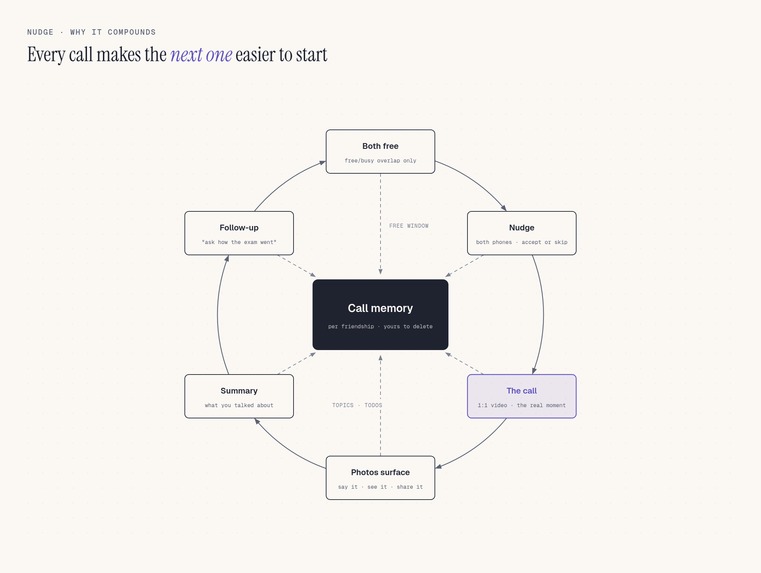
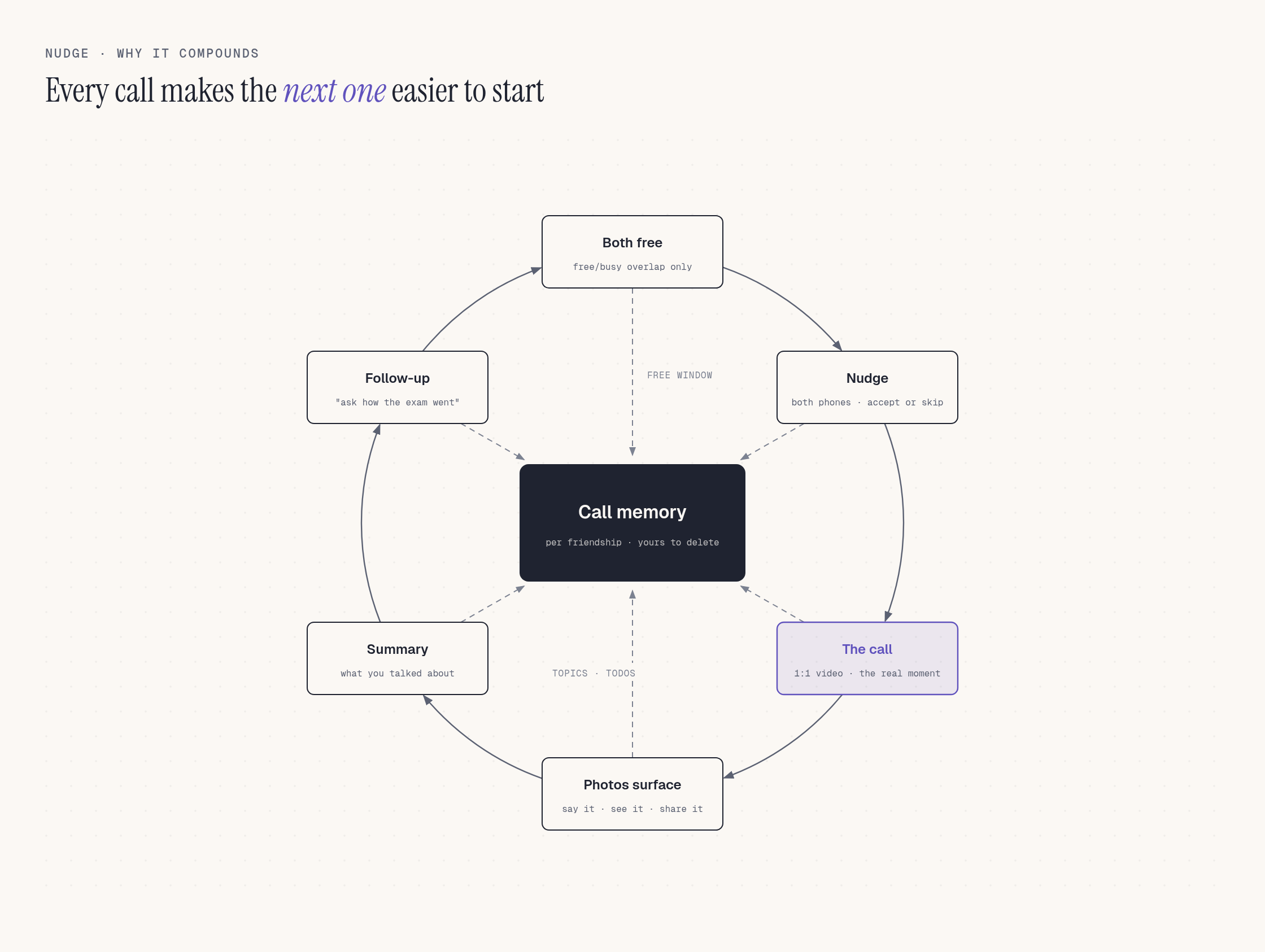
The Nudge loop: every call seeds the next one
-
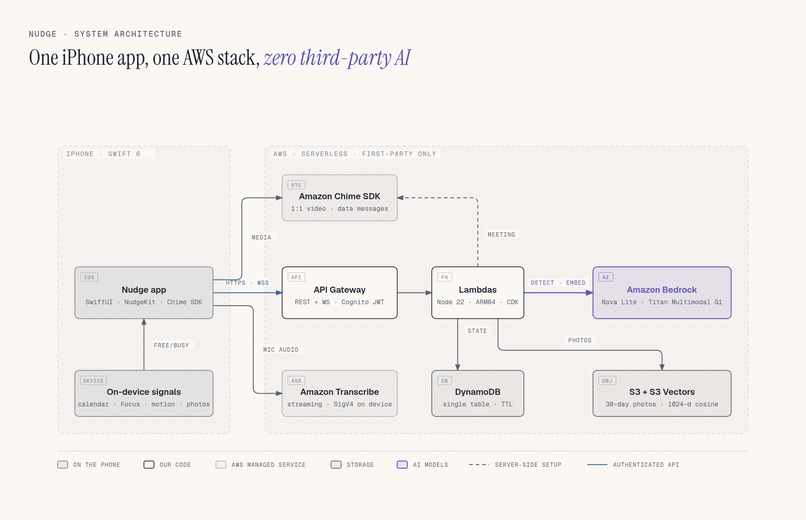
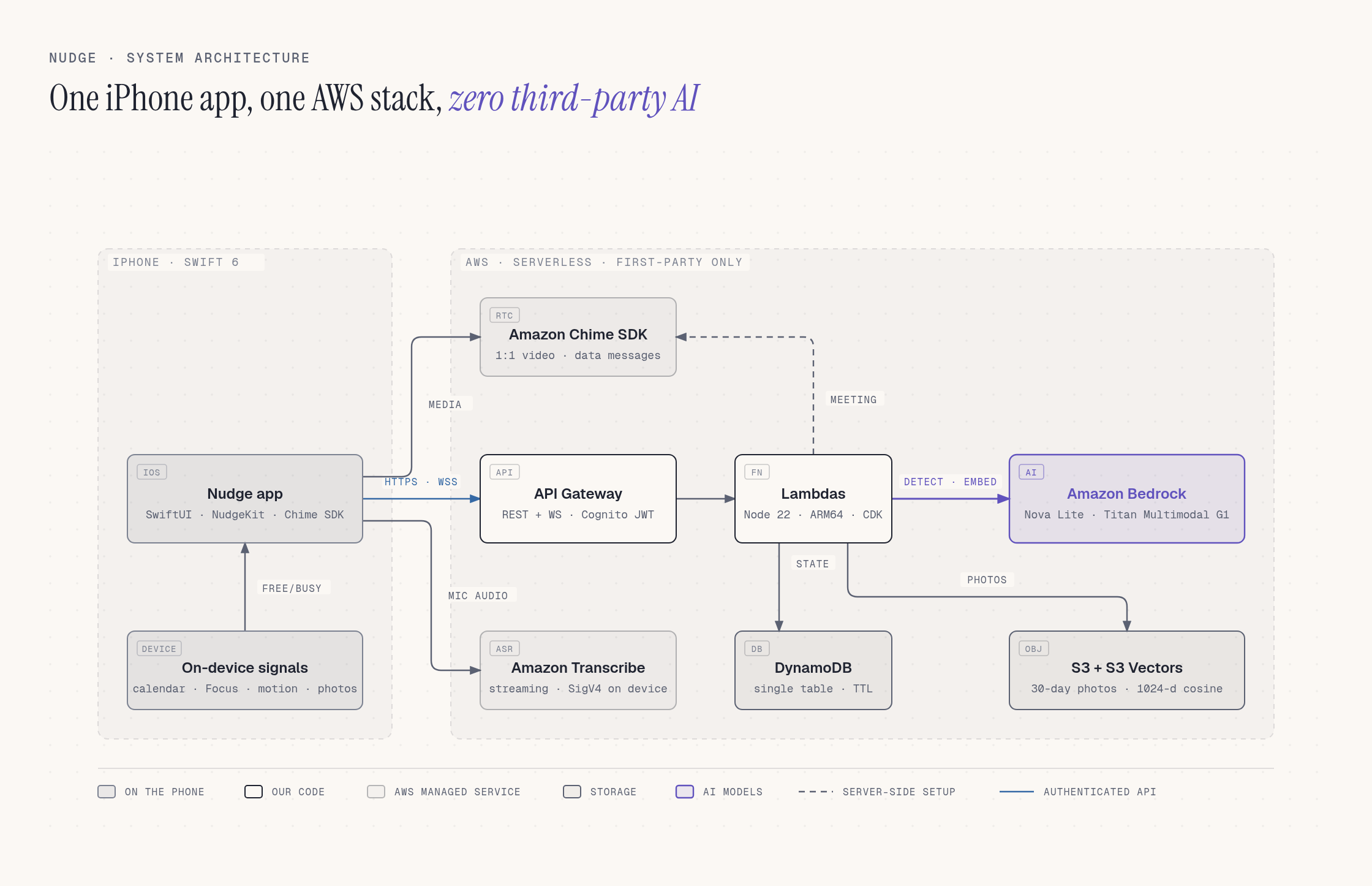
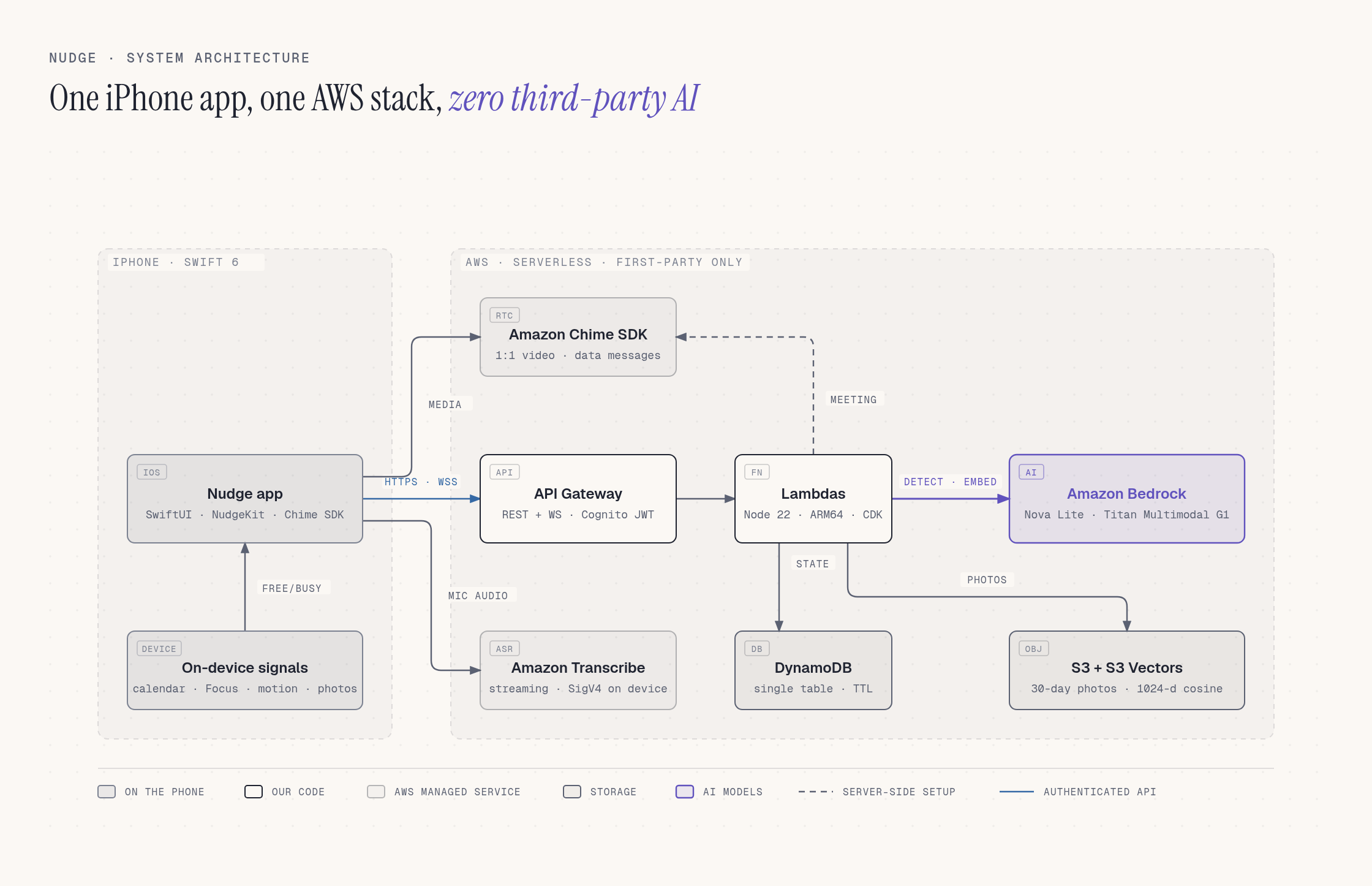
Architecture: SwiftUI app + AWS serverless, first-party Bedrock models only
-
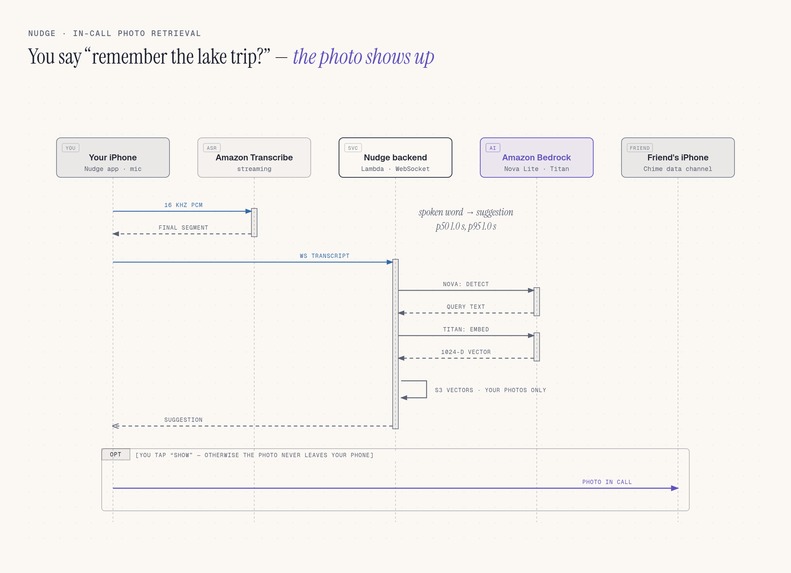
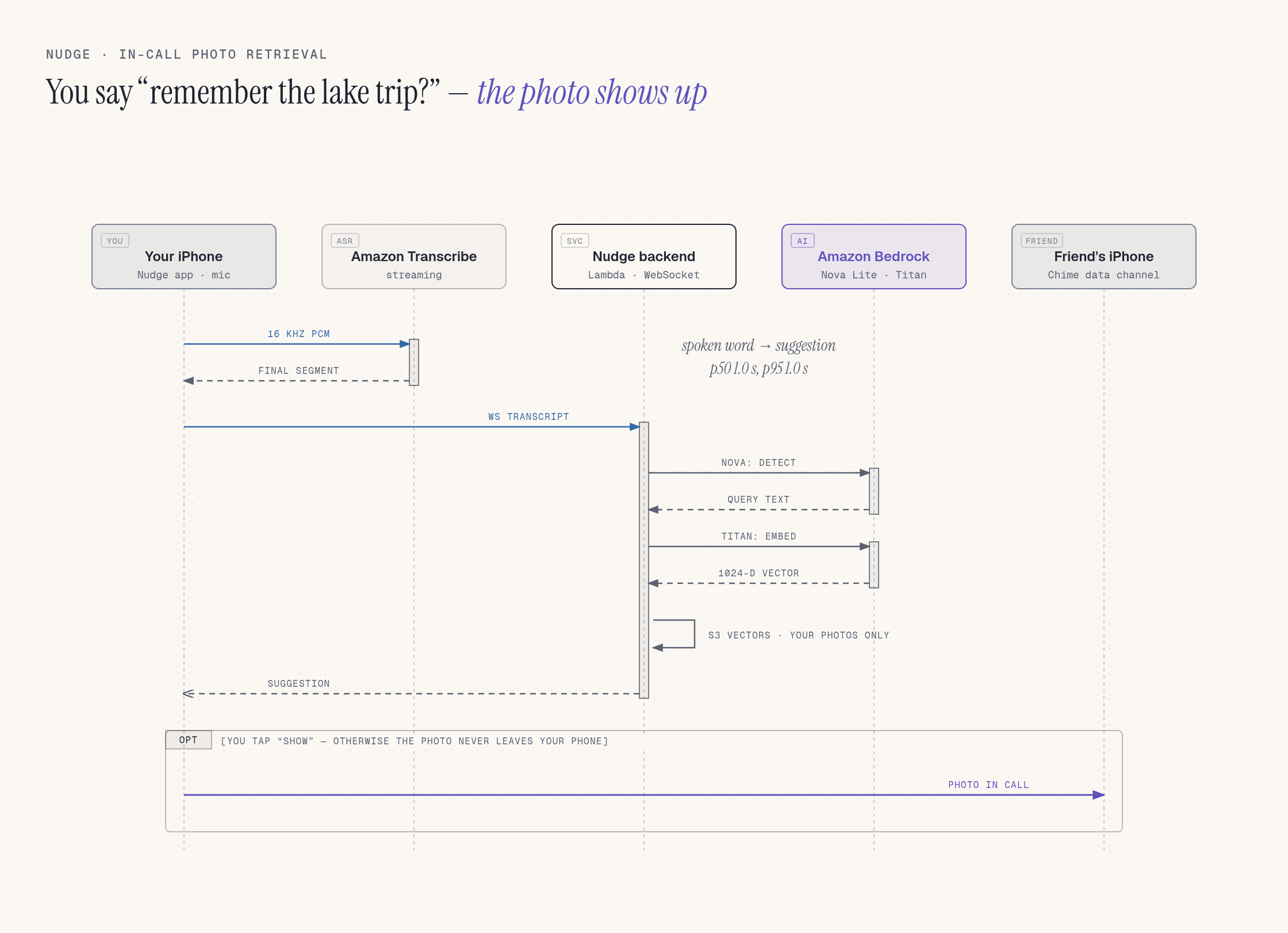
Sequence: a spoken photo reference becomes a shared photo (~1 s p50)
-
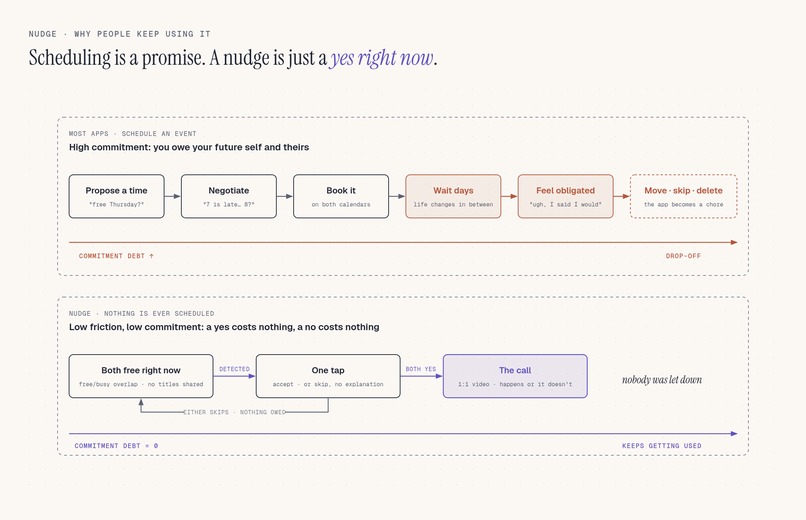
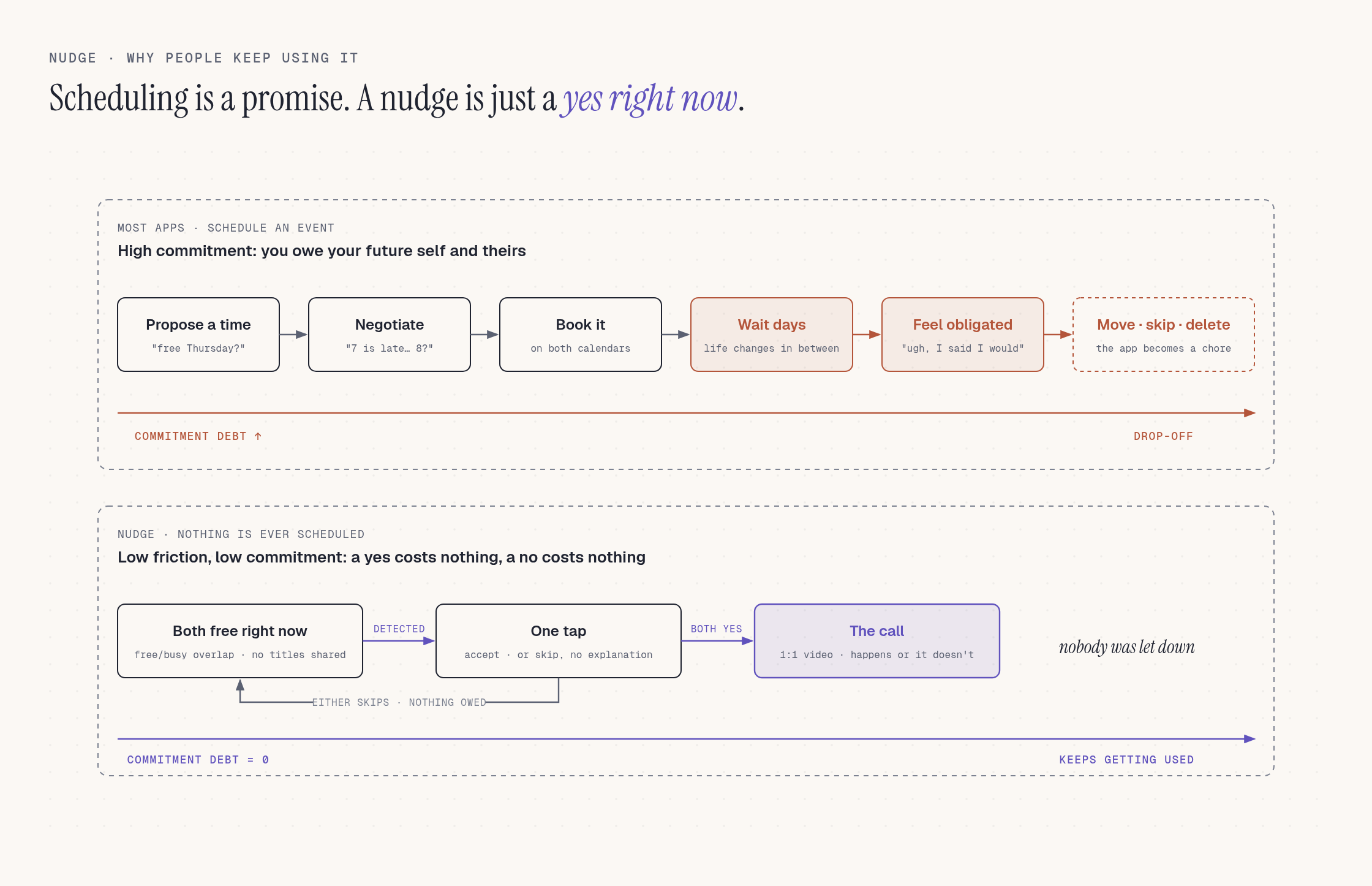
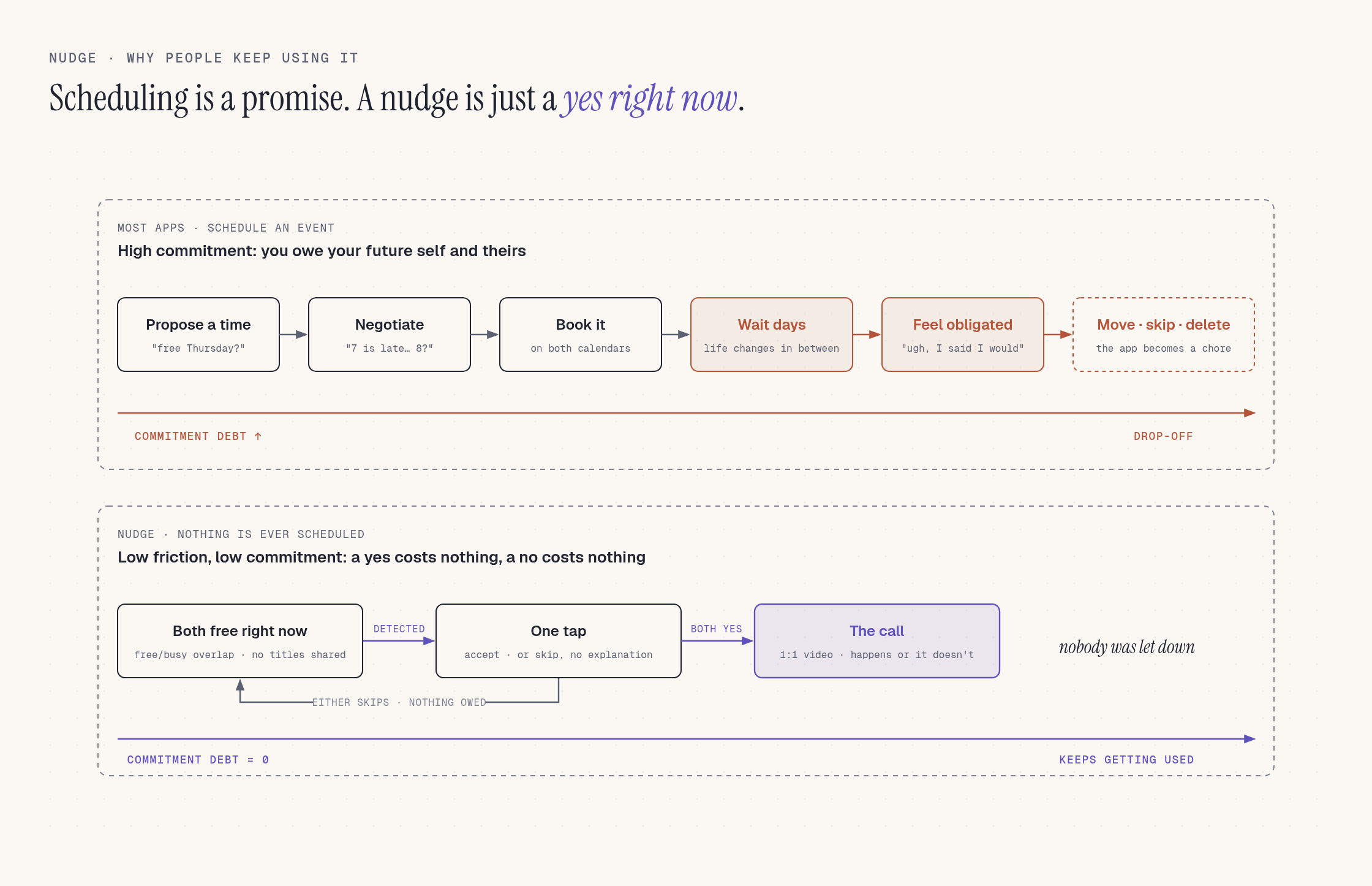
Scheduling is a promise; a nudge is just a yes right now
-
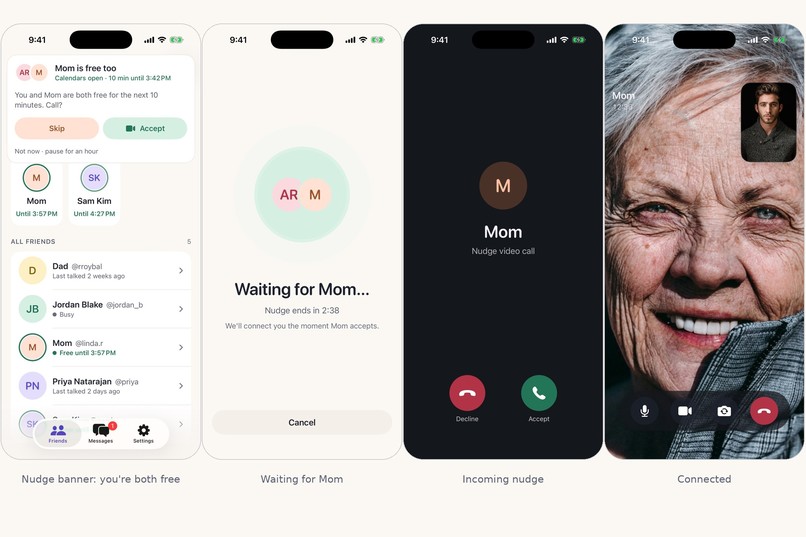
A nudge becomes a call
-
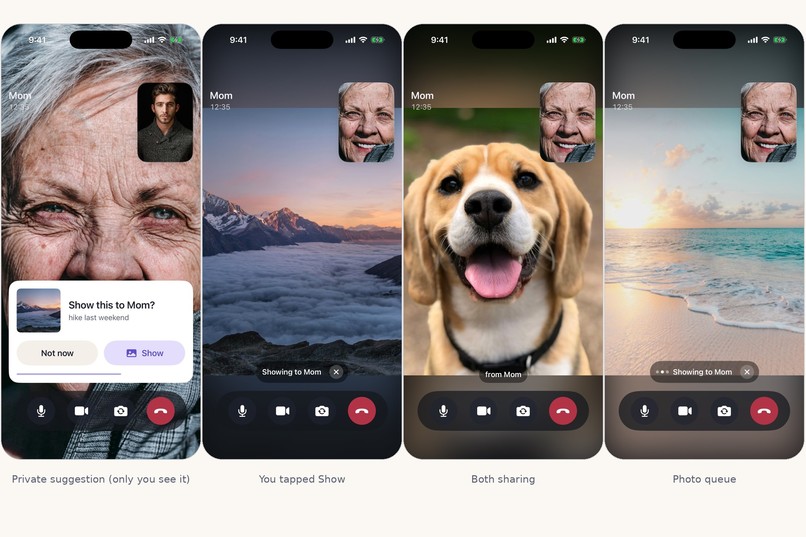
Say it, see it, share it: photos surface in the call
-
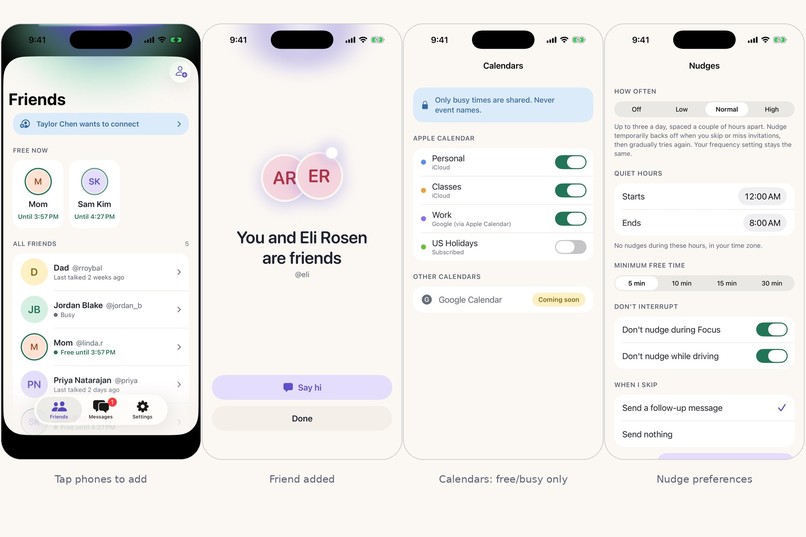
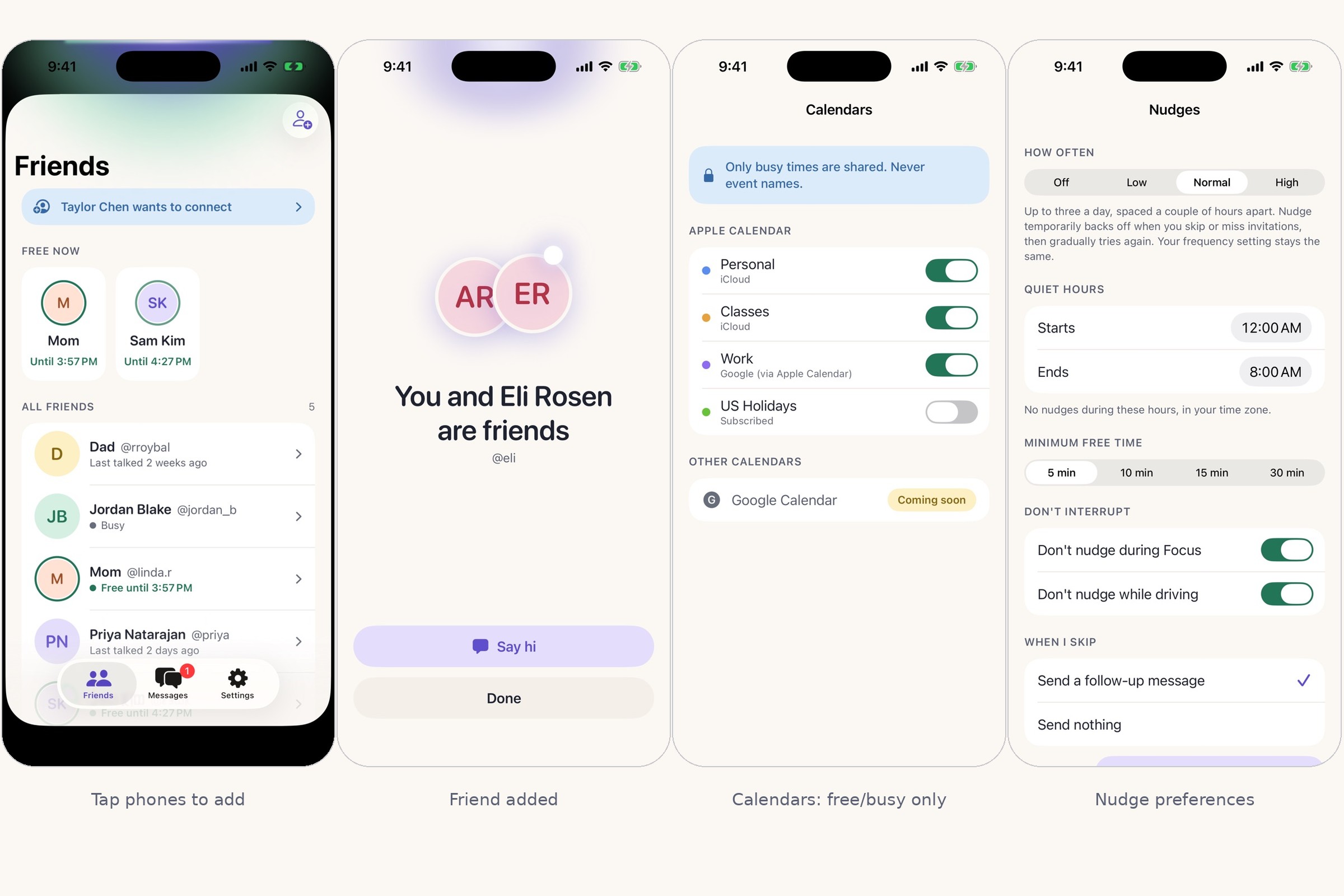
Tap phones to add friends; only free/busy leaves the device
-
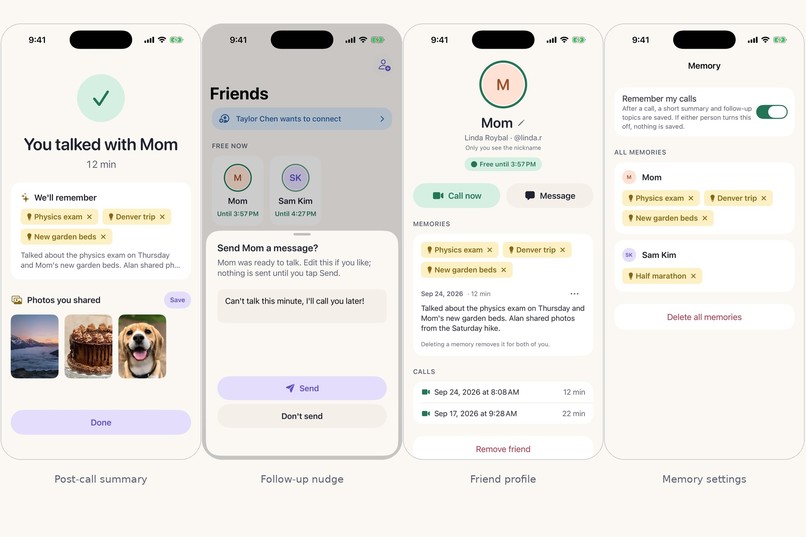
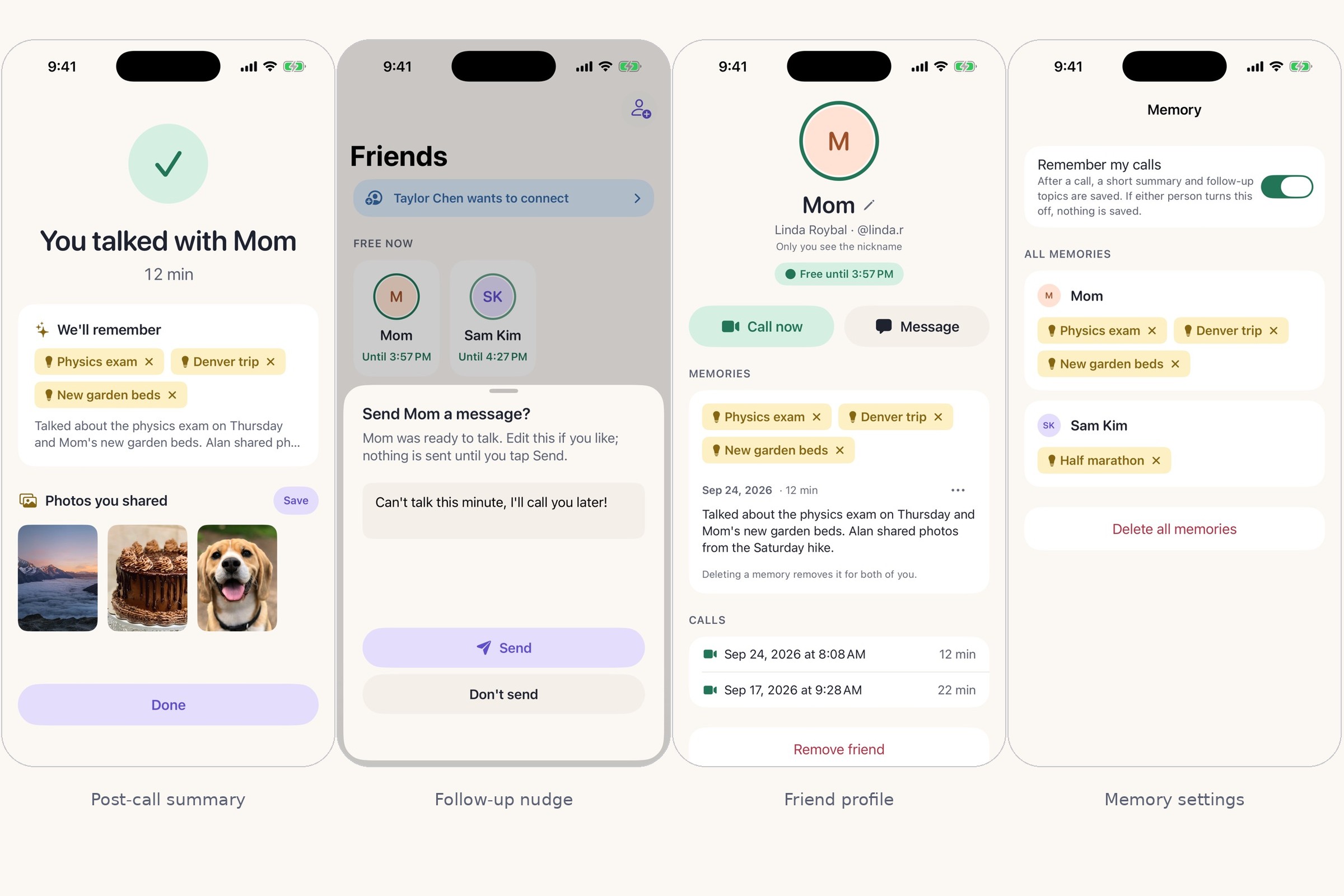
Memory that carries the thread
📖 DeepWiki (full code walkthrough): https://deepwiki.com/AlanRoybal/hackgt 🐙 Code: https://github.com/AlanRoybal/hackgt
Nudge — call the people you love when you're both actually free
The challenge and who it's for
The people we love most are the ones we call least. Not because we don't care — because starting a call is friction: is she busy? is it a bad time? what do I even say? So we default to a "miss you" text, and months go by.
Nudge is for anyone with someone they keep meaning to call — a parent in another city, a sibling, a college friend, a grandparent. Specifically the pairs who want to talk more but keep bouncing off the "is now okay?" problem. There are no roles and no group features: one friendship, two phones.
How it strengthens human connection (meaningfully, not metrically)
Nudge removes the three things that stop a call from happening, and it does it without turning friendship into a streak or a notification farm:
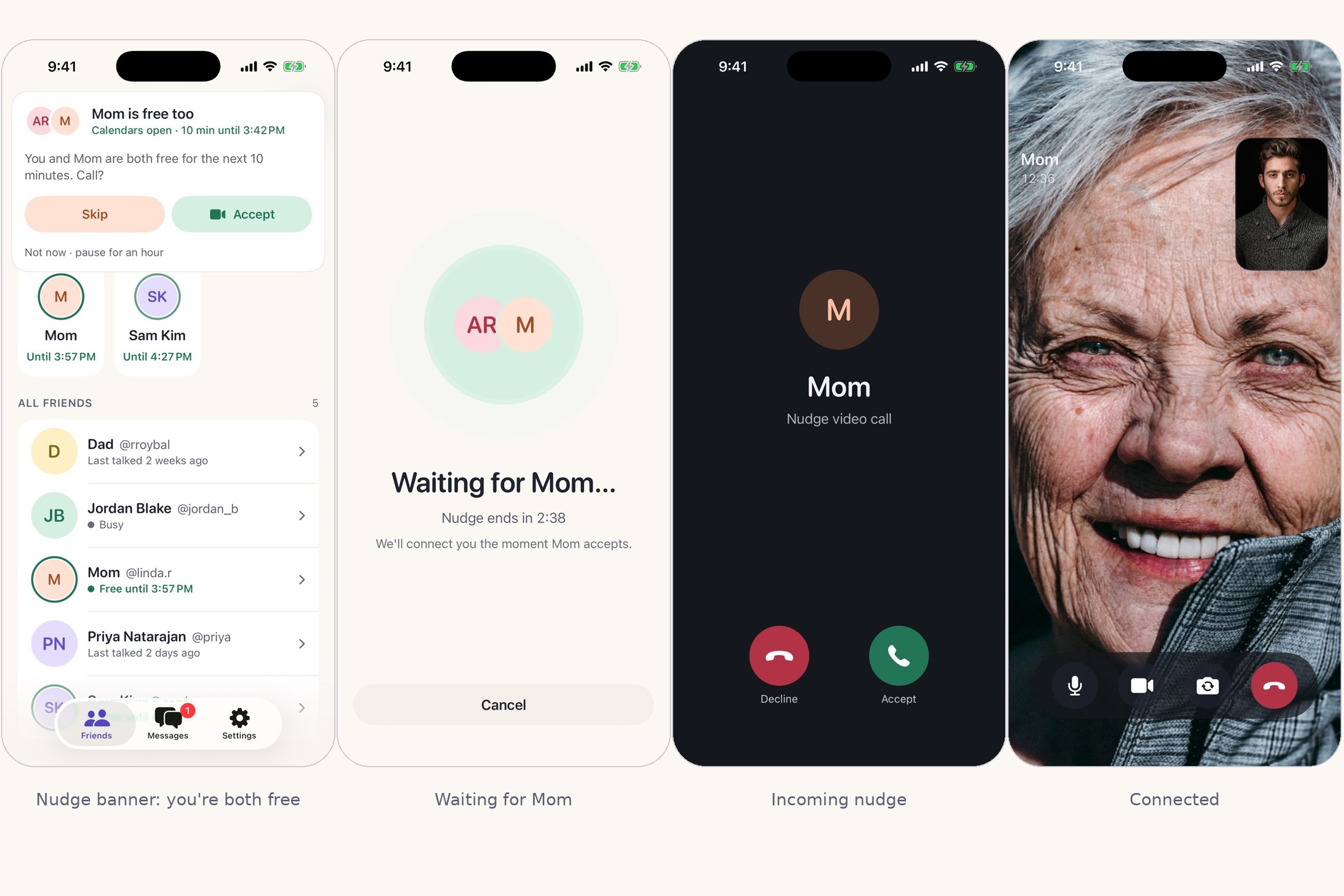
- It finds the moment. Both phones share only free/busy blocks from their calendars (never event titles) plus on-device signals — Focus mode, driving, whether the phone is awake. When both of you are free right now, both phones get one nudge. A nudge is a mutual invitation: either person can Skip with a reason, and the other side just sees "Not right now."
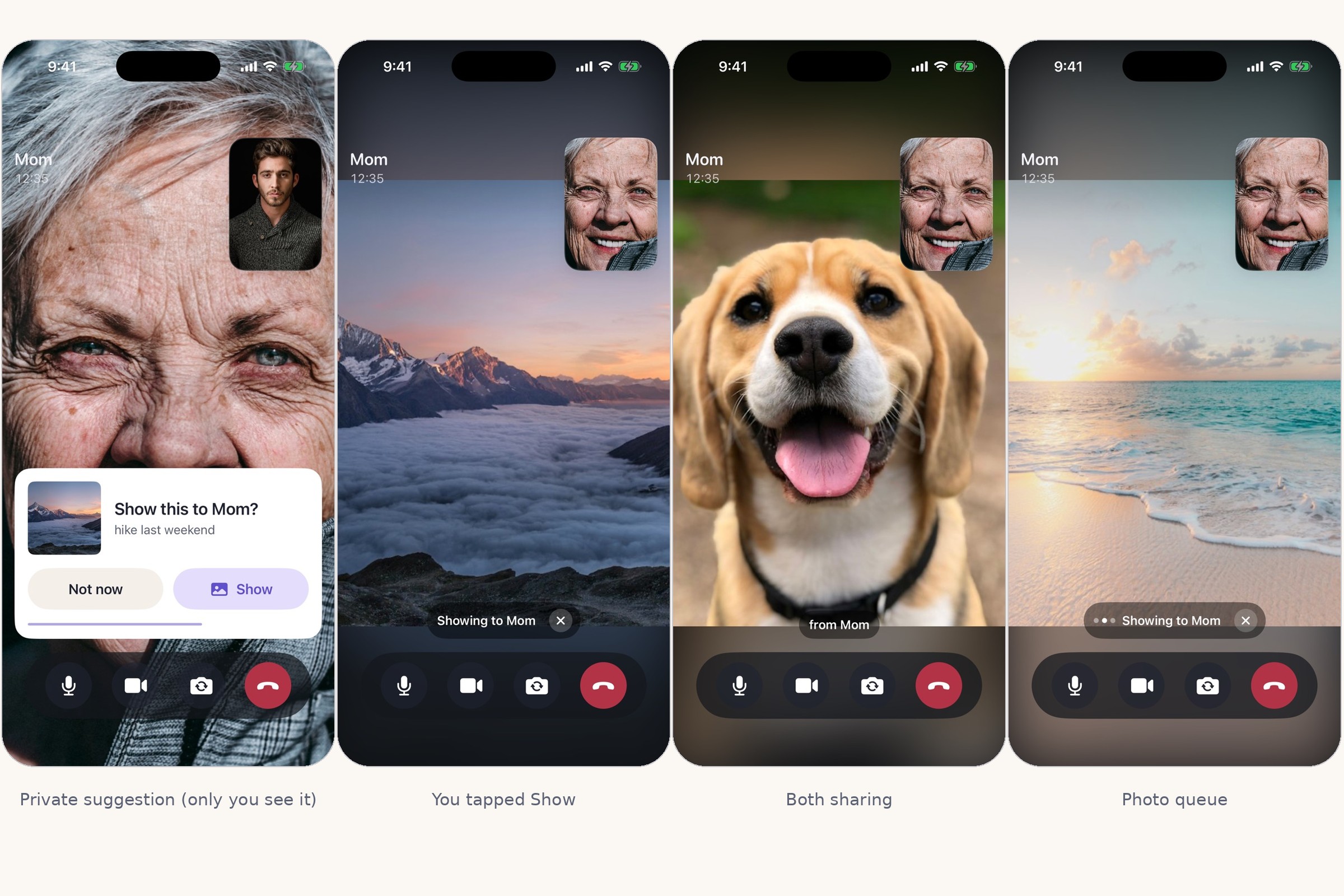
- It makes the call better. During the video call, when you say "remember the hike last weekend?" the photo appears in your own mini window with an Ask first card. Tap Show and it's on Mom's screen. Conversations stop being "how are you… fine" and become show-and-tell.
- It carries the thread. Afterwards Nudge writes a short summary you both can see and delete. Topics with follow-ups ("physics exam Thursday") seed the next nudge: "Want to ask Mom how the exam went?"
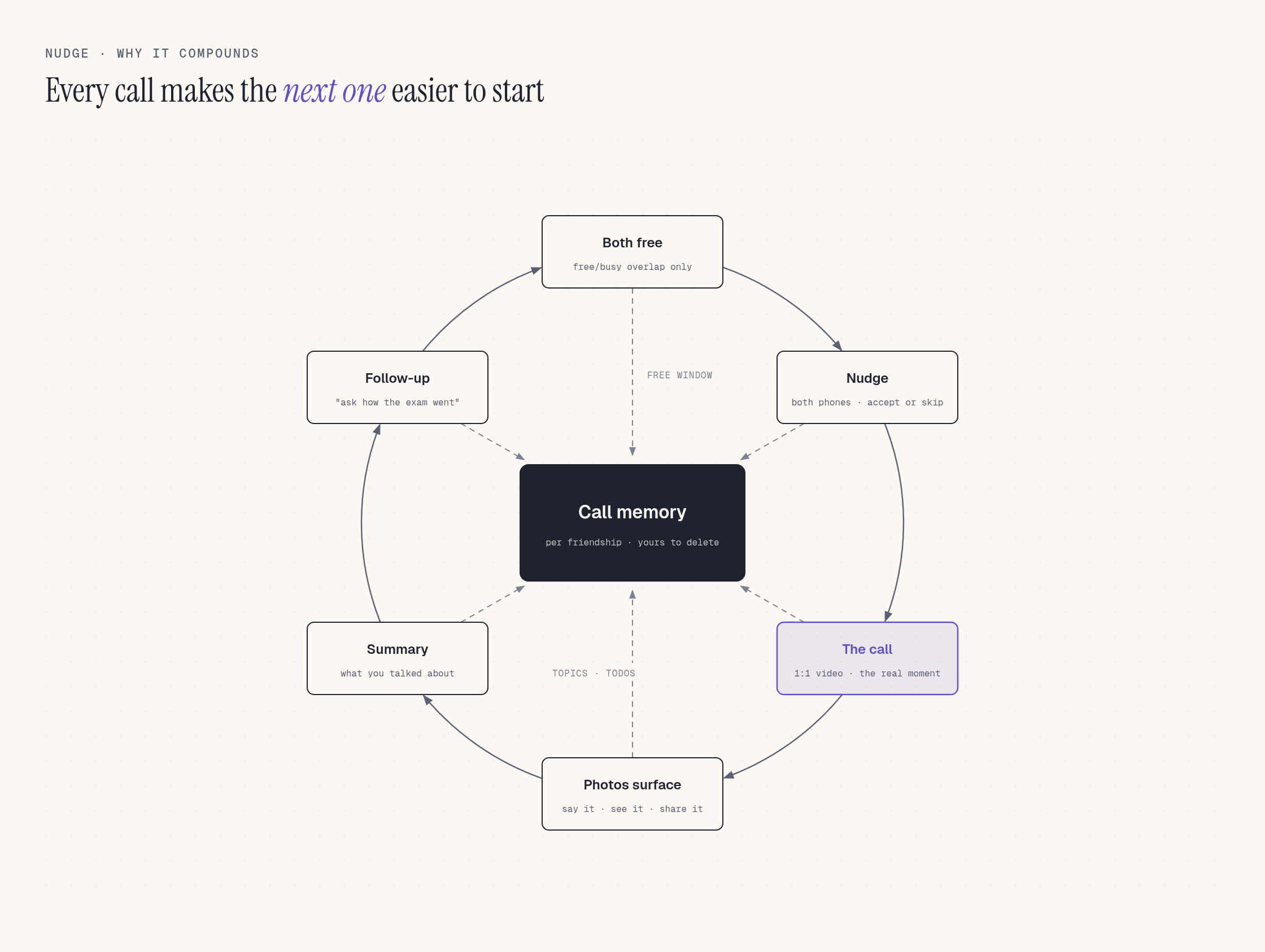
Every one of those steps is opt-in and symmetric — nothing happens to the other person without their acceptance. That's the point: the app is a good friend who says "you're both free, want me to connect you?", not a machine that guilt-trips you.
Why AI is essential (and where it isn't)
Nudge's core feature — photos that appear because you mentioned them — is impossible without AI, and we built it entirely on Amazon Bedrock first-party models:
- Amazon Nova Lite reads the live transcript one line at a time and decides is this a reference to a photo, and what would you search for? ("the hike last weekend" →
hike mountains last weekend). It also captions every indexed photo, writes the post-call summary, extracts follow-up topics, and drafts the "in a meeting until 4" auto-replies. - Amazon Titan Multimodal Embeddings G1 puts your photos and the spoken query into the same 1,024-d vector space. Photos are embedded image-only (our eval showed it beat caption fusion: top-1 1.00 vs 0.95).
- Amazon S3 Vectors stores those embeddings and answers each query scoped to the speaker's own photos only.
- Amazon Rekognition + Nova gate what ever gets indexed: moderation labels, OCR for documents/IDs/screenshots, and a Nova "is this sensitive?" pass. 9/9 sensitive fixtures were excluded; 0/7 benign ones wrongly excluded.
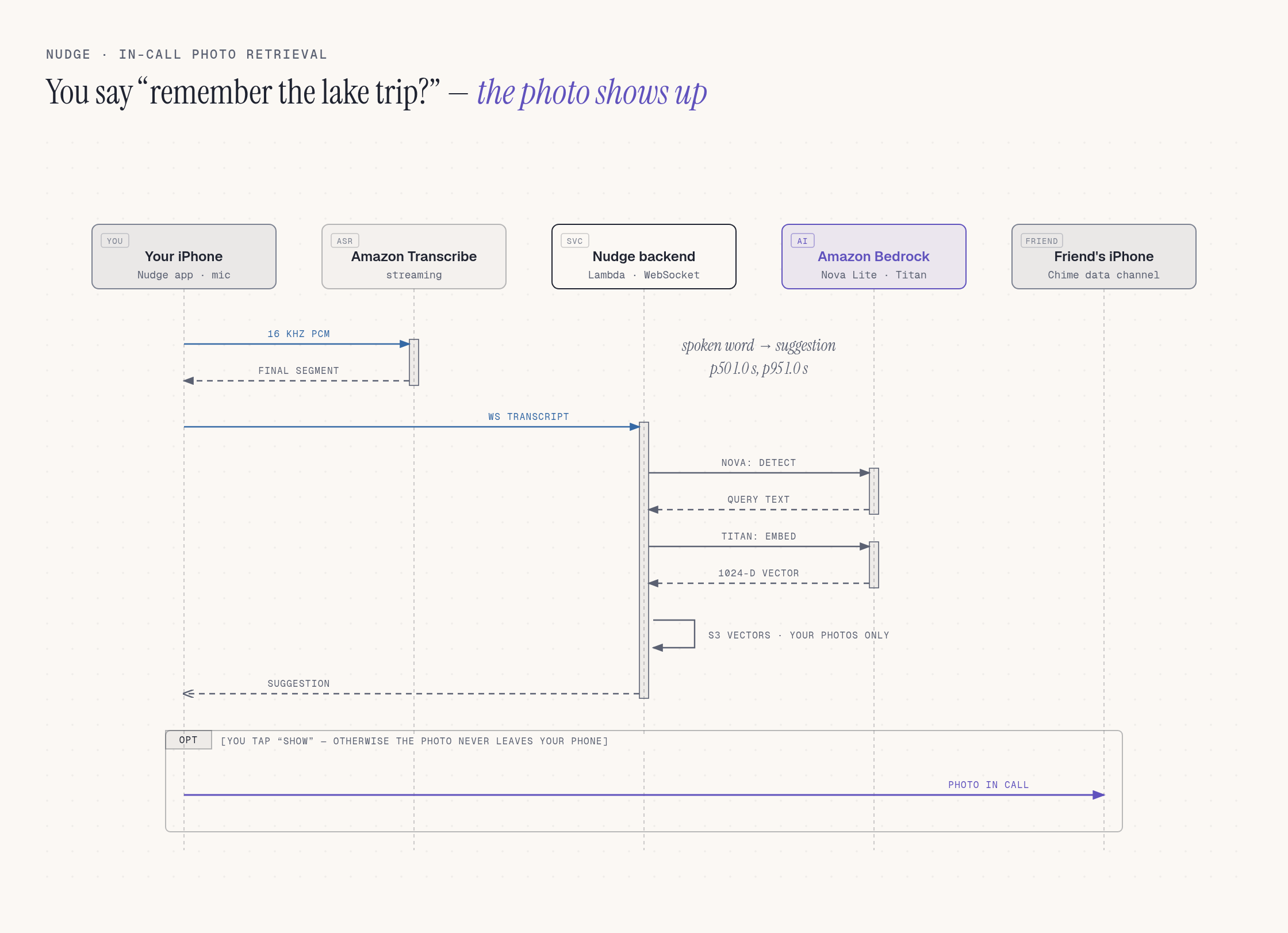
We measured it rather than hoped: the detector scores precision 1.000 / recall 0.896 on a 140-window eval set with 0/30 hard-negative false positives, retrieval is top-1 1.000 on a 60-photo CC0 set, and end-to-end transcript → suggestion runs at ~1.0 s p50 against the deployed stack.
Where AI isn't the answer we didn't force it: free-time matching is deterministic interval math, the nudge scheduler is adaptive but rule-based (response history adjusts timing within the frequency you chose), and Amazon Transcribe + Amazon Chime SDK handle speech and media as infrastructure, not "features."
Why it's original
Most "stay in touch" apps take one of two shapes: reminder lists / streak counters, or scheduling — put a call on the calendar for Thursday at 7. Scheduling sounds responsible, but it is a high-commitment act: you are promising your future self and someone else's future self, and people quietly resent and abandon those promises (the event gets moved, then skipped, then the app gets deleted). Nudge is deliberately low-friction and low-commitment: nothing is ever scheduled. It waits until you are both free right now, asks each of you with a single tap, and if either says "not now" nothing happened and nobody was let down. Because saying yes costs nothing and saying no costs nothing, people keep using it — the app never becomes a chore you owe someone.
Beyond that, Nudge is different in four concrete ways:
- Mutual availability, not reminders. Both calendars have to be free; both people have to accept. Nobody is ever "reminded" to bother someone who is busy.
- The camera roll joins the conversation. We haven't seen another calling app that listens for "remember when…" and surfaces the actual photo — privately to the speaker first, then shared with one tap.
- Ask first, always. Nothing leaves your phone by voice alone. The suggestion appears in your window; the friend sees nothing until you tap Show. Photo indexing is 30-day, resized, private-bucket, and deletable; free/busy is the only calendar data that leaves the device.
- Tap phones to become friends. Adding a friend is physical: hold two iPhones near each other (UWB / Nearby Interaction, with accelerometer knock detection as fallback) and they link over MultipeerConnectivity — no handles to type when you're already in the same room.
Tools, harnesses, and models — and what each one bought us
Product stack
| Layer | What | Why it mattered |
|---|---|---|
| iOS | Swift 6, SwiftUI, iOS 18+, XcodeGen, SwiftPM (NudgeKit package) |
Strict concurrency caught real races in call/photo state; NudgeKit keeps 60+ pure-logic tests fast without a simulator. |
| Calls | Amazon Chime SDK for iOS (0.27.4) — 1:1 video + data messages | Data messages carry photo-share offers/acks so photos sync in the mini windows without a media pipeline change. |
| Speech | Amazon Transcribe Streaming (SigV4 + event-stream hand-written in Swift; Chime meeting transcription as fallback) | No AWS SDK for Swift needed; final segments feed the detector line by line. |
| AI | Amazon Bedrock: Nova Lite, Titan Multimodal Embeddings G1; Amazon Rekognition (moderation, DetectText) | First-party only, all covered by AWS credits; see above. |
| Backend | TypeScript 5.9, Node 22 on ARM64 Lambda, esbuild, AWS CDK v2 | One cdk deploy stands up the whole stack; 0.3–0.8 MB bundles keep cold starts sub-second. |
| API/Auth | API Gateway HTTP + WebSocket, Cognito User Pool + Identity Pool, Sign in with Apple | Identity Pool gives the phone short-lived creds to call Transcribe directly. |
| Data | DynamoDB single table (TTL), S3 (private, resized), S3 Vectors (1,024-d cosine) | Serverless vector search with no cluster to run. |
| Async | SQS + DLQs (nudge delays, expiry, post-call summary), EventBridge Scheduler | Replaced Step Functions with plain delayed messages — simpler, cheaper. |
| Push | APNs (alert / background / VoIP) + Notification Service & Content extensions | Accept from the lock screen; rich nudge cards. |
Test & eval harnesses (what made shipping this in a hackathon possible)
evals/— detector (140 two-speaker windows incl. 30 hard negatives + 8 context cases), retrieval (60 CC0 photos), safety (16 fixtures). Every prompt change re-ran these; the detector's "judge only the newest line" fix came straight out of an eval regression.tools/peer-bot— a headless-Chrome Chime client (Puppeteer +amazon-chime-sdk-js) that plays your friend: accepts nudges, joins the call with a fake camera, answers photo offers.two-botsmode verifies simultaneous shares, queues of three, and p95 ≤ 800 ms show latency without a second human.tools/e2e/ios-e2e.sh— XCUITest scenarios that run the real app in the simulator against the deployed dev stack with the bot as the friend, including the app-terminated → push → Accept → call path.tools/latency-report— pulls CloudWatch metrics for transcript → suggestion timing per stage.- Vitest + fast-check (93 unit + 31 integration tests against the live dev stack) and XCTest (62 tests in 16 suites).
- Screenshot mode — a launch argument that renders any screen with seeded data so
ios/scripts/screenshots.shproduces all 212 captures deterministically; also what the design review ran on.
Build-process tools
- Claude Code built the app and backend from a single detailed spec (
prompts/01-claude-code-build.md) with a decision log (docs/DECISIONS.md, 50 entries) so every non-obvious call is written down. - Devin produced the Figma design system and full screen set in parallel (
prompts/02-devin-figma-design.md), then adopted the contrast-adjusted tokens we measured (ios/scripts/contrast.py) so light-mode "Strong" colors clear WCAG AA. - Apple design skill (
emilkowalski/skills→apple-design, pinned inskills-lock.json) kept the UI restrained: standard system chrome, flat pastel content, labels that name what's inside. - DeepWiki (link at top) documents the resulting codebase.
What's real today, what's next
Deployed to a dev stage in us-east-1; all backend integration tests and the simulator E2E run against it. Two things we could not fully verify in the simulator and want to finish on physical devices: real APNs/VoIP delivery (dev stage logs pushes to DynamoDB so tests can assert on them) and UWB tap-to-add. Before any public launch: a lawyer's pass on the transcription consent language, and splitting the single Lambda IAM role.
Built With
- amazon-bedrock
- amazon-chime-sdk
- amazon-cognito
- amazon-dynamodb
- amazon-nova
- amazon-rekognition
- amazon-sqs
- amazon-titan
- amazon-transcribe
- amazon-web-services
- api-gateway
- apns
- aws-cdk
- aws-lambda
- claude-code
- ios
- node.js
- puppeteer
- s3-vectors
- swift
- swiftui
- typescript
- vitest
- xcodegen


Log in or sign up for Devpost to join the conversation.