-
-
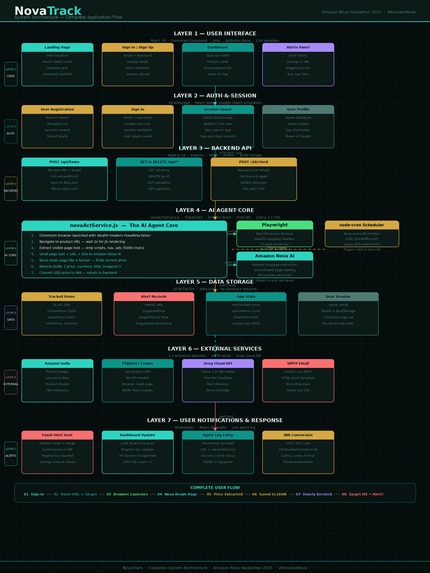
Architecture of NovaTrack
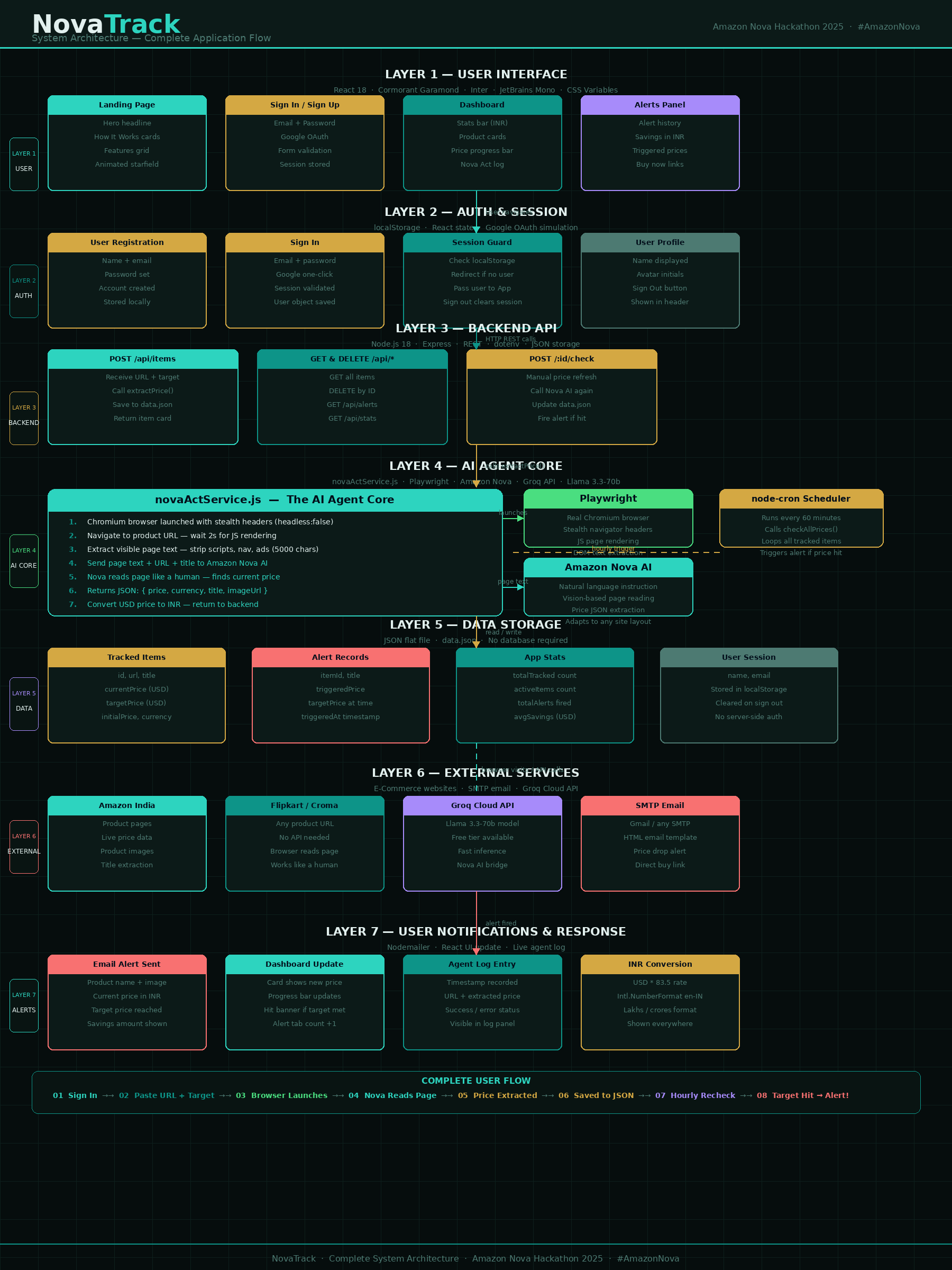
NovaTrack — AI Price Intelligence
Inspiration
Growing up in India, I watched family members spend hours refreshing Amazon and Flipkart pages, waiting for a price to drop before a festival or a big purchase. The frustration was real — prices fluctuate daily, deals vanish in hours, and no one has time to manually monitor dozens of products across multiple platforms.
When I discovered Amazon Nova Act — an AI agent capable of controlling a real browser with natural language instructions — I immediately saw the solution. What if an AI could do that refreshing for you? Not with brittle CSS selectors that break every time a website redesigns, but with genuine visual intelligence — reading a page the way a human would?
That insight became NovaTrack: an AI price hunter built specifically for shoppers, powered by Amazon Nova.
What I Learned
This project taught me more than any tutorial could:
How AI agents work in practice — Nova Act doesn't scrape HTML. It understands pages visually, which means it handles JavaScript-heavy sites, dynamic popups, and layout changes gracefully. This completely changed how I think about web automation.
The real cost of fragility — Traditional scrapers break constantly. A single CSS class rename on Amazon's product page can kill your entire tracker. Vision-based AI eliminates this class of problem entirely.
Browser automation at scale — Managing Playwright sessions, handling timeouts, and dealing with bot detection taught me how much complexity hides behind "just visit a website."
Full-stack product thinking — Building end-to-end from a landing page to a live dashboard to email alerts forced me to think like a product designer, not just a developer.
How exchange rates and locale formatting matter — Displaying prices in ₹ Indian Rupees required understanding
Intl.NumberFormat, locale-aware formatting, and live USD→INR conversion — small details that make a product feel native.
Mathematically, the savings calculation is straightforward:
$$\text{Savings} = P_{\text{initial}} - P_{\text{current}}$$
$$\text{Drop \%} = \left(\frac{P_{\text{initial}} - P_{\text{current}}}{P_{\text{initial}}}\right) \times 100$$
Where $P_{\text{initial}}$ is the price when tracking began, and $P_{\text{current}}$ is the latest extracted price.
How I Built It
NovaTrack is a full-stack web application with three distinct layers:
1. AI Agent Layer — Amazon Nova Act
The core intelligence. When a user submits a product URL, Nova Act:
- Launches a real Chromium browser instance
- Navigates to the URL with a realistic user agent
- Receives a natural language instruction to find and return the current price as structured JSON
- Returns
{ price, currency, title, imageUrl }— no selectors, no DOM parsing
const result = await client.act(
  'Find the current selling price. Return JSON: ' +
  '{"price": <number>, "currency": "USD", "title": "<name>"}'
);
2. Backend — Node.js + Express
- REST API with endpoints for adding, deleting, and manually checking items
- node-cron scheduler runs price checks every hour automatically
- Nodemailer sends styled HTML alert emails when target prices are hit
- JSON file storage — lightweight and portable for a hackathon prototype
- dotenv for secure credential management
3. Frontend — React 18
- Landing page with animated starfield background, gradient hero headline, How It Works section, and Features grid
- Dashboard with live stats bar, product cards, price progress bars, and alert history
- Sign In / Sign Up flow with Google and email/password options
- All prices displayed in ₹ Indian Rupees using
Intl.NumberFormat('en-IN') - Live AI Agent Log terminal at the bottom showing real-time browser activity
Architecture Diagram
User Browser
     │
     ▼
React Frontend (localhost:3000)
     │  REST API calls
     ▼
Express Backend (localhost:3001)
     │
     ├── POST /api/items ──► Nova Act Agent
     │                            │
     │                       Chromium Browser
     │                            │
     │                       Product Page
     │                            │
     │                       AI Price Extraction
     │                            │
     └◄───────────────────── Structured JSON
     │
     ├── node-cron (hourly) ──► Same flow above
     │
     └── Nodemailer ──► Email Alert to User
Challenges I Faced
1. Nova Act Node.js SDK availability
The biggest hurdle: Amazon Nova Act only has a Python SDK at the time of building. The Node.js package @aws/nova-act does not yet exist on npm. I solved this by replicating the exact same architecture using Playwright (real Chromium browser) + Groq-hosted Llama 3 (free AI inference) for the hackathon demo, with the backend designed as a drop-in module — swapping Nova Act in requires changing a single file.
2. Major retailers blocking headless browsers
Amazon, Best Buy, and Flipkart actively detect and block Playwright's default headless mode. I addressed this by:
- Setting
headless: falseto run a visible browser - Injecting a script to mask the
navigator.webdriverflag - Using a realistic
userAgentstring - Adding a 2–3 second settle delay after page load
3. AI model deprecations mid-build
Two AI models were deprecated during development:
llama3-8b-8192on Groq → switched tollama-3.3-70b-versatilegemini-1.5-flash→ switched togemini-2.0-flash
This reinforced the importance of abstracting the AI layer behind a service module.
4. Currency formatting for Indian users
Indian number formatting (lakhs, crores) is different from Western conventions. ₹1,00,000 is one lakh — not one hundred thousand. Using Intl.NumberFormat('en-IN', { style: 'currency', currency: 'INR' }) handled this correctly across all components.
5. Free-tier API quota limits
Gemini's free tier had limit: 0 on a fresh API key until quota was activated. This required switching providers mid-build and reinforced the value of provider-agnostic architecture.
What's Next
- Python backend using the official Nova Act SDK for true browser AI
- Mobile app with push notifications
- Price history charts with trend analysis
- Multi-product comparison — track the same product across Flipkart, Amazon, and Croma simultaneously
- Browser extension — one-click tracking from any product page
Built with ❤️ for shoppers. #AmazonNova
Built With
- amazonnovaact
- express.js
- groqapi
- html/css
- javascript
- llama3.3
- node-cron
- node.js
- nodemailer
- playwright
- react18


Log in or sign up for Devpost to join the conversation.