-
-

1- Homepage - Dark theme
-

2- Homepage - Light theme
-

3- Experience it yourself-Choose-ChildAge
-

4- The Workflow in action (1)
-
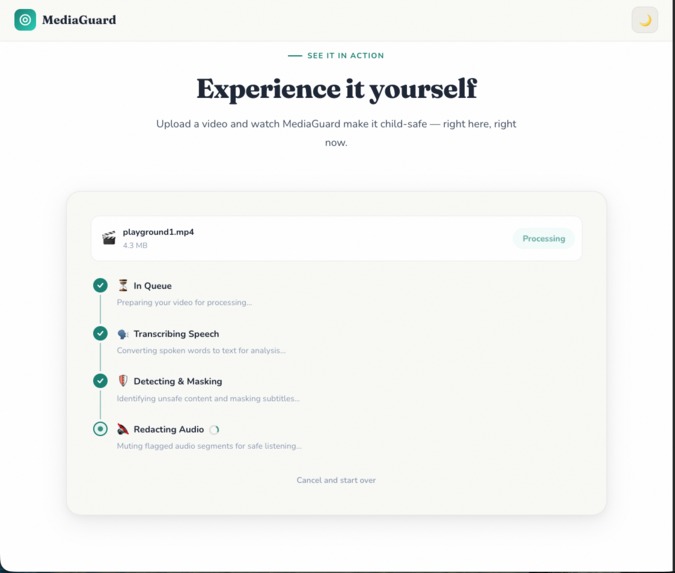
4- The Workflow in action (2)
-
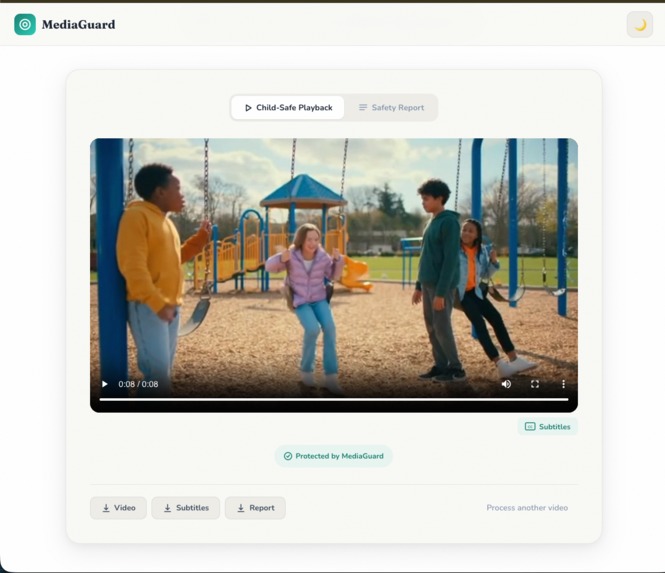
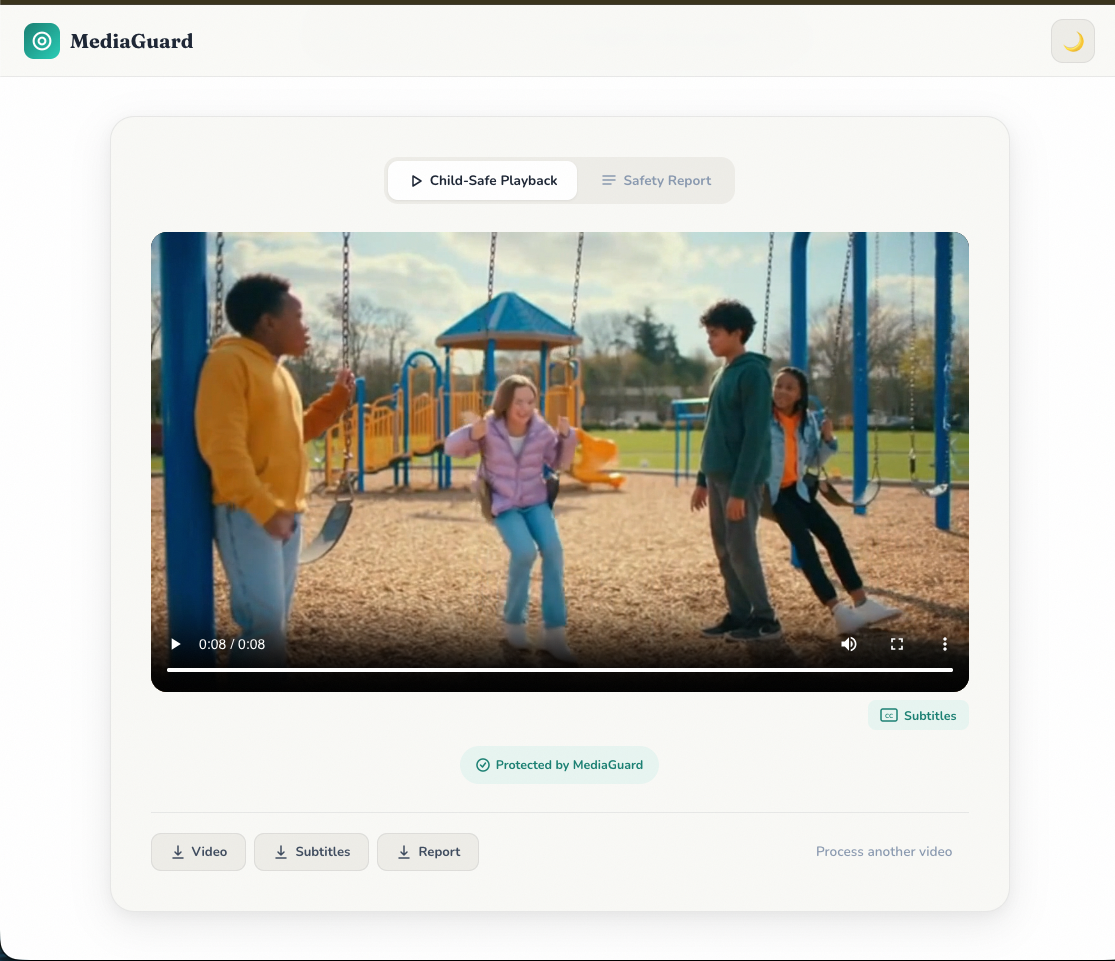
5- Child-Safe Playback
-
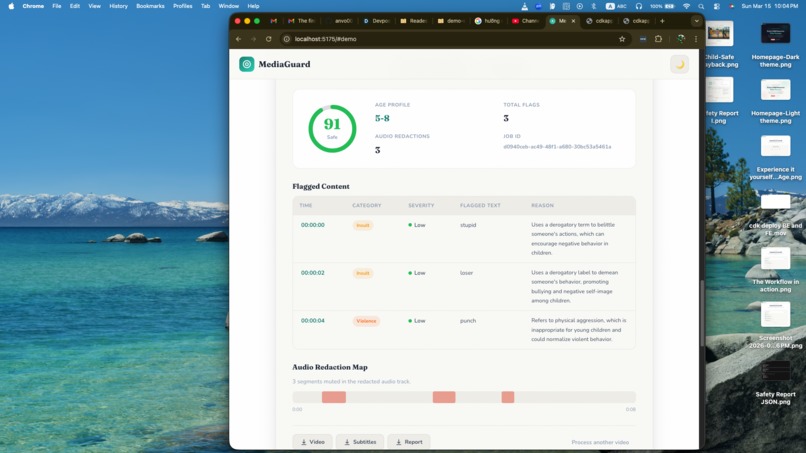
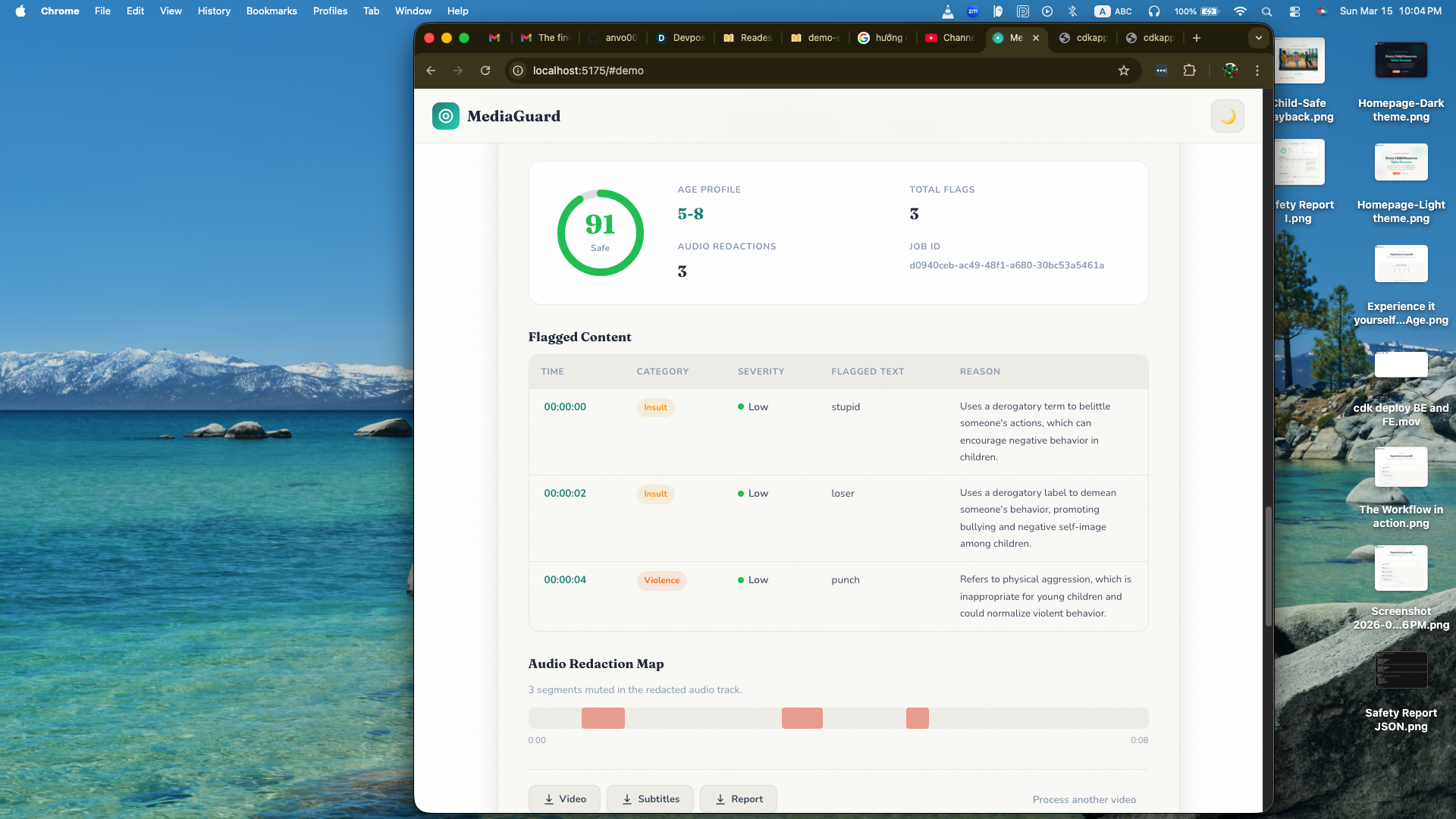
6- Safety Report





Inspiration
Sometimes parents receive recommendations for great videos for their children, but it’s hard to know whether the content is truly appropriate for their age. Many of these videos are long, and it’s unrealistic to watch the entire thing before letting children access them.
I experienced this with my little child. I once let him watch a recommended video and later noticed some inappropriate words that were not suitable for his age. The video itself was educational, but those moments made me wish there was a way to filter unsafe language without blocking the whole video.
As a parent, I realized that what we really need is not stricter blocking, but smarter filtering that keeps the good parts while removing the harmful moments.
That idea inspired MediaGuard — an AI-powered system that uses Amazon Nova to analyze video transcripts, detect age-inappropriate language, and mask unsafe subtitles while muting the corresponding audio. It also generates a transparent safety report for parents.
Instead of blocking content entirely, MediaGuard removes harmful moments while preserving the original viewing experience, helping children enjoy online videos more safely.
What it does
MediaGuard transforms uploaded videos into safer versions for children by automatically detecting and filtering age-inappropriate language.
When a video is uploaded, MediaGuard:
- Transcribes speech using Amazon Transcribe
- Analyzes the transcript with Amazon Nova to detect language inappropriate for a selected age group
- Masks unsafe words in subtitles
- Mutes the corresponding audio segments in the video
- Generates a transparent safety report explaining what content was modified and why
The system outputs:
- Redacted video – a safer playback version with muted segments
- Sanitized subtitles – subtitles with masked language
- Safety report – a clear explanation of moderation decisions
Instead of blocking entire videos, MediaGuard removes only harmful moments while preserving the original viewing experience.
How we built it
MediaGuard is built as a serverless AI moderation pipeline on AWS that processes videos automatically after upload.
Core components:
React + Vite frontend
Allows users to upload videos and track moderation jobs.Amazon API Gateway + AWS Lambda
Handles API requests, job creation, and generates secure upload URLs.Amazon S3
Stores uploaded videos and all generated outputs.AWS Step Functions
Orchestrates the full moderation workflow, coordinating transcription, AI analysis, and video processing.Amazon Transcribe
Converts the video audio into subtitles and transcripts.Amazon Nova (via Amazon Bedrock)
Analyzes transcripts to detect age-inappropriate language using contextual reasoning rather than simple keyword filtering.AWS Lambda + FFmpeg
Applies the moderation results by muting unsafe audio segments and generating a redacted video.Amazon DynamoDB
Stores job status and metadata so the frontend can track progress.
Workflow summary:
- User uploads a video through the web interface
- The file is stored in S3 and triggers a Step Functions workflow
- Amazon Transcribe generates subtitles
- Amazon Nova analyzes the transcript and flags unsafe language
- Lambda functions redact subtitles and mute the corresponding audio segments
- MediaGuard produces a safer video, sanitized subtitles, and a safety report
Challenges we ran into
Learning AWS CDK and Infrastructure as Code
This was my first time building the entire project using Infrastructure as Code with AWS CDK. Designing and deploying the full serverless architecture this way required a lot of experimentation and learning.Realizing subtitle filtering was not enough
At first, I focused only on redacting subtitles. My son often watches videos like Star Wars or The Clone Wars with subtitles, so I thought masking unsafe words there would solve the problem. However, during testing I realized the inappropriate audio was still clearly audible, which made subtitle-only moderation ineffective. I had to redesign the pipeline and add additional steps to mute the corresponding audio segments.Copyright and streaming concerns
I was unsure about the copyright and streaming rights for using real videos (such as YouTube content) in the demo. To avoid potential issues, I decided to generate sample videos using AI so the demo would remain safe and compliant.Designing a simple but informative UI
Another challenge was designing a UI that stays simple for users while still displaying enough information, such as job status, moderation results, and safety reports.
Accomplishments that we're proud of
Building a full end-to-end AI moderation pipeline
MediaGuard processes videos automatically from upload to moderation, producing a safer video, sanitized subtitles, and an explainable safety report.Using Amazon Nova as the reasoning layer
Instead of simple keyword filtering, MediaGuard uses Amazon Nova to analyze transcripts in context and identify age-inappropriate language more intelligently.Turning moderation into editing instead of blocking
Rather than rejecting an entire video, MediaGuard preserves useful content by masking subtitles and muting only the problematic moments.Designing a fully serverless architecture on AWS
The system integrates Amazon Transcribe, Amazon Nova (via Bedrock), AWS Lambda, Step Functions, S3, and DynamoDB to create a scalable moderation pipeline.Learning and deploying infrastructure with AWS CDK
This project was built entirely using Infrastructure as Code, making the deployment reproducible and production-ready.Solving the real problem of subtitle-only filtering
After discovering that muting subtitles alone was not enough, the system was redesigned to also mute the corresponding audio segments in the video.Building a complete working prototype during the hackathon
From idea to deployment, MediaGuard became a functional application with a web interface, backend pipeline, and automated moderation workflow. I even showed the UI and moderation report to my son to see if he could understand why certain words were flagged as inappropriate for children his age.
What we learned
- AI moderation must understand context
Simple keyword filtering is not enough. Words can have different meanings depending on context, and Amazon Nova’s reasoning capabilities help identify language that is truly inappropriate for a specific age group. Breaking the system into small modules improves flexibility
Separating the pipeline into transcription, AI analysis, moderation processing, and report generation made the system easier to debug and extend.Serverless orchestration works well for media processing
Using AWS Step Functions with Lambda allowed us to coordinate multiple processing stages while keeping the architecture scalable and manageable.Explainability builds trust for parents
A moderation system should not act like a black box. Generating a safety report that explains why content was flagged helps parents understand and trust the system.Designing for real users matters
Parents need tools that are simple and transparent. The UI needed to balance ease of use with enough information to show moderation results clearly.
What's next for MediaGuard
In the future, MediaGuard could expand into:
- Child-safe streaming modes that automatically sanitize videos before playback
- Browser extensions that protect children while watching videos on popular platforms
- Moderation tools for schools and educators to safely use online media in classrooms
- Educational media sanitization that helps teachers share external videos without worrying about inappropriate language
Our long-term vision is to build a transparent AI safety layer for video content, helping families and educators create safer digital environments for children.
Built With
- amazon-bedrock
- amazon-dynamodb
- amazon-nova
- amazon-transcribe
- amazon-web-services
- api-gateway
- aws-cdk
- aws-lambda
- aws-step-functions
- cloudfront
- ffmpeg
- python
- react
- rest-api
- serverless-architecture
- typescript
- vite

Log in or sign up for Devpost to join the conversation.