-
-
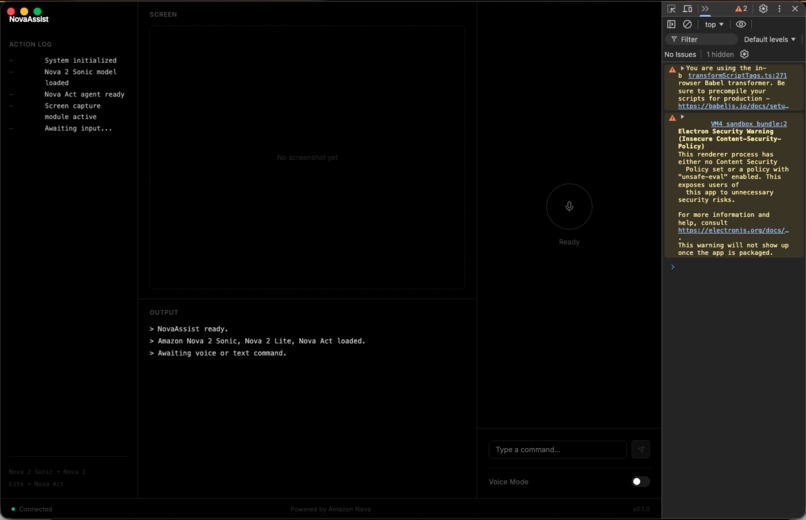
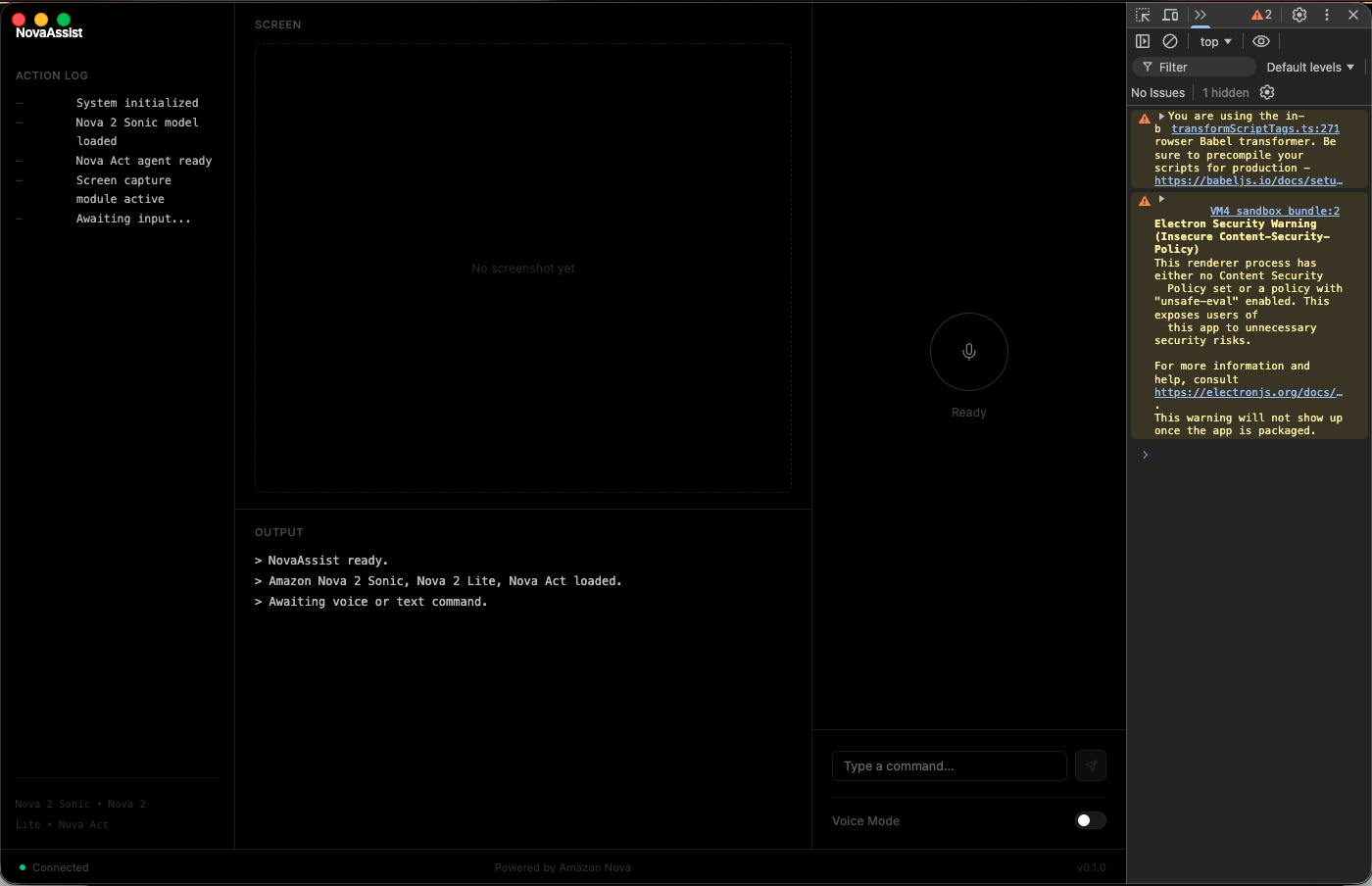
application interface - could not show the terminal as my secrets were there
-
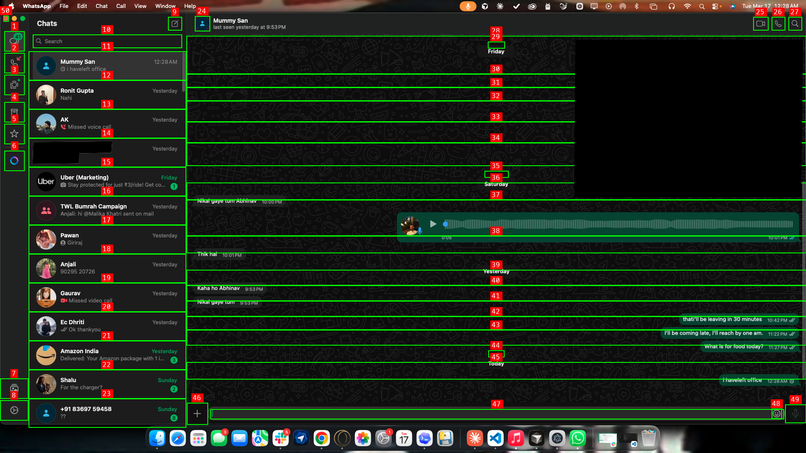
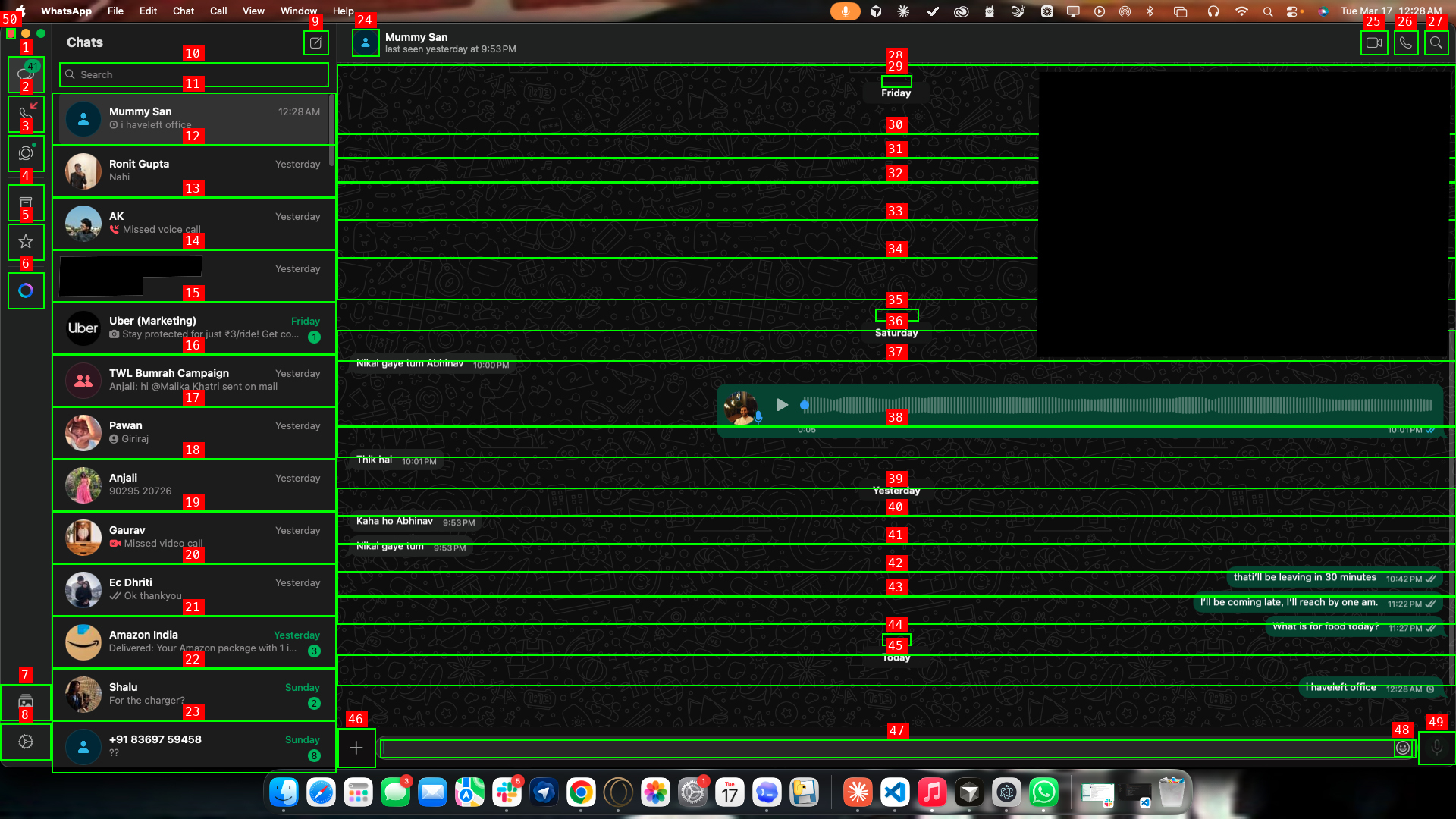
screen agent analyzing WhatsApp via Set-of-Mark prompting -- 49 interactive elements detected and labeled for precise click targeting.
Inspiration
For people with visual impairments, using a computer means relying on screen readers that read out menus, buttons, and text one element at a time. Want to send a WhatsApp message? Navigate through dozens of accessibility nodes, tab through the interface, hope the app is properly labeled. What a sighted person does in 10 seconds takes minutes — or isn't possible at all if the app has poor accessibility support.
I wanted to build something different. Instead of forcing visually impaired users to navigate complex interfaces through screen readers, what if an AI agent could just see the screen for them and do the task? Say "reply to my mom on WhatsApp saying I'll be late" and it handles every click, every keystroke — the user never has to navigate the interface at all.
That's NovaAssist. A voice agent that replaces screen navigation entirely with natural speech.
What it does
NovaAssist is a voice-controlled desktop agent for macOS built for accessibility. Instead of requiring users to navigate visual interfaces, it lets them describe what they want in plain speech — and the agent sees the screen and does it for them.
Say "Jarvis" and tell it what you need:
- "Open WhatsApp and reply to my mom saying I'll be late" — it opens the app, finds the chat, clicks the input field, types the message, sends it.
- "Open Chrome and search for train tickets to Pune" — launches the browser, opens a tab, runs the search.
- "Click the first booking link on this page" — reads the page, finds the link, navigates to it.
- "Take notes: buy groceries, call dentist, review the PR" — creates a new Apple Note with those items.
- "Find my resume on the Desktop" — runs a Spotlight search and reveals the file.
It works across native apps (WhatsApp, Slack, Spotify, Notes), Chrome (tabs, profiles, JS execution), terminal, and the file system.
The core idea: visually impaired users shouldn't have to understand an app's layout to use it. The screen agent sees the interface using the macOS Accessibility API and Amazon Nova 2 Lite's vision capabilities, overlays numbered labels on interactive elements (Set-of-Mark prompting), and executes clicks and keystrokes through native Quartz CoreGraphics. It can operate any app — even ones with poor screen reader support — because it interacts the way a sighted person would: by looking and clicking.
How we built it
The app is an Electron desktop app (Node.js main process + React renderer). Three Amazon Nova models split the work:
Hearing: Nova 2 Sonic handles real-time speech-to-text over bidirectional WebSocket. We added smart silence detection — it stops listening after 3 seconds of quiet, so you don't need to press a button. Picovoice Porcupine runs offline in the background for always-on wake word detection ("Jarvis").
Thinking: The transcribed text goes to Nova 2 Lite via Bedrock, along with session context — open Chrome tabs, active page content, running apps, recent actions. The model returns a structured JSON action plan. For "Reply to my mom on WhatsApp saying I'll be late," it outputs: open WhatsApp, then run the screen agent with instructions to find mom's chat, type the message, press Enter. It handles 15+ action types: browser control, app launching, file search, Apple Notes, terminal commands, IDE integration, and the screen agent.
Seeing and acting: The screen agent loops through screenshot => Accessibility API element detection => Set-of-Mark annotation => Nova 2 Lite vision analysis => action execution => verify. For browser tasks, we also use Nova Act for complex multi-step workflows and direct AppleScript for simple Chrome control.
Mouse and keyboard control uses macOS Quartz CoreGraphics via Python's pyobjc bindings - native-level events that work with sandboxed App Store apps.
Challenges we ran into
Click accuracy was bad at first. I started with coordinate grids overlaid on screenshots, asking Nova 2 Lite to estimate pixel positions. It missed targets by 20-50 pixels constantly — clicking sidebar icons instead of chat names, landing outside app windows. Switching to Set-of-Mark prompting (using the Accessibility API for exact element coordinates) fixed this completely.
macOS focus management is a pain. When the Electron overlay appeared, the OS shifted app focus, so clicks landed on the wrong window. I had to explicitly re-activate the target app before the screen agent starts each action.
The model would lie about success. Nova 2 Lite would declare "message sent" when the screenshot hadn't changed at all. I built screenshot diff detection using perceptual hashing — if the screen looks identical after an action, the model gets a warning that nothing happened and tries different coordinates.
JavaScript selectors kept failing silently. The brain model generated jQuery-style :contains() selectors that don't work in vanilla Chrome JS. We switched to extracting numbered link lists with actual URLs and navigating directly.
One weird edge case: the model would sometimes type the same text twice instead of pressing Enter to send. Built auto-correction that detects duplicate type actions and converts the second one to a keypress:return.
Accomplishments that we're proud of
First-click accuracy on WhatsApp chats using Set-of-Mark — the agent clicks "Mummy San" at exact coordinates on the first try.
Fully hands-free from wake word to spoken confirmation. No keyboard, no mouse, no visual interface navigation required at any point.
The ability to control any native macOS app through vision — including apps with poor or missing screen reader support, which are normally inaccessible to visually impaired users.
Smart silence detection that knows when you've stopped talking without requiring a button press.
What we learned
Vision models need structured visual prompting to be precise. Raw coordinate grids don't cut it — Set-of-Mark with exact bounding boxes from the Accessibility API made all the difference.
The macOS Accessibility API is underused. It gives you every interactive element in any app with position, size, role, and label. That's a goldmine for automation.
Most of the engineering effort went into the gap between "the model understands what to do" and "actually doing it on screen." The AI part was maybe 30% of the work. The other 70% was fighting macOS focus, click offsets, timing issues, and edge cases.
Nova's model family (Sonic + Lite + Act) covers the full loop: hear, think, see, act. Having all three under one ecosystem made integration cleaner than stitching together separate providers.
What's next for NovaAssist
Screen reading feedback — having the agent describe what's on screen when asked ("What's in this email?" or "Read me the top 3 search results"). Multi-monitor support and Retina display scaling. Conversation memory so it learns user preferences over time. Multi-app workflows — "take this email, summarize it, post it to Slack." Custom wake words and voice profiles. Integration with existing assistive technology like VoiceOver for a hybrid experience.
Built With
- amazon-bedrock
- amazon-nova-2-lite
- amazon-nova-2-sonic
- amazon-nova-act
- applescript
- boto3
- electron
- macos-accessibility-api
- node.js
- picovoice-porcupine
- pil/pillow
- pyaudio
- python
- quartz-coregraphics
- react

Log in or sign up for Devpost to join the conversation.