NOVA
Because Everyone Deserves to See the World
NOVA is a desktop vision assistant for blind and visually impaired people. It runs on an ordinary laptop with no cloud services at runtime. It detects and tracks objects in a camera feed or a recorded video, says where they are and what colour they are, remembers where useful objects were last seen, reads text, and speaks what it finds.
💡 Inspiration
Knowing that an object exists is not enough. A blind person also needs to know where it is, what it looks like, and what a sign or label says. We asked: what if an assistant could describe the surroundings, remember where things were, and answer questions about them, all on the user's own computer?
✅ What NOVA does
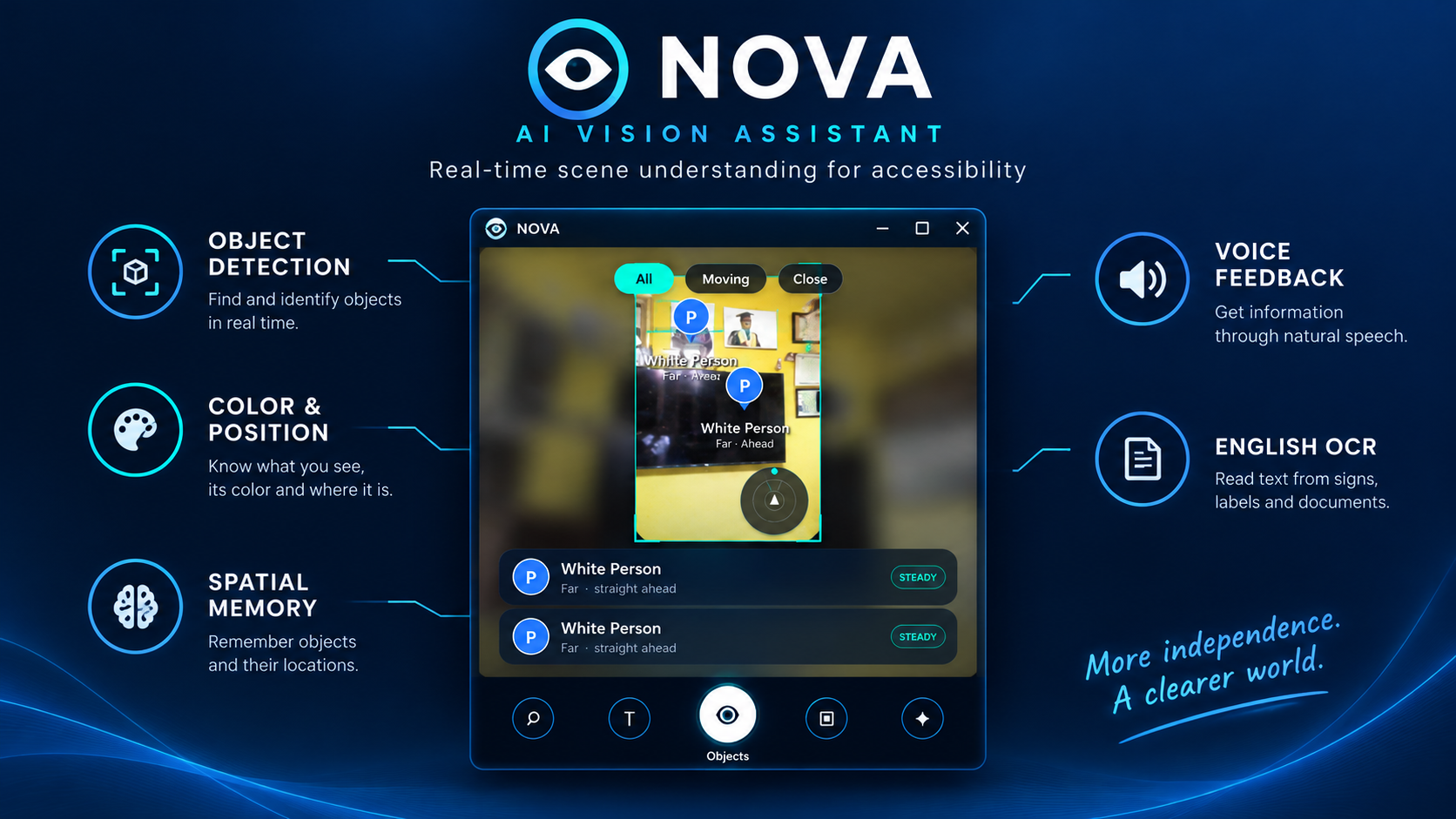
- Object detection and tracking: YOLOv8s with tracking. Detections below 0.35 confidence are ignored.
- Position, motion and proximity: left / centre / right, approaching or moving away, and Close / Far. Proximity is estimated from the size of the object's bounding box, not measured in metres.
- Colour: the dominant colour of each object.
- Spatial memory: remembers where useful objects were last seen (phone, bottle, cup, laptop, bags, books) and answers "Where is my phone?".
- Text reading: EasyOCR reads text from the camera view and pulls out amounts, phone numbers, dates, emails and links.
- Ask AI: a local Llama 3.2 3B model through Ollama. Questions about the scene and memory are routed by keyword rules to NOVA's own tools. Llama answers general questions and cannot see the camera.
- Spoken output with spoken warnings for objects coming toward the user.
- Optional depth-map view (MiDaS): off by default, visual only. It is not used for spoken alerts.
- A phone-style interface that works with a camera or an opened video file.
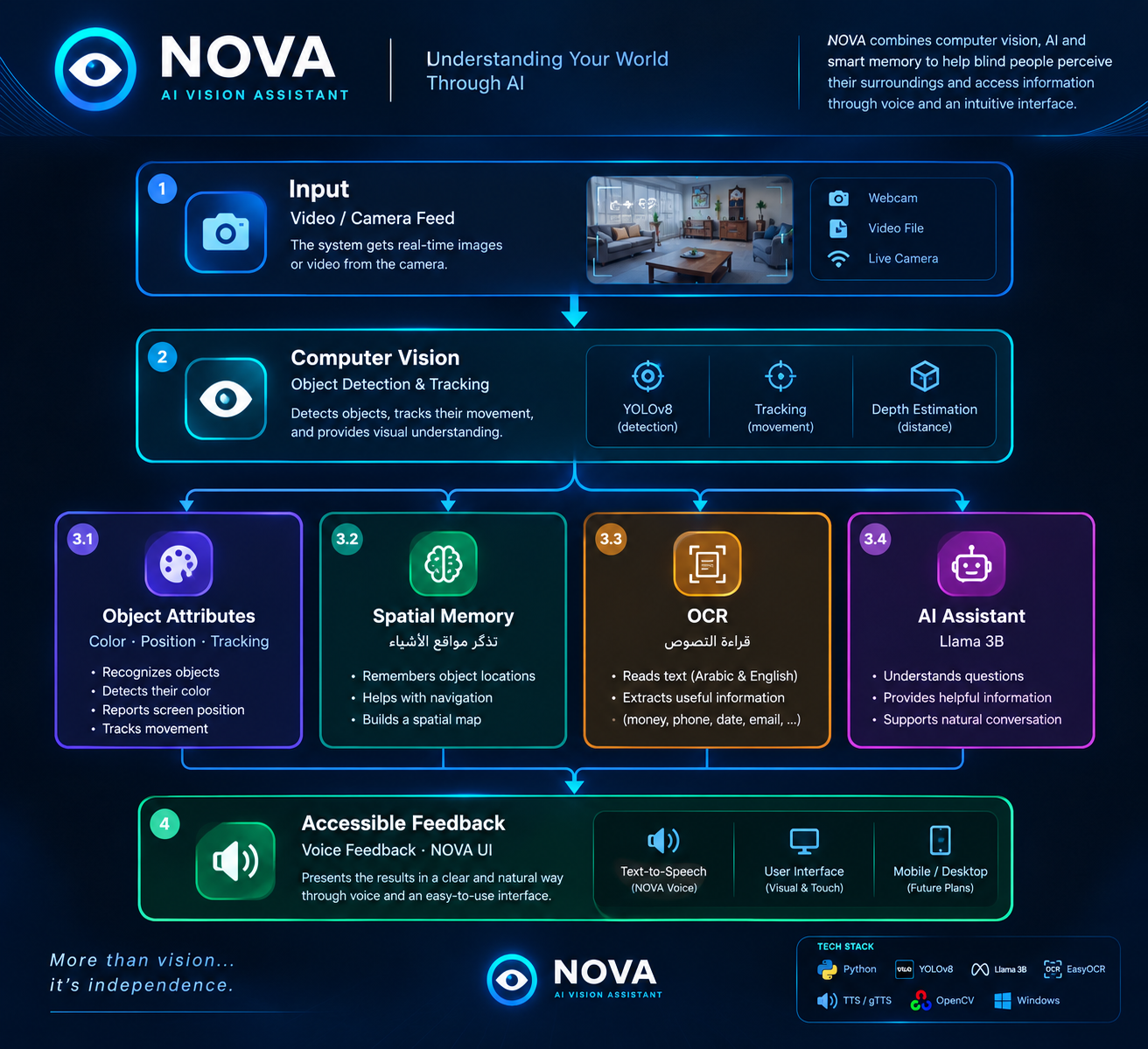
🔄 How it works
Camera / video
   └─► YOLOv8 detection + tracking
         ├─► direction, approaching / moving away, Close / Far (box size)
         ├─► colour
         ├─► memory: where each useful object was last seen
         └─► spoken descriptions and warnings (text-to-speech)
   └─► optional depth-map overlay (visual only)
   └─► frame ─► OCR (EasyOCR) ─► text shown / read aloud

User question ─► keyword router ─┬─► memory and scene tools (NOVA's own code)
                                 └─► local Llama 3.2 3B (general questions only)
📊 Measured results
One laptop: Intel Core i3-1115G4, 8 GB RAM, CPU only, Windows 10. Times taken by hand with a stopwatch (about ±0.5 s).
| Measure | Result |
|---|---|
| Memory question in the app | about 0.5 s |
| Frames per second | about 4 FPS |
| Read Text (OCR) on one frame | about 22 s |
| Llama 3B answering "2+2" | about 30 s |
| Memory recall | 20 correct out of 20 questions |
| Objects detected correctly in the demo video | 2 correct out of 2 checked (very small sample) |
🏗️ Built with
Python, OpenCV, Ultralytics YOLOv8s, EasyOCR, Ollama with Llama 3.2 3B, pyttsx3, MiDaS (optional), Tkinter and Pillow.
🧩 Challenges
- Running everything on a CPU-only laptop. This limits the frame rate to about 4 FPS and makes OCR and Llama slow.
- Camera access. The webcam on our test laptop returned black frames through OpenCV, so most testing and the demo use recorded video.
- Letting a small Llama model choose tools. Llama 3.2 1B refused ordinary requests when asked to pick tools. We switched to keyword routing for NOVA's own features and use Llama only for general questions.
- Reliable speech. Text-to-speech on Windows was the hardest part to keep working.
🚧 Limitations
- Objects come from the COCO set of 80 classes. There is no class for keys or a wallet, so NOVA cannot find them.
- The depth view is relative and only a visual aid. Close / Far comes from bounding-box size.
- The demo uses recorded video. Live webcam support depends on the camera driver.
- About 4 FPS on our laptop, a slow first OCR read, and slow Llama answers.
- Llama answers can be wrong, and it cannot see the camera.
- Voice output stopped after some messages in our testing, and we have not fully resolved this.
- NOVA has not been tested with blind or visually impaired users and is not a replacement for a cane or guide dog.
🧠 What we learned
- Measure before claiming. We assumed NOVA could find keys and a wallet, then found that YOLO's 80 classes do not include them. We changed the app and the description to match what it can really do.
- A small language model is not a reliable tool chooser. Plain keyword rules were more dependable for NOVA's own features, and Llama is better used for open questions.
- Hardware shapes the design. On a CPU-only laptop every extra component costs time, so we kept the depth view optional and measured each part.
🚀 What's next
Testing with blind and visually impaired users, a faster detector for low-power laptops, reliable live-camera support, and a more dependable voice pipeline.
🤝 Team and AI assistance
Built by Yassin Adnan Mohemad Abdel Mohsen (detection, memory, agent, interface) and Yassin Mohemad Ahmed Amin (OCR module). We used AI assistants (Claude, ChatGPT and Gemini) for coding help, review and planning, and we ran and tested the code ourselves.
Built With
- ai
- machine-learning
- ocr-it
- yolov8