-
-
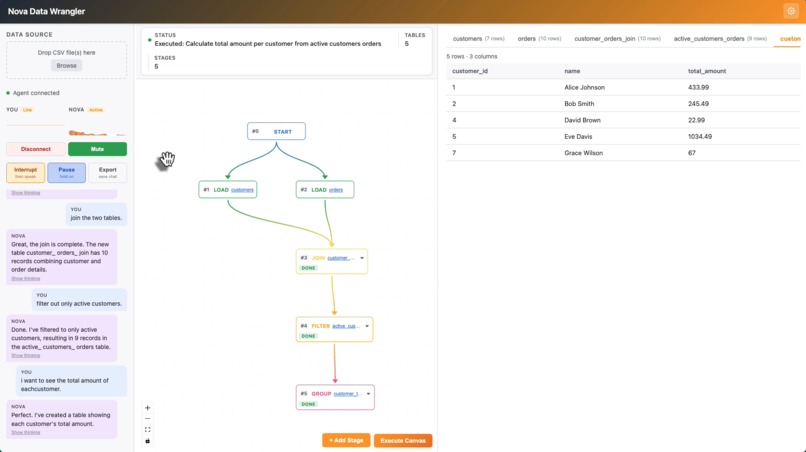
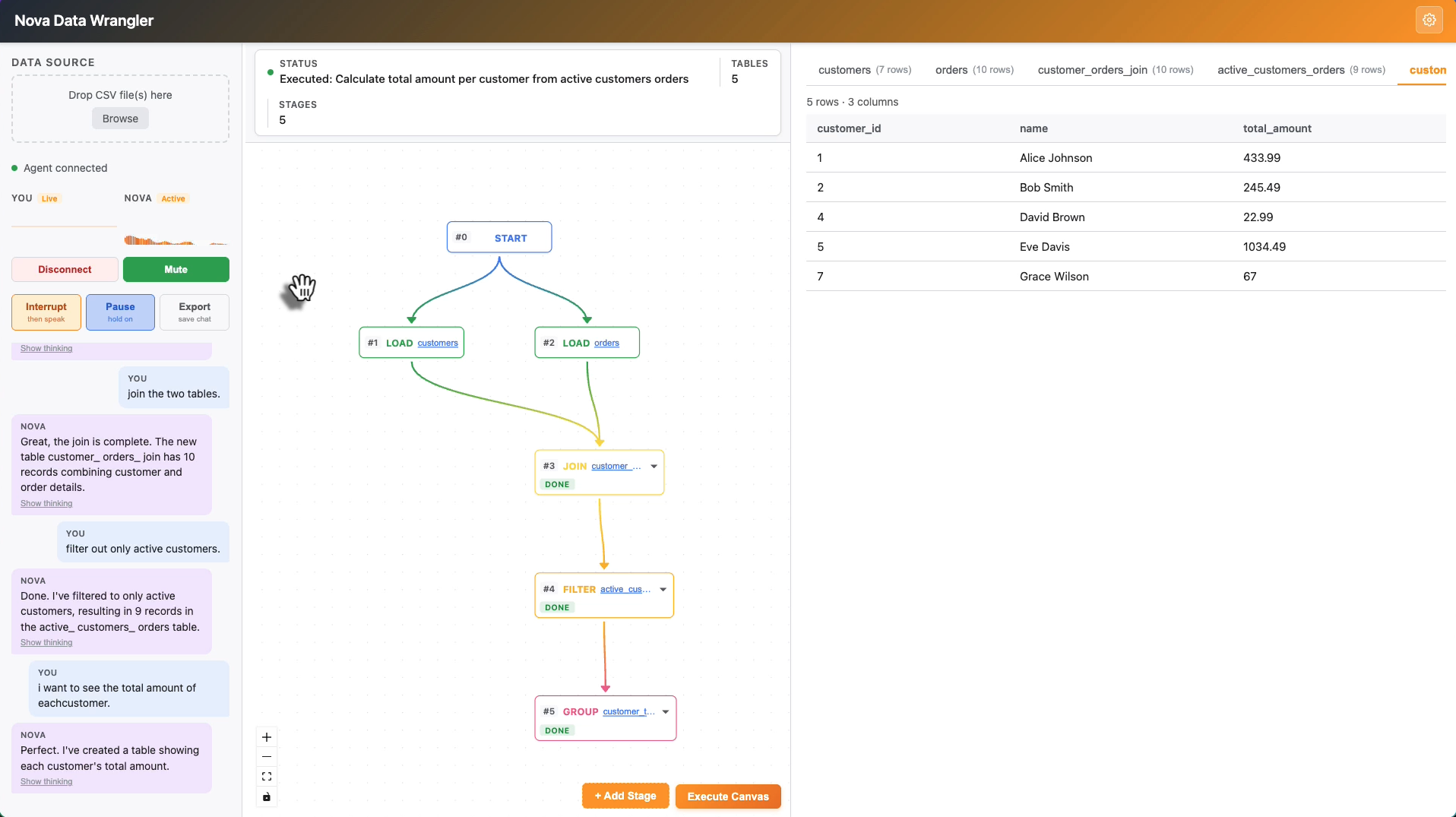
Main View
-
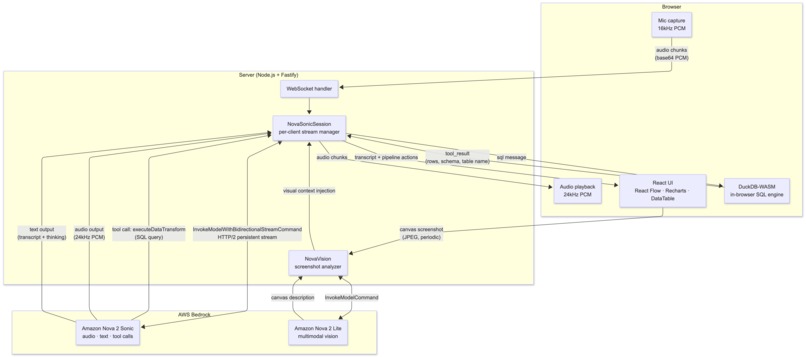
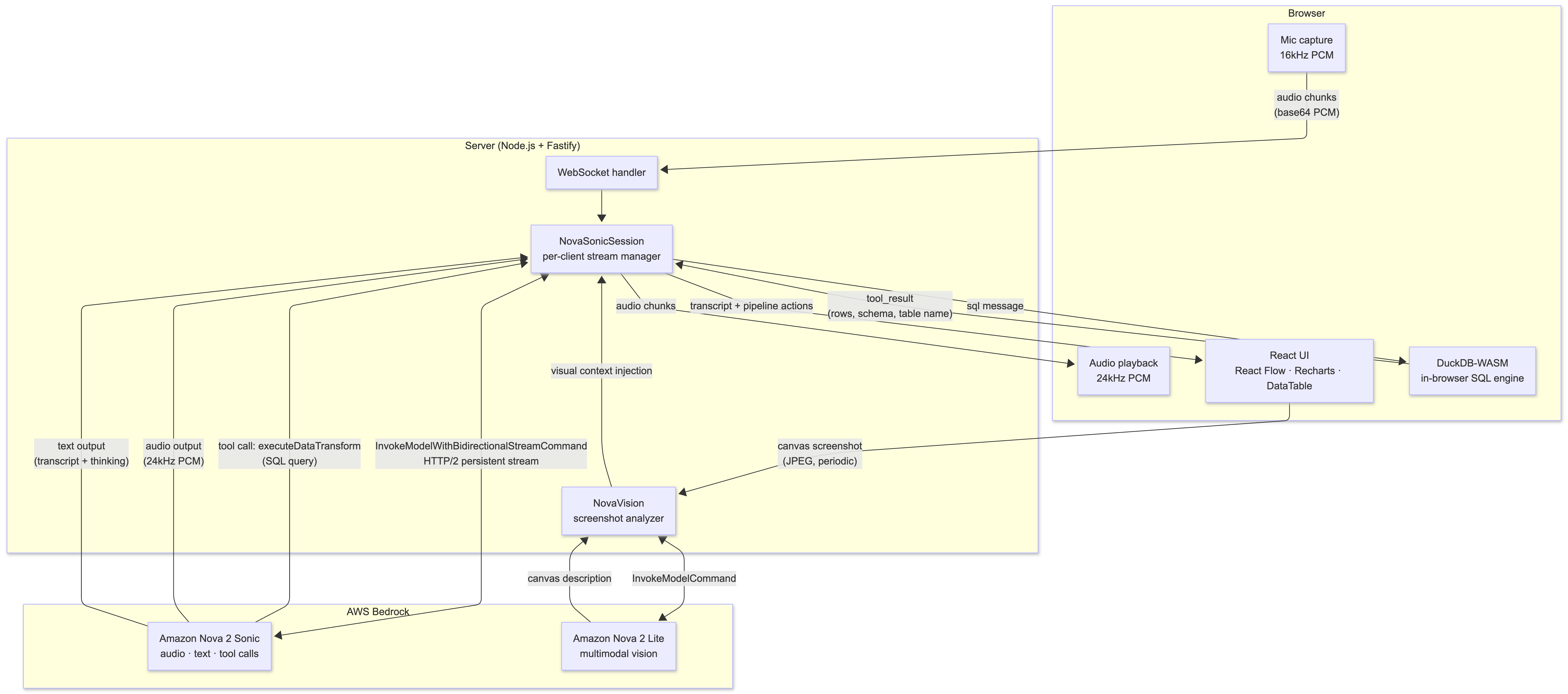
Architecture
-
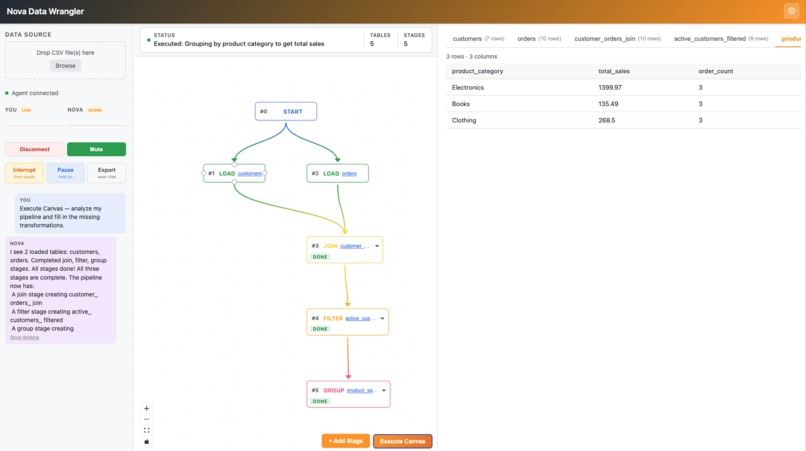
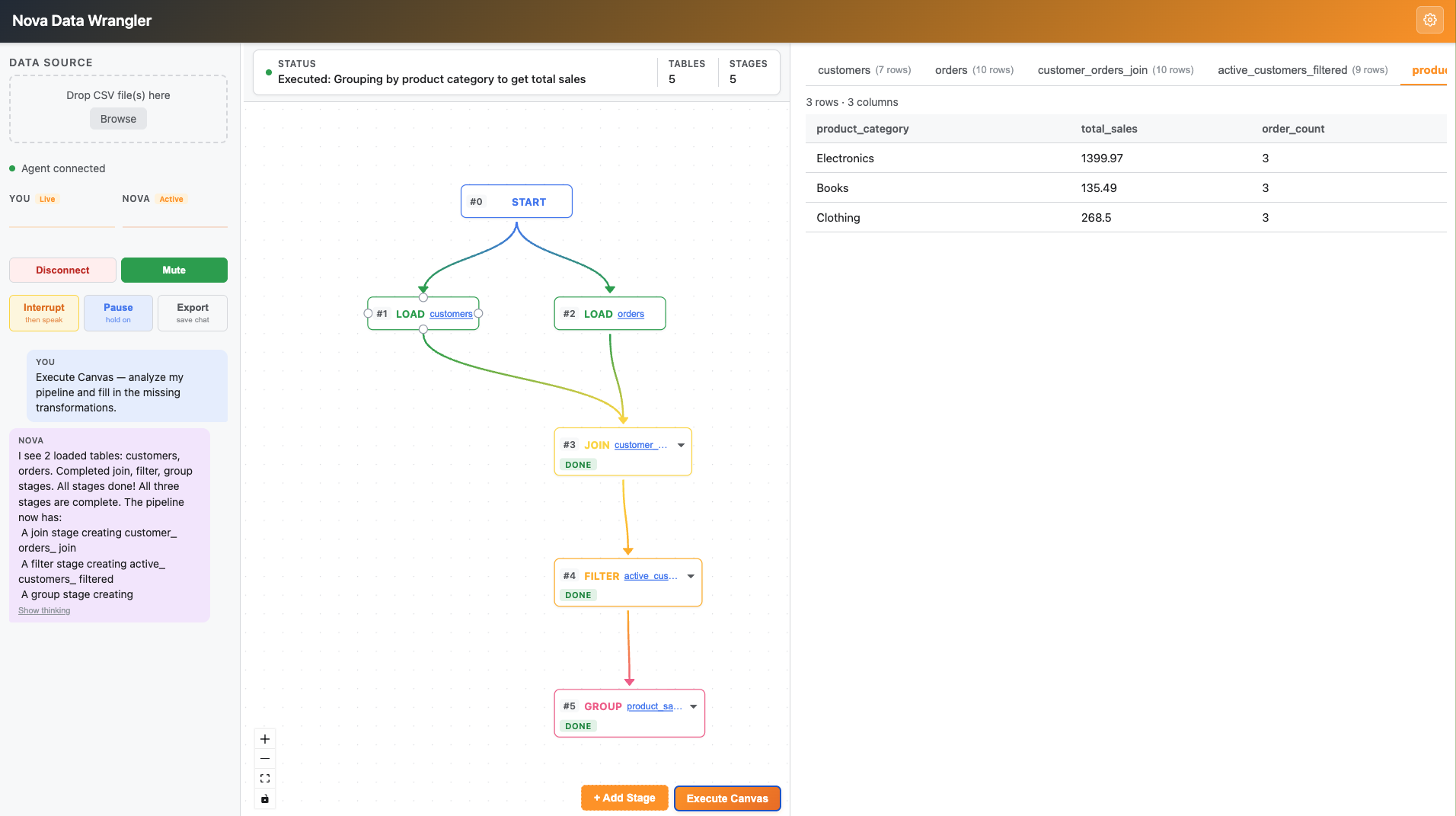
Execute Mode
-
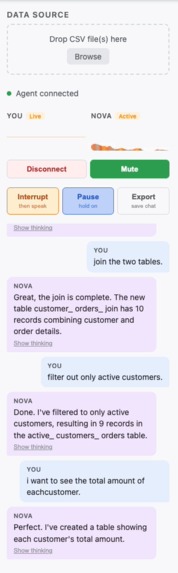
Live Chat
-
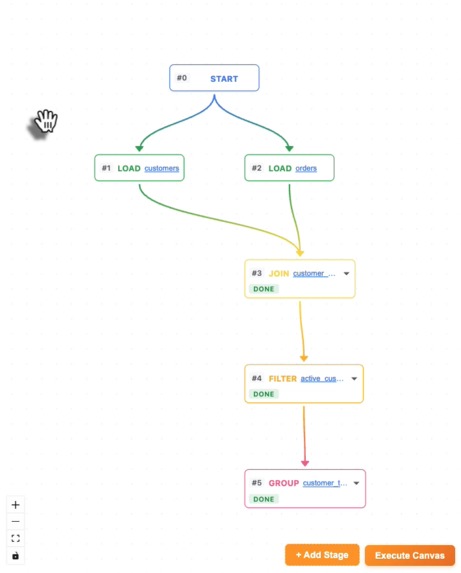
Stage Flow
Inspiration
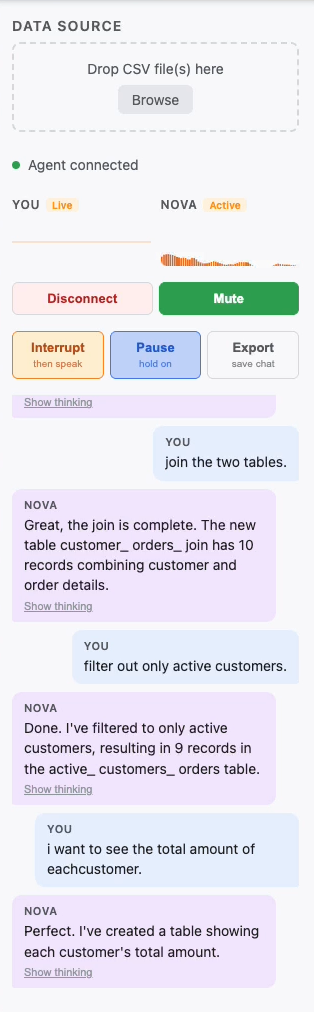
Data wrangling is one of the most time-consuming parts of any data project. Most tools require you to know SQL, click through menus, or write code just to do basic joins and filters. I wanted to see what it felt like to talk to a data pipeline — to say "join these two tables on customer ID, then filter for active users, then group by category" and watch it happen in real time, as if you had a data engineer sitting next to you.
Amazon Nova 2 Sonic made that vision feel achievable. Its bidirectional streaming API and native tool calling meant I could build a single, persistent voice session that both listens and acts simultaneously — no modal dialogs, no round-trip latency, no context switching.
What it does
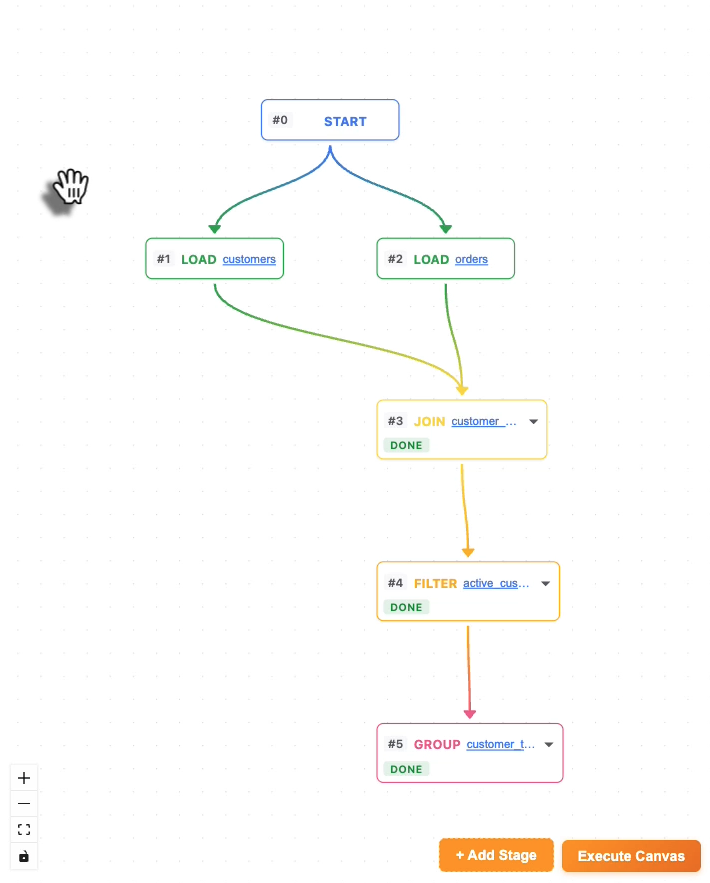
Nova Data Wrangler is a voice-driven data pipeline builder. You upload CSVs, speak naturally to an AI agent, and watch a visual pipeline graph assemble itself in real time.
- Talk to your data — say "filter orders from the last 30 days" or "join customers on customer_id" and Nova writes the SQL, runs it in DuckDB, and adds a node to the pipeline graph.
- Execute Canvas mode — add stages visually (JOIN, FILTER, GROUP, etc.), then click "Execute Canvas." Nova analyzes the entire graph, fills in each incomplete stage with correct SQL, and narrates what it's doing — one stage at a time, chaining results sequentially.
- In-browser SQL engine — DuckDB-WASM runs all queries entirely in the browser. Your data never leaves your machine.
- Visual pipeline — React Flow renders a live graph of every transformation. Gradient edges show data lineage. Every node is inspectable and reconfigurable.
- Charts on demand — ask for a bar, line, or pie chart and Recharts renders it inline from the active result table.
- Full voice controls — pause, resume, interrupt mid-sentence, mute mic, and undo transformations by voice.
How we built it
The stack is deliberately minimal: every layer does exactly one job.
Backend — Node.js + Fastify + @fastify/websocket. A single NovaSonicSession class per client opens a persistent bidirectional stream to Amazon Bedrock using InvokeModelWithBidirectionalStreamCommand. An EventQueue (an async iterable backed by a promise queue) bridges the imperative send*() API with the streaming body the SDK requires. Tool calls from Nova are dispatched either immediately on the server (chart rendering, node addition) or forwarded to the browser for DuckDB execution, with results sent back as tool_result events.
Frontend — React 19 + Vite + TypeScript. useAudioCapture captures 16kHz mono PCM from the mic and streams it as base64 chunks. useAudioPlayback decodes 24kHz PCM output from Nova and plays it seamlessly via the Web Audio API. FlowPane (React Flow) exposes an imperative handle for adding, updating, and connecting nodes. useDuckDB wraps DuckDB-WASM for in-browser query execution.
Multimodal understanding — Periodic screenshots of the canvas are sent to Amazon Nova 2 Lite via InvokeModelCommand. The description is injected into the Sonic voice session as background context, giving the agent visual awareness of the pipeline without requiring image input in the streaming session.
Sequential canvas execution — One of the trickier architectural pieces. Nova's tool calling is parallel by default: given a multi-stage pipeline, it would plan all the SQL at once using assumed table names — then fail when those tables didn't exist yet. The fix was sequential prompting: send one stage, wait for the tool_result with the actual table name, then inject that name into the next stage's prompt before sending it.
Challenges we ran into
HTTP/2 stream stability — InvokeModelWithBidirectionalStreamCommand runs over a persistent HTTP/2 stream. We hit RST_STREAM errors (result code 2 / GOAWAY) that would silently kill the session. Fixed with retry logic on connect, explicit NodeHttp2Handler configuration, and client.destroy() on disconnect to release connections promptly.
Parallel tool calling breaks sequential pipelines — Nova would pre-plan all SQL transformations before receiving any results, using assumed intermediate table names like filtered_orders. When those tables didn't exist in DuckDB, every subsequent stage failed. Solving this required redesigning canvas execution as a sequential prompt chain — each stage is a separate turn, with the previous stage's actual table name injected before the next prompt.
SQL dialect mismatch — DuckDB uses its own date arithmetic syntax (CURRENT_DATE - INTERVAL 'N days'). Nova would sometimes generate SQLite-style DATE(col, modifier) or MySQL-style date_add() calls that would error. Added explicit dialect rules to the system prompt with examples of correct and banned syntax.
Stage type misclassification — The pipeline canvas matches incoming SQL to the correct "pending" node (JOIN, FILTER, GROUP, etc.) by inspecting the query with regexes. A bug in the regex ordering meant any GROUP BY query that also had a WHERE clause was classified as "filter" — and when the filter node was already complete, Nova would create a spurious new node instead of updating the group node. Fixed by checking GROUP BY before WHERE.
Interrupt lifecycle — After the user hits "Interrupt," Nova's audio suppression needed to clear on the next user speech event. The server-side interrupted confirmation event proved unreliable for timing this. We reset suppression directly on user_text (the user's own speech being transcribed), which fires reliably as soon as the user starts talking.
Accomplishments that we're proud of
- True single-session architecture — one bidirectional stream handles voice conversation, tool calling, and pipeline execution end-to-end. No dual-model workaround, no context switching mid-conversation.
- Sequential canvas execution that actually works — chaining multi-stage pipelines with correct table name propagation, through a model that wants to parallelize everything.
- Zero server-side data — DuckDB-WASM keeps all data in the browser. The server is stateless with respect to user data.
- Natural voice UX — pause, resume, interrupt, mute, and undo all feel like first-class controls, not afterthoughts.
What we learned
- Streaming APIs reward explicit state machines — bidirectional streaming with interleaved tool calls requires careful tracking of which content blocks are open, which tool calls are in-flight, and which audio playback states are active. Refs and explicit guards work better than React state for sub-render-cycle timing.
- System prompts are architecture — the difference between Nova writing correct DuckDB SQL vs. broken dialect SQL was entirely in the system prompt. Treating the system instruction as a spec (with explicit bans, examples, and error-recovery rules) was as important as any code change.
- Sequential > parallel for dependent pipelines — when stages have data dependencies, parallelism is the wrong default. Enforcing sequential execution by design, rather than hoping the model respects ordering, produced reliable results.
- HTTP/2 connection lifecycle matters — persistent streaming connections need explicit teardown. Forgetting to
destroy()the client left zombie HTTP/2 sessions that caused confusing errors on reconnect.
What's next for Nova Data Wrangler
- Larger file support — chunked CSV loading and streaming ingestion for files too large to load in one shot.
- Pipeline persistence — save and reload pipelines as JSON; share pipeline specs as URLs.
- Nova-assisted stage configuration — when adding a stage manually (via the + button), have Nova suggest join keys, filter conditions, and group-by columns based on the loaded schemas.
- Export to code — generate a Python/pandas or SQL script from the visual pipeline, so users can take their wrangling logic into a production environment.
- Collaborative mode — multiple users editing the same pipeline graph with voice, with Nova mediating conflicts.
Built With
- duckdb-wasm
- javascript
- node.js
- nova2-lite
- nova2-sonic
- react
- typescript

Log in or sign up for Devpost to join the conversation.