Inspiration
I was inspired by a project that I saw online where people can play drums virtually by tapping on air. As I have learned piano before, I thought about creating a similar program but with piano sounds instead of drums. I was also inspired by numerous projects that I saw online about recognizing handwriting.
What it does
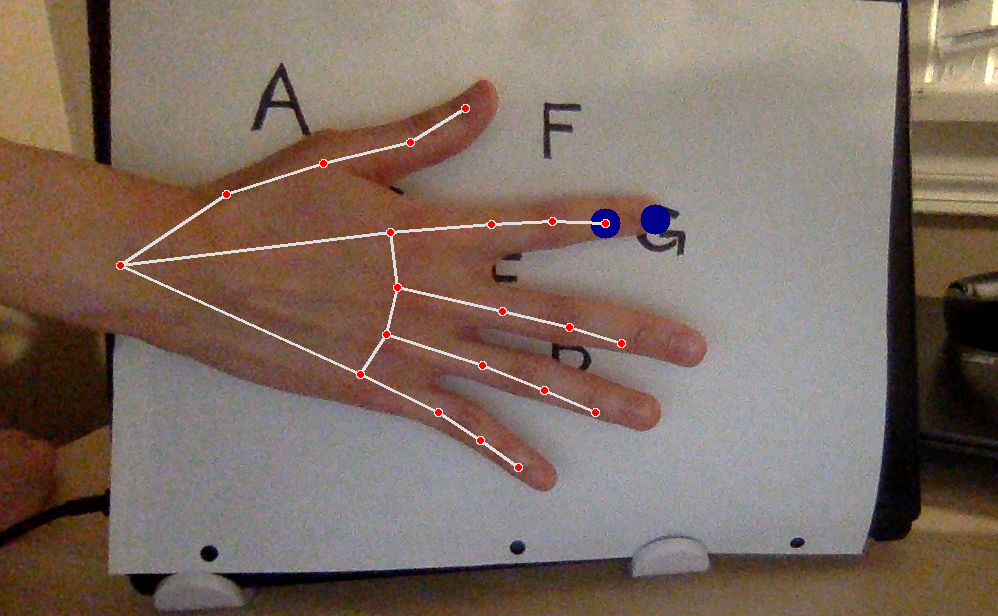
The goal is to create an interactive program where the program plays a piano key when the user taps on the corresponding key letter on a piece of paper. The user is expected to write 7 letters (C, D, E, F, G, A, B) on a piece of paper and show the paper to the program. Live camera can then be started. As the user taps on each letter on the paper, the corresponding piano key will be played. The piano keys used by the program are the 7 white keys from C4 to B4.
For example, if the user taps on the letter 'C' that he wrote on the paper, the program will play the sound of C4.
How we built it
Camera 📷
cv2.VideoCapture doens't work on Google Colab. Therefore, code snippets from Google Colab are used to implement the capture photo function.
Similarly, cv2.VideoCapture didn't work on Google Colab when I was trying to use it to process live video and capture every frame in the live video. I found code snippets from The AI Guy on YouTube that can achieve this with the help of some JavaScript code. The video can be found at https://www.youtube.com/watch?v=ebAykr9YZ30
The reason why it's tricky to use the camera on Google Colab is that Google Colab is running on my browser. Hence, some web API's need to be used for Google Colab to access my local hardware such as my camera.
Handwriting recognition ✍🏻
- In order to save time, I did not create a machine learning model from scratch and train it to recognize handwritten texts. Instead, I used Google Cloud's Vision API to recognize handwritten words in an image. Google Cloud has offered many tutorials and code samples on their website which helped me immensely. I have used their code sample from https://cloud.google.com/vision/docs/fulltext-annotations. I changed and deleted a few lines of their code since I will only need to recognize words and not blocks and paragraphs.
Piano key sounds 🎹
- The piano keys used are the 7 white keys from C4 to B4.
- The sound files of the 7 piano keys are downloaded from https://freesound.org/people/Tesabob2001/packs/12995/.
Hand recognition ✋
- A part of the project involves recognizing where my index finger tip is. I referred to https://google.github.io/mediapipe/solutions/hands.html a lot when implementing this function.
Challenges we ran into
The program was originally meant to work without needing the user to take a photo of his paper first and the program would recognize all 7 letters in live video even when the user moves the paper around. However, this makes it difficult for Google Vision to recognize the letters.
Implementing camera capture and live video is one of the most challenging parts of the project. Most resources online talk about implementing camera capture and live video on local machines, which is different from implementing these on Google Colab. I also spent a lot of time adjusting the width and height of camera capture and live video so that they match. This is important for the program to remember the positions of each letter on the paper.
I spent quite some time implementing pytesseract only to realize that it is not a tool meant to recognize handwriting. It performed very badly in handwriting recognition.
The program works under several assumptions. These assumptions can be removed as we enhance the program later on. Due to time constraints in the hackathon, these assumptions are not dealt with yet and they need to be satisfied for the program to work well:
Firstly, the environment needs to be well lit or else Google Vision won't be able to recognize the handwriting well.
It is recommended to write the letters in bold.
The letters need to be apart from each other to avoid the program from reading them as a single word.
Each of the 7 letters (C, D, E, F, G, A, B) appears exactly once on the paper. The program doesn't work if a letter is missing. If a letter appears more than once, for example, if there are three 'A' on the paper, only one of the three 'A' will be remembered by the program in terms of its position.
Accomplishments that we're proud of
- The program correctly identifies where each letter is.
- The program plays the correct piano key when I tap a letter on my paper!
What we learned
- We should research on a library or tool before implementing it.
- There is a difference between using Google Colab (browser) and local applications such as Jupyter Notebook in accessing local hardware.
- I learned about Google Vision API and mediapipe which I did not know about before.
What's next for Notes on Paper
Possible extension of this functionality: I was thinking about my nephew when working on this project. I imagined how fun it would be if, say, my nephew doodled a cat, a bird, and a car on a piece of paper and showed it to a program. When he points at his drawing of a cat, the program recognizes that it is a cat and responds by saying "what a beautiful cat" or playing some sounds. This would certainly encourage my nephew to draw more!
Built With
- google-cloud
- google-colab
- google-vision-api
- python


Log in or sign up for Devpost to join the conversation.