-
-
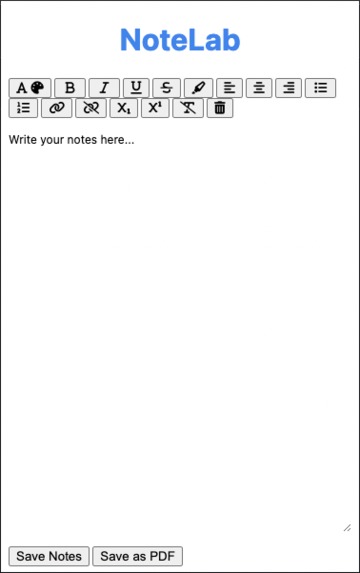
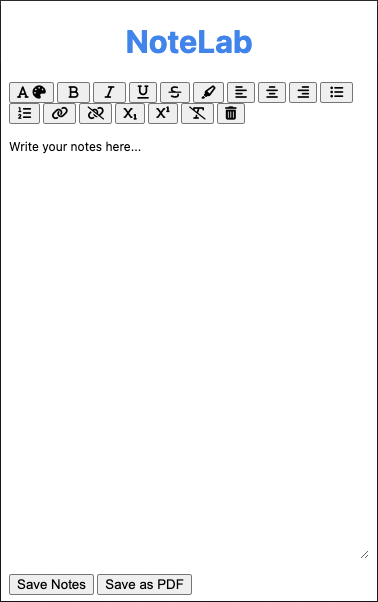
The UI of our project, NoteLab
Inspiration
During a lecture in school, students multitask by listening to the teacher while writing down notes. Most of the time, students end up focusing too much on making effective notes that they fail to attain the knowledge that the teacher taught. This would cause further problems in a student's education, such as obtaining low scores, mental health issues, and sleep deprivation. This is what inspired us to create NoteLab!
What it does
NoteLab is powerful educational note taking chrome extension that allows users to add text, images, videos, and audio files to their notes with a simple click. Just by right clicking and selecting 'Add Selection to Notes', users will be able to create dynamic, effective, and inspiring educational notes. NoteLab also includes basic text editing functions, allowing users to add and change text the way they want to.
How we built it
For our extension, we have 5 main files: notes.html, notes.css and notes.js is the webpage where users can type their notes in; background.js is the service worker that runs in the background, and it sets up the context menu and sends the selected text, audio, video, or image to notes.js through content_script.js; content_script.js is the file that stores the selected text that the user wants to add and sends it to notes.js when the webpage is loaded. When the extension popup window is loaded, notes.js requests content_script.js for the stored selections that the user wanted to add by sending content_script.js a message. content_script then sends that text as a response to the message from notes.js; notes.js then takes the placeholder text inside notes.html and replaces it with the users last saved notes and the text the user wanted to add. To save notes, we used window.localStorage to store the notes in the browser. This way, the user's notes will persist even when chrome closed and re-opened.
As for formatting text, we found document.execCommand. Even though this function is deprecated, almost all of its functions work really well; most of the formatting buttons use document.execCommand. The only button that does not use document.execCommand is the clear button; all it had to do is set the html content of the editable area to nothing.
The final feature that has not been talked about is the Save as PDF function. This function allows users to download their notes as a pdf file to use later. To make this work, we use jsPDF. This library allows making and downloading pdf files with text that the website chooses to add, including html content. However, there was a major issue with this as well, which is described in the next section.
A minor feature of our extension is resizing the notes-taking area. With this, users can drag the bottom-left corner of the area to take notes in and resize the area to their liking. However, when doing this, the window acts a bit weird: when dragging the icon at the bottom left to the right, the entire extension popup window moves to the left instead. This is because of how chrome renders the extension popup windows: it does not allow the window to go off the chrome screen. This weird behavior will be seen in the demonstration video, and there is no real fix to this.
Challenges we ran into
Our main challenge was communicating between background.js and notes.js. While doing research about this problem, we found sources that claimed that sending a message from a service worker will reach the extension popup window, however, other sources said the opposite. We later found that sending a message from a service worker can be received from a content script, and sending a message from the extension window to a content script also works, but a direct message from a service worker to a content script does not work. With that in mind, we used content_script.js as a communicater between background.js and notes.js. But then we found that notes.js cannot receive a message when the extension popup window is not open. To fix that, we sent a message from notes.js to content_script.js and content_script.js would reply with the requested selections. These selections would be stored in content_script.js itself.
Another major challenge we faced was saving videos; specifically, embedded videos that do not use the html element. The major source of videos, YouTube, made this problem worse: YouTube uses their own context menu and overrides the default ones, meaning there is almost no way to select a youtube video and click "Add Selection To Notes." If we had more time in this hackathon, we could have fixed this major problem.
Another major challenge we ran into was saving the notes as a pdf. If the notes had anything that was not text, the downloaded pdf file would contain nothing. There was no real way to fix this bug: pdf files most of the time cannot contain videos or audio files at all. For images, however, the rendering of jsPDF would fail. There is an alternative to fix this issue, but due to the time restriction we could not fix the issue.
The last major challenge we faced was adding an image or video that was larger than the maximum size of a chrome extension popup window: 800 pixels by 600 pixels. When this happens, the entire popup window can be scrolled through, which is not good for the user as then their notes would get hidden at the top. To fix this, we tried to make the image and video resizable; however, all solutions that we found while researching did not work. If we got more time to work on this project, we may be able to fix this issue.
Accomplishments that we're proud of
We made a very functional chrome extension that has a lot of advanced features, including bold, italics, underline, strikethrough, and many more features to edit text. Saving and downloading text is also another advanced feature that we are proud of. Lastly, getting the service worker and the popup window to communicate with each other is one of our best accomplishments with this project.
What we learned
We learned how to make a working chrome extension, and also how extension scripts work with each other to make the whole extension work properly.
What's next for NoteLab
There are many features that need improved and added to NoteLab, including
- getting images and possibly videos and audio files to be rendered in the downloaded pdf
- allowing youtube and other non-html5 videos to be added to notes
- add more text formatting functions
- resizing image, and video files
- add dark mode support
- overall make the UI of the popup-window look better.


Log in or sign up for Devpost to join the conversation.