Inspiration
Our lectures, slides, and worksheets all live on screens, but the moment you want to mark one up, you're chained to a laptop trackpad or a whiteboard. We enable teachers to be able to walk around the room and annotate the slide on the projector, turning any screen into a smartboard. Smartboards cost thousands of dollars per classroom, and camera-based pen trackers need a camera mounted, calibrated, and in clear view. Notechalant does it for about $25 in parts with nothing to install in the room. Students can take real handwritten notes on the lecture PDF that end up typed and searchable, with an AI tutor that can interpret handwritten notes and provide assistance.
What it does
Notechalant is a pen you write with in the air and an app that turns that writing into notes, with a in-app tutor for study help!
- Write on any screen from across the room. The pen's motion moves a cursor, and holding its touch pad puts ink down.
- No camera, no computer vision. The pen tracks itself with a motion sensor, so there's no camera to set up, no line of sight to keep clear, and it works in a dark lecture hall or a bright one. Nobody in the room is filmed.
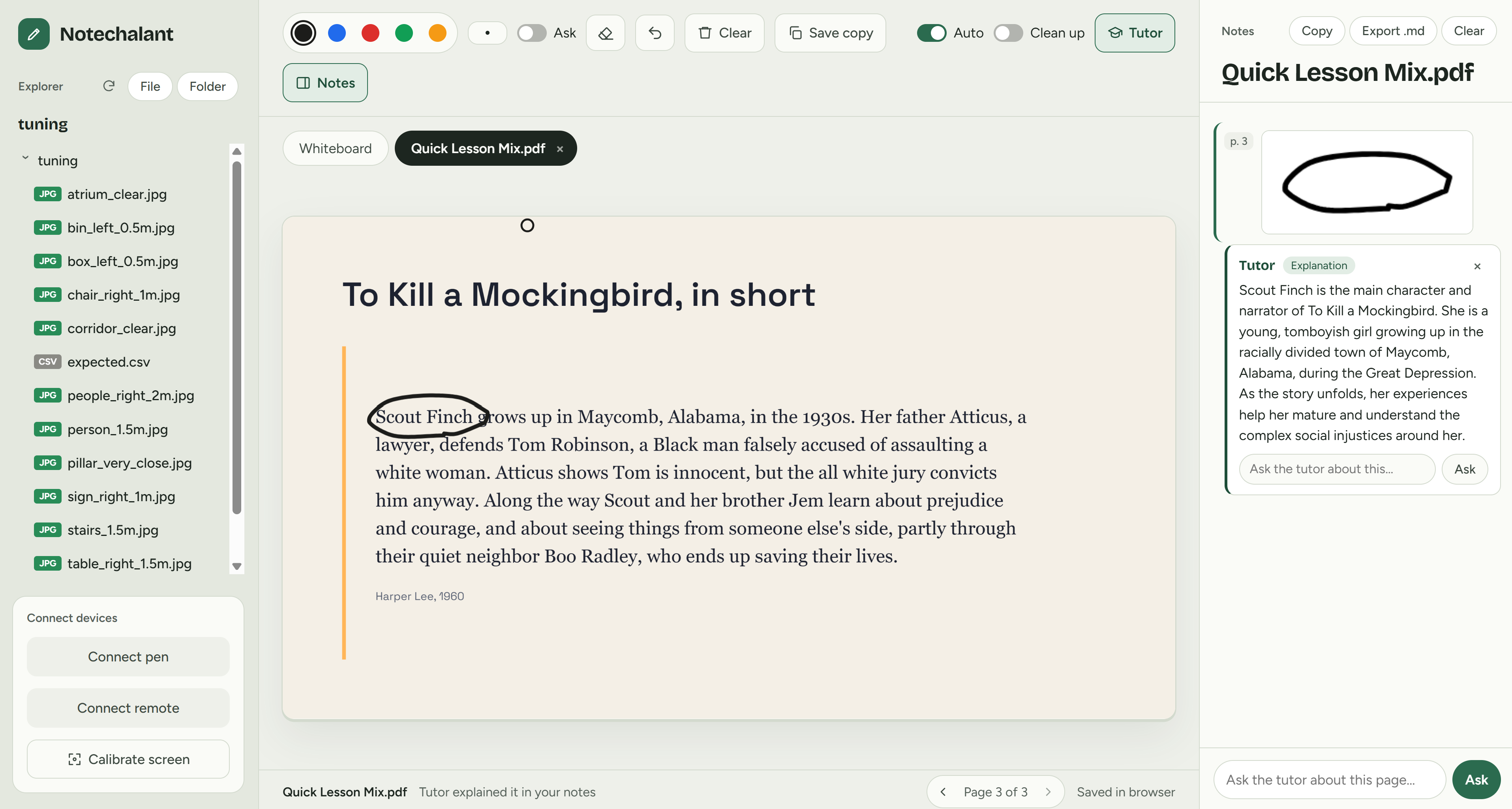
- Write on your own files. Open a folder or drop in a file: PDFs, PowerPoint, Word, Excel, images, or text. Your ink stays anchored to the page, even when the window resizes.
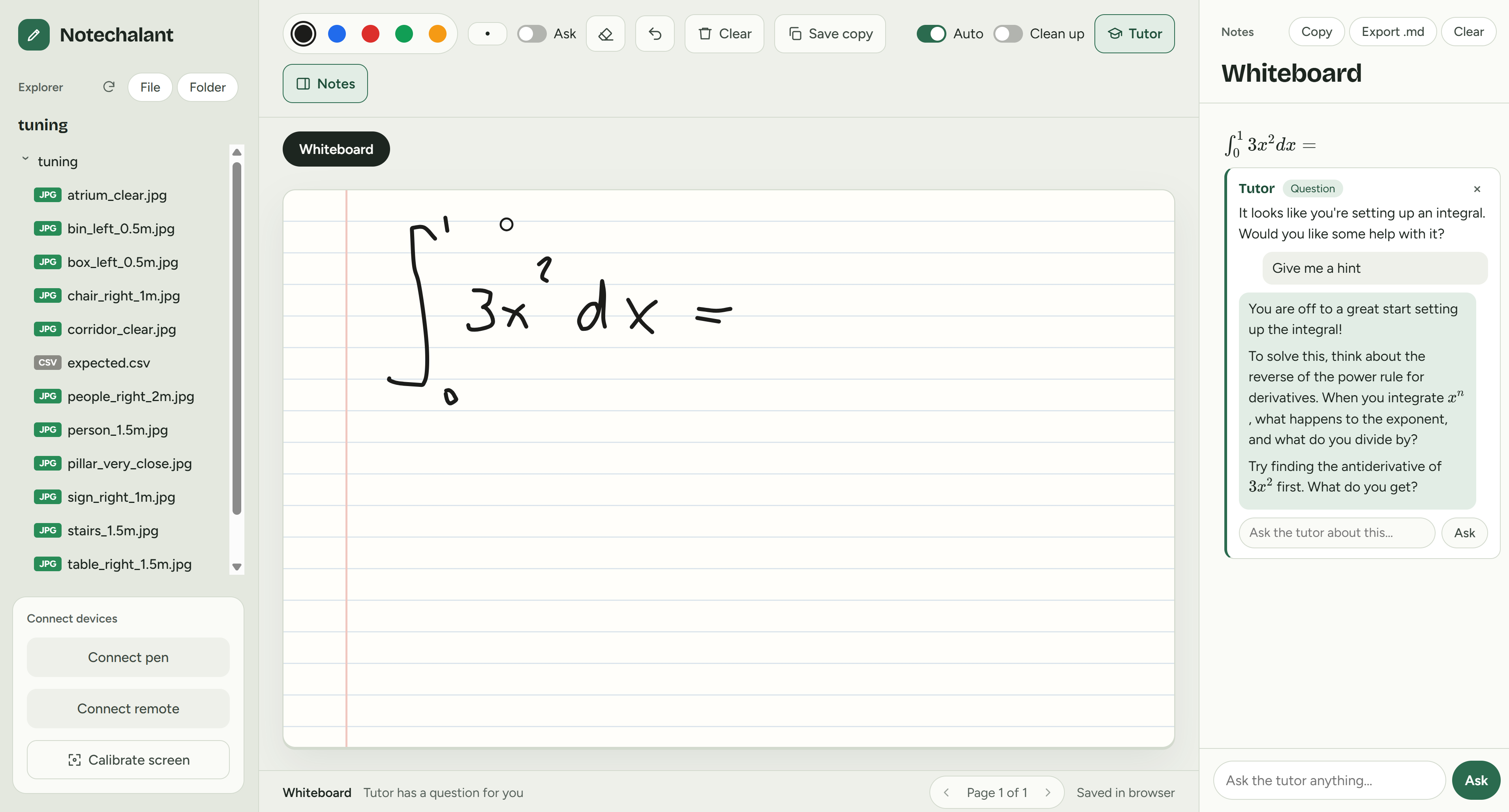
- Typed notes, automatically. When you pause, your handwriting is transcribed into notes for that file, with math rendered as LaTeX. Write \(7x + 4\), pause, add \(=\), and the note updates to \(7x + 4 =\) because we treat a line as a line. Circles, arrows, and underlines stay as ink and are left out of your notes.
- Tutor mode. A tutor looks at each new note and at the page you're reading. It catches mistakes, offers fixes, explains, and answers questions about the page.
- Save copy. Exports the document with your ink drawn on it. The original file is never changed.
- Private by design. Files are opened in the browser and never uploaded. Only the handwriting is sent to be read.
- An IR remote works as a clicker for changing pages and navigating app controls while presenting. ## How we built it
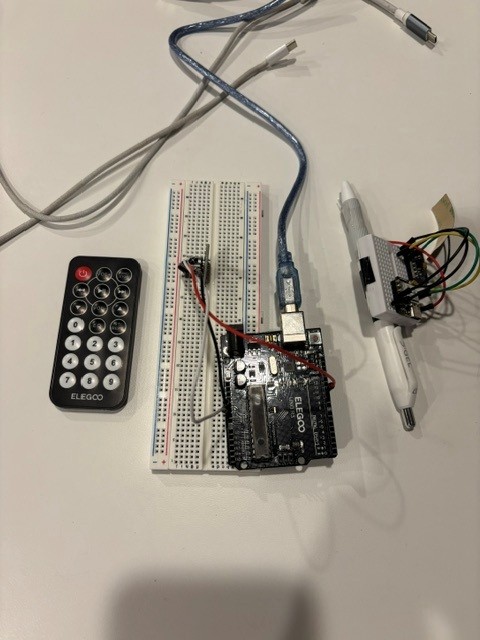
Hardware. An MPU6050 motion sensor on a Seeed XIAO ESP32-S3, streaming gyro and accelerometer readings at about 100 Hz. Bluetooth Low Energy is the main link, with USB serial and a WebSocket relay as fallbacks. We prototyped on an STM32 over USB before the ESP32 arrived. An Arduino UNO with an IR receiver turns a kit remote into a clicker.
Motion. Instead of tracking the pen's position (integrating acceleration drifts off within seconds), the pen works like an air mouse. Gyro rotation maps to cursor movement, with calibration and smoothing tuned on recorded pen data. We also chose this over computer vision, where a camera watches the pen. Vision needs line of sight, good lighting, calibration to the screen, and real processing power, and it breaks when someone walks in front of the camera. A motion sensor needs none of that, and the math runs easily on any laptop.
App. Vanilla JavaScript built with Vite, running in the browser.
- The File System Access API opens local folders like VS Code for the web does. Ink and notes save to a hidden folder next to your files.
- PDF.js, docx-preview, read-excel-file, and pptx-renderer render documents.
- Word and Excel content is split into pages between paragraphs and rows, so nothing is cut in half.
- KaTeX renders math.
- pdf-lib builds the annotated copies.
AI. Google Gemini, called through a small Node server locally and a Vercel function when deployed, so the API key never reaches the browser. Each note remembers which strokes it came from. Writing added to the same line re-reads the whole line and updates the note instead of making a new one.
Challenges we ran into
- Drift. Double-integrating an IMU to get position falls apart in about a second, so we redesigned around rotation.
- Speed and rate limits. Our first model took 4 to 40 seconds per request and allowed 5 requests per minute on the free tier. We benchmarked models, switched to Gemini Flash-Lite (about 1 second), and retry requests that stall.
- Re-reading changed the answer. When we re-read a whole line, the model read \(7x\) as \(7 \times\). We fixed it by sending the earlier reading along and adding a rule for x. We A/B-tested prompts on the exact images the app sends, and the fix went from 0 of 4 to 4 of 4 runs correct.
- Ink that stays put. Strokes are stored in page coordinates, not screen pixels, so they land in the same place across window sizes, zoom, and devices.
- Office files in a browser. Browsers can't display Word, Excel, or PowerPoint, so we render them to HTML and lay them out as real pages.
Accomplishments that we're proud of
- The whole loop works: wave a pen and get typed notes, with math, on your own PDF.
- It runs entirely in a browser, with no install, and your documents never leave your computer.
- It's accessible: about $25 in parts instead of a smartboard, no camera or special room setup, and a teacher can write from anywhere in the room, including from a seat.
- It's tested end to end: unit tests plus browser tests with real handwriting sent to the real model. ## What we learned
How to turn noisy IMU data into usable motion, how much prompt wording matters for handwriting (and how to measure it instead of guessing), and how far modern browser APIs go: Web Bluetooth, Web Serial, and the File System Access API.
What's next for Notechalant
- Several pens at once, for group work
- Exporting notes straight to Google Docs and learning management systems (LMS)
- A smaller, rechargeable pen body
- An on-pen model that recognizes letters without the internet

Log in or sign up for Devpost to join the conversation.