-
-
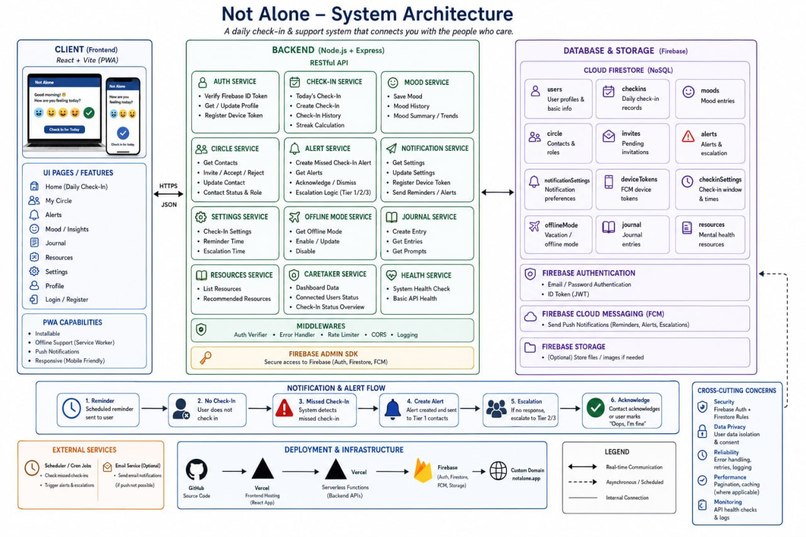
System architecture diagram
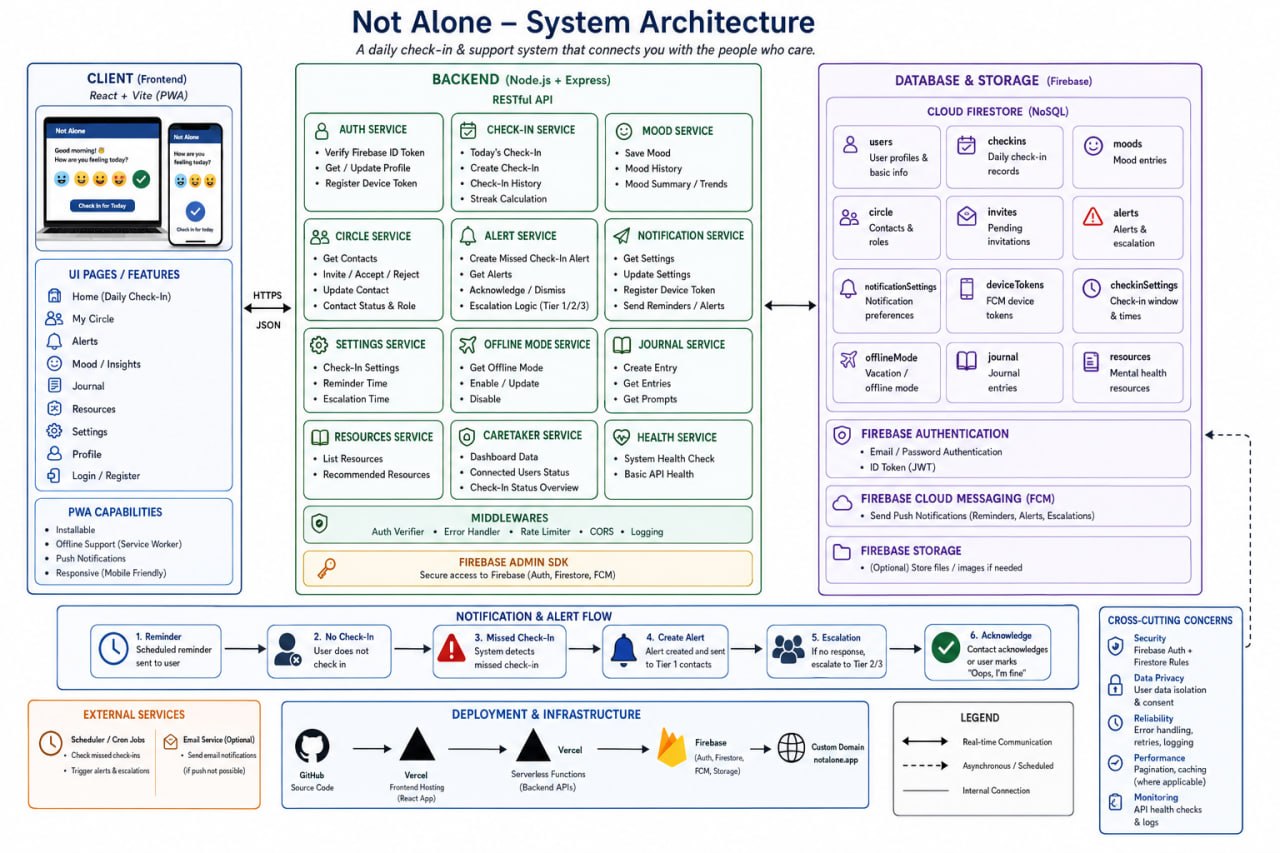
Not Alone — A Wellbeing & Care-Coordination Platform for Seniors
Project Overview & Functionalities
Not Alone is a web platform that helps seniors stay mentally and physically well while keeping their support network — family caretakers, social workers, and administrators — connected and informed. It pairs lightweight daily self-check-ins and mood/journaling tools with an automated escalation system that notifies a senior's caretakers when something looks wrong, so small warning signs don't go unnoticed.
The whole experience is role-based: every person signs in once, and the app routes them to a view tailored to who they are.
Seniors get the day-to-day wellbeing tools: a daily check-in, mood logging on a simple 1–5 emoji scale, a guided journal whose entries are automatically tagged with the user's most recent mood, an Insights view that turns those entries into mood history, summaries and check-in streaks, a curated Resources library (browsable, filterable, mood-recommended, with a detail view per resource), personal Tasks, an Offline mode for defining check-in windows, plus Settings and Profile.
Caretakers see the care side: their Circle of linked seniors, an Alerts feed of escalations (with push notifications), shared Tasks and Case notes, and the Resources library.
Social workers get a caseload-oriented view: a Map that locates contacts via the device's geolocation, the Alerts feed, Case notes, Tasks, and Resources.
Admins manage the platform: assigning user roles and viewing usage statistics.
Underpinning these views are a few core systems:
- Role-Based Access Control (RBAC) — every route and API endpoint is gated by role, both in the React router and again on the server, so access is enforced, not just hidden.
- Check-in & escalation engine — a scheduled job detects missed check-ins, raises alerts in the database, and pushes them to the relevant caretakers and social workers.
- Mood & journaling analytics — moods captured across check-ins and journal entries feed the Insights summaries and streaks.
- Care coordination — the care circle, shared tasks, and case notes let multiple caregivers stay aligned on one senior.
Pain Points It Solves
Undetected decline and isolation. Seniors living alone can experience a downturn in mood or health that nobody notices until it's serious. Daily check-ins and mood/journal trends surface those signals early, and the Insights view makes gradual changes visible rather than invisible.
Slow emergency response. If a senior stops responding, time matters. The escalation engine turns a missed check-in into an active alert pushed straight to caretakers, closing the gap between "something's wrong" and "someone knows."
Fragmented caregiving. Care is usually split across family, social workers, and the senior themselves, with no shared picture. The care circle, shared tasks, and case notes give everyone one coordinated source of truth.
Limited access to mental-health support. The Resources library — including mood-based recommendations — puts grounding exercises, support templates, and crisis resources one tap away, instead of leaving people to search in a moment of need.
Accessibility and connectivity barriers. A clean, role-specific UI keeps each user's screen uncluttered, and the offline-mode check-in windows accommodate seniors who aren't continuously online.
External APIs & Services Used
- Firebase Authentication — user sign-in and identity; issues the ID tokens the app uses for every authenticated request.
- Cloud Firestore — the primary datastore (roughly 15 collections: users, journal entries, moods, check-ins, alerts, circle, buddies, tasks, case notes, care assignments, devices, notifications, offline periods, and more).
- Firebase Admin SDK — server-side verification of the Firebase ID tokens and privileged Firestore access from the backend.
- Firebase Cloud Messaging (FCM) — push notifications, used to deliver alerts (e.g. a missed check-in) to caretakers' devices.
- Browser Geolocation API — used by the social worker Map to obtain the device's current position.
- Vercel — deployment target; the backend is structured as serverless Python functions.
No paid third-party APIs are required to run the project; everything above is either a Firebase service or a standard Web API.
How the Tech Stack Was Used
Frontend — React + Vite + React Router. The client is a single-page app. A central AuthContext tracks the signed-in Firebase user, fetches their canonical profile (including role) from the backend, and exposes the effective role to the rest of the app. A ProtectedRoute wrapper gates every page by allowed roles, and the navigation bar renders only the links relevant to the current role. A single api.js client wraps all backend calls and automatically attaches the user's Firebase ID token to each request. The Firebase Web SDK handles authentication and registers the browser for Cloud Messaging.
Backend — Python (serverless functions + local dev server). The backend follows a file-per-endpoint serverless layout intended for Vercel, with a local dev_server.py that emulates the same routing for development. The heart of it is an RBAC layer (rbac.py) that verifies the incoming Firebase ID token via the Admin SDK, loads the user's profile and role from Firestore, and authorizes each route against the roles it permits. Request handlers are split by domain (Firestore-backed modules for journal, circle, alerts, tasks, case notes, admin, etc., plus dedicated public handlers for resources and journal prompts). The server supports a dual auth mode — a mock-identity mode for fast local development with no Firebase credentials, and real Firebase token verification for production-like testing — which let the team move quickly without standing up credentials for every change.
Database — Cloud Firestore. All persistent state lives in Firestore, accessed from the backend through the Admin SDK. Documents are keyed by the Firebase Auth UID so that the record a user authenticates against is the same one administrators manage, keeping roles and profiles consistent across the app.
Notifications — Firebase Cloud Messaging. Devices register a messaging token with the backend; when the escalation engine raises an alert, caretakers receive it both in the in-app Alerts feed and as a push notification, with the client listening for foreground messages.
Scheduling — cron-triggered escalation. A scheduled job periodically scans for missed check-ins and writes the resulting alerts into Firestore, which is what makes the safety-monitoring loop run on its own rather than depending on someone manually checking.


Log in or sign up for Devpost to join the conversation.