-
-
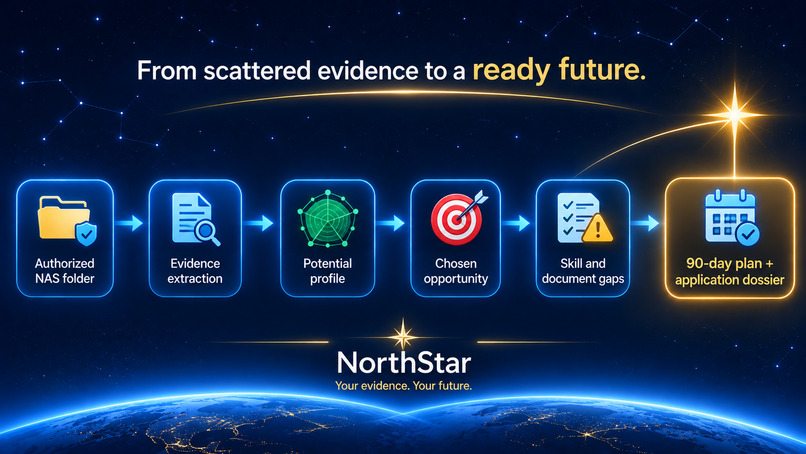
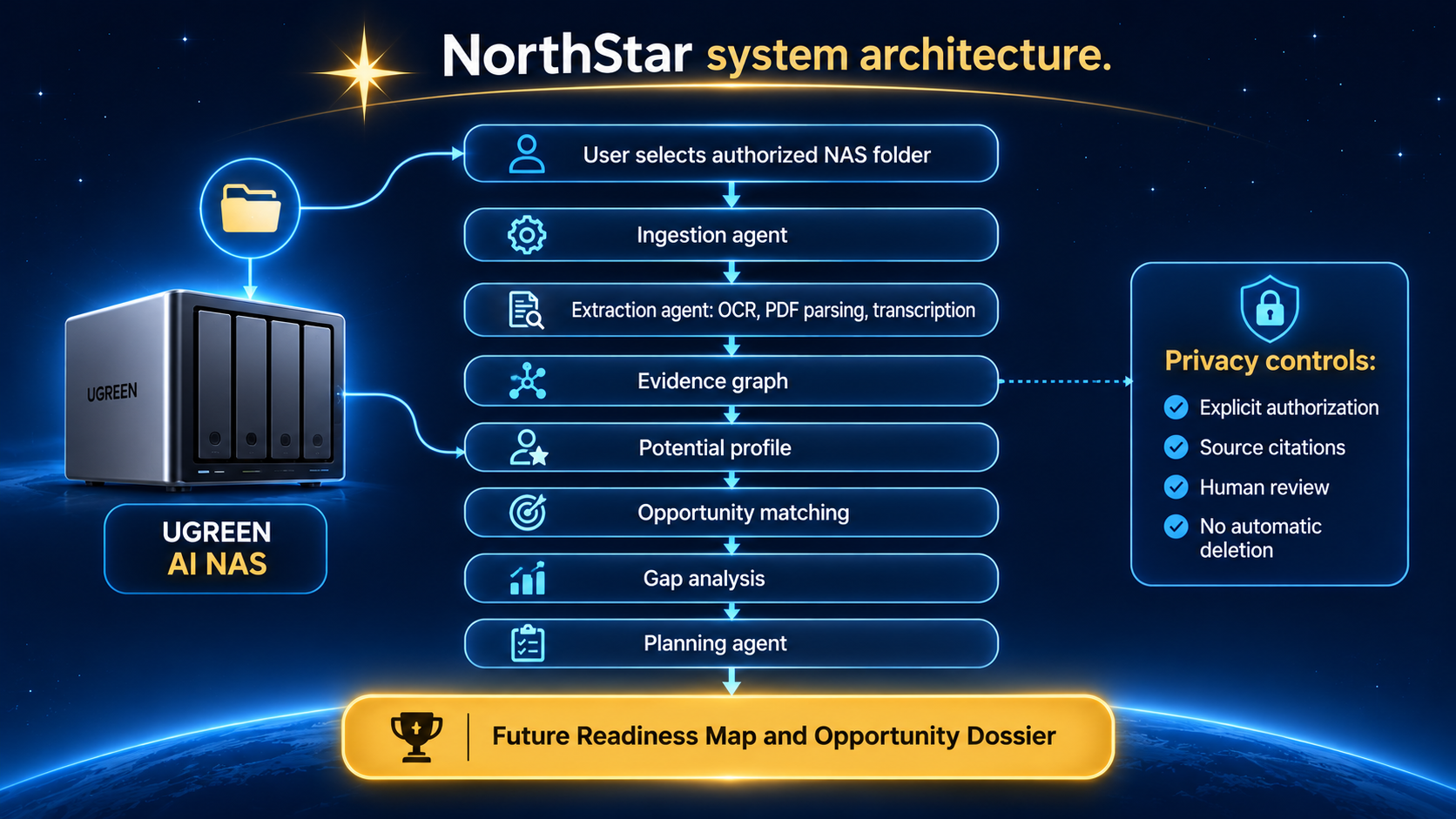
How it works diagram
-
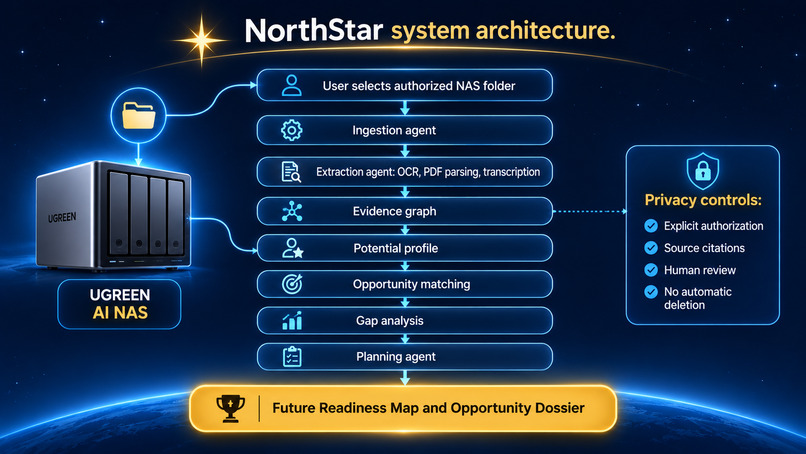
Architecture diagram
-
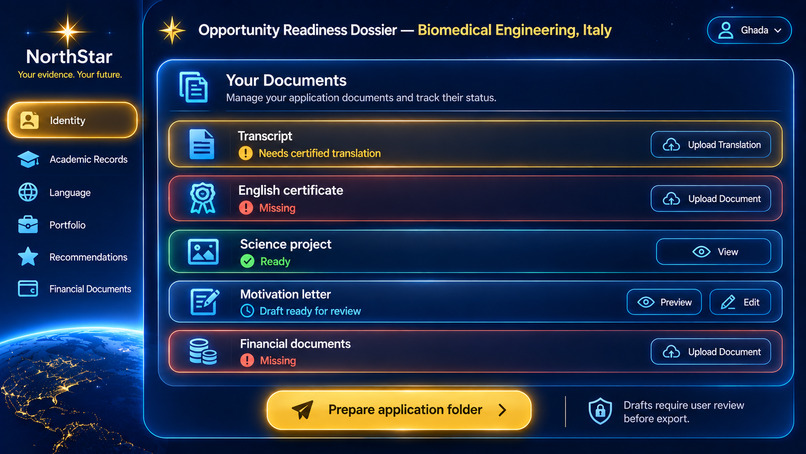
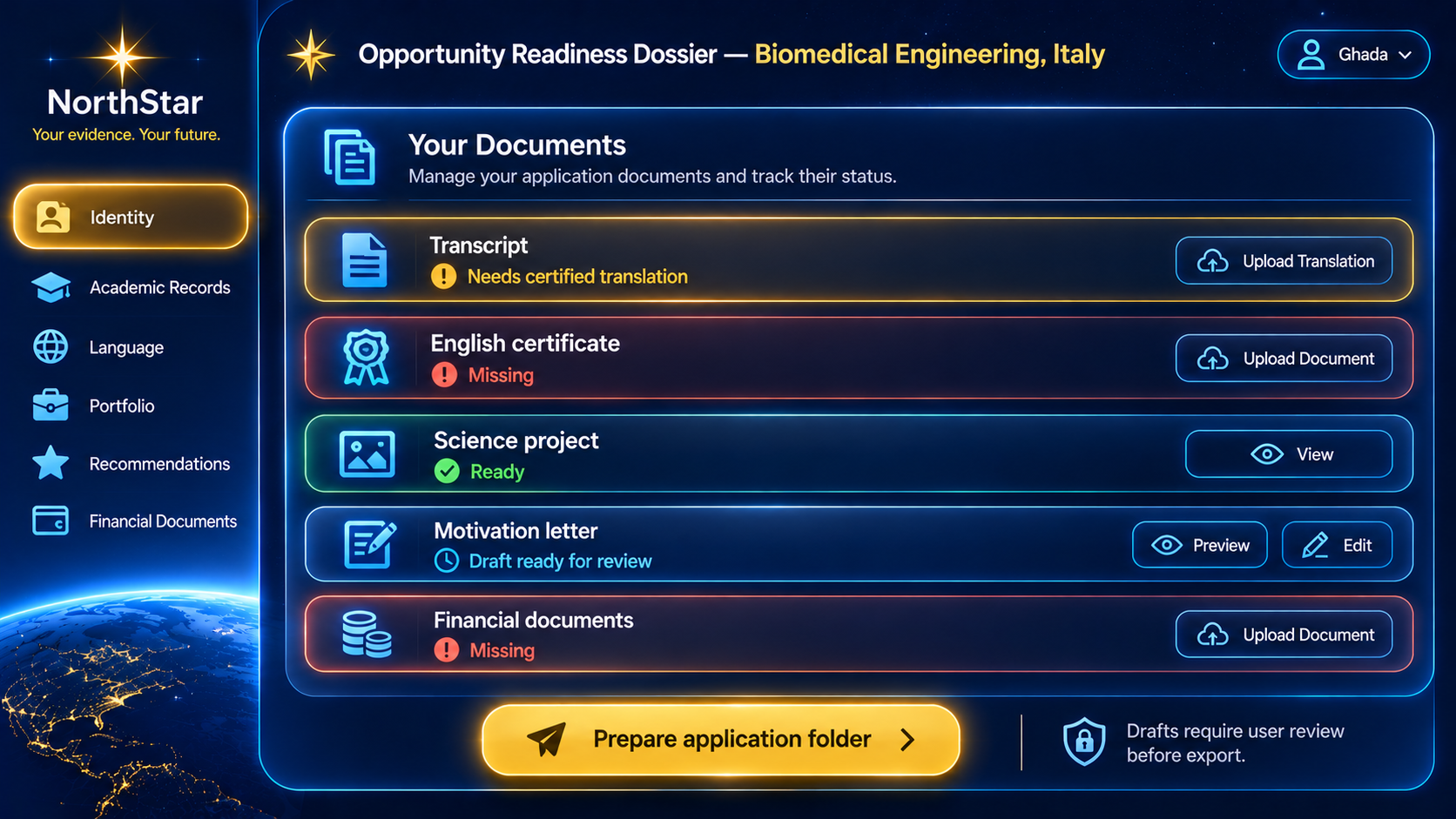
Opportunity Readiness Dossier
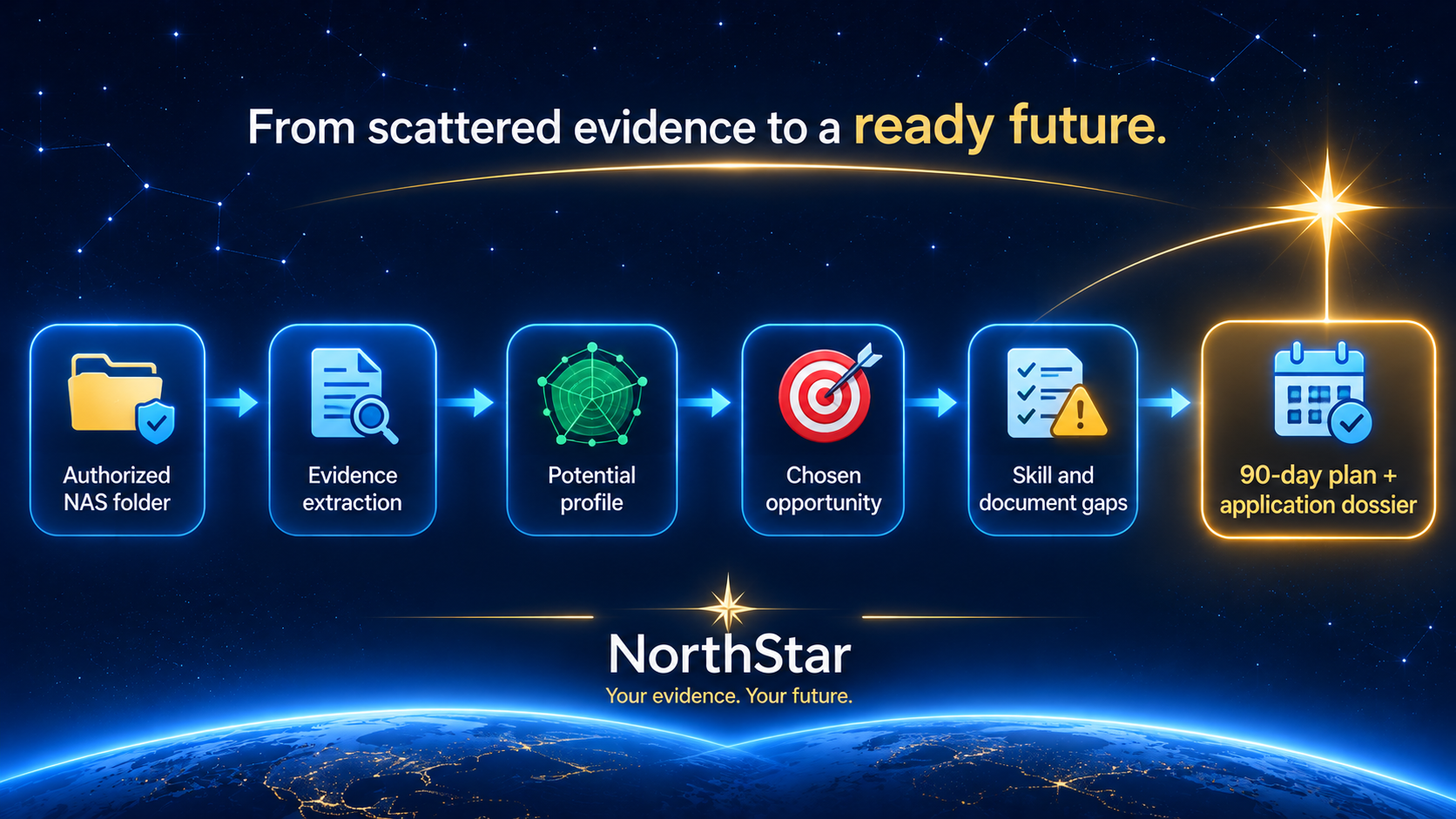
NorthStar — Your evidence. Your future.
NorthStar is a private, NAS-native future-readiness coach. It helps a student turn scattered school reports, projects, certificates, photos, voice notes, and application documents into a clear picture of their strengths, potential pathways, skill gaps, and readiness for a chosen opportunity.
Instead of giving generic advice such as “study harder” or “choose a career,” NorthStar works from evidence already stored on the user’s NAS. It connects who a student is today with the future they want to reach—and then shows the practical steps needed to get there.
Inspiration
The original inspiration came from observing that many students avoid mathematics, even though future technical and engineering careers increasingly depend on mathematical and analytical skills. The deeper issue was not simply that students “do not like math.” It was that they often cannot see how today’s choices connect to future opportunities.
Students, parents, and schools already generate a great deal of evidence: report cards, homework, science-fair photos, project files, certificates, teacher comments, voice notes, and activity records. But this evidence is usually scattered across folders, phones, and family computers. As a result, a student’s real strengths, recurring weaknesses, interests, and readiness for a future path remain invisible.
We asked a different question:
What if a student’s own NAS could become a private coach that reveals their potential, identifies the gaps between them and their chosen future, and helps them become genuinely ready for that opportunity?
That question became NorthStar.
What it does
NorthStar has two connected modes:
1. Potential Mode
The user selects an authorized NAS folder containing school and personal evidence. NorthStar analyzes the available material and builds a Potential Profile.
It identifies:
- Academic strengths and recurring subjects.
- Evidence of projects, competitions, certificates, and extracurricular activities.
- Skills shown through real work, such as research, communication, design, coding, teamwork, or problem-solving.
- Possible interest areas based on the evidence.
- Repeated weaknesses or missing evidence.
- A visual Future Readiness Map.
For example, NorthStar may find strong evidence in biology, visual communication, and project completion, while also finding limited evidence of advanced mathematics. It does not label the student as “bad at math.” Instead, it explains the evidence and recommends a practical next step.
2. Opportunity Mode
When the student chooses a goal—such as “I want to study biomedical engineering in Italy”—NorthStar switches into Opportunity Mode.
It compares the student’s evidence with the requirements of the selected pathway and creates an Opportunity Readiness Dossier.
It identifies:
- Documents that already exist.
- Documents that are missing, expired, or incomplete.
- Documents that may need translation, certification, or updating.
- Academic or skill gaps relevant to the chosen pathway.
- A preparation timeline based on the application deadline.
- The highest-leverage actions for the next 90 days.
- A draft application narrative or portfolio outline based only on evidence the user approves.
The result is not just advice. It is an actionable plan: what to improve, what to prepare, what to collect, and what to do first.
How we built it
NorthStar is designed as an AI Skill for the UGREEN AI NAS environment. Its workflow is built around local, user-authorized files rather than requiring users to upload sensitive school or family documents to an external service.
The system follows a modular agent workflow:
- Ingestion — NorthStar scans the selected NAS folder and identifies supported documents, images, PDFs, presentations, and audio files.
- Extraction — It extracts relevant information, including subjects, grades, project titles, dates, skills, certificates, and key statements.
- Evidence modeling — Each extracted item becomes an evidence record linked to its original source file.
- Potential profile — NorthStar groups evidence into strengths, interests, experiences, and possible skill gaps.
- Pathway analysis — The user selects a future direction, such as a university program, career field, scholarship, or mobility opportunity.
- Gap analysis — NorthStar compares the user’s evidence with the requirements of the selected pathway.
- Planning — It generates a realistic action plan focused on the highest-impact next steps.
- Readiness output — It produces a Future Readiness Map, a 90-day plan, and an Opportunity Readiness Dossier.
The project uses the kinds of capabilities already present in the UGREEN SkillHub ecosystem, including document question answering, cross-document retrieval, structured extraction, translation, summarization, study planning, knowledge-graph visualization, transcription, and file organization. NorthStar’s value is not any single capability; it is the orchestration of these capabilities into one coherent future-readiness workflow.
What we learned
We learned that a strong AI product should not begin with a model or a feature. It should begin with a real decision that people struggle to make.
For students, that decision is often:
“What should I do now to have a better future?”
We also learned that personal data needs careful handling. A student’s report card, medical information, family documents, and application materials are sensitive. NorthStar therefore follows a privacy-first approach:
- The user explicitly selects the NAS folders NorthStar may access.
- The Skill works with authorized local files.
- It does not delete or move original files without explicit approval.
- Every major claim links back to a source document.
- AI-generated application materials remain drafts until the user reviews them.
- NorthStar avoids making definitive predictions about a person’s future.
Finally, we learned that “career guidance” becomes much more useful when it is grounded in evidence. Instead of asking, “What career should I choose?” NorthStar asks:
“What evidence do you already have, what future are you aiming for, and what is the highest-leverage action you can take this week?”
Challenges we faced
Turning a broad idea into a focused product
Our first idea was broad: help students prepare for the future. That was meaningful, but too vague to build well in a hackathon.
We narrowed the scope to one complete loop:
[ \text{Evidence} \rightarrow \text{Potential} \rightarrow \text{Chosen Opportunity} \rightarrow \text{Gaps} \rightarrow \text{Action Plan} \rightarrow \text{Readiness} ]
This made the product easier to explain, demo, and evaluate.
Avoiding generic AI advice
Many AI tools can summarize a CV or suggest careers. The challenge was making NorthStar feel personal and credible.
We solved this by making evidence linkage central. Every strength, weakness, recommendation, and document status should point to a real file, page, photo, or audio recording on the NAS.
Handling incomplete and messy data
Real student folders are messy. Files may be scanned, duplicated, mislabeled, incomplete, or stored in different languages.
We designed NorthStar to work with uncertainty rather than pretend it has complete information. When evidence is missing, it says so clearly and asks for the smallest useful next action.
Balancing ambition with privacy
A future coach becomes more powerful when it can see more context, but more context also means more sensitive data.
We resolved this by making user authorization, local processing, source citations, and human review core parts of the design—not optional features.
What makes NorthStar different
| Typical career tool | NorthStar |
|---|---|
| Gives generic recommendations | Builds a profile from the user’s real evidence |
| Focuses only on CVs or test scores | Uses documents, projects, photos, certificates, and voice notes |
| Gives advice without context | Links every insight to a source file |
| Stops at “you should improve math” | Creates a concrete plan and identifies what evidence to build |
| Treats applications as separate paperwork | Connects skill development with application readiness |
| Sends sensitive data to the cloud by default | Is designed around private, user-authorized NAS folders |
Future vision
In future versions, NorthStar could support:
- Parent and teacher collaboration views.
- School and scholarship application templates.
- Portfolio generation from real student projects.
- Progress tracking across school terms.
- Career-transition support for adults.
- Local-language support for Arabic, French, and English.
- A counselor mode that helps educators identify students who need support earlier.
Our long-term vision is simple:
NorthStar helps people see who they could become—and gives them the evidence, plan, and readiness to get there.
Built With
- ai-skills
- git
- html/css
- javascript
- json
- knowledge-graphs
- llm-apis
- markdown
- ocr
- pdf-parsing
- python
- rag
- skill.md
- speech-to-text
- ugreen-ai-nas
- ugreen-skillhub
- vector-search
