





Inspiration
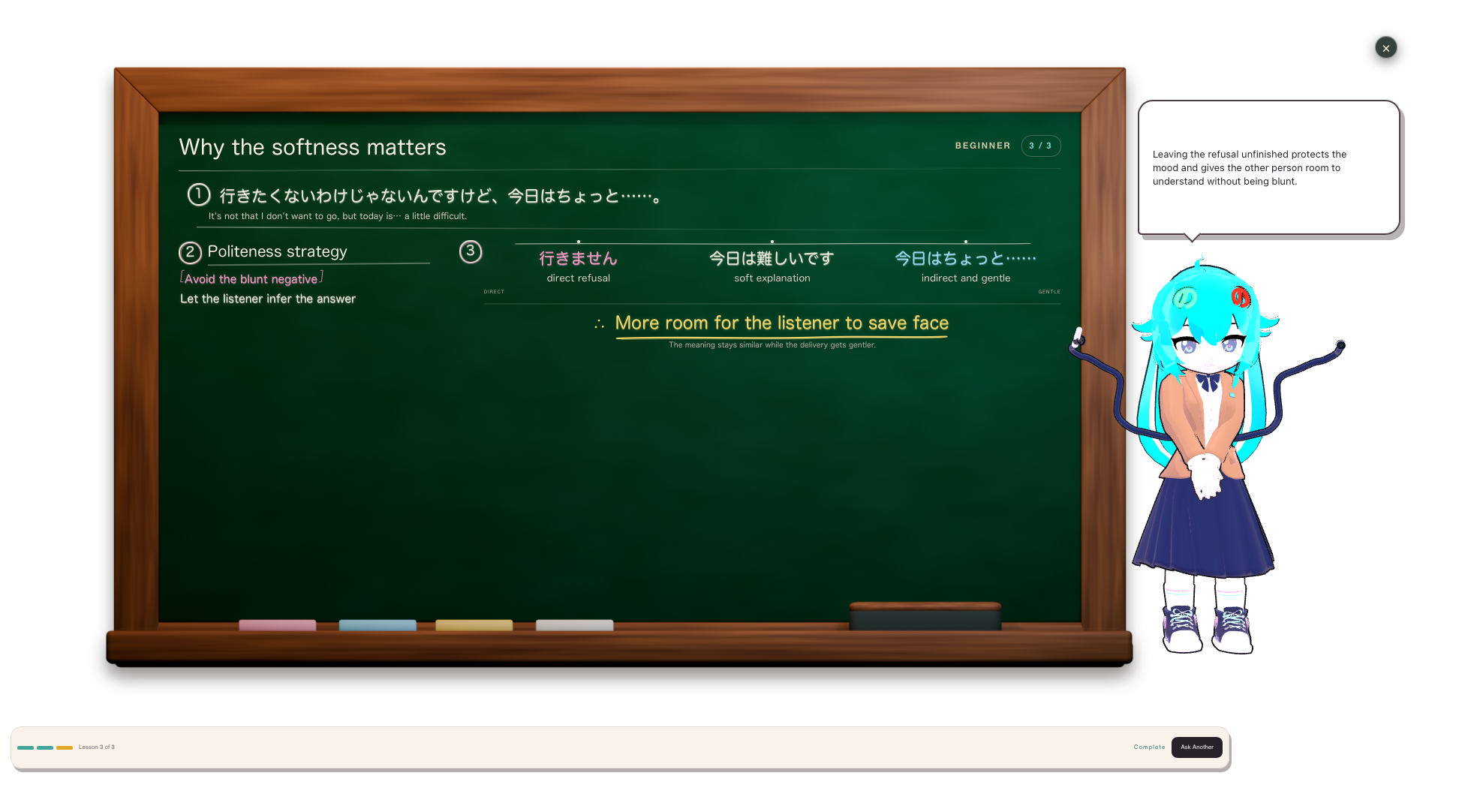
I love Japanese media and am actively learning the language, but many of the online YouTube videos, livestreams and shows I want to watch don't have subtitles in languages other than Japanese. So when I watch these videos I can only understand about half of what is being said since I'm still learning the language. Sometimes it's great practice, but I often miss words, meanings and cultural relevance to what is being said. NonoSubtitles was created to solve these problems since it can provide a transcription of the original language, a translation to the user's language and a lesson about why things are said a certain way and the culture behind it. For example, 今日はちょっと... literally translates as "Today is a little..." From an English speakers perspective this doesn't make full sense. ちょっと means little, but in this context it becomes "I can't do this today". The culture is trying to be polite by not outright saying "I cannot do this today", ちょっと being that bridge word. Without the explanation is it hard to understand so the AI teacher's lesson would be perfect for these situations. It's possible to copy this into an LLM, but with more intense situations it is hard to understand every word when you don't know it exactly, as well as harder to put the context of the whole situation inside. Since NonoSubtitles is already has the transcript in Japanese, this can all be done automatically with a click. I've been having fun watch some of my favorite streamers and finally understanding everything they say, as well as learning about niche topics and words I would otherwise miss.
What it does
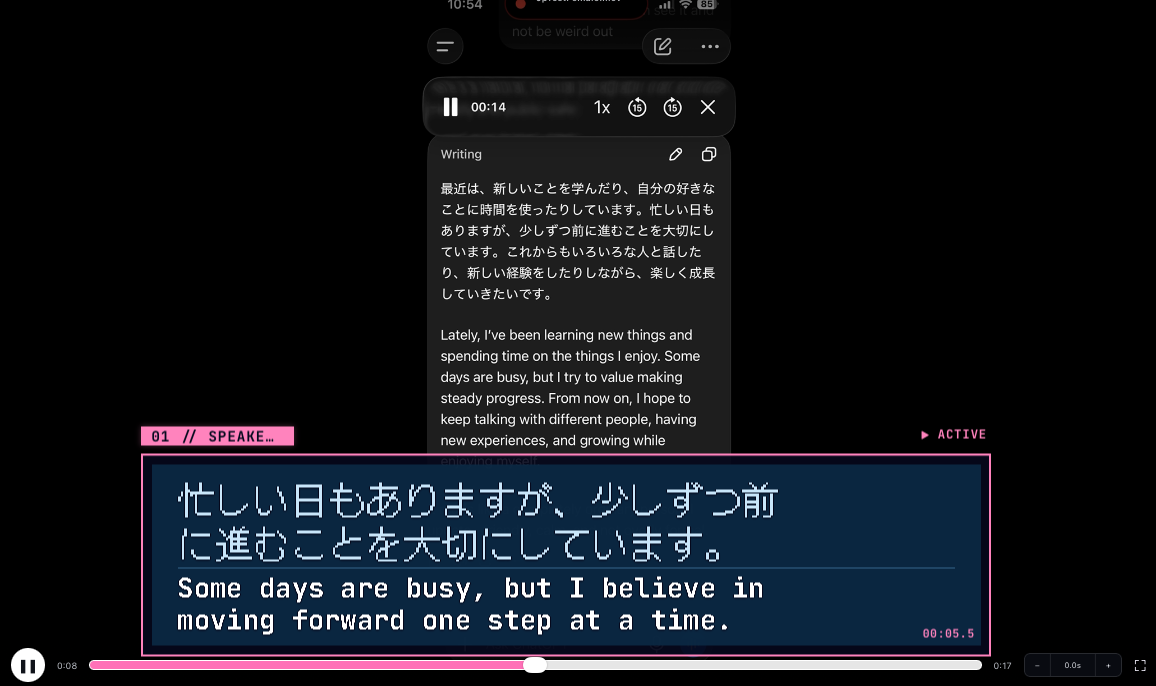
NonoSubtitles is a macOS (with windows and linux as the next implementations) than can process local videos or listen to audio from a program, such as a web browser, through Apple's native screen sharing system. It produces subtitles in the original language as well as a translation into a target language. Currently it is only tested with Japanese source to English translation, but since it uses OpenAI models for the transcriptions, translations and lessons, it will be able to support any language supported by the OpenAI models. The subtitles are displayed always on top, without a formal window so it can take up little space just like normal subtitles. The subtitles have different themes, ranging from all the classic subtitle styles to more stylized interesting subtitles depending on the user's preferences. Every finalized subtitle can be clicked to bring up an AI teacher where you can ask any question about the subtitles. There are presets for "Break this sentence down" and "Explain the cultural significance" to gain a better understanding based on the users needs. The lesson has options for beginner, intermediate and advanced.
How we built it
Codex and ChatGPT were used for 90-95% of development including planning, creating the specs, technical implementation, code, subtitle styles via lunacy, chalkboard 3d set created via blender, Nono's teacher outfit and help of design of all the workflows of agents called, subtitles and lessons. The stack uses Tauri with Svelte and Rust. I prefer this stack since it typically uses low RAM and can be used in Linux, Windows and Mac. I chose Mac as my target for this hackathon. I was responsible for product direction, features, visual design and figuring how each piece would work together. All animations and 3d models were refined by me as well. I already has Nono's, the teacher mascot, base 3d model before the hackathon since it is the mascot I use across many of my applications. The NonoSubtitles app, teaching system, subtitle pipeline, animations, integration and infrastructure were all created inside of the hackathon window. Claude Fable and Moonshot Kimi were also used as occasional reviewers and orchestrators using chatgpt-5.6-sol as subagents, when ChatGPT/Codex had troubles identifying bugs alone. They were also used for help with animation integration into three.js.
Technical Pipeline
For local video, NonoSubtitles extracts audio from video files, then sends it to OpenAi's models via API. gpt-4o-transcribe-diarize model is used in local videos since it is able to seperate speech from four different speakers allowing subtitles to be labeled by who is saying the lines as well as timestamps for the transcription. For source only subtitles, only gpt-realtime-whisper is used, for speed and cost since the other features of gpt-4o-transcribe-diarize are less required for native speakers. For translations, both gpt-5.6-terra and gpt-realtime-translate are options for use. Both have positives and negatives. gpt-5.6-terra takes the source transcription and translates often being slower but accurate to the source text. gpt-realtime-translate is quick and great but can only process audio so when it returns source + translation, a techincal limitation is these may differ. For example I once saw Japanese showing twelve and English showing eleven. gpt-5.6-sol is used for lesson creation because it has the highest success rate for correct formatting and choosing correct animations to go with the lessons.
Why It Matters
Language barriers are still prevalent online. The most common language is English which is alienating to non speakers. For me I am learning Japanese, but can't fully understand every conversation. The internet brings interest into foreign films, videos, livestreams, educational content, but subtitles can be missing, inaccurate or unavailable in one's native language. A boon of NonoSubtitles is that education is optional. It can be used for source language transcriptions, translations alone or learning. That makes it versatile and easy to enter.
Why Nono?
I included Nono because I wanted the app to feel more lighthearted, fun and personable instead of a utility only app which can scare off users. Nono is a mascot I use for all of my apps I am making. Her name comes from my mission statement. "No tracking. No ads. No subscriptions. No accounts. No anti-consumer behavior." the only one that can change is accounts since NonoSubtitles would be a pay as you go and needs a way to pay or track. But I read No... No... No... and thought, aww Nono is cute! I prefer apps with lots of expressiveness and personality. This is off-putting to some users, but my target audience is those who share that feeling with me!
Challenges we ran into
The biggest challenge I had was agentic testing not working because of Mac's Keychain. Since the API keys were stored this way, the agents had no way of inputting my password and accepting. While I worked or cared for my mother, I could not have the agent check for issues autonomously. Next would be my windows computer broke during a lightning storm which are common in Tennessee. I had planned to port NonoSubtitles to Windows, as well as do animation work on this desktop but was unable to. I could only build for Mac with no way of testing windows and use the Mac for animations in blender only.
Accomplishments that we're proud of
Accomplishments I am proud of is the speed of the subtitles in both languages with an average of 1.7 second delay. For livestreams this is fast enough to keep up with the chat which I've been testing and having a lot of fun with! Second is the AI teacher simulation. Having it display a lesson and be able to point to and underline words/concepts at appropriate times almost feels like magic.
What we learned
I learned how to use Github! I usually use a local git on my home server. I learned about licensing for apps and software. I learned about animation and how to apply it to three.js I learned about MacOS keychain to store API keys for security, rather than keeping it in a file in app.
What's next for NonoSubtitles
Next for NonoSubtitles will be to bug fix first and foremost. With only a week to work and a busy schedule I was not able to fix or figure out every bug. The biggest one is source language sentences being split up in the subtitle window, creating a jarring effect. Next would be to extensively test all of the OpenAI API models to figure the best pipeline for accuracy, speed and cost. This was done a bit, but to save time I stopped after an hour of testing. Nono's animations will be refined. This was my first attempt at animation so the character can look a tad goofy sometimes. The toon shader also needs a lot of work! Syncing animations from Nono's body and tails with the lesson, and delivering a multi step lesson is important. Since subtitles can be generated with timestamps, I would like to add the capability to add subtitles to your videos to upload online. I wanted to do this for the hackathon but found myself short on time. Lastly, it will be ported to Linux and Windows. Since it's on Tauri/Svelte/Rust, it already has functionality on these two systems, with the main connector being the audio capture needing different code and testing.

Log in or sign up for Devpost to join the conversation.