-
-
Nonna Notes
-
Architecture Diagram
Inspiration
My husband and I both grew up with Italian grandmothers who cooked without recipes. Everything was by feel, taste, and memory. We wanted to build something that brought that presence back into the kitchen: a voice that guides you, remembers what you've made, and keeps up with the chaos of actually cooking.
What it does
Nonna is a real-time AI cooking companion powered by Gemini Live API. She watches your kitchen through the camera, listens through the mic, and responds with voice. No typing, no tapping, no screen-staring. The whole experience is designed to disappear into the background of actually cooking.
She handles two modes naturally through conversation:
Follow a recipe - paste a URL, YouTube video, or photo of a handwritten recipe card and Nonna parses it into a structured, voice-ready format. For recipe URLs, she also scrapes and matches step photos from the blog post so you can see what each step should look like. She guides you through at your pace, manages timers, prompts you to show your progress through the camera, and captures step photos as you cook.
Document a recipe - cook the way your grandmother did, narrating as you go. Nonna listens and builds a structured recipe in real-time: ingredients, steps, timing. When you're done, you have a saved recipe ready to re-cook.
Everything else happens through natural conversation: set timers, ask questions, request music, check the current step. Recipes save automatically, can be edited live during a session or manually in the recipe library, and drafts can be picked back up exactly where you left off.
There's a Gordon Ramsay easter egg too. Tap the logo five times.
How we built it
Google services used:
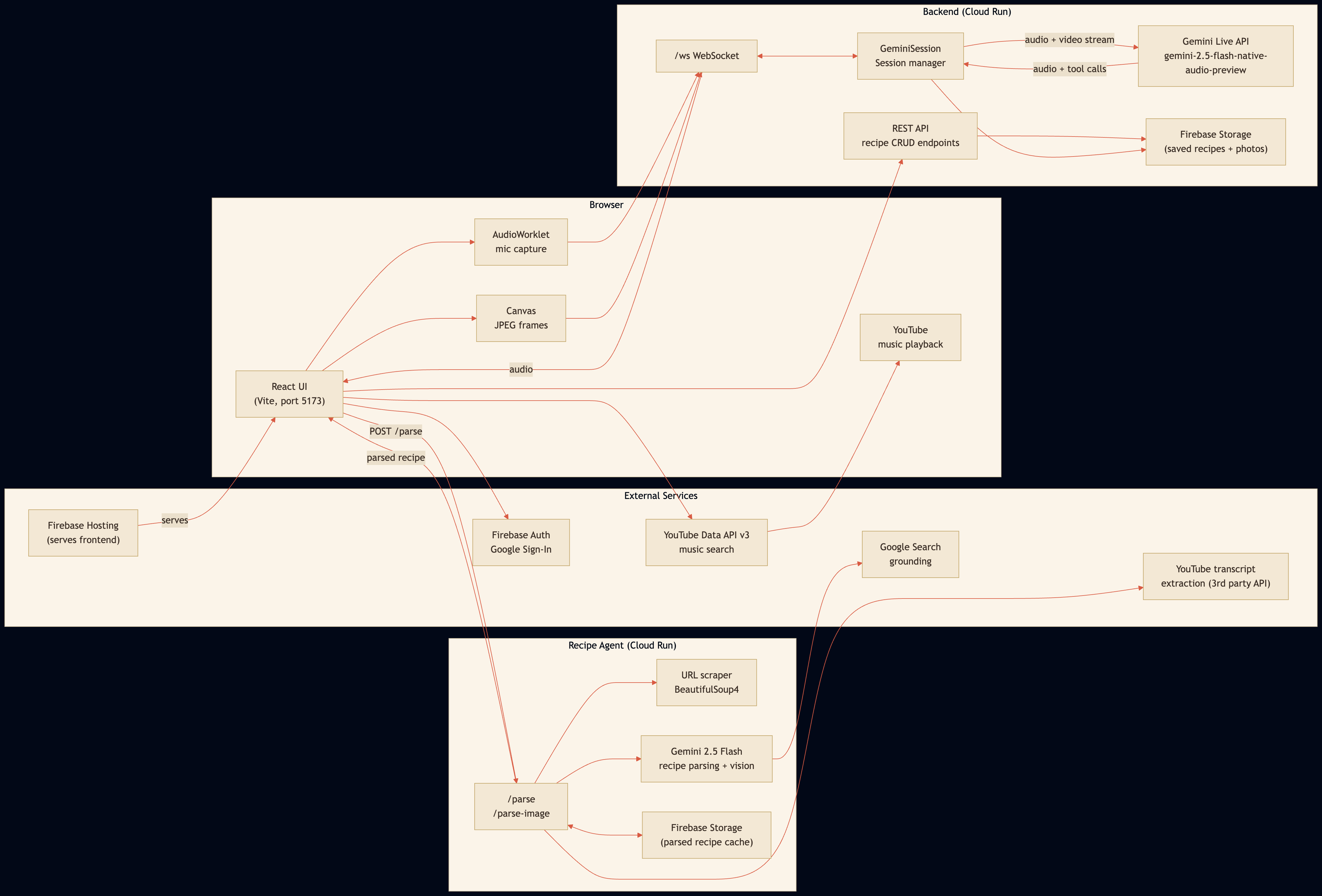
- Gemini 2.5 Flash Live API - real-time bidirectional audio and video streaming (cooking session)
- Gemini API (multimodal + Google Search grounding) - recipe parsing, vision matching, recipe generation
- Cloud Run - hosts the FastAPI backend and the recipe-agent microservice
- Firebase Hosting - serves the React frontend
- Firebase Storage - persists user recipes (with step photos) and caches parsed recipes globally by URL (24h TTL, avoids re-parsing the same recipe twice)
- Firebase Auth - Google Sign-In for user accounts (production)
- YouTube Data API v3 - music search for background playback
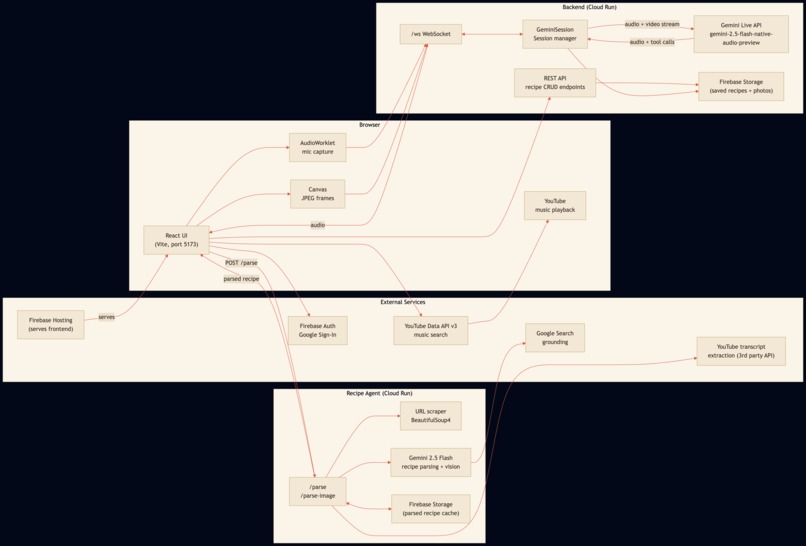
The browser captures audio via AudioWorklet and live JPEG frames via Canvas, streaming both continuously over WebSocket to the FastAPI backend on Cloud Run. The backend pipes that stream into Gemini 2.5 Flash Live API using the Google GenAI SDK - Gemini sees the kitchen, hears the cook, and responds with audio streamed back in real-time. Tool calls from Gemini (set a timer, capture a photo, mark a step complete) are translated into UI updates sent back to the browser.
A separate recipe-agent microservice on Cloud Run handles recipe parsing - scraping URLs, extracting YouTube transcripts, and processing uploaded photos using Gemini multimodal with Google Search grounding for accuracy. It also publishes an A2A-compliant agent card.
Nonna's persona lives entirely in the system prompt: the warmth, the Italian phrases, the pacing, the references to her village and wooden spoon. The same architecture powers Gordon Ramsay with a completely different personality.
Challenges we faced
- The Gemini Live API sends speech and tool calls as separate response objects in sequence, which caused Nonna to narrate a step and then narrate it again after the tool resolved. We built a speech budget state machine - a per-turn counter that allows exactly one post-tool speech turn before suppressing output, with a 6-second safety valve. This was the hardest part of the project.
- YouTube transcript extraction from Cloud Run IPs gets blocked by YouTube, so we fall back to a third-party transcript API for cloud deployments.
- The Gemini Live API also disconnects with errors unpredictably mid-session. We built a reconnect mechanism that works when only the Gemini connection drops (the browser WebSocket stays alive), but when both connections die simultaneously the backend can't send a "reconnecting" indicator to the browser. We accepted this as a known edge case.
- Nonna also occasionally goes silent or takes a few prompts to respond - with more time we'd love to make her responses feel even more seamless.
What we learned
Building on a real-time streaming API means designing state machines, not request/response handlers. Every edge case needs an explicit answer in code: what happens when the model speaks and calls a tool in the same turn, when both WebSocket connections die simultaneously, when the model goes silent mid-session. Prompt engineering for voice is also fundamentally different from text - pacing, silence, and natural turn-taking all need to be specified explicitly, not assumed.
What's next
- Step photos are currently stored as base64 strings inside recipe JSON blobs, which works at hackathon scale but won't hold up with many users. The natural next step is moving photos to dedicated blob storage (Firebase Storage objects) and referencing them by URL.
- We'd also like to add social sharing - a recipe you documented with Nonna should be easy to share with a link.
- For YouTube recipes, we'd love to extract step screenshots directly from the video at the right timestamps, but YouTube's lack of a frame extraction API makes this significantly harder than URL scraping.
- The app was built as a desktop experience (laptop or desktop browser); mobile support would be a nice future addition.


Log in or sign up for Devpost to join the conversation.