-
-
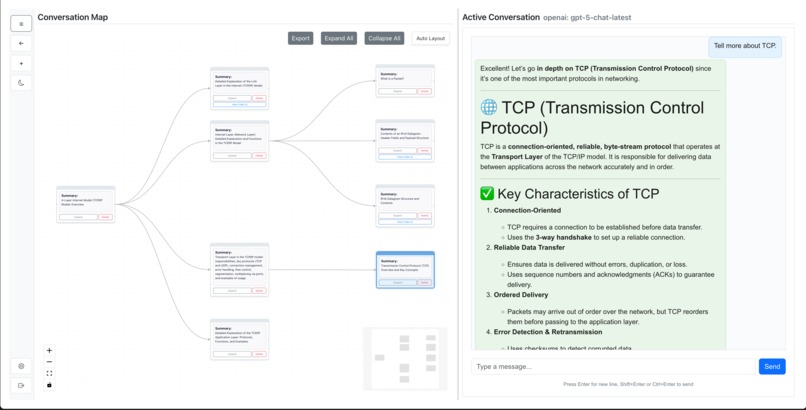
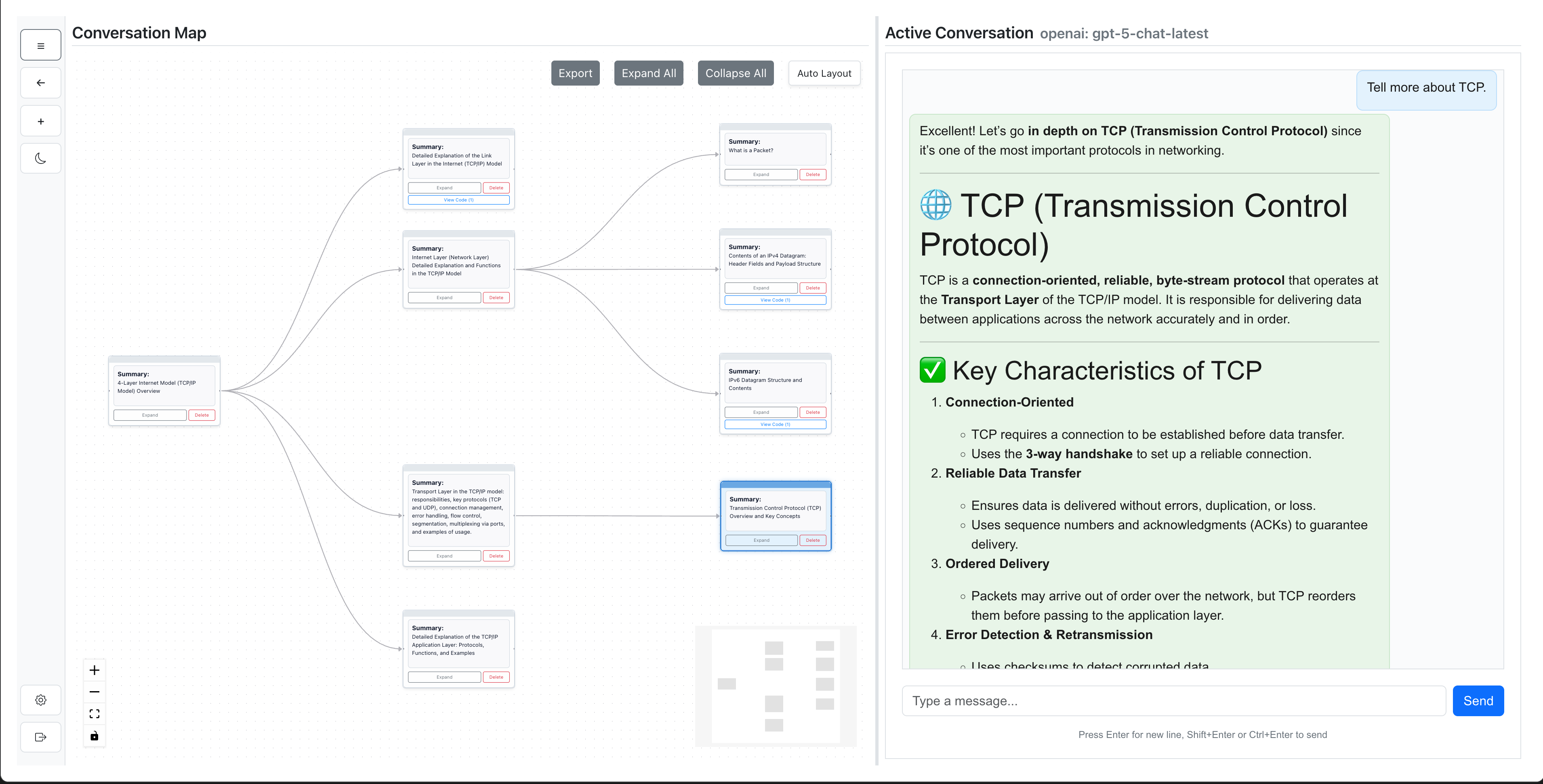
The interface combines a visual conversation map (left) with a traditional chat panel (right).
Project Story: Non-Linear Chatbot
Inspiration
The idea for Non-Linear Chatbot was born out of a simple but persistent frustration: traditional chat interfaces force conversations into a single linear thread. Whether using ChatGPT or other AI chat tools, I often found myself lost in endless scrolls, unable to easily revisit earlier discussions, explore alternative solutions, or keep my train of thought organized. Branching features—where available—were awkward or limited. As someone who often juggles multiple writing and coding tasks, I wanted something closer to a mind map for conversations, letting me fork discussions, track parallel lines of inquiry, and manage all my ideas in one place. Most important of all, I want this to be something that can be easily adapted into mainstream chatbots, like ChatGPT or Gemini, without altering too much of their interfaces. Therefore, I used half of the screen for the conversation canvas. This design allows users to enjoy the familiarity of traditional chat while seamlessly gaining the power of non-linear, visual thinking—making adoption easier for both users and future integrators.
Problems It Solves
Traditional chat interfaces force all conversations into a single, linear timeline. This causes several problems for users who want to do more than just casual Q&A:
Loss of Context: It’s easy to lose track of earlier ideas, alternate approaches, or important details as the conversation scrolls ever downward.
Difficult to Explore Alternatives: If you want to try multiple directions or explore “what if” questions, you’re forced to start new chats or lose the thread of your current conversation.
Messy Multitasking: Power users often keep dozens of chat tabs open to preserve old information, but this quickly gets out of hand—creating clutter and making useful knowledge hard to find or reuse.
Poor Information Management: Valuable discussions are buried and forgotten as new messages arrive. There’s no intuitive way to organize, revisit, or summarize branches of thought.
Limited Visual Feedback: Linear text history doesn’t reveal the structure of your ideas or allow you to see how your thinking branched over time.
Non-Linear Chatbot addresses all these issues by letting you:
- Fork and Branch at any point, creating parallel conversations without losing context.
- Visualize your entire dialogue as a node graph, scroll back by simply clicking a node, making navigation and memory easier.
- Organize discussions as a mind map, so you can revisit, compare, and summarize ideas efficiently.
- Export complex conversations for sharing or offline use.
- Reduce Tab Clutter by keeping everything in one flexible workspace.
What I Learned
Building this project taught me a ton—both technically and in terms of product design:
- System Design for Scalability: Architecting a conversation as a tree structure, with each message pair as a node, required rethinking how state, storage, and traversal work in a real-world app.
- Full-Stack Engineering: I learned to leverage the Wasp full-stack framework, React 18, ReactFlow for visualization, Node.js 22, and PostgreSQL, combining modern web tech with robust backend logic.
- Multi-Provider AI Integration: Designing a unified API abstraction for OpenAI, Gemini, HuggingFace, and even local models (like Ollama) taught me a lot about API design, error normalization, and streaming data (NDJSON).
- UI/UX for Information Management: I learned how much difference features like “Expand All/Collapse All,” path highlighting, and drag-and-drop make for real productivity and mental clarity.
How I Built It
- Backend & Infrastructure: The backend is built using Wasp and Node.js, with a PostgreSQL database to persist conversation trees. API keys and provider configs are managed securely via environment variables. I designed the system to support both cloud and local AI providers—making it easy to test with local models (Docker/Ollama) or scale to production with cloud APIs.
- Frontend: The UI is a modern, responsive app powered by React and ReactFlow. Every message branch is a draggable node in a tree. You can fork, explore, and visualize conversations in real time. I focused on clean UX, supporting light/dark themes, resizable panels, and a zero-flicker experience.
- AI Integration: Built a unified “provider factory” supporting multiple AI services with OpenAI-compatible APIs, including robust error handling and real-time streaming via NDJSON. Added queue-based streaming to prevent data loss, plus flexible settings for provider/model selection.
- Export & Sharing: Implemented the ability to export entire conversation trees as interactive, offline HTML files—making it easy to share or revisit complex discussions.
- DevOps & Deployment: The project is fully containerized (Docker), with GitHub Actions for CI/CD, supporting both Heroku (backend) and Netlify (frontend) deployments.
Challenges Faced
- Tree-Structured Data Management: Storing, updating, and visualizing conversation trees is much more complex than linear chat logs. Ensuring fast performance and correct state updates as trees grow took careful design and testing.
- Real-Time Streaming Across Providers: Each AI provider implements streaming differently (or not at all). Normalizing their responses, handling errors gracefully, and supporting real-time UI updates was a major challenge.
- Balancing Power and Usability: With great flexibility comes the risk of overwhelming users. I iterated a lot on the UI/UX to keep things intuitive—e.g., visual cues for active threads, easy branch navigation, and smart defaults.
- Limited Time for Polish: As a solo developer juggling studies, research, and other projects, I had to prioritize core features over endless refinements. There are still many improvements planned, such as node deletion for tidier trees and better collaboration features.
Outcome & What’s Next
Non-Linear Chatbot is now open source and deployed online—with support for GPT-OSS, GPT-5 and other models! I hope it inspires others who feel limited by traditional chat tools. Ultimately, this project is about making conversations as flexible as our thinking—and helping everyone get more value from their AI interactions.

Log in or sign up for Devpost to join the conversation.