-
-
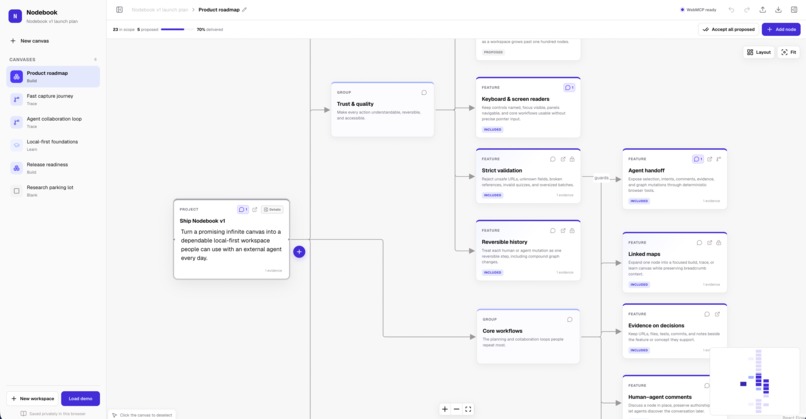
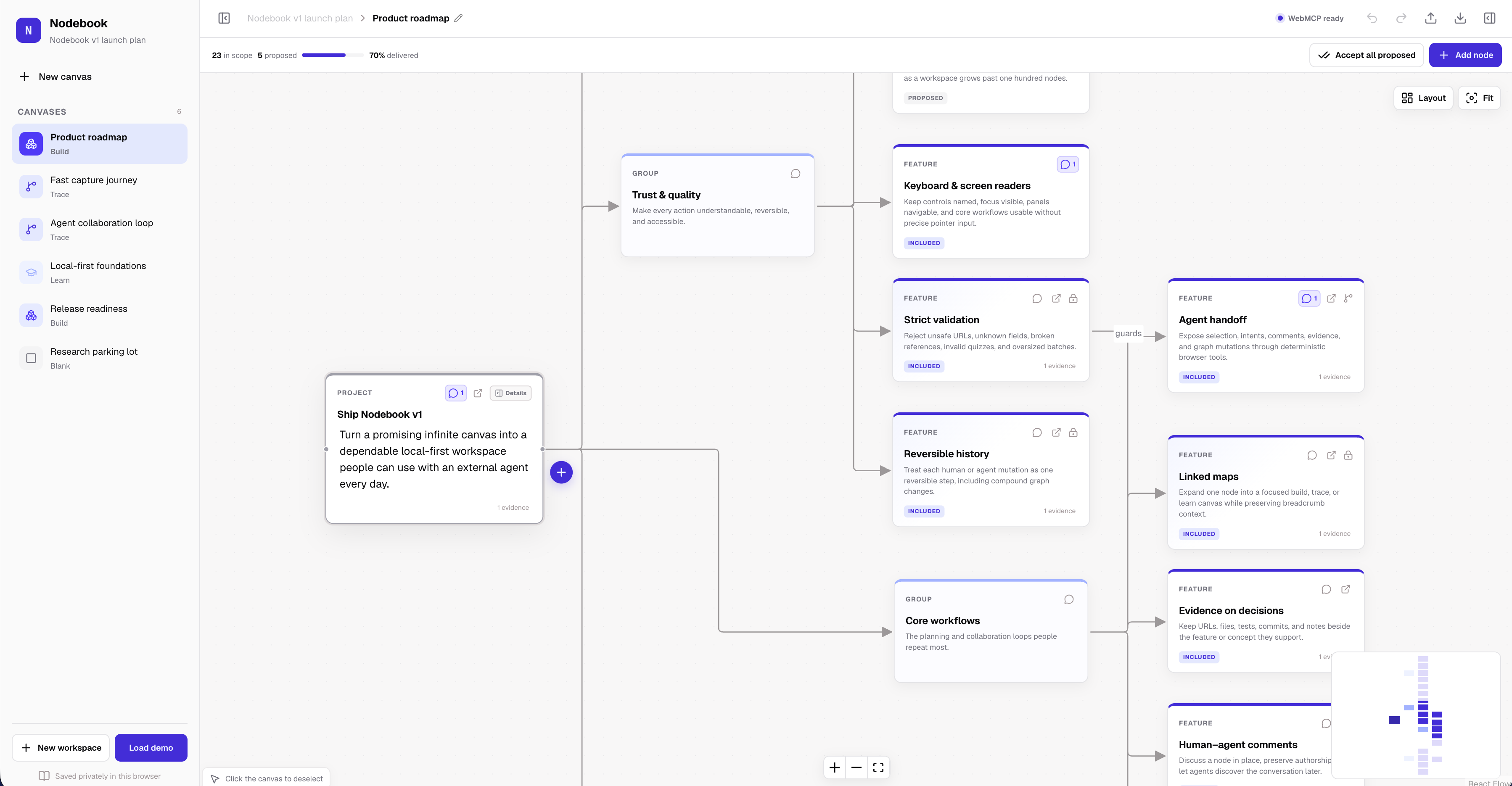
A product roadmap where scope, progress, evidence, and agent-created relationships stay visible on one connected canvas.
-
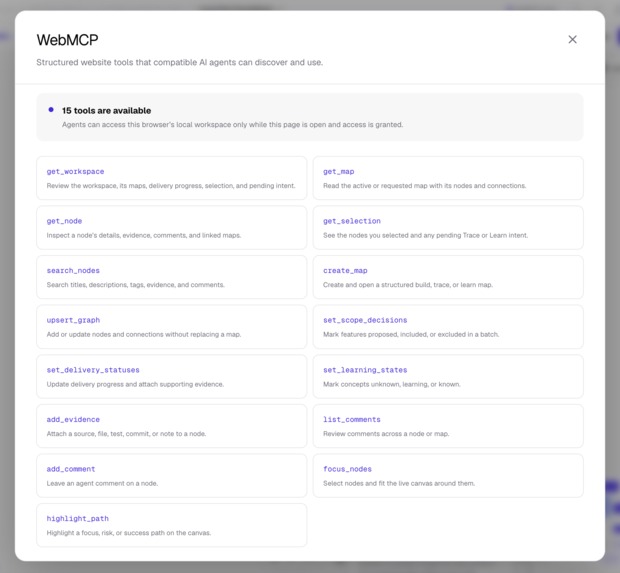
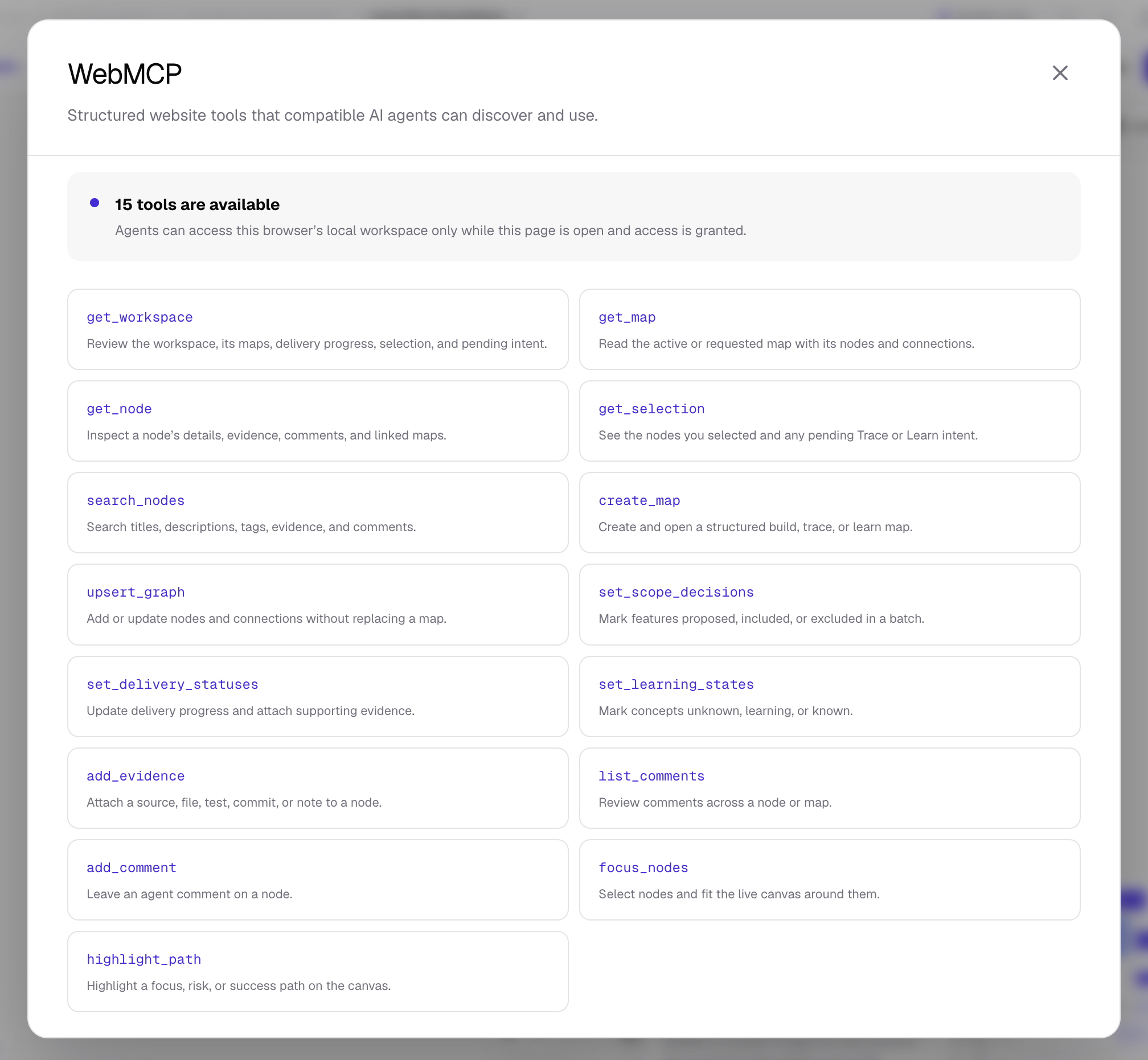
Nodebook exposes 15 WebMCP tools for reading context, creating maps, updating plans, adding evidence, and focusing important paths.
-
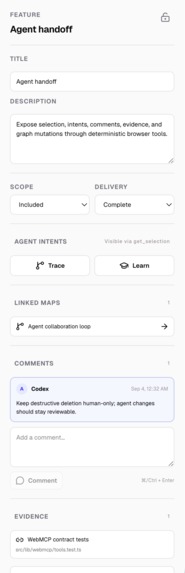
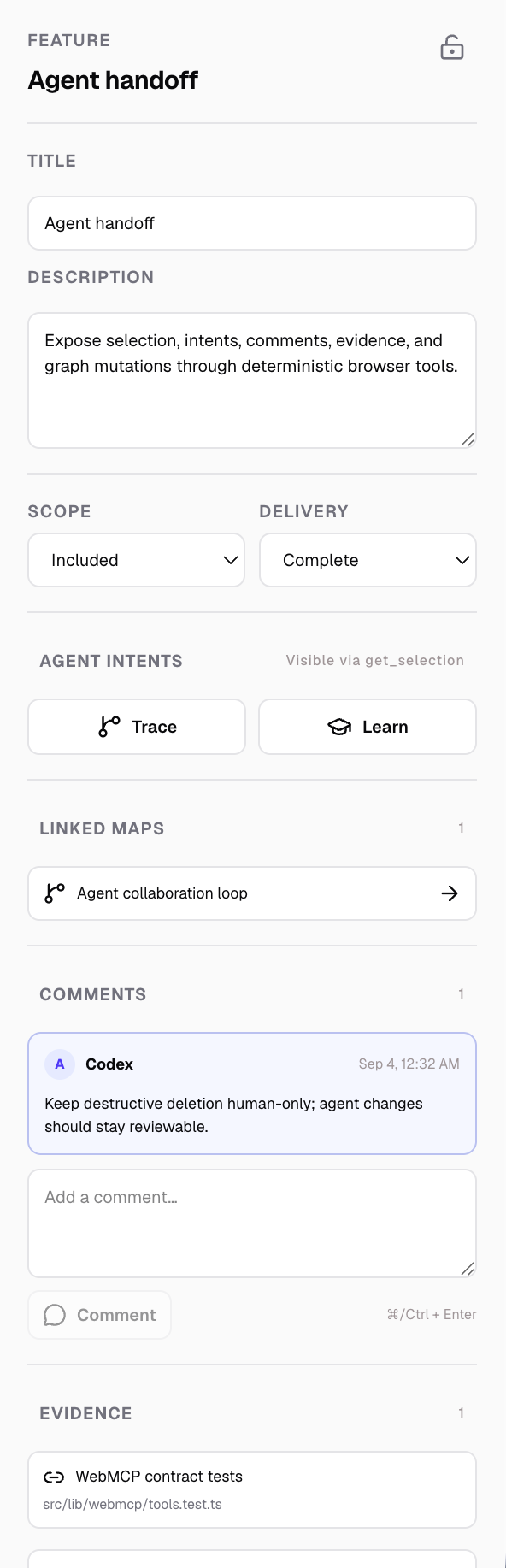
The inspector makes agent work reviewable with linked maps, named comments, evidence, delivery status, and human-controlled locks.
-
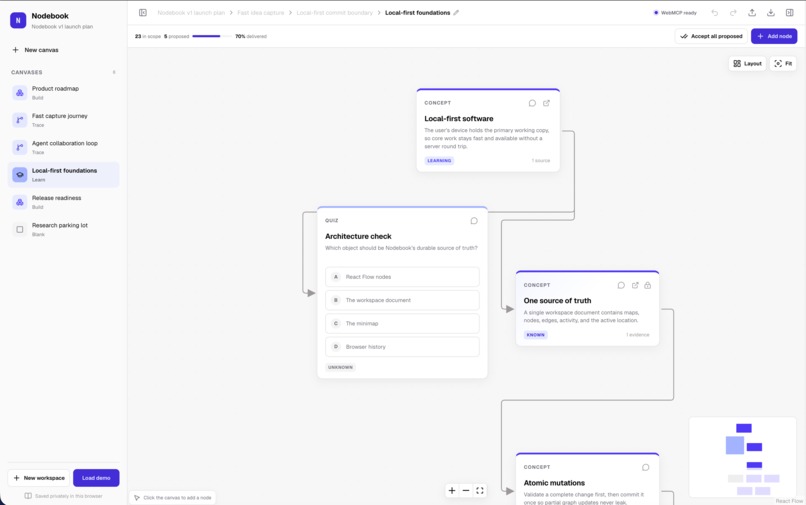
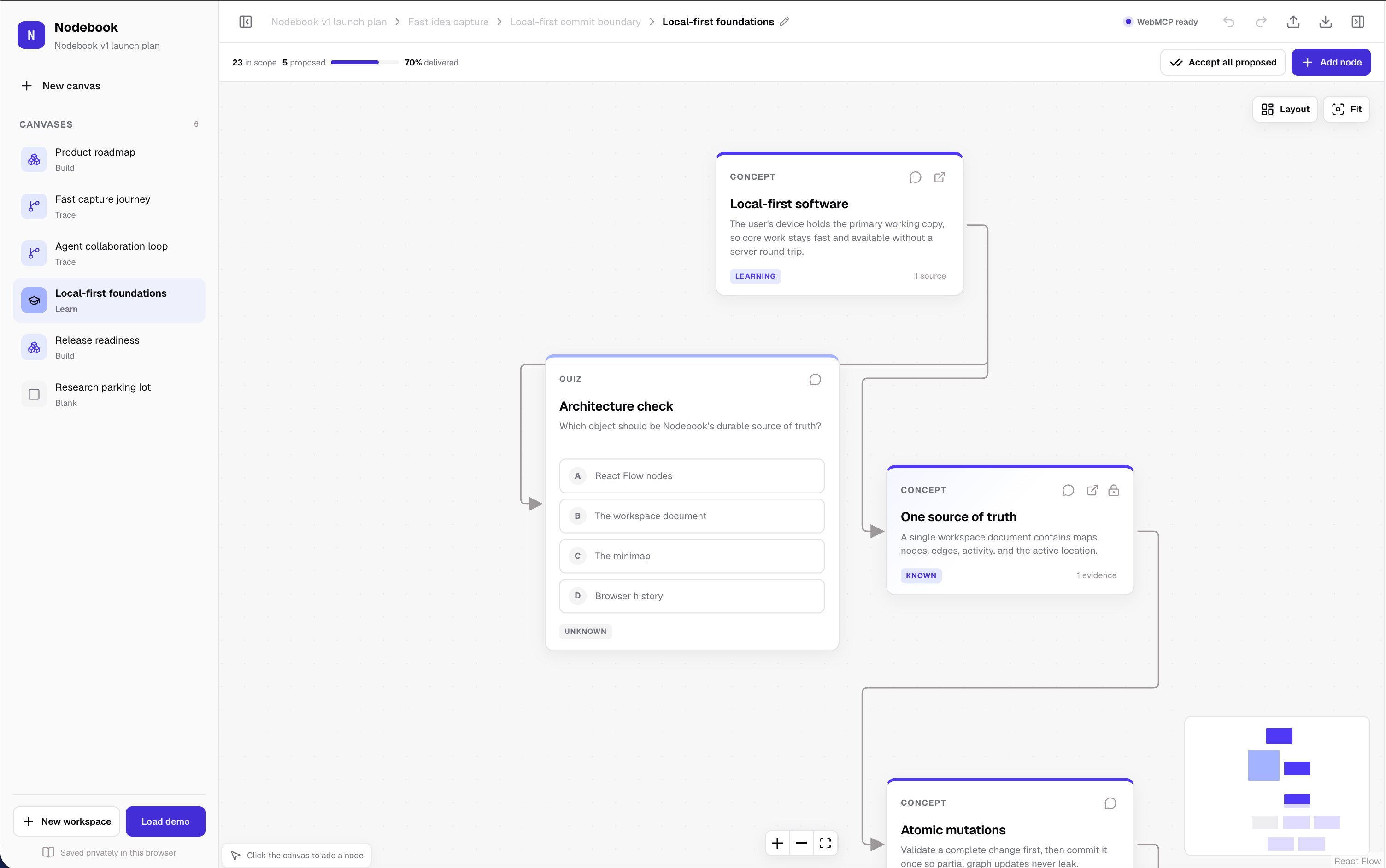
A learning map connects concepts, evidence, exercises, and an interactive quiz so people and AI can build understanding together.
Inspiration
AI assistants can help plan a product, research an idea, or explain a difficult concept. But their best work often ends up buried inside a chat. The person then has to copy the result into a document, rebuild the relationships, and explain the same context again in the next conversation.
I built Nodebook to give people and AI assistants a shared visual workspace. The person chooses the direction, while the assistant helps organize the work directly on the canvas.
What Nodebook does
Nodebook is an infinite visual canvas for planning, tracing, and learning.
A workspace can contain three kinds of connected maps:
- Build maps for features, scope, progress, risks, and evidence
- Trace maps for user journeys, system flows, and failure paths
- Learn maps for concepts, examples, exercises, and quizzes
People can create and edit nodes, decide what is in scope, track delivery, attach evidence, leave comments, and lock important decisions.
An AI assistant can read the same workspace through WebMCP. It can understand which node the person selected, create connected maps, update plans, add evidence and comments, and highlight important paths.
For example, a person can select “Crash-safe recovery,” click “Trace,” and ask the assistant to map the recovery process. The assistant can read that selection, create the complete flow, connect it to the original feature, highlight the riskiest path, and leave an explanation, all without the person copying the project into the prompt.
Why WebMCP is a strong fit
Nodebook is useful because the person and the assistant work with the same information.
Without WebMCP, an assistant would need to interpret screenshots, click through the interface, or ask the person to repeatedly copy information into a chat. Those approaches are slow and can lose important details.
With WebMCP, Nodebook gives the assistant clear actions for reading and changing the workspace. The assistant receives the exact nodes, relationships, comments, evidence, and selected task. Its changes then appear immediately on the canvas, where the person can inspect and edit them.
This creates a better experience than an embedded chatbot. The conversation is not the final product. The shared, lasting workspace is.
How I implemented WebMCP
Nodebook registers 15 browser tools with document.modelContext.registerTool().
These tools allow an assistant to:
- Read the workspace, maps, nodes, comments, and human selection
- Search across titles, descriptions, tags, evidence, and comments
- Create linked Build, Trace, and Learn maps
- Add or update nodes and connections
- Make scope and delivery updates
- Attach evidence and attributed comments
- Focus nodes and highlight important paths
Every request is checked before it changes the workspace. Invalid links, missing nodes, duplicate IDs, unsafe source URLs, oversized requests, and broken connections are rejected.
Each successful assistant action is applied as one undoable change. Locked nodes are skipped, and assistants are not given a tool that permanently deletes nodes. This keeps important decisions under human control.
How it was built
Nodebook is built with Next.js, React, TypeScript, and React Flow. Dagre arranges assistant-created maps into a predictable layout. Zustand manages the workspace, while Zod checks tool requests and imported files.
The workspace is saved in the browser using IndexedDB. There are no accounts, API routes, analytics, cloud database, or Nodebook storage server. People can export the complete workspace as JSON and import it again later.
The included demo contains a product roadmap, user journeys, a learning map, release checks, evidence, comments, locked decisions, and a research parking lot.
Challenges
The hardest part was making assistant actions feel like real product actions instead of hidden changes.
I needed to make sure that a large graph update either succeeded completely or changed nothing. I also had to keep the visible canvas, undo history, browser storage, and WebMCP responses in agreement.
Another challenge was balancing useful assistant access with human control. Nodebook solves this with strict validation, visible activity, attributed comments, undo support, locked nodes, and human-only deletion.
Accomplishments
I am proud that Nodebook is a complete working application rather than only a WebMCP experiment.
It includes:
- 15 working WebMCP tools
- A detailed, editable demo workspace
- Linked maps with breadcrumbs
- Evidence and human-assistant comments
- Scope, progress, and learning states
- Path highlighting and automatic layout
- Undo and redo for assistant changes
- Local browser persistence
- Safe JSON import and export
- Automated unit and browser tests
What I learned
I learned that good human-AI collaboration needs more than a prompt box.
The assistant needs clear actions and reliable context. The person needs to see what changed, understand why it changed, and remain able to edit, lock, or undo the result.
WebMCP makes that possible using the website’s real data and actions.
What’s next
Next, I would improve keyboard navigation, test larger workspaces, add more starter templates, and make recovery guidance even clearer.
I would also explore shareable, read-only workspace snapshots while keeping Nodebook’s main promise: the person owns the workspace and stays in control.
Built With
- codex
- css
- dagre
- flow
- indexeddb
- next.js
- openai
- playwright
- react
- tailwind
- typescript
- vercel
- vitest
- webmcp
- zod
- zustand

Log in or sign up for Devpost to join the conversation.