-
-
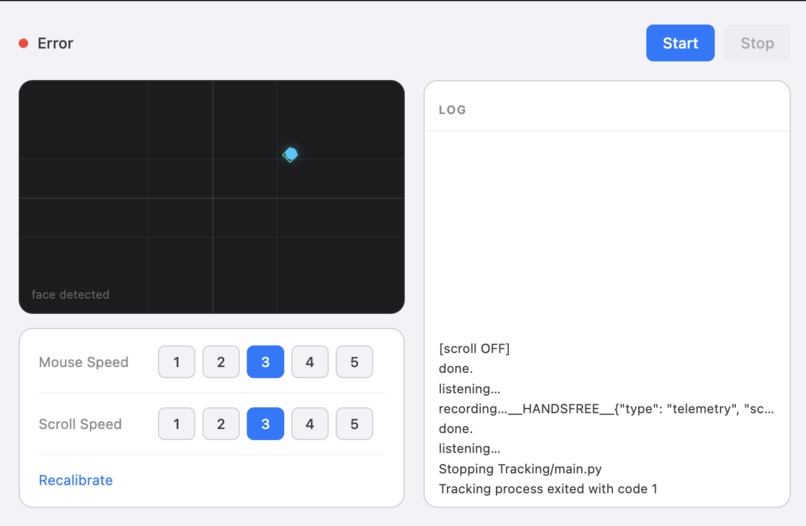
User Interface
Inspiration
For many people with motor impairments, repetitive strain, temporary injury, or just moments when their hands are busy, the mouse-and-keyboard model creates constant friction. We wanted to build something that's lightweight and easy to use for people. This system where users can control using head gesture and voice to control a computer efficiently and without any hands, bringing computer access to all in an age where the world revolves around technology.
What it does
Node is a hands-free desktop control app. It lets a user:
- Move the cursor with head tracking
- Click with double blinks
- Toggle scrolling with blink gestures and voice commands
- Use voice input to trigger actions and interact with the system
- Run everything from a desktop app instead of separate scripts and terminals
- The idea is to turn natural signals into usable desktop control with as little friction as possible.
How we built it
We built Node as a hybrid desktop system with an Electron frontend and a Python tracking backend.
The desktop UI was built to manage the experience from one place, while the tracking engine handles computer-vision and input control in real time. MediaPipe is used to estimate head pose and facial landmarks, OpenCV processes the webcam feed, and custom logic maps yaw, pitch, and eye aspect ratio into cursor movement and click gestures.
On the voice side, the app listens for a wake phrase, transcribes speech, and routes commands through an LLM-based Model Context Protocol (MCP) architecture flow. The LLM is able to convert natural language to function calls that allow your laptop to complete tasks from opening apps/tabs, searching websites, and even performing common key binds. Through MCP, these commands can be chained to allow for complex computer actions.
Challenges we ran into
One challenge was making head tracking feel precise enough to be useful. Human motion is difficult to track and webcam input is imperfect. We had to tune smoothing and calibration carefully so the system felt responsive and reasonable to use. Eventually, we were able to create a system that was very accurate and allowed for more fluid operation.
Accomplishments that we're proud of
We are proud that we were able to design and implement an app that takes in diverse inputs such as head movement, eye state, and voice commands. Furthermore, we are happy with how we were able to calibrate the system as well as we did.
What we learned
We learned how to combine APIs from a variety of services such as Gemini, for LLM reasoning, and ElevenLabs, for speech-to-text. Additionally, we also learned how to create desktop apps using Electron. This experience was invaluable to our skills development.
What's next for Node
- More MCP functons
- Ability to rebind keystrokes (e.g. change from double blink to head nod for click)
- Packaging and cross compatibility
- Ability to autofill details (ex. credit card details, emails, etc)


Log in or sign up for Devpost to join the conversation.