Inspiration
Nmap is a very useful tool, but for those who are new to cybersecurity, its results can be hard to interpret.
Nmap sometimes displays open ports, services, and technical information, but if you don’t understand what they mean, it’s hard to know if the information is important or not. That’s why I wanted to create a tool that simplifies reading Nmap results for beginners.
Features
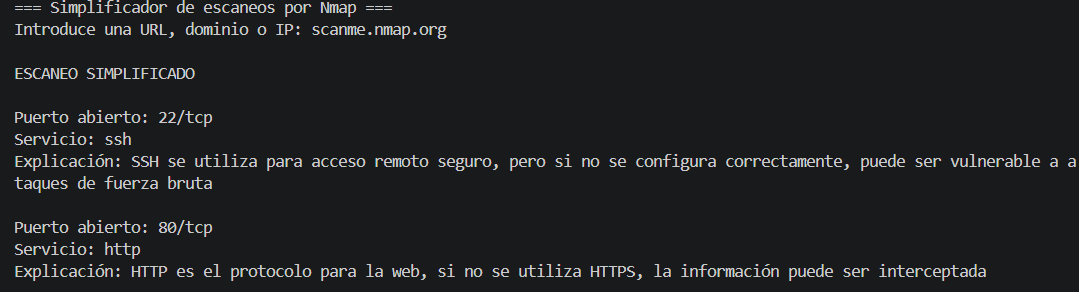
Nmap Simplifier allows the user to enter a target, such as an IP address or URL, and launches a basic Nmap scan.
Then, the program processes the results and generates a simplified report. It shows the open ports, the detected services and a brief explanation of the typical use of each port.
For example, instead of just showing “[22/tcp open ssh],” the tool explains that SSH is used for remote access and that its use can be risky if not configured correctly.
Development
I developed this project using Python and Nmap.
The code is spread across several files for ease of understanding and improvement:
main.py executes the main program.
scanner.py performs Nmap parsing.
report.py generates the simplified report.
Challenges Encountered
One of the main challenges was figuring out how to use Python’s Nmap results. Nmap provides a wealth of information; therefore, I had to determine what was useful to a beginner and what could be ignored for the time being.
Another challenge was explaining technical concepts in a simple and clear way. I wanted the report to be easy to read while remaining relevant from a cybersecurity perspective.
The organization of the code was also crucial, as I didn’t want to put everything in a single file.
Accomplishments We Are Proud Of
I am proud that this project works and solves a real problem for beginners, particularly by explaining the role of each port. This is something I myself didn’t understand when I first became interested in cybersecurity.
It’s still not a very complex tool, but it simplifies the technical concepts and makes them more accessible. I also appreciate the organization of the project into separate files: this makes it clearer and easier to develop.
What We Learned
Through this project, I deepened my understanding of how Nmap works and how to automate network analysis with Python. I’m sure this will be very helpful for my future projects. In addition, I improved my Python skills, which is very important to me.
Next Steps for Nmap Simplifier
The next step is to add more ports and more detailed explanations to the report.
I would also like to add risk levels so the tool can indicate whether a service presents low, medium or high risk. Another idea would be to export the report as a PDF or HTML file to make it easier to share. But for that, I still need to improve my Python skills.
Built With
- nmap
- python

Log in or sign up for Devpost to join the conversation.