Inspiration
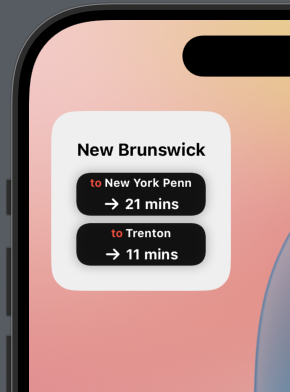
All of us use NJ Transit regularly, with some of us using it daily. Often, we find ourselves checking the NJ Transit app for the timings of the next train so we know exactly when we have to leave to walk towards the station. However, it takes 7 clicks after opening the app to see the timing of the next train. This can be slightly irritating for someone who uses NJ Transit regularly, so we wanted to build a convenient widget to quickly view the timing of the next train in just a glance.
What it does
Using the location of the user, we find the nearest NJ Transit train station and show the next train timings for the Eastbound and Westbound trains. This will be displayed as a widget on the users phone, allowing them to quickly glance at the widget and see the next train times instead of opening the app and clicking 7 times to find out the same information.
How we built it
We built our project on the iOS Xcode IDE, using Swift and SwiftUI. We utilized NJ Transit API to find out the timings of the next trains, and NJ Transit Rail Data Sets for the exact locations of the train stations. Libraries we used in Swift include: CoreLocation to find out the users location, Foundation, and WidgetKit so we could format our widget and use it on a phone.
Challenges we ran into
We had some difficulty setting up Xcode and Swift. We ran into challenges with location, which we solved using CoreLocation, and api integration.
Accomplishments that we're proud of
Getting the users closest NJ Transit stop given the location.
What's next for NJ Transit Train Times Widget
We plan to branch this project from iOS android os with the android development studio. This way, everybody can have access to our widget regardless of their os.


Log in or sign up for Devpost to join the conversation.