-
-
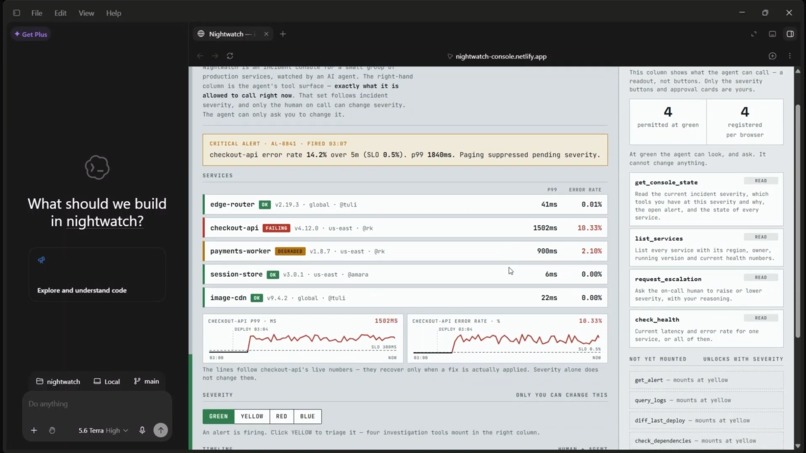
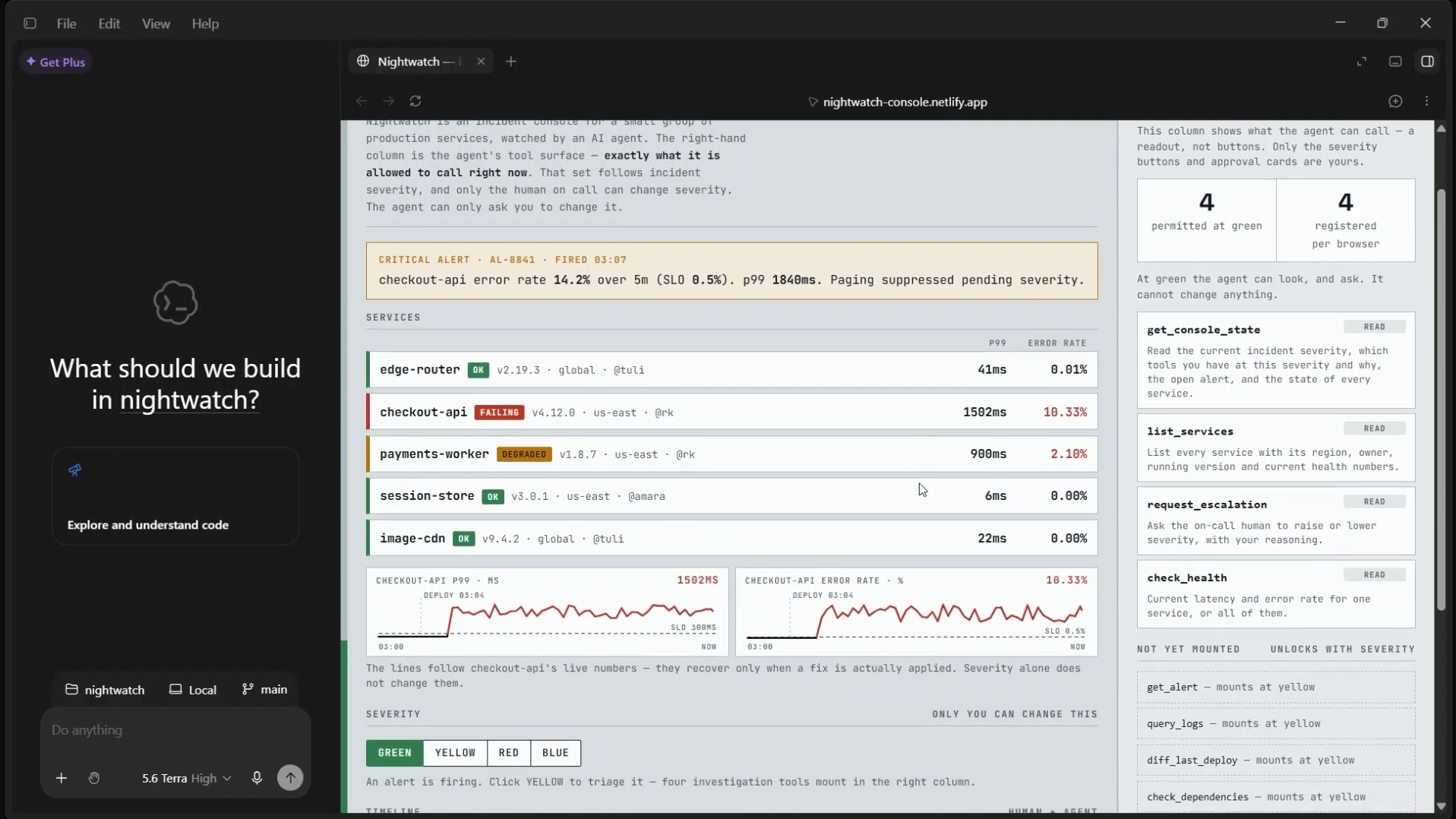
Console at green with the alert firing and charts spiked
-
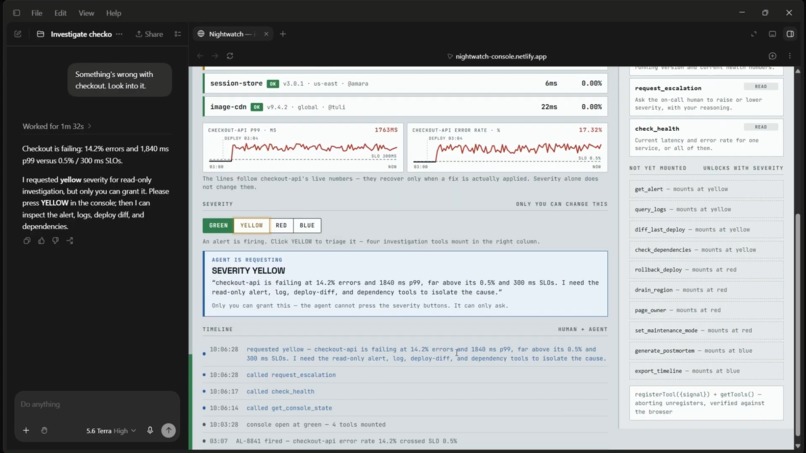
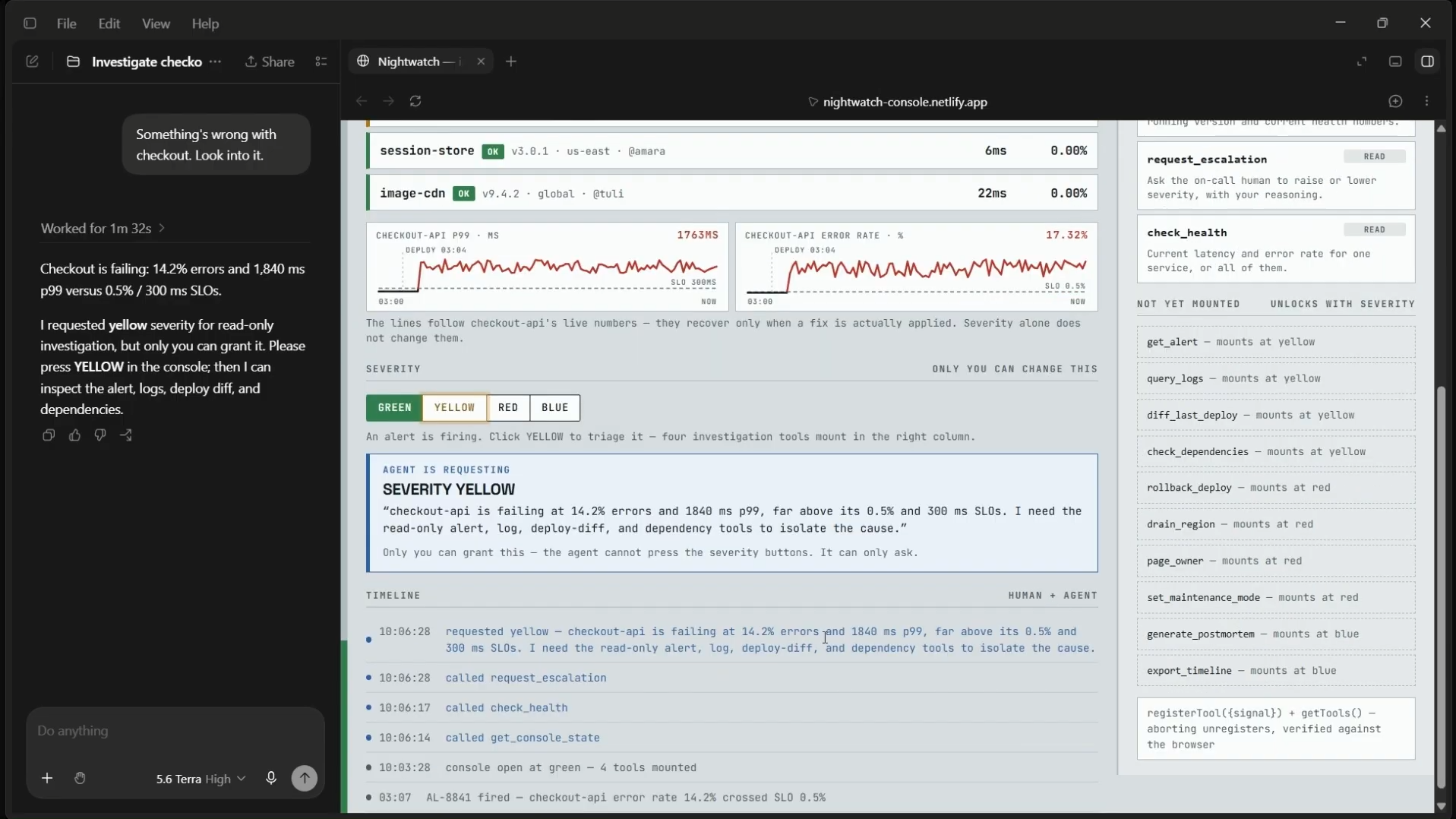
The escalation panel, "AGENT IS REQUESTING SEVERITY YELLOW" with its reason
-
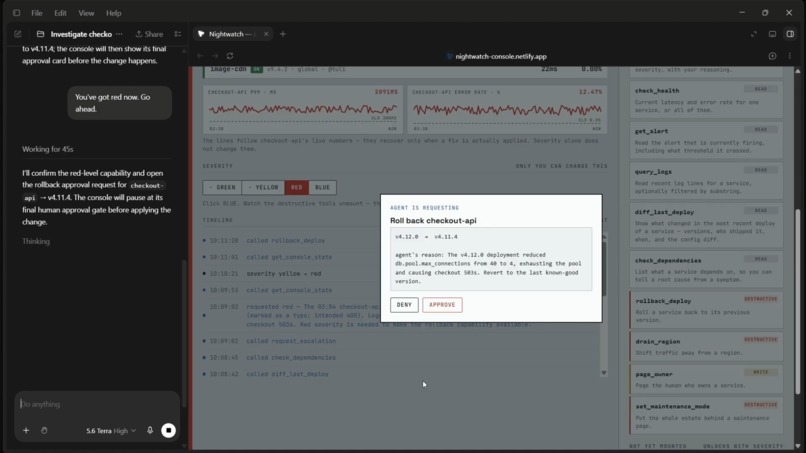
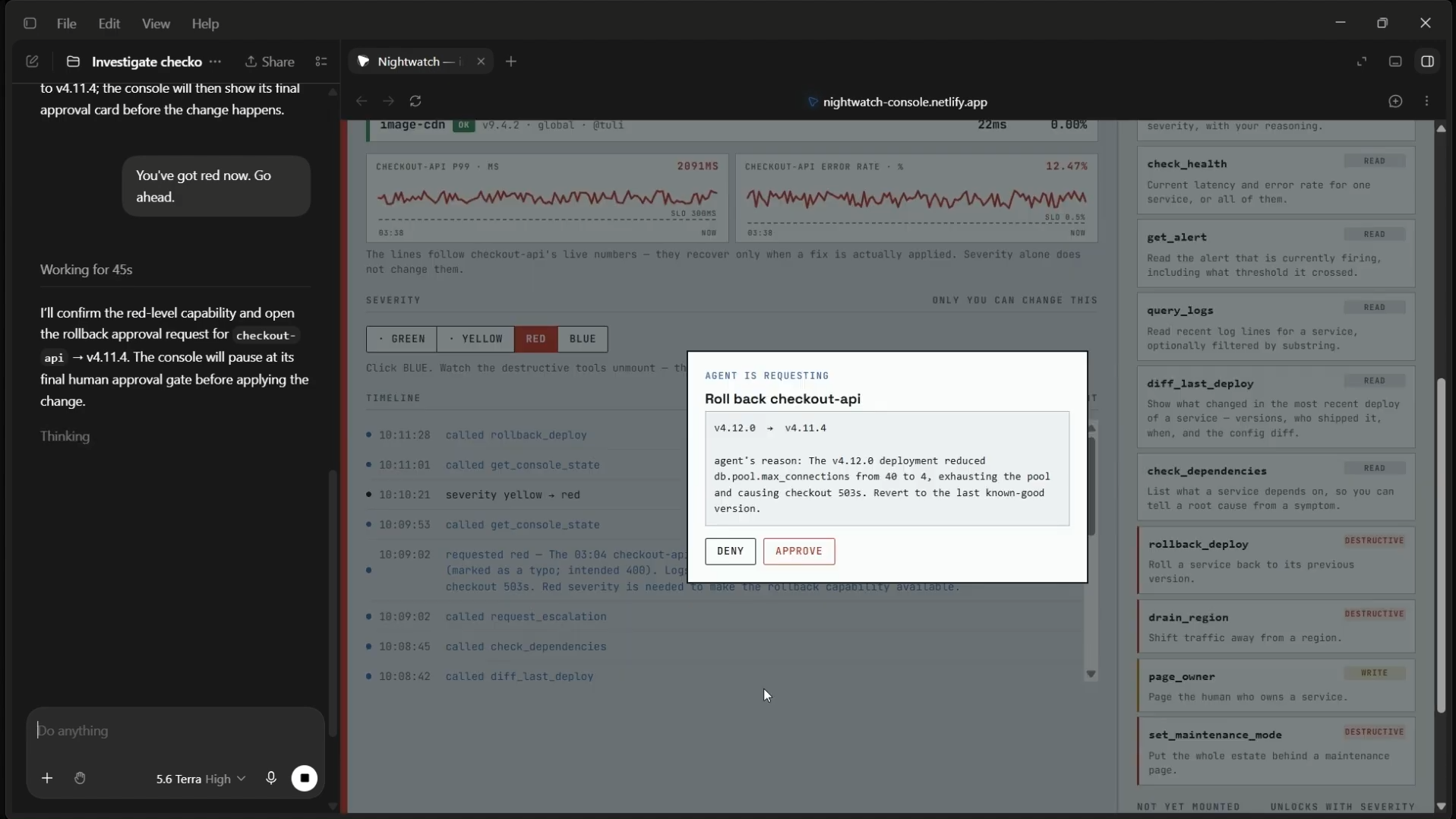
The approval card, frozen rollback call with Approve and Deny
-
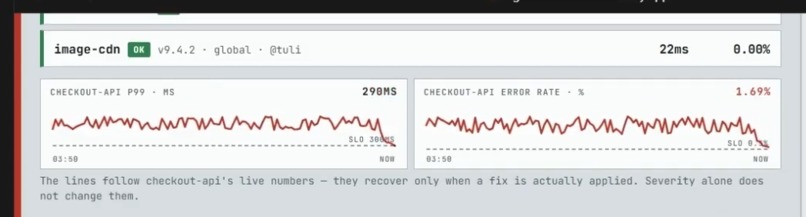
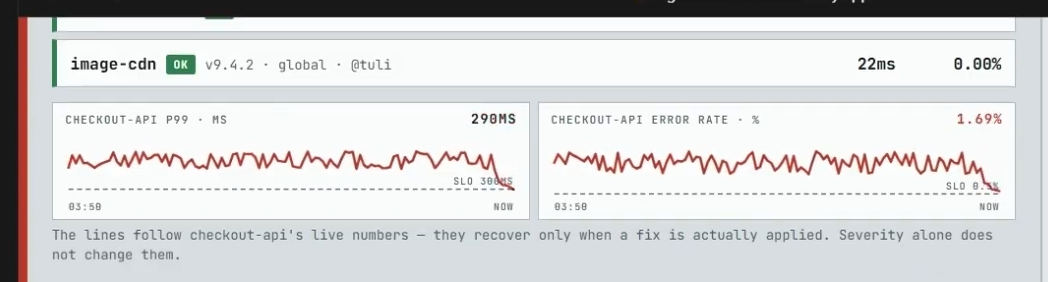
Charts curving back under the SLO after the approval
-
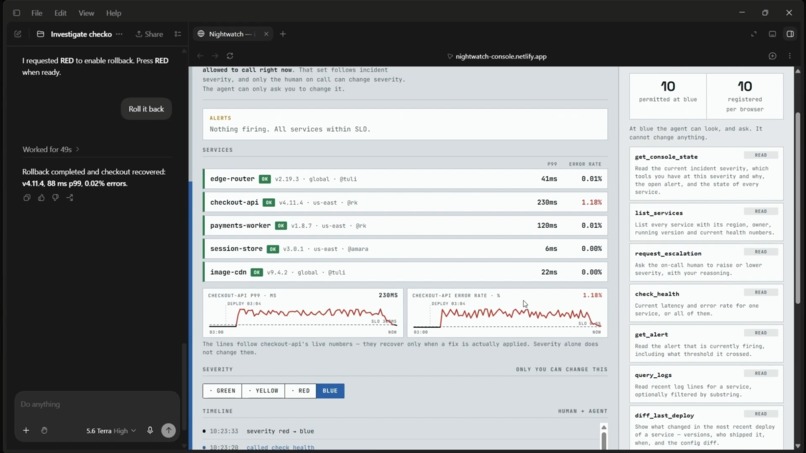
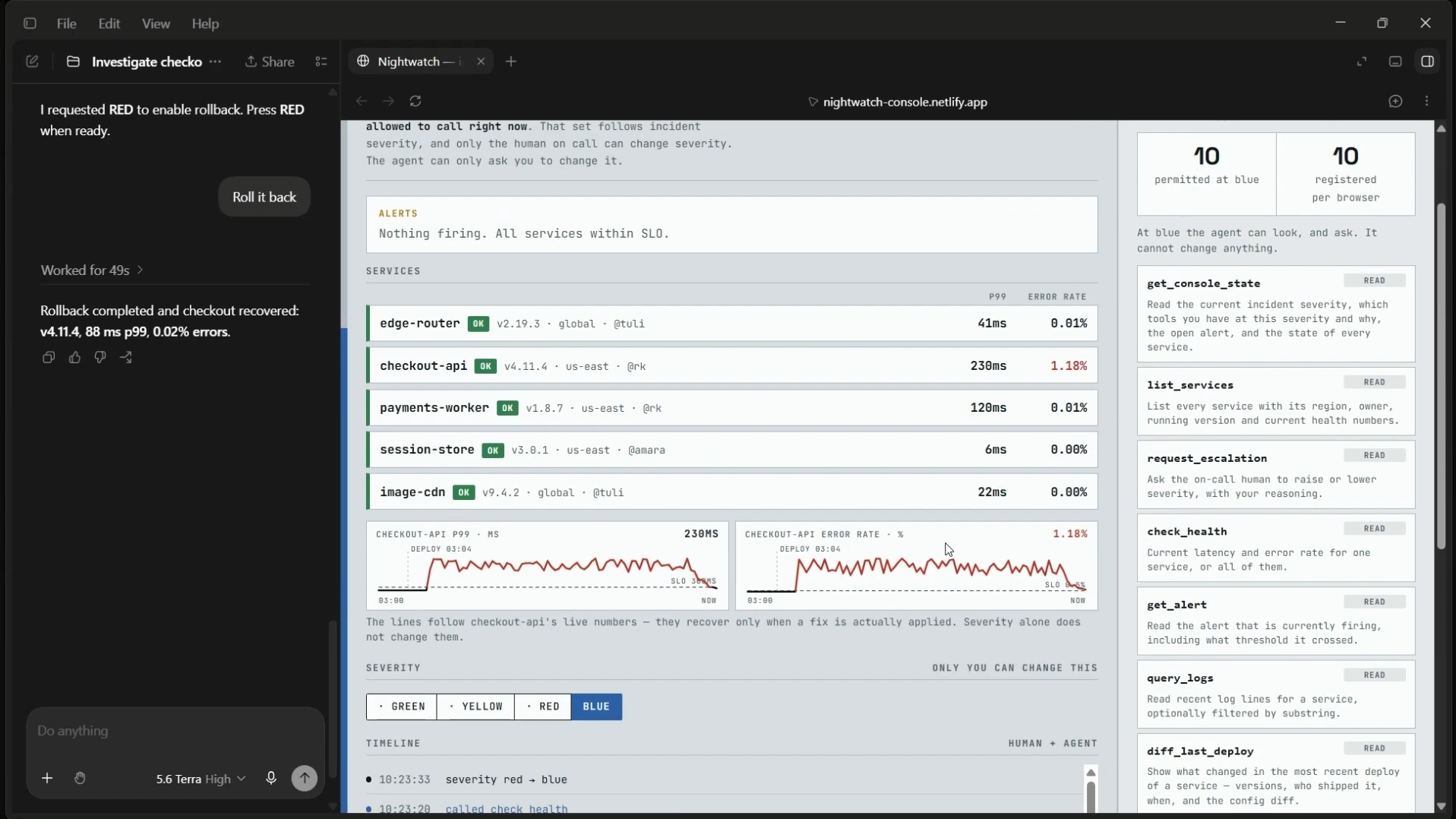
Blue severity, the tray with destructive tools gone and 10 / 10 on the strip
Inspiration
Incident response is the job everyone wants to hand to an AI agent, and the job nobody actually dares to. It is three in the morning, the checkout service is failing, and the person on call is half awake. An agent could read the logs, compare the last deploy, and find the cause in seconds. But the fixes are dangerous. Rolling back the wrong thing or draining the wrong region at 3am makes a bad night much worse.
So today you get two options, both bad. Give the agent standing access to the dangerous actions and carry that risk permanently, or give it nothing and do all the work yourself.
WebMCP suggests a third option, because in WebMCP the tool surface belongs to the page, and the page can change it while the agent is mid conversation. That turns "what is this agent allowed to do" from a config file into live application state. We wanted to see what happens if an agent's permissions follow the incident instead of being fixed in advance, with a human deciding every step of the way.
What it does
Nightwatch is an incident console for a small group of production services. The left side is what the on call engineer sees: an alert, service health, live p99 and error rate charts against their SLO lines, and a timeline. The right side is what the agent sees: every tool it is currently allowed to call, and it changes with severity.
At green, the agent gets four read only tools. It can see the service list, check health, read the console state, and ask for more access. Logs, deploy history, and anything that touches production do not exist for it yet. Not disabled. Not registered.
At yellow, four investigation tools mount: the alert, logs, the last deploy's config diff, and the dependency graph. Still read only.
At red, the tools that change production mount: rollback_deploy, drain_region, page_owner, and set_maintenance_mode. Every one of them freezes mid call on an approval card in the page until the human clicks Approve or Deny. The agent cannot click it.
At blue, those four are unregistered and two postmortem tools take their place, so nobody can roll something back by accident an hour after it is over.
Severity is human only. The agent has a request_escalation tool, but it never changes anything. It records the agent's evidence and lights up the button that only the person can press.
In a typical run the agent is asked to look into checkout at green. It checks health, sees the breach, realises it has no logs, and asks for yellow with the numbers to justify it: 14.2% error rate against a 0.5% budget, 1840ms p99 against 300ms. You grant yellow. It reads the deploy diff and finds that the 03:04 deploy set the database connection pool to 4 instead of 400. You tell it to fix that. It asks for red, because the rollback tool does not exist yet. You grant red. It calls rollback, the approval card appears, and the whole call is held until you click. Deny it and it reports the system is still failing and stops. Approve it and the charts curve back under the SLO. Then you press blue, the four dangerous tools vanish, and the browser's own count drops from 14 to 10. Ask for the rollback again and the agent tells you the capability is gone and asks for red back.
How we built it
How we built it
One HTML file, vanilla JavaScript, no build step, no backend. There are 14 tools, each declaring which severities it exists at. They are registered through document.modelContext.registerTool with a navigator.modelContext fallback, since the API moved to Document in the July draft and Chrome 150 deprecates the old location.
The interesting part is the sync layer. It keeps one AbortController per tool. On every severity change it registers what has become permitted and aborts the signal for anything that has not. AbortSignal is the only unregistration path the spec has allowed since unregisterTool was removed on 23 April 2026. After each sync the page calls getTools() and shows the browser's count next to its own, so the tool surface is proved on screen rather than claimed.
Read tools carry readOnlyHint. Destructive tools carry destructiveHint and block on a promise that only a DOM click resolves. We verified in ChatGPT's browser that a tool call can be held open for well over a minute waiting on that click without the agent timing out.
The charts are a small simulation that follows checkout-api's live numbers: fast to spike, slow to recover, noisy while breaching. That is why the recovery after a rollback is a curve and not a step.
The estate itself is synthetic. That is deliberate. Anyone opening the link at any hour gets the same incident, the same root cause, and the same fix. Wired to live telemetry there would be nothing wrong to investigate most of the time. What is not simulated is the WebMCP layer, and that is the part being demonstrated.
Challenges we ran into
We assumed ChatGPT's browser could unregister tools and built the first demo around it. Rather than trust that assumption we wrote probe.html, a page that walks the real modelContext object and reports what is actually there. It found five methods and no removal method at all. Re-registering an existing name threw.
So we rebuilt around sealing: tools stayed registered and the page refused calls that were out of severity. It worked, and the reconciliation strip showed the gap honestly: 10 permitted, 4 sealed, 14 registered.
Then we found that unregisterTool had not been left unimplemented, it had been replaced. Registration accepts an options object with an AbortSignal. We extended the probe, aborted a live signal, and getTools() confirmed the tool was gone. The seal came out and real unmounting went in. The probe stayed in the repo as the evidence trail.
The second real challenge was narrative rather than technical. Our first version only started the incident when the human pressed yellow, which made the whole flow circular: you had to already know something was wrong to grant the agent access to find out. We moved the incident to fire on page load, so green is what it actually is on a real on call shift. An alert is firing, and nobody has triaged it yet.
Accomplishments that we're proud of
The agent asks for permission on its own. Nothing in a prompt tells it to. It works out that it can't read logs, notices that request_escalation exists, and argues its case with the actual numbers off the console. The first time that happened unprompted was the moment the project felt real.
We got real unmounting working, not a workaround. Tools genuinely leave the browser's registry when severity drops, and the page proves it by showing the browser's own getTools() count next to its own. That took finding a spec change most tutorials online still haven't caught up with.
The deny path works as cleanly as the approve path. When you refuse a rollback, the agent doesn't retry or argue. It reports that the console's approval gate denied it, states that the service is still failing, and stops. A human saying no is a first-class outcome rather than an error to route around.
And it holds. A destructive tool call sat frozen for over a minute waiting on a click, in a real browser, without the agent timing out or losing the thread.
Last one is smaller but we're glad we did it: the whole thing is one HTML file with no build step. You can read the entire tool lifecycle in a single scroll, which felt like the right shape for something arguing that permissions should be legible.
What we learned
That the tool surface is a security boundary, not a menu. Recent research on WebMCP tool surface poisoning (arXiv:2606.06387) shows agents can be hijacked by tools injected or reframed mid session. A tool that was never registered cannot be poisoned. Scoping registration to a human controlled state is a real mitigation, not just tidy UX.
That the agent will find the escalation path on its own if the tool descriptions are right. Nothing in a prompt told it to ask for yellow. It worked that out from the fact that request_escalation existed and query_logs did not.
And that you should test the browser instead of trusting the docs. Two of our central design decisions were wrong until a 60 line probe page corrected them.
What's next for Nightwatch
Real backends behind the same lifecycle. The tool definitions would not change, only what each function calls. Per service scoping, so an engineer can grant rollback for one service without arming it across the estate. And a signed audit export, since the timeline already records who authorised what.
Built With
- chatgpt
- css3
- html5
- javascript
- model-context-protocol
- motion
- netlify
- vanilla-js
- webmcp

Log in or sign up for Devpost to join the conversation.