-
-
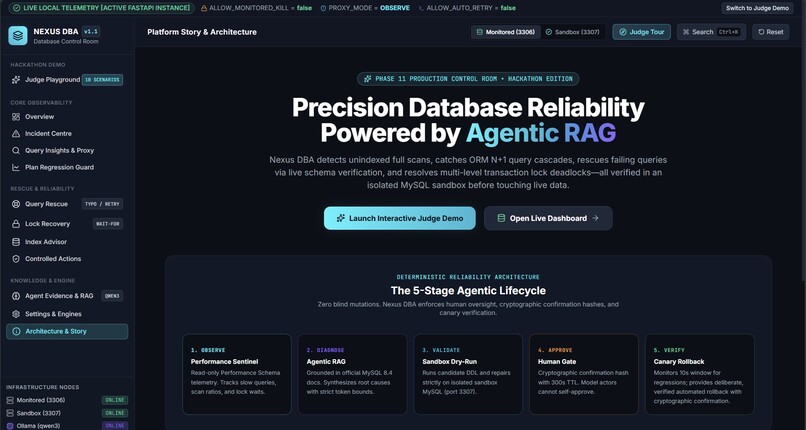
NexusDBA dashboard showcasing database health, query diagnostics, and AI-driven performance optimization
-
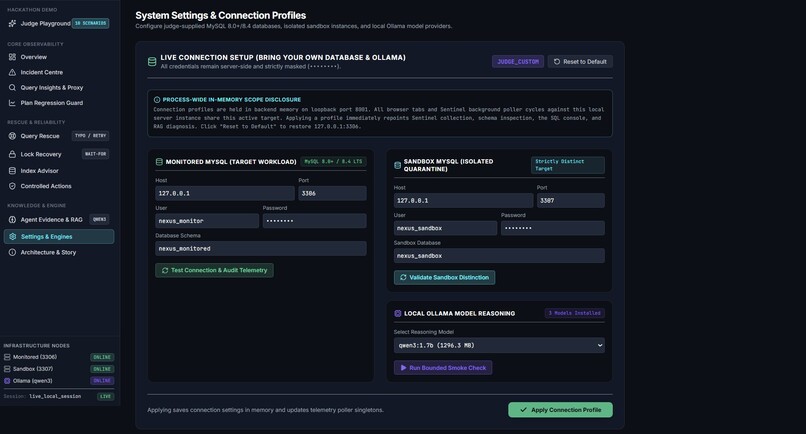
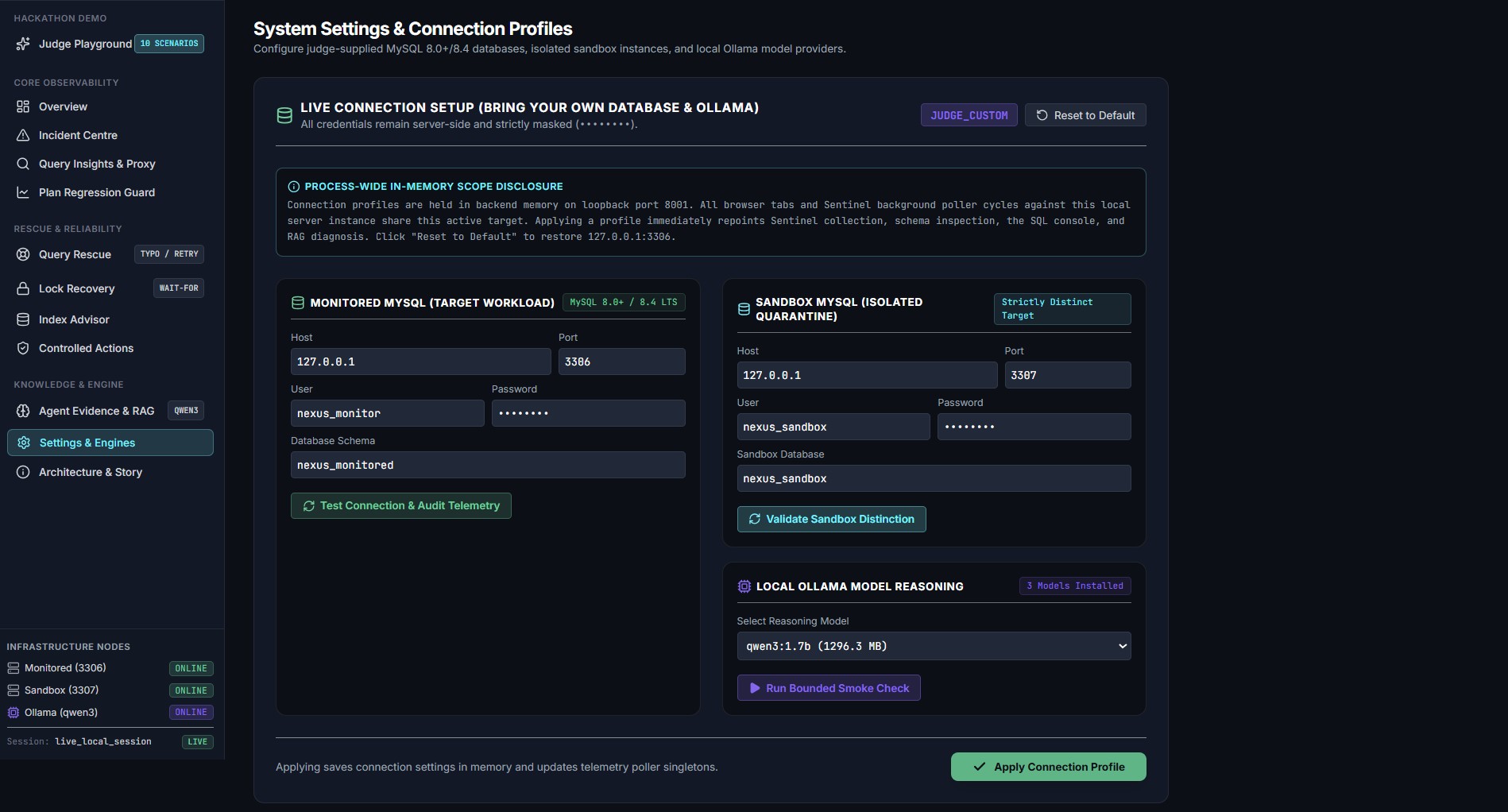
Configure database connections and select a local AI model to power the NexusDBA agent workflow
-
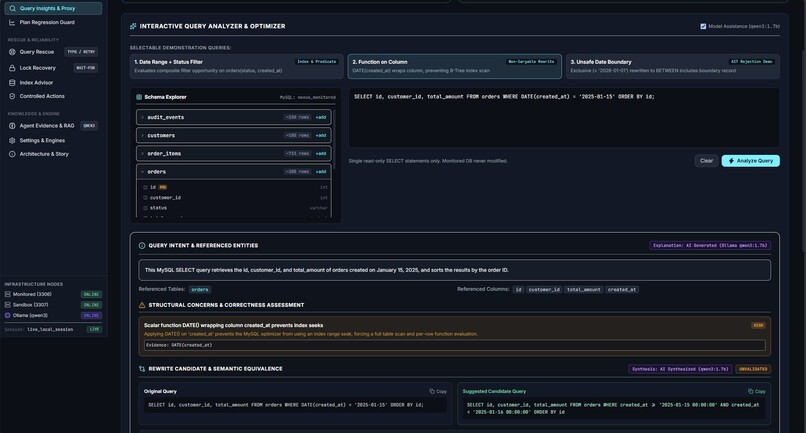
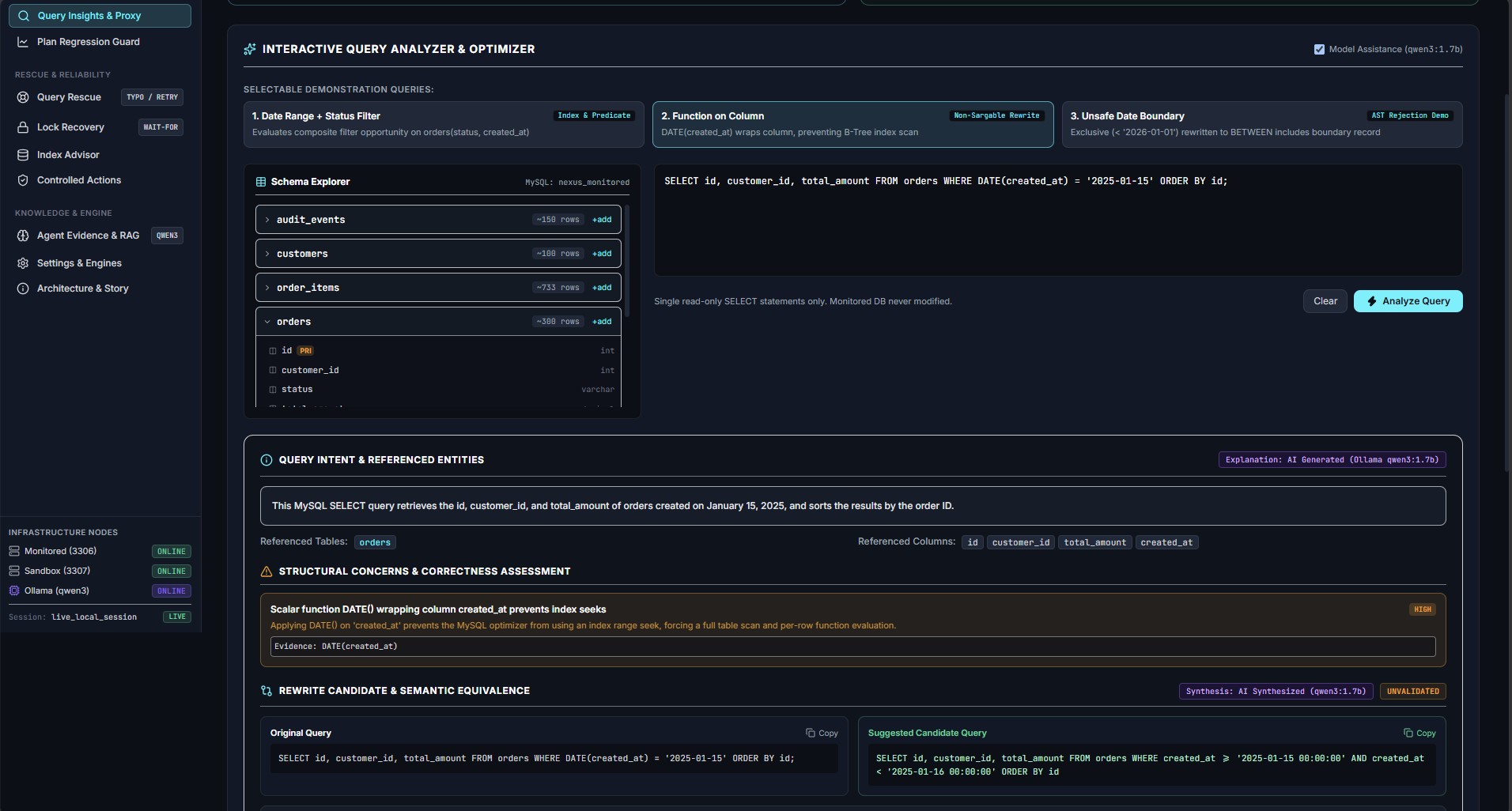
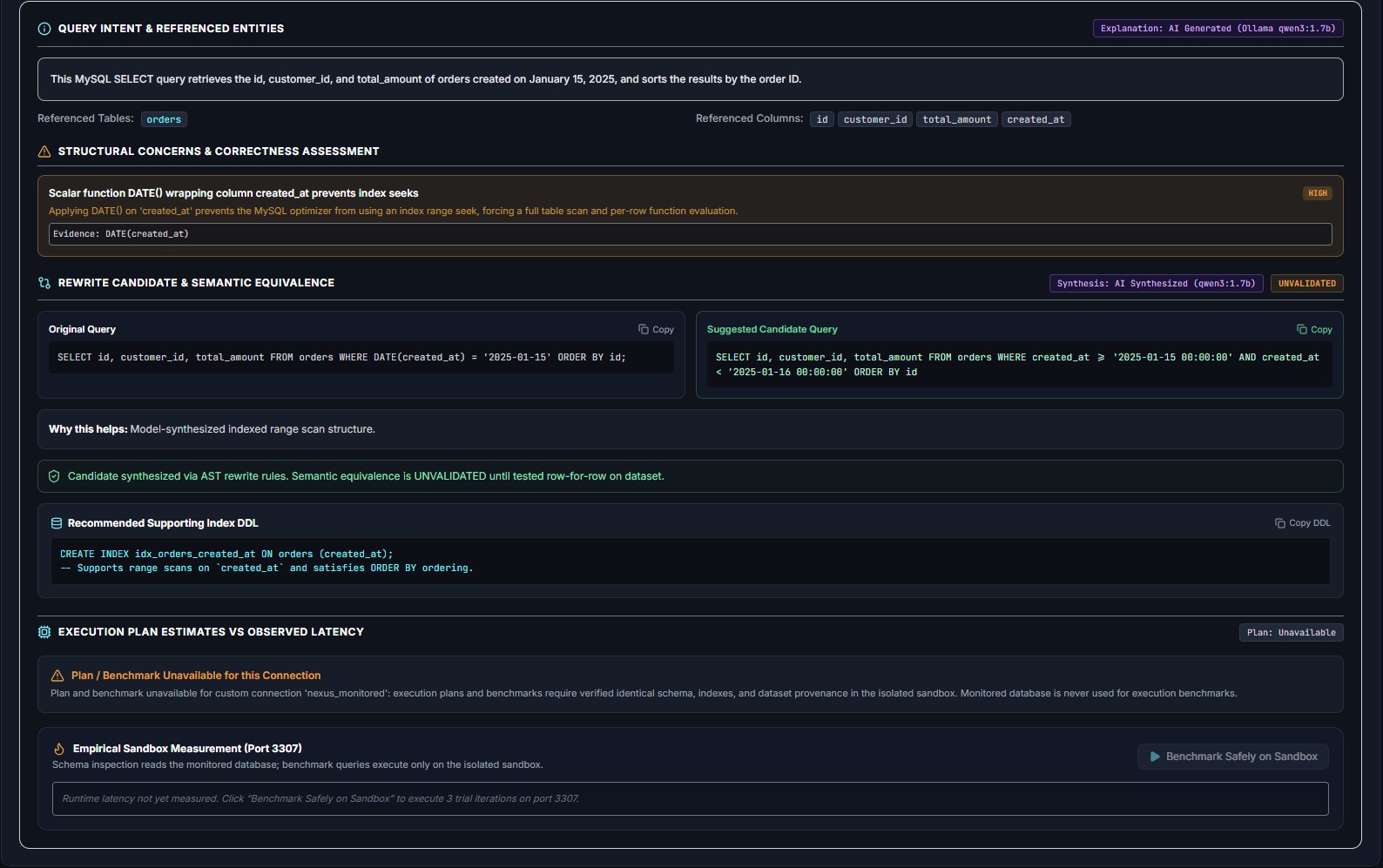
NexusDBA analyzes SQL queries, explains query behavior, and surfaces potential performance bottlenecks.
-
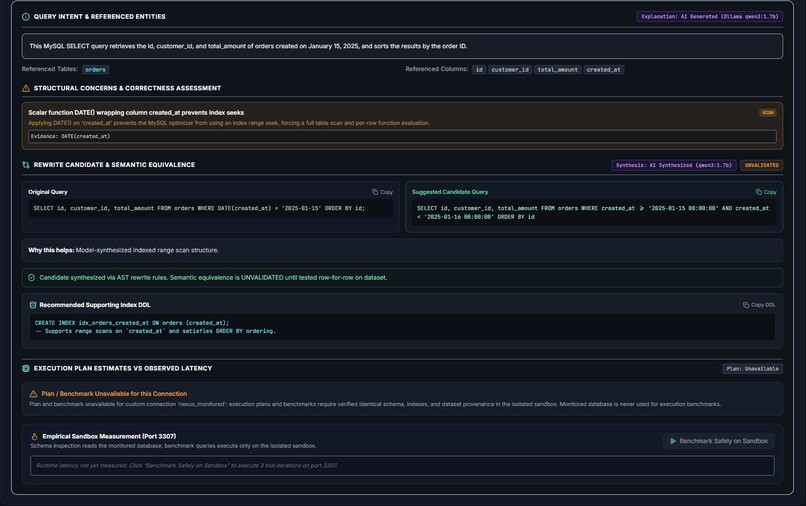
NexusDBA analyzes SQL queries, explains query behavior, and surfaces potential performance bottlenecks.
-
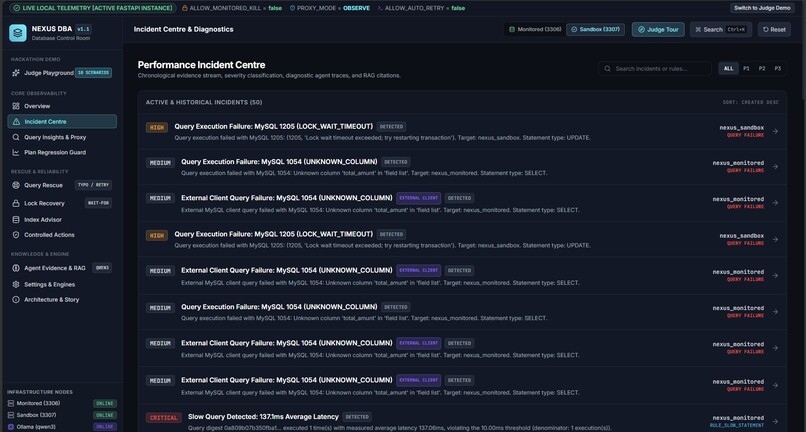
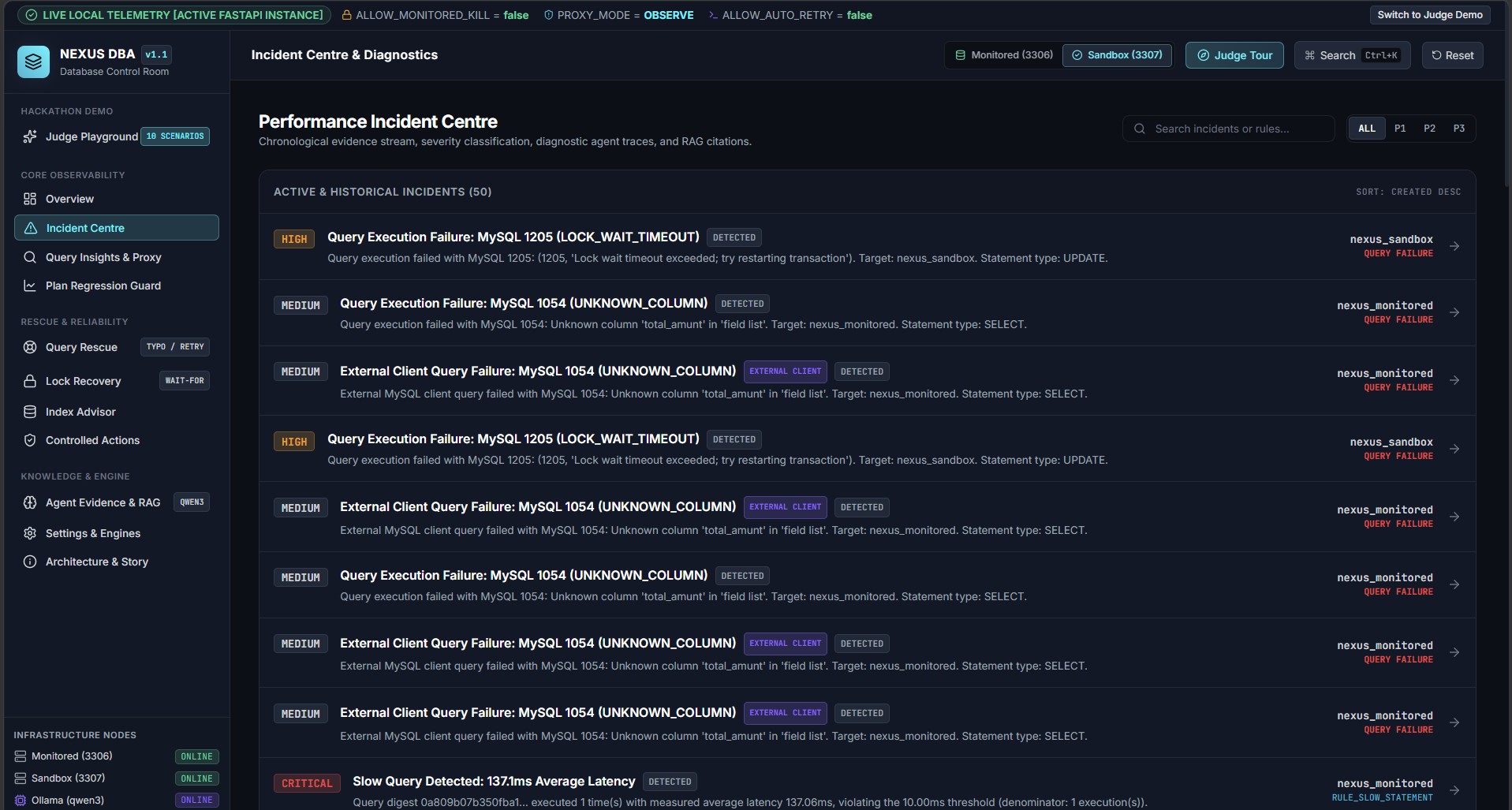
Continuous monitoring detects slow queries and database failures, then surfaces incidents for targeted remediation.
-
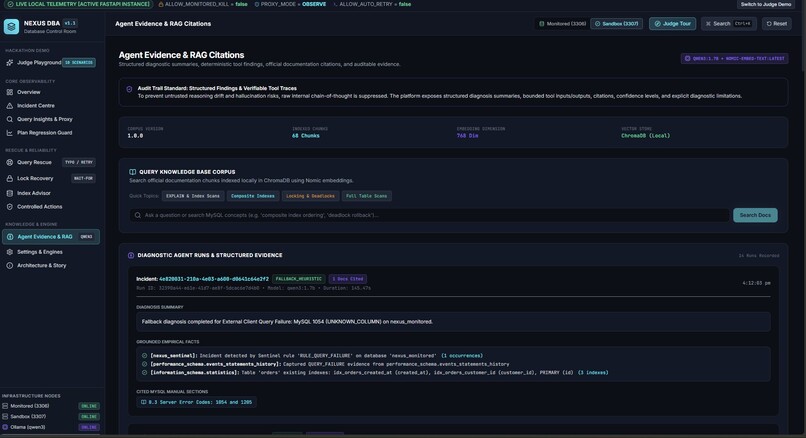
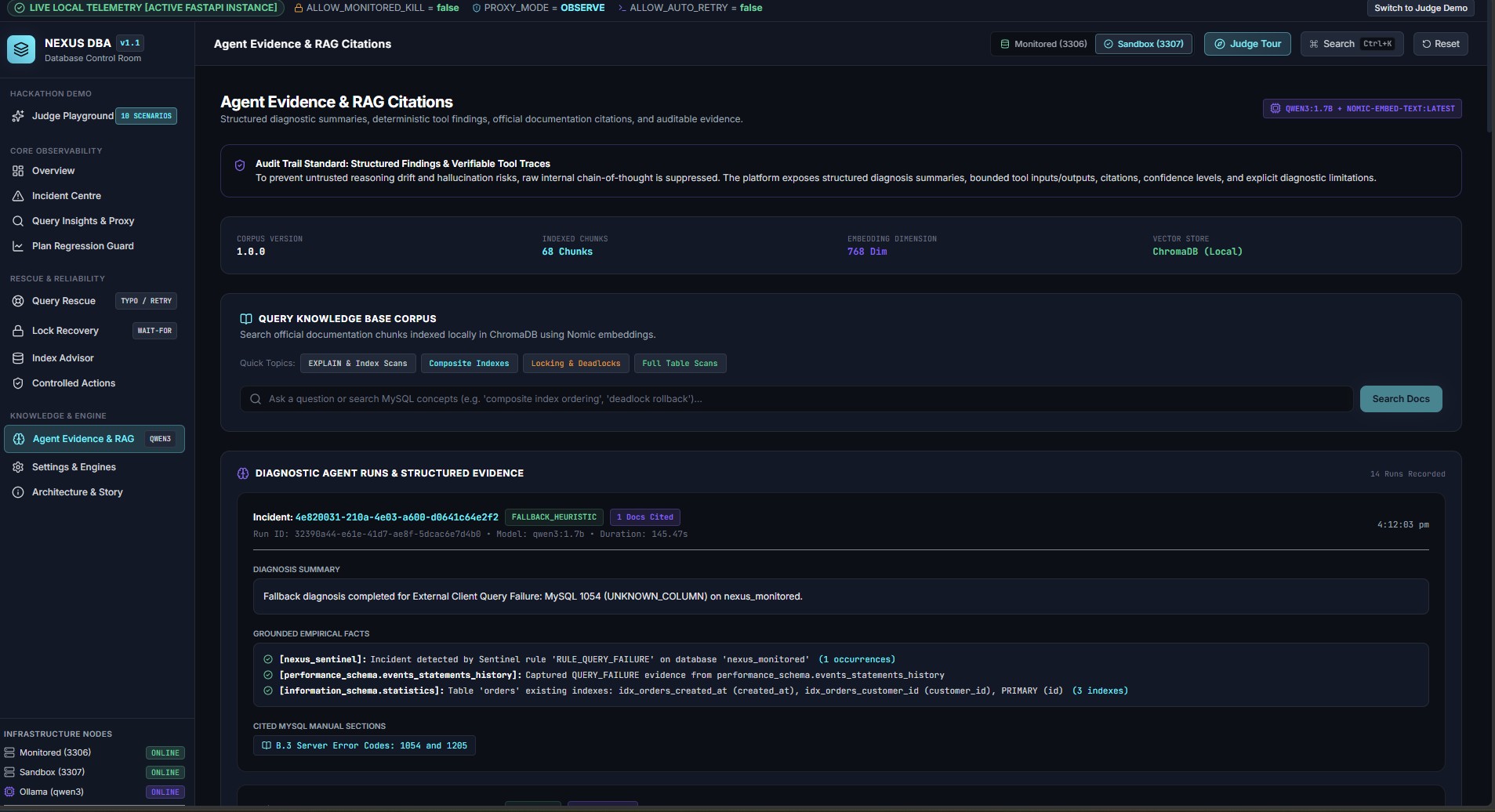
RAG grounds NexusDBA’s recommendations with relevant DBA knowledge, diagnostic evidence, and cited sources.
-
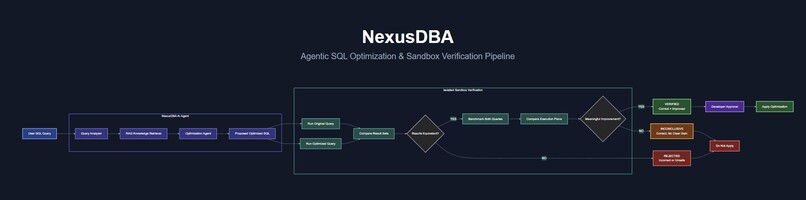
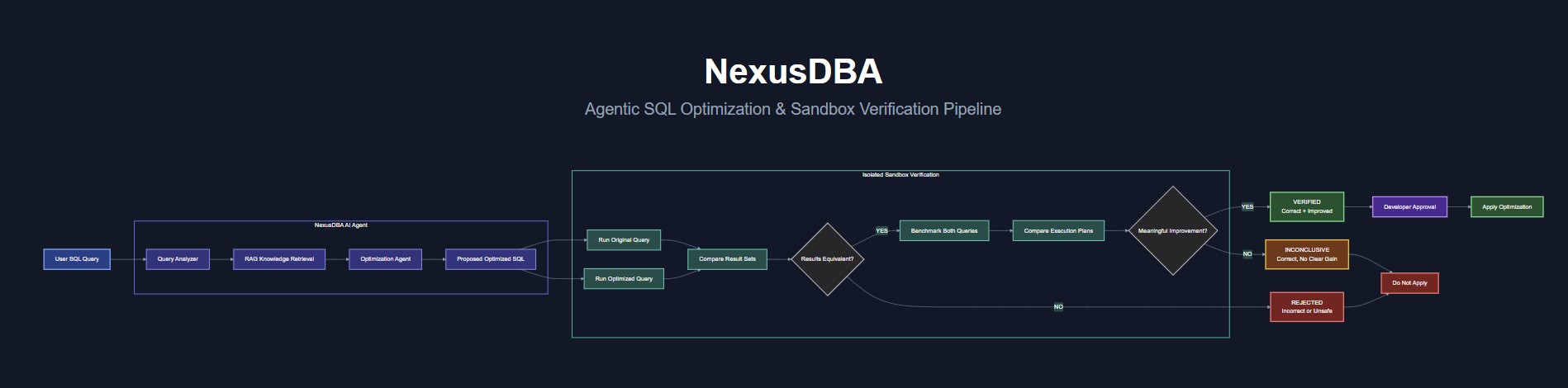
NexusDBA architecture connecting the agent workflow, knowledge layer, MySQL, and sandbox verification pipeline.
Inspiration
A database problem often starts with a vague symptom: a page is loading slowly, an API request has failed, or a query that used to work has started behaving differently. Finding the SQL involved can take time. Deciding how to fix it safely can take even longer.
I kept coming back to one question: what would I need to see before trusting an AI-generated database recommendation? A query can look faster while returning the wrong rows. An index can improve one execution plan while adding costs elsewhere. A model can give a convincing explanation without having enough evidence to support it. I wanted to build something that treats those concerns as part of the main workflow.
That led me to Nexus DBA. My goal was to bring monitoring, diagnosis, testing, and supporting evidence into one place. I wanted it to help a developer understand what happened and decide what to do next, while leaving database changes under human control.
What it does
Nexus DBA is an AI-assisted workspace for investigating MySQL problems. It observes database activity and helps turn raw telemetry into incidents that a developer can work through. Depending on the evidence available, it can surface inefficient scans, failed SQL statements, repeated N+1 query patterns, lock waits, and suspicious changes in execution plans.
A developer can also start with a query of their own. In Query Insights, they can paste SQL, read a plain-language explanation, and review a proposed alternative when Nexus finds a useful change. The original and candidate SQL are displayed together. Instead of asking the developer to trust the suggestion immediately, Nexus presents available plan and sandbox evidence and makes clear when a performance improvement has not been measured.
Query Rescue handles another familiar situation: a query fails and the error message alone is not very helpful. Nexus looks at the error and the database schema, suggests a correction, and provides a way to test whether that correction executes in the separate sandbox. Passing that test shows that the SQL runs; it does not automatically prove that it matches every intention of the original application.
The other sections support the same investigation. The Index Advisor provides recommendations to review alongside the current index inventory. Plan Guard helps compare an observed plan with an earlier reference and separates a suspicious structural change from a slowdown confirmed by runtime evidence. The Evidence Center retrieves relevant MySQL documentation so a developer can inspect the basis for a diagnosis. Controlled actions keep proposed changes and their approval states visible to an operator.
How I built it
I built the frontend with React and TypeScript and the backend with Python and FastAPI. MySQL supplies the workload as well as the telemetry used to investigate it. I run a monitored MySQL instance for live scenarios and a separate MySQL sandbox for bounded validation. Keeping those environments separate was a core design choice: a candidate can be examined without quietly applying it to the database being monitored.
For the AI workflow, I use a local model through Ollama, with LangGraph coordinating the investigation steps. ChromaDB stores searchable MySQL documentation for retrieval. When the agent needs technical context, it can retrieve relevant material and present it alongside its finding. I also use deterministic checks where they are more dependable than a model, including SQL safety rules and comparisons that can catch a rewrite changing query results.
I built a repeatable sample dataset and a collection of scenarios to exercise the system. They let me trigger problems deliberately, examine the response, and test what the interface claims. For visitors who cannot install the full stack, I created a hosted Judge Demo using labeled recorded scenarios. The Live Local version connects to running MySQL instances and an available local Ollama model; the hosted demo lets judges explore the product without requiring those services on their computers.
Challenges I ran into
The most important challenge was learning to separate a plausible suggestion from a proven fix. One scenario compares an original date filter with a proposed BETWEEN rewrite. At first glance, the queries appear to cover the same period. But the original uses an exclusive upper boundary, while BETWEEN includes it. In my fixture, that difference adds an extra order to the result. If Nexus only looked at execution time, it could present an incorrect rewrite as an improvement. I made result differences visible and treated that candidate as unsafe.
Performance evidence was challenging in a different way. In an index scenario, the optimizer estimated a smaller scan for the candidate plan. The actual timings on my small dataset, however, were too close to support a claim that the query became faster. I had to revisit the interface and its wording so an estimated reduction in rows per scan was never confused with measured rows examined or a demonstrated speedup.
Some patterns also need more context than MySQL can provide on its own. Repeated similar queries do not necessarily prove an N+1 problem; the stronger case comes from seeing how those queries relate to one application request. Likewise, a changed execution plan is worth investigating, but it should not be called a confirmed slowdown without runtime evidence.
There were practical limits too. MySQL, the backend, the browser, and the local model were all running on one laptop. Model responses could take time, and repeated evaluations made resource use noticeable. I worked on bounded runs, clearer fallback behavior, and repeatable scenarios. Temporary sandbox operations also needed reliable cleanup so one demonstration would not affect the next.
Accomplishments that I'm proud of
I'm proud that Nexus DBA can demonstrate an investigation from beginning to end. A real SQL error can be observed, opened as an incident, examined in Query Rescue, and followed by a correction that is tested in the sandbox. A developer can inspect both the proposed SQL and the evidence behind it instead of receiving only a short AI answer.
The date-boundary scenario is a particularly good example of what I wanted to build. Nexus identifies that the proposed query returns a different result set and rejects it. That is a more useful outcome than producing a faster-looking query that changes the answer. I also value the index scenario, where Nexus reports that a plan estimate improved while the measured runtime does not justify claiming a speedup.
I developed this as a solo project, including the backend workflows, frontend, sample workloads, and judge experience. That made the scope difficult to manage, but it also let me keep the safety rules consistent across the system. The local setup runs against MySQL and Ollama, while the hosted Judge Demo gives visitors a repeatable tour of recorded cases. I put effort into labeling what is live, what is recorded, what has been tested, and which actions remain pending.
What I learned
This project taught me that the difficult part of an AI database assistant is not simply generating SQL. The real work is connecting a suggestion to the evidence that would make it useful. I needed to ask whether the original and candidate return the same results, whether an improvement is estimated or measured, whether the observed queries belong to one application request, and whether the system has enough information to recommend an action at all.
I also learned to pay close attention to the language in the UI. “Suspected,” “proposed,” “validated,” and “approved” are different states. If the interface blurs them together, a user can walk away with the wrong conclusion even when the underlying data is correct. I spent time revising those descriptions as I tested the scenarios.
Finally, I learned that an honest demo is stronger than one that claims every result is a success. Some candidates should be rejected. Some experiments are inconclusive. Some actions should remain staged until a person approves them. Making those outcomes understandable became one of the most valuable parts of Nexus DBA.
What's next for Nexus DBA
My next step is making Live Local easier for someone bringing their own supported MySQL database and compatible Ollama model. I want the setup experience to clearly explain connection requirements, available telemetry, permissions, and which features can run with the resources the user has. A developer should be able to understand the scope of access before starting an investigation.
I also want to test on larger and more varied workloads. My controlled dataset is useful for demonstrating specific failures, but broader workloads would help me judge whether a candidate index or rewrite remains helpful over time. I want stronger comparisons across query patterns, data sizes, and application behavior, with results that remain easy to trace back to their source.
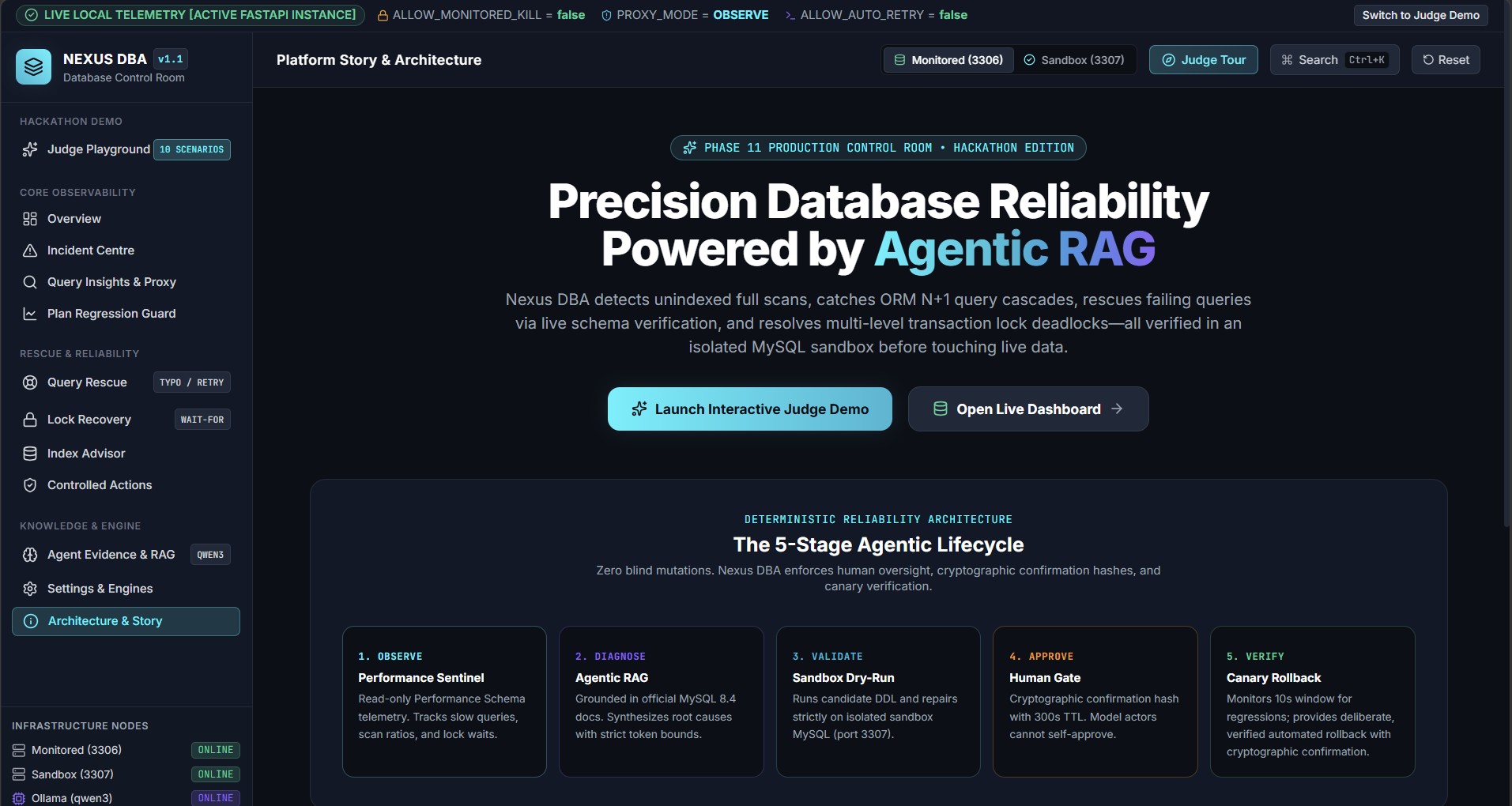
Longer term, I plan to develop the controlled approval, canary, verification, and rollback workflow further. The aim is to support the whole journey from detecting an issue to evaluating a possible change and checking its effect afterward. Throughout that process, Nexus DBA should keep the operator informed, show uncertainty where it exists, and make it easy to choose not to apply a change when the evidence is insufficient.


Log in or sign up for Devpost to join the conversation.