-
-
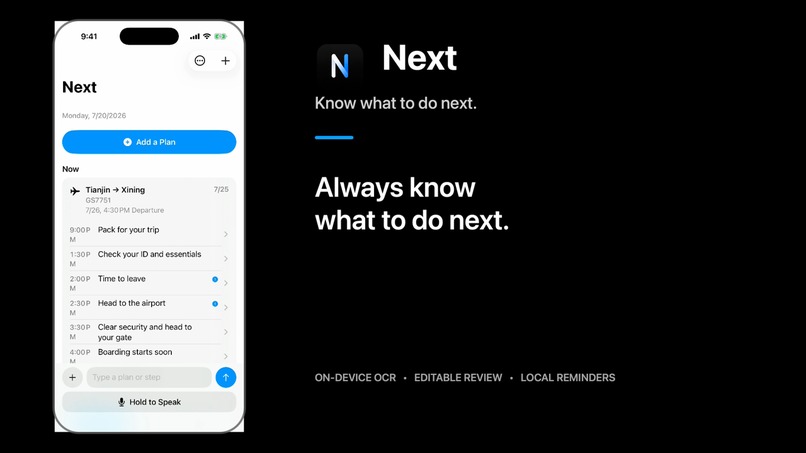
Next turns travel inputs into an editable action timeline.
Inspiration
Travel plans usually arrive as screenshots, booking confirmations, and chat messages. The important information is there, but the user still has to translate it into actions: when to pack, when to leave, when boarding begins, or when to check out.
Traditional task apps make users reconstruct that timeline manually. Next was created to remove that management work and answer one question:
What should I do next?
What it does
Next accepts three forms of input:
- A travel screenshot
- A spoken sentence
- Manually entered plan details
From input to action
A user can import a flight screenshot, review the recognized text, confirm the extracted departure details, and receive an editable sequence of preparation steps—from packing and leaving home to arriving at the airport and boarding. Each step can be corrected before it becomes a local reminder.
For screenshots, Next uses Vision OCR to extract text. Users can correct that text before a local parser identifies flight, train, hotel, or general plan details.
Every extracted field remains editable. Once confirmed, Next generates preparation steps such as packing, checking essentials, leaving, reaching the station or airport, boarding, checking in, and checking out.
The plan is stored locally with SwiftData, reminders are scheduled as local notifications, and Home organizes plans around their earliest unfinished step.
How it was built
Next is a native SwiftUI app for iOS 18 and later. It uses SwiftData for local persistence, Vision and PhotosPicker for screenshot OCR, Speech for voice transcription, UserNotifications for reminders, and XCTest for regression coverage.
The workflow is deliberately separated:
Input → OCR or transcript → editable source text → TravelParser → editable draft → ReminderStepGenerator → editable Steps → SwiftData → local notifications
This separation keeps every automated stage inspectable and editable. OCR, parsing, persistence, and reminder scheduling run locally, while voice transcription uses Apple’s Speech framework. Next has no account system, app-owned backend, third-party dependency, or runtime OpenAI API call.
Challenges
The biggest challenge was preventing uncertain recognition from becoming confidently incorrect data.
Real screenshots contain navigation labels, advertisements, status-bar times, multiple dates, and fragmented text. The app reconstructs visual text order and parses fields with local context instead of selecting the first number it finds.
Other challenges included:
- Preserving original OCR text for traceability
- Handling dates without a year
- Detecting overnight travel without inventing times
- Keeping audio recording state safe after interruption or cancellation
- Preventing duplicate local notifications
- Presenting multiple preparation Steps without turning Home into a long task list
Accomplishments
- Completed the screenshot-to-notification workflow
- Supported screenshot, speech, and manual input across flights, trains, hotels, and general plans
- Kept OCR text, extracted fields, and generated steps editable
- Built stable local notification reconciliation
- Created a Plan-grouped Home timeline
- Preserved user control at every automated stage
- Reached 112 passing automated tests
Future plans
- Split multiple trips from one screenshot
- Support more booking and ticket layouts
- Expand English and Chinese travel-language coverage
- Refine the experience with real beta feedback
- Explore richer notification actions
- Explore Siri, App Intents, and Apple Watch support
- Evaluate optional AI-assisted parsing while preserving confirmation and privacy
How we used Codex and GPT-5.6
Codex supported the engineering workflow throughout development. We used it to inspect the repository, divide product requirements into scoped implementation stages, implement native iOS features incrementally, run builds and tests, and convert reproducible failures into regression coverage.
One recurring problem was travel screenshots containing unrelated status-bar times, advertisements, fragmented dates, and multiple terminal labels. GPT-5.6 helped analyze these failure patterns and define narrowly scoped correction requirements. Codex then inspected the relevant parser and OCR pipeline, implemented the approved changes, and added regression tests for the real examples.
We also created an AGENTS.md development guide instructing Codex to protect stable modules, preserve original OCR text, avoid speculative parsing, and require successful builds and tests before commits.
GPT-5.6 was used as a planning and review partner to refine product requirements, analyze implementation results, design Codex tasks, review English localization, and prepare the Build Week submission.
Codex and GPT-5.6 were development tools. The production app runs on-device and does not call the OpenAI API at runtime.

Log in or sign up for Devpost to join the conversation.