-
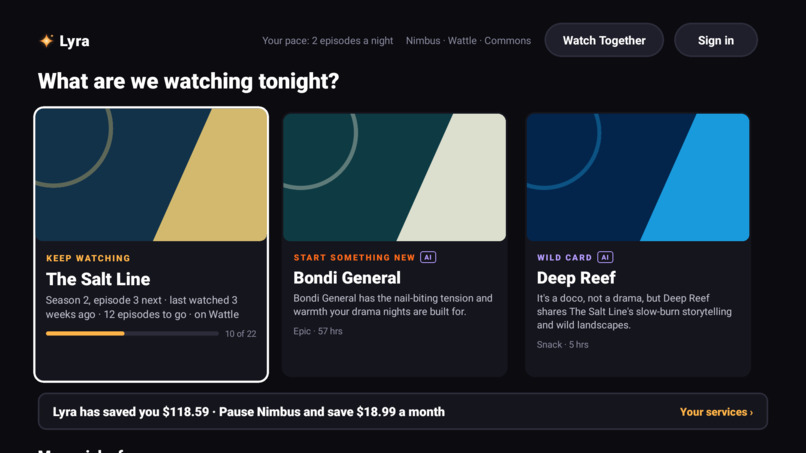
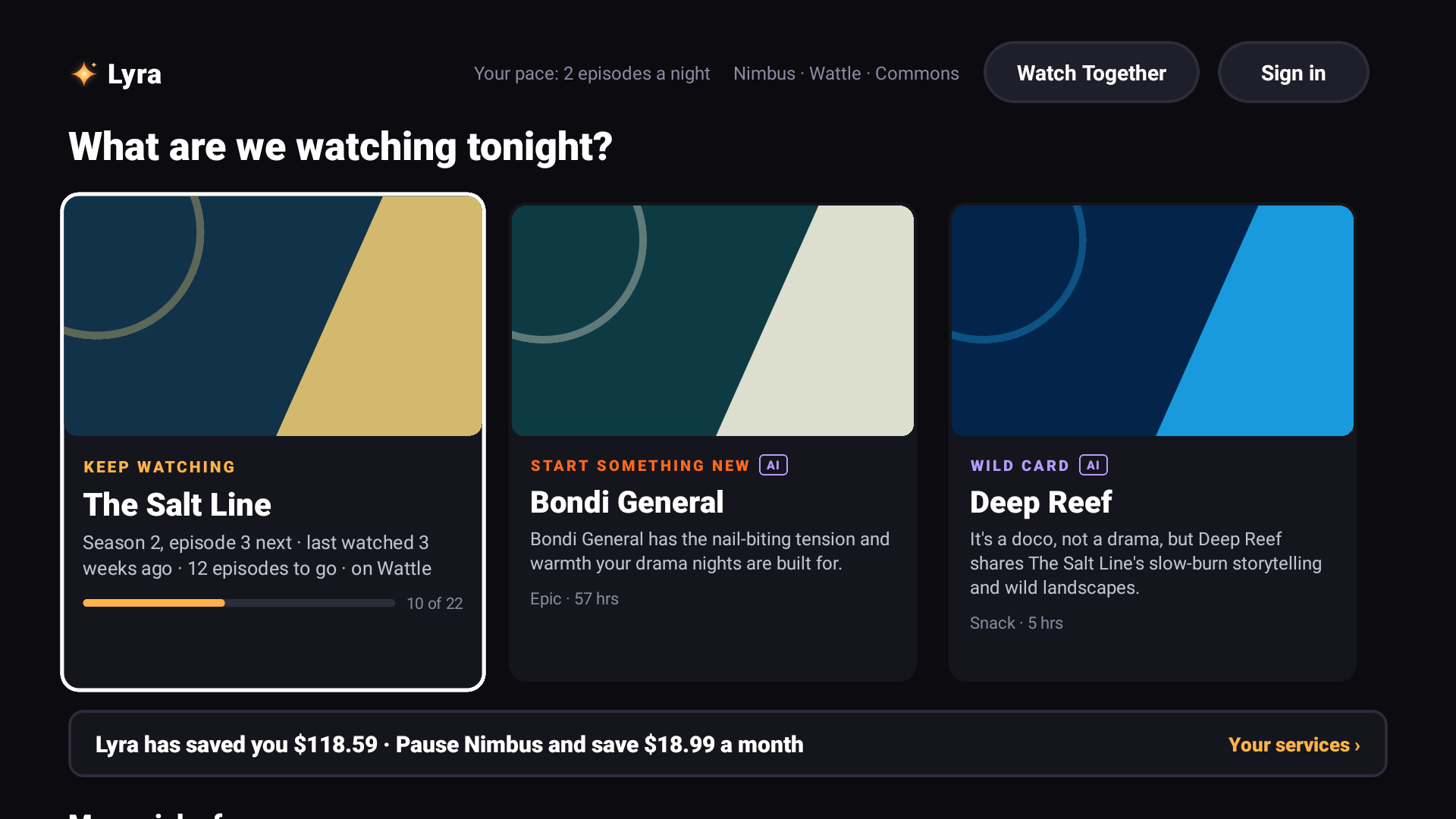
Home on Fire OS: Keep watching, Start something new, and a Wild card, with a reason for each.
-
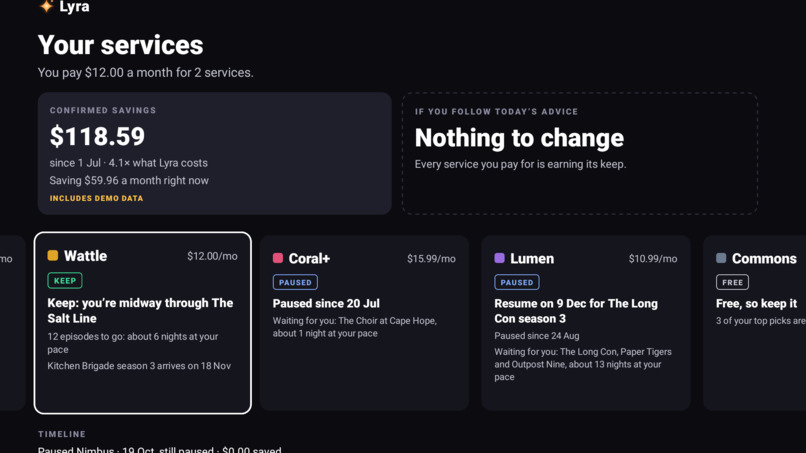
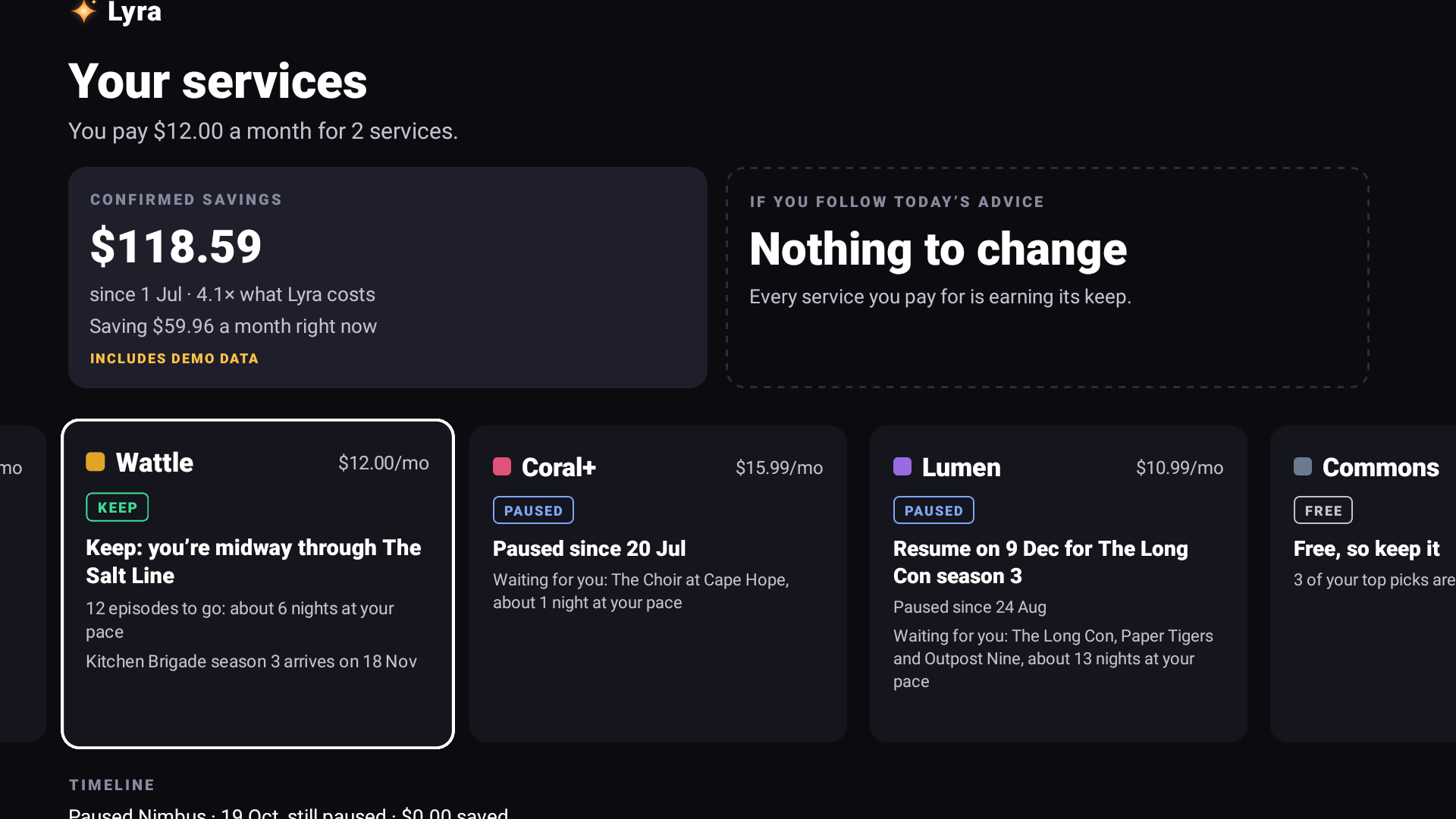
Your services: A way to track subscriptions and AI recommendations on where the household can find savings while committed to one show.
-
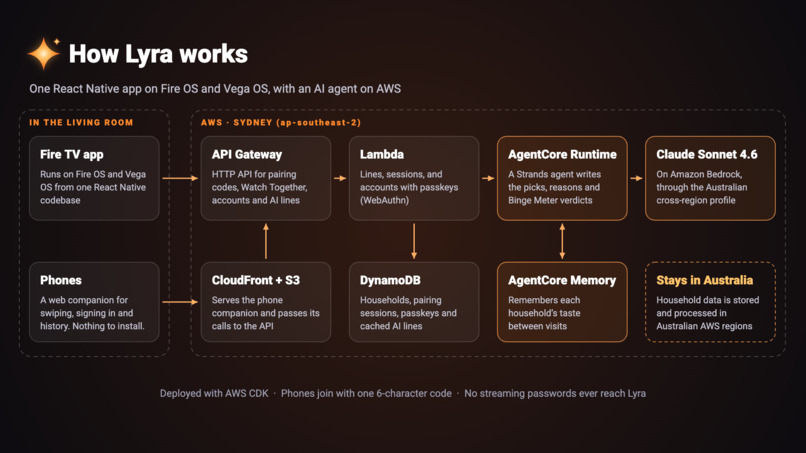
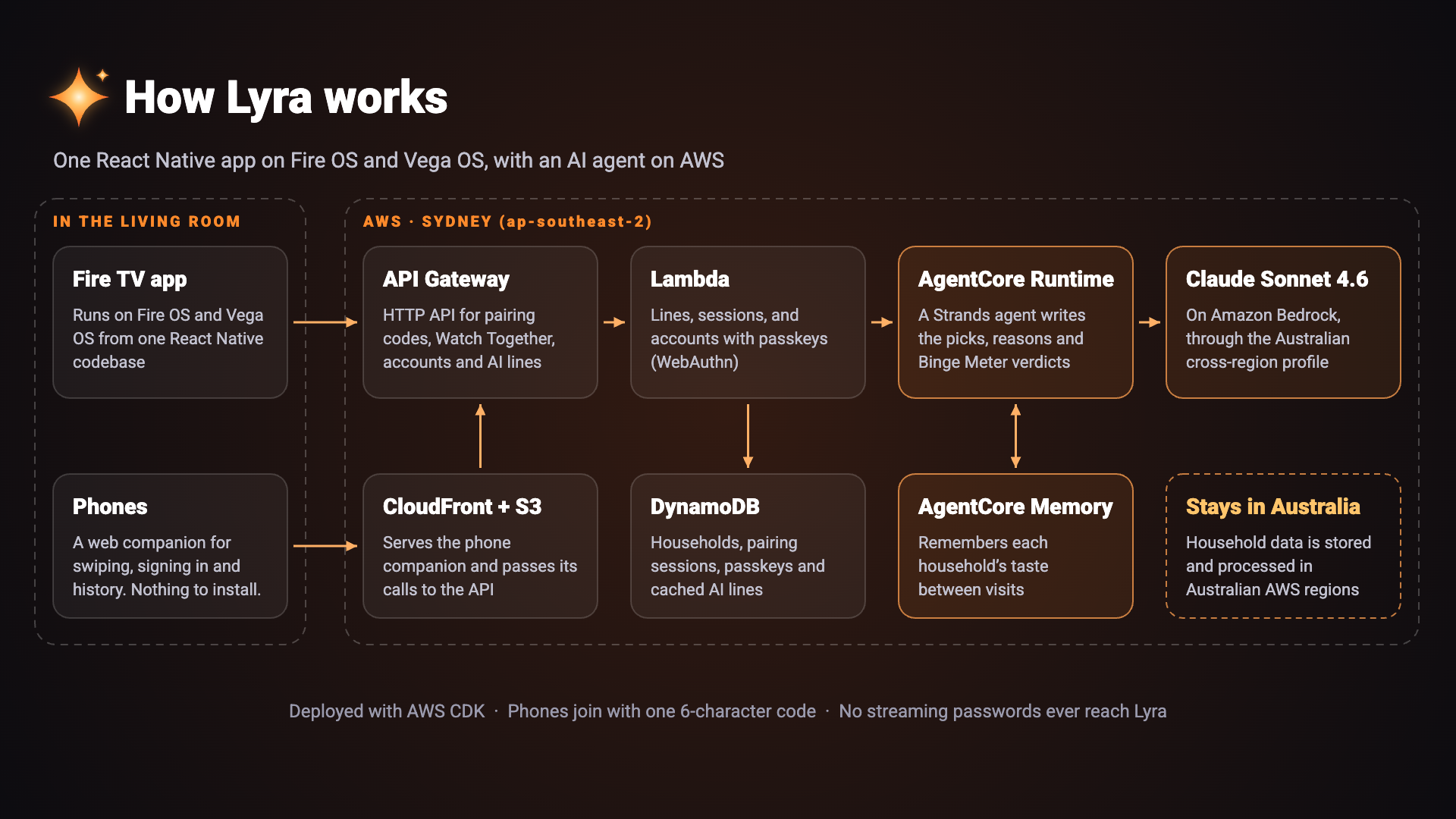
Architecture: Fire OS and Vega apps, the phone companion, and the Strands agent on Bedrock AgentCore in Sydney.
-
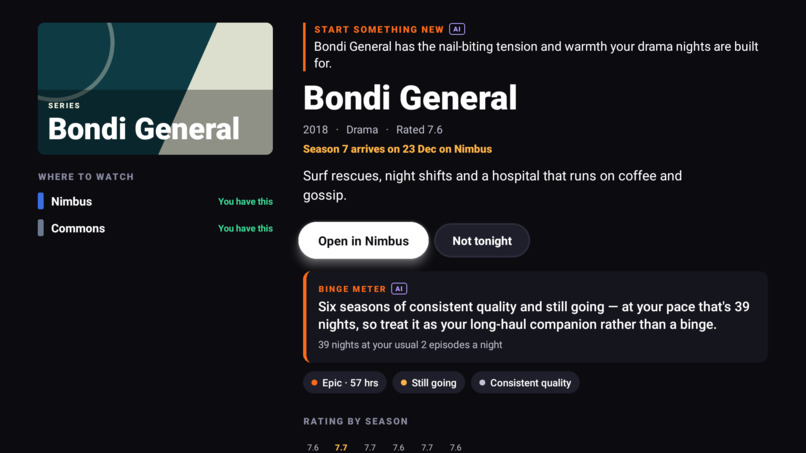
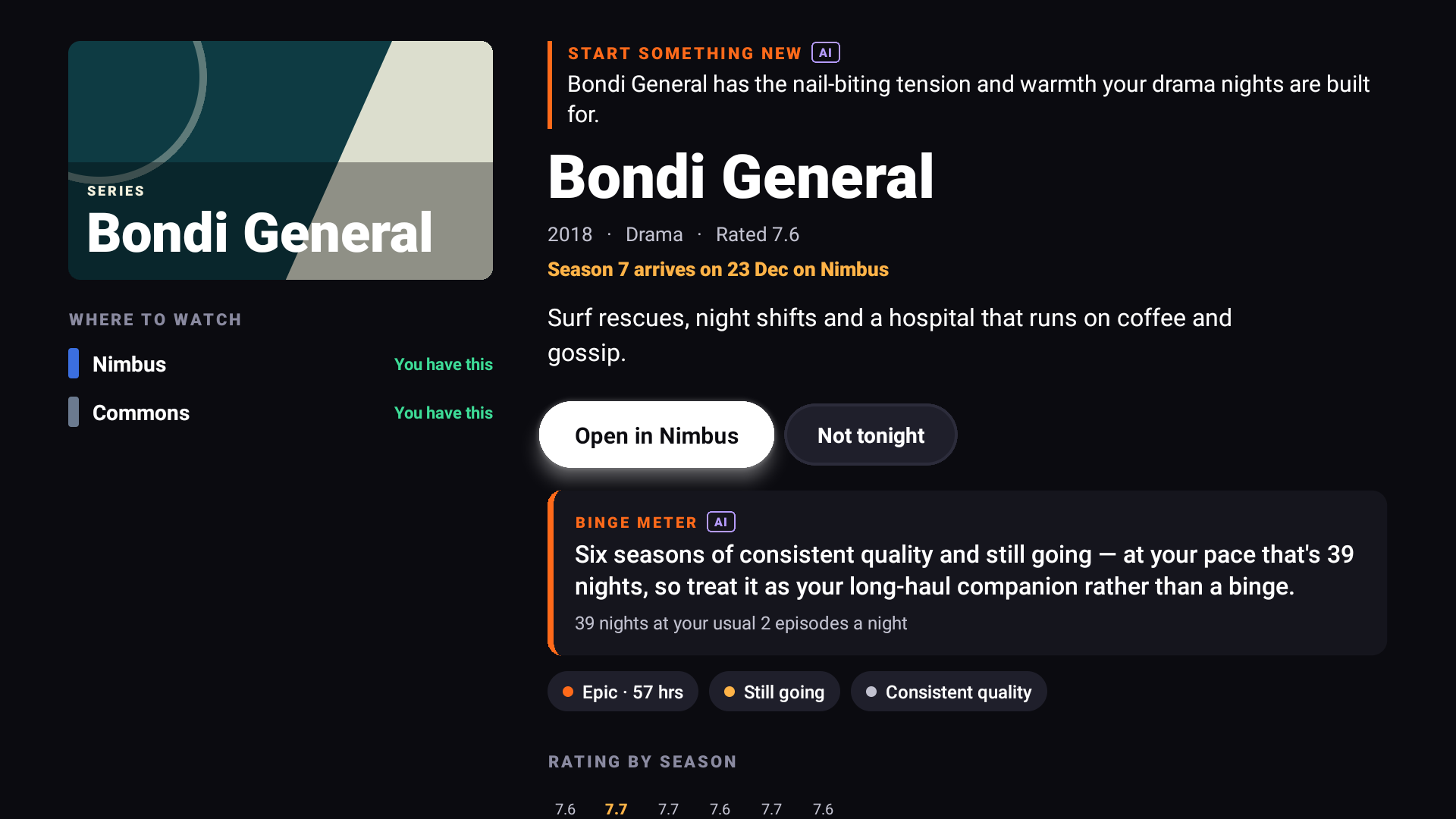
Binge meter: How big a commitment a show is, whether it has an ending, and how many nights it will take at your pace.
Inspiration
My household pays for several streaming services, and every night starts the same way: twenty minutes of scrolling, then an argument. Each app only recommends its own shows. None of them knows what we watch elsewhere, and none of them will tell us we're paying for something nobody has opened in weeks. A new TV is worse: every app wants its own sign-in, one at a time, each with a code typed into a different website.
Lyra is the app that looks across all of it, built for the room the TV is in: a remote, a sofa, and everyone's phones.
What it does
- Three picks for tonight. Keep watching, with the next episode and where it is; start something new; and a wild card from a genre you don't usually watch that shares the feel of something you loved. An AI agent on AWS writes why each pick suits this household.
- Binge Meter. How big a commitment a show is, whether it has an ending, whether it gets better, and how many nights it will take at your pace.
- Watch Together. Everyone scans one QR code (there's no app to install) and swipes the same deck on their phone, like a dating app for shows. The TV shows who's on the couch and how far they've got, then reveals the pick most voted yes to.
- Subscription Optimiser and Savings Tracker. Keep, pause or rotate each service. Lyra knows what's coming back: if nobody's watching a service but a show you like returns in six weeks, it says "Pause now, resume on" that date, and it never suggests pausing just before a favourite returns. Savings only count once you confirm a pause, and they're compared with what Lyra itself costs.
- Coming soon. New seasons across every service, starting with the ones your household would care about.
- Your history in a minute. Lyra can't read other apps, so your phone fills in what you've watched: swipe popular shows (watched, loved it, not seen), or upload a viewing-history file, which is read on the phone.
- Sign-in Concierge. A passkey on your phone signs the TV in to your household, with nothing typed on the TV. A new TV gets everything back after one tap. Then one code lets everyone sign the TV in to their own streaming services at the same time, each on their own phone with their own password manager. Lyra never sees those passwords.
The same app runs on Fire OS (tested on a Fire TV 4-Series) and Vega OS (tested on the Vega Virtual Device), from one React Native codebase.
How I built it
- One codebase for two TV platforms, starting from Amazon's MIT-0 multi-TV sample:
apps/fireos: Expo 54 with react-native-tvos 0.81.apps/vega: React Native for Vega 0.72, Vega SDK 0.24.packages/shared: the screens, D-pad focus navigation and UI both apps use.packages/core: framework-free domain logic (recommendations, Binge Meter, optimizer, group pick, release planning), with 52 tests. The phone companion runs the same code.
- The phone companion is a small Vite and React website, served from S3 and CloudFront. Phones join with a six-character code and talk to the TV through short-lived sessions.
- The AI agent is a Strands agent on Amazon Bedrock AgentCore Runtime. It uses Claude Sonnet 4.6 on Bedrock through the Australian cross-region inference profile, and AgentCore Memory for each household's lasting taste.
- The TV shows rule-based lines instantly, then swaps in the agent's lines, marked AI, when they arrive. If the agent is unreachable, nothing breaks.
- The serverless backend: three Lambda functions behind API Gateway, and one DynamoDB table with TTL on everything short-lived. Accounts use passkeys (WebAuthn), so there's no password to leak.
- Everything runs in Sydney (ap-southeast-2), so household data stays in Australia.
- Everything is defined in one AWS CDK stack.
- A fictional demo catalog (seven services, twenty titles and their upcoming seasons) keeps the demo free of other companies' trademarks. Release dates count from today, so the advice reads the same whenever it runs.
Challenges I ran into
- No way to read watch history on Fire TV. Apps can't see each other's viewing, so Lyra learns from the phone instead: a one-minute taste deck, a history-file upload, and what it opens itself. (Feature request FR-01.)
- An app can't sign in to other apps, and it shouldn't hold anyone's passwords. That turned "a password app for the TV" into the Sign-in Concierge: a passkey for Lyra itself, and a checklist where each phone uses the provider's own sign-in, all at once. (FR-05.)
- Honest money advice. Lyra can't see anyone's bills. So savings count only when you confirm a pause, it watches for three weeks before suggesting one, and it checks each service's upcoming seasons first.
- Tooling. The official sample didn't build on the current Vega SDK. Fire TV's screen recorder keeps only a few frames, so the demo is filmed with a camera. There were sixteen issues like these in all, each one written up in the friction log.
Accomplishments that I'm proud of
- Every screen is shared between Fire OS and Vega.
- The Watch Together swipe, where a room full of phones and one TV agree on a show.
- A brand-new TV that gets the whole household back after one passkey tap, then signs in to every service in parallel.
- Savings advice that knows when your show is coming back.
What I learned
- Ten-foot design means letting the phone do the typing, and showing three decisions instead of a grid.
- AgentCore can host a real agent with memory without managing containers or servers. Keeping a rule-based answer underneath it makes the AI an upgrade, not a dependency.
- Passkeys work well for TVs when the phone does the ceremony.
What's next for Lyra
- A live catalog with real Australian services and availability.
- Remembered phones, so regular viewers don't have to scan each time.
- Launching on the Amazon Appstore at US$4.99 a month (A$7.99 in Australia).
- Testing on a Fire TV Stick 4K Select running Vega.
- Asking Amazon for system-level history sharing and phone sign-in (FR-01, FR-05), which would make Lyra effortless.
Testing it
The backend stays deployed in Sydney until judging ends (20 Nov 2026). Lyra is free to test: there's no paywall, and no account is needed until you try sign-in.
Quickest: install a prebuilt app from the repo's GitHub release (lyra-fireos.apk, lyra-vega-aarch64.vpkg, lyra-vega-x86_64.vpkg).
- Fire OS (any Fire TV with ADB debugging on):
adb connect <tv-ip>:5555 adb install lyra-fireos.apk - Vega Virtual Device: use
aarch64on Apple silicon Macs andx86_64on Intel Macs.vega virtual-device start vega run-app lyra-vega-aarch64.vpkg com.onfire.tv.main
A ten-minute tour. You'll need two phones with cameras, and one of them must support passkeys for steps 5 and 6.
- Choose Get started. Pick Nimbus, Wattle and Commons, then a few genres.
- On the History screen: scan the QR code with a phone and swipe through a few shows (the TV counts them as they arrive), press Load sample history (demo) for a few months of viewing, then choose Show my home.
- On Home: open a pick to see its reason and the Binge Meter. Choose Watch Together, swipe on two phones, then choose Show our pick.
- Select the savings banner, or Your services & savings, and press Load demo savings. The Nimbus card says when to pause and resume. Press OK to confirm the pause, and again within 10 minutes to undo it.
- Select Sign in (top right). On the phone, choose "New to Lyra?" and create a passkey.
- To test a new TV: clear Lyra's data (
adb shell pm clear com.onfire.tv), choose I've used Lyra before, and sign in with the same passkey. Then try Sign in to my services from two phones at once. The provider pages are demo stand-ins; type nothing real there.
Build from source: see the README's "Run it" section. Without a .env.local, the app runs offline, with picks, the Binge Meter and the optimizer, but no phone features or AI lines. With your own AWS account, backend/deploy.sh deploys the full backend and writes .env.local.
Feedback, feature requests and friction log
- Product feedback, including the AWS services:
docs/PRODUCT_FEEDBACK.md - Feature requests (five, each with a priority):
docs/FEATURE_REQUESTS.md - Friction log (sixteen entries):
FRICTION_LOG.md
Built With
- amazon-api-gateway
- amazon-bedrock
- amazon-bedrock-agentcore
- amazon-cloudfront
- amazon-dynamodb
- amazon-web-services
- aws-cdk
- aws-lambda
- claude
- expo.io
- fire-os
- fire-tv
- passkeys
- python
- react
- react-native
- react-native-tvos
- strands-agents
- typescript
- vega-os
- vite
- webauthn

Log in or sign up for Devpost to join the conversation.