Nexome
1. Project Name and Short Tagline
Project Name: Nexome
Tagline: The first variant-discovery engine that thinks in pedigrees, not single patients.
2. Description: Problem, Intended Users, and Solution
The Problem
Most genomic analysis looks at one individual and one variant at a time. This can miss:
- How variants are inherited across multiple generations.
- Combinations of variants inherited from different branches of a family.
- Interactions between multiple genes.
- Non-coding variants that may affect distant genes through chromatin structure.
The Solution
Nexome analyzes an entire family as one connected biological system. It combines:
- Family inheritance patterns.
- Variant and gene relationships.
- Multi-gene interactions.
- Regulatory and chromatin context.
- Machine-learning predictions.
- Explainable evidence scoring.
Most products look at individuals variants and associate it with the disease, so the entire chain of mutations is missed out. Our system aims to trace the variants across various levels of the family tree (grandparents to parents to child), thus identifying combinations across different branches of the family, and connect non-coding variants to potential target genes through chromatin context.
Intended Users
- Genetic researchers.
- Genetic counselors.
- Bioinformatics teams.
- Researchers studying epistasis and regulatory genomics.
3. Working Demo / Testing Instructions
Complete Setup
# ============================================================
# 1. CLONE THE REPOSITORY
# ============================================================

# Clone the project.
git clone https://github.com/SharGIT-prog/Nexome

# Enter the project directory.
cd Nexome


# ============================================================
# 2. CREATE THE PYTHON ENVIRONMENT
# ============================================================

# Create an isolated Python environment.
python3 -m venv .venv

# Activate it.
source .venv/bin/activate

# Windows:
# .venv\Scripts\activate

# Install dependencies.
pip install -r requirements.txt


# ============================================================
# 3. SET UP REFERENCE DATA
# ============================================================

# Download the real ACMG Secondary Findings v2.0 gene panel.
# The script also provides an offline fallback.
python scripts/download_data.py

# Build the local reference database used for annotation.
python scripts/build_reference_data.py


# ============================================================
# 4. GENERATE THE EXAMPLE FAMILIES
# ============================================================

# Generate three synthetic demonstration families:
#
# FAM001 = multigenerational inheritance
# FAM002 = higher-order gene interactions
# FAM003 = regulatory/chromatin analysis
#
# These are synthetic examples, not real patients.
python scripts/generate_family_inputs.py


# ============================================================
# 5. GENERATE THE TRAINING COHORT
# ============================================================

# Generate the synthetic multi-family cohort used for training.
# The model is trained across many families rather than one
# seven-person family.
python scripts/generate_training_cohort.py


# ============================================================
# 6. TRAIN THE MODEL
# ============================================================

# Train and compare the models, perform the ablation study,
# calculate epistasis coefficients, and save the best model.
python scripts/train.py

# Saved model:
# outputs/models/best_model.joblib


# ============================================================
# 7. RUN FAM001 - INHERITANCE
# ============================================================

# Demonstrates multigenerational inheritance tracing.
python run_analysis.py \
  --family data/families/FAM001

# Report:
# outputs/reports/FAM001/disease_risk_report.html


# ============================================================
# 8. RUN FAM002 - HIGHER-ORDER INTERACTIONS
# ============================================================

# Demonstrates multi-gene interaction analysis.
python run_analysis.py \
  --family data/families/FAM002

# Report:
# outputs/reports/FAM002/disease_risk_report.html


# ============================================================
# 9. RUN FAM003 - CHROMATIN
# ============================================================

# Demonstrates regulatory variants and temporal chromatin context.
python run_analysis.py \
  --family data/families/FAM003

# Report:
# outputs/reports/FAM003/disease_risk_report.html


# ============================================================
# 10. USE YOUR OWN FAMILY
# ============================================================

# Create a directory for your family.
mkdir -p data/families/MY_FAMILY

# Add the seven VCF files:
#
# gp1.vcf       = grandparent 1
# gp2.vcf       = grandparent 2
# gp3.vcf       = grandparent 3
# gp4.vcf       = grandparent 4
# parent1.vcf   = parent 1
# parent2.vcf   = parent 2
# child.vcf     = child
#
# Also add:
#
# pedigree.csv
# phenotypes.csv
#
# Optional:
#
# chromatin/t1.csv
# chromatin/t2.csv
# chromatin/t3.csv


# ============================================================
# 11. CUSTOM FAMILY STRUCTURE
# ============================================================

# The expected structure is:
#
# 4 grandparents
# 2 parents
# 1 child
#
# pedigree.csv:
#
# individual_id,role,sex,father_id,mother_id,spouse_id,phenotype
#
# The system validates the pedigree before analysis.


# ============================================================
# 12. CUSTOM PHENOTYPE DATA
# ============================================================

# phenotypes.csv:
#
# individual_id,phenotype,onset_age,notes


# ============================================================
# 13. OPTIONAL CHROMATIN DATA
# ============================================================

# Chromatin files:
#
# locus_a,locus_b,contact_frequency,a_type,b_type
#
# Multiple files can represent different states/timepoints:
#
# chromatin/t1.csv
# chromatin/t2.csv
# chromatin/t3.csv


# ============================================================
# 14. PREPROCESS YOUR FAMILY
# ============================================================

# Validate the family structure and generate intermediate data.
python scripts/preprocess_data.py \
  --case-dir data/families/MY_FAMILY


# ============================================================
# 15. RUN THE COMPLETE ANALYSIS
# ============================================================

# Uses the same inference pipeline as the example families.
# There is no separate demo mode.
python run_analysis.py \
  --family data/families/MY_FAMILY

# Results are written to:
# outputs/reports/MY_FAMILY/


# ============================================================
# 16. VIEW THE CUSTOM REPORT
# ============================================================

# Open this file directly in a browser:
#
# outputs/reports/MY_FAMILY/disease_risk_report.html
#
# Additional outputs include:
#
# prediction.json
# prediction.csv
# variant_ranking.csv
# gene_ranking.csv
# hyperedge_ranking.csv
# pathway_analysis.csv
# inheritance_report.json
# chromatin_analysis.json
# discovery_report.txt


# ============================================================
# 17. OPTIONAL: RUN INDIVIDUAL PIPELINE COMPONENTS
# ============================================================

# Variant parsing and preprocessing.
python scripts/preprocess_data.py \
  --case-dir data/families/MY_FAMILY

# Variant annotation.
python scripts/annotate_variants.py \
  --case-dir data/families/MY_FAMILY

# Build inheritance graph.
python scripts/build_family_graph.py \
  --case-dir data/families/MY_FAMILY

# Build variant/gene/pathway graph.
python scripts/build_variant_graph.py \
  --case-dir data/families/MY_FAMILY

# Build pathway-constrained hypergraph.
python scripts/build_hypergraph.py \
  --case-dir data/families/MY_FAMILY

# Build temporal chromatin graph.
# Only required when chromatin data is available.
python scripts/build_chromatin_graph.py \
  --case-dir data/families/MY_FAMILY


# ============================================================
# 18. AUTOMATED TESTING
# ============================================================

# From the project root:
cd Nexome

# Activate the environment if necessary.
source .venv/bin/activate

# Run the complete test suite.
pytest

# The suite contains 23 tests covering:
# - pedigree construction and validation
# - VCF parsing
# - genomic indexing
# - inheritance classification
# - hypergraph construction
# - chromatin graph loading
# - pipeline execution
# - candidate scoring and ranking


# ============================================================
# 19. START THE API
# ============================================================

# Start the FastAPI backend.
uvicorn api.main:app --reload --port 8000

# API:
# http://localhost:8000

# Interactive documentation:
# http://localhost:8000/docs

# Main endpoints:
# GET  /health
# GET  /cases
# POST /analyze/{family_id}
# GET  /report/{family_id}/html


# ============================================================
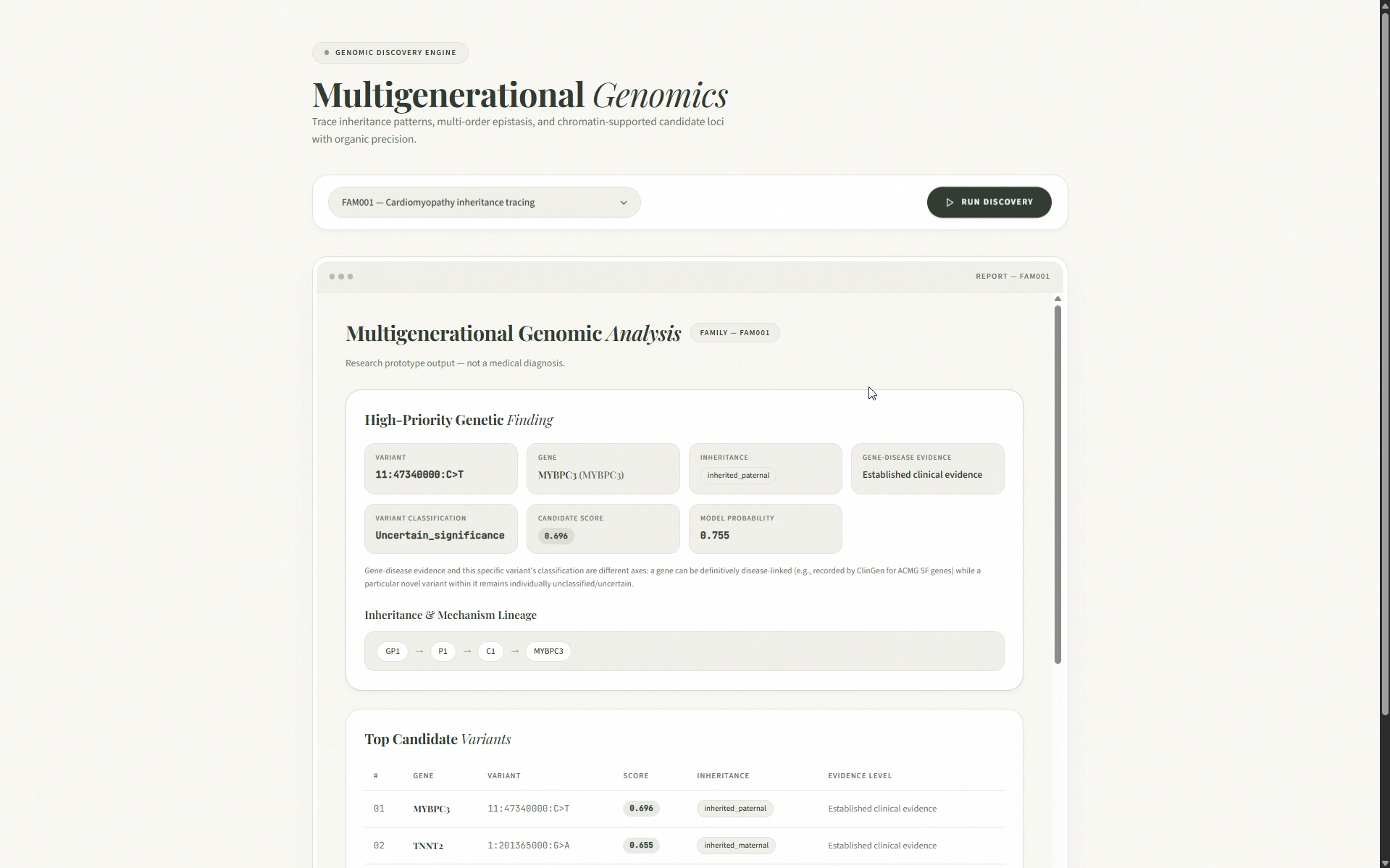
# 20. START THE FRONTEND
# ============================================================

# Keep the API running in Terminal 1.
# Open a second terminal.

cd Nexome/frontend

# Start the dependency-free frontend.
python3 -m http.server 5500

# Open:
# http://localhost:5500


# ============================================================
# 21. DOCKER
# ============================================================

# From the project root:
cd Nexome

# Build and run the application.
docker compose up --build

# API:
# http://localhost:8000


# ============================================================
# 22. FASTEST FULL DEMO
# ============================================================

git clone https://github.com/SharGIT-prog/Nexome
cd Nexome

python3 -m venv .venv
source .venv/bin/activate

pip install -r requirements.txt

python scripts/download_data.py
python scripts/build_reference_data.py
python scripts/generate_family_inputs.py
python scripts/generate_training_cohort.py
python scripts/train.py

# Run the main example.
python run_analysis.py \
  --family data/families/FAM001

# Open:
# outputs/reports/FAM001/disease_risk_report.html


# ============================================================
# 23. FASTEST TEST-ONLY SETUP
# ============================================================

cd Nexome

python3 -m venv .venv
source .venv/bin/activate

pip install -r requirements.txt

pytest


# ============================================================
# 24. PRIVACY
# ============================================================

# FAM001-FAM003 contain synthetic genomic data.
#
# No real patient genomes are included in the repository.
#
# When using real genomic data:
# - Do not commit VCFs to Git.
# - Keep sensitive data outside version control.
# - Follow applicable privacy and access-control requirements.
#
# Nexome is a research prototype.
# Its outputs are NOT medical diagnoses and should not be used
# independently for clinical or treatment decisions.
4. Source Code Repository
GitHub: https://github.com/SharGIT-prog/Nexome
The repository contains the complete implementation, documentation, example families, training pipeline, testing suite, API, frontend, and generated analysis reports.
5. Public Demonstration Video
Video: https://www.youtube.com/watch?v=74PahmBulfo
The demonstration shows:
- The genomic-analysis problem Nexome addresses.
- The system running on example families.
- Multigenerational inheritance tracing.
- Higher-order genetic interaction analysis.
- Regulatory variant analysis through chromatin context.
- The resulting explainable discovery report.
6. Technologies Used
- Python 3.12
- NumPy, pandas, SciPy - scientific and data processing
- scikit-learn - machine learning and evaluation
- NetworkX - graph-based analysis
- FastAPI + Uvicorn - backend API
- Pydantic - data validation
- PyYAML - configuration
- pytest - automated testing
- HTML/CSS/JavaScript - frontend and reports
- Docker - packaging and deployment
7. What Was Created
Nexome was developed as an end-to-end family-aware genomic analysis system.
Key components created include:
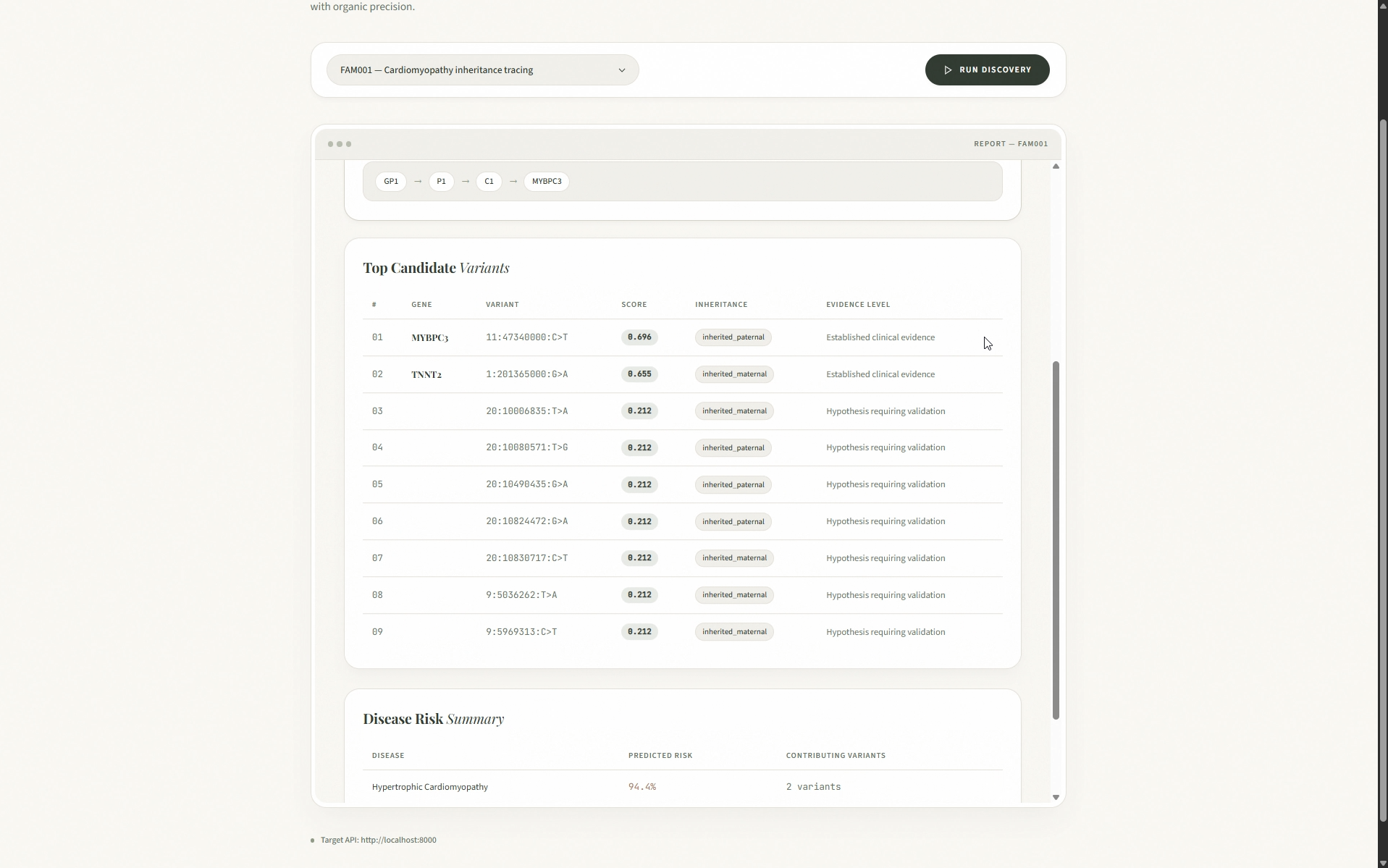
- A pedigree-aware inheritance engine that traces variants across generations.
- Genomic interval indexing for efficient variant and regulatory-region lookup.
- A heterogeneous graph connecting individuals, variants, genes, pathways, diseases, and regulatory elements.
- A pathway-constrained hypergraph for higher-order genetic interactions.
- A temporal chromatin model for connecting regulatory variants with potential target genes.
- Relatedness-weighted graph propagation across the family.
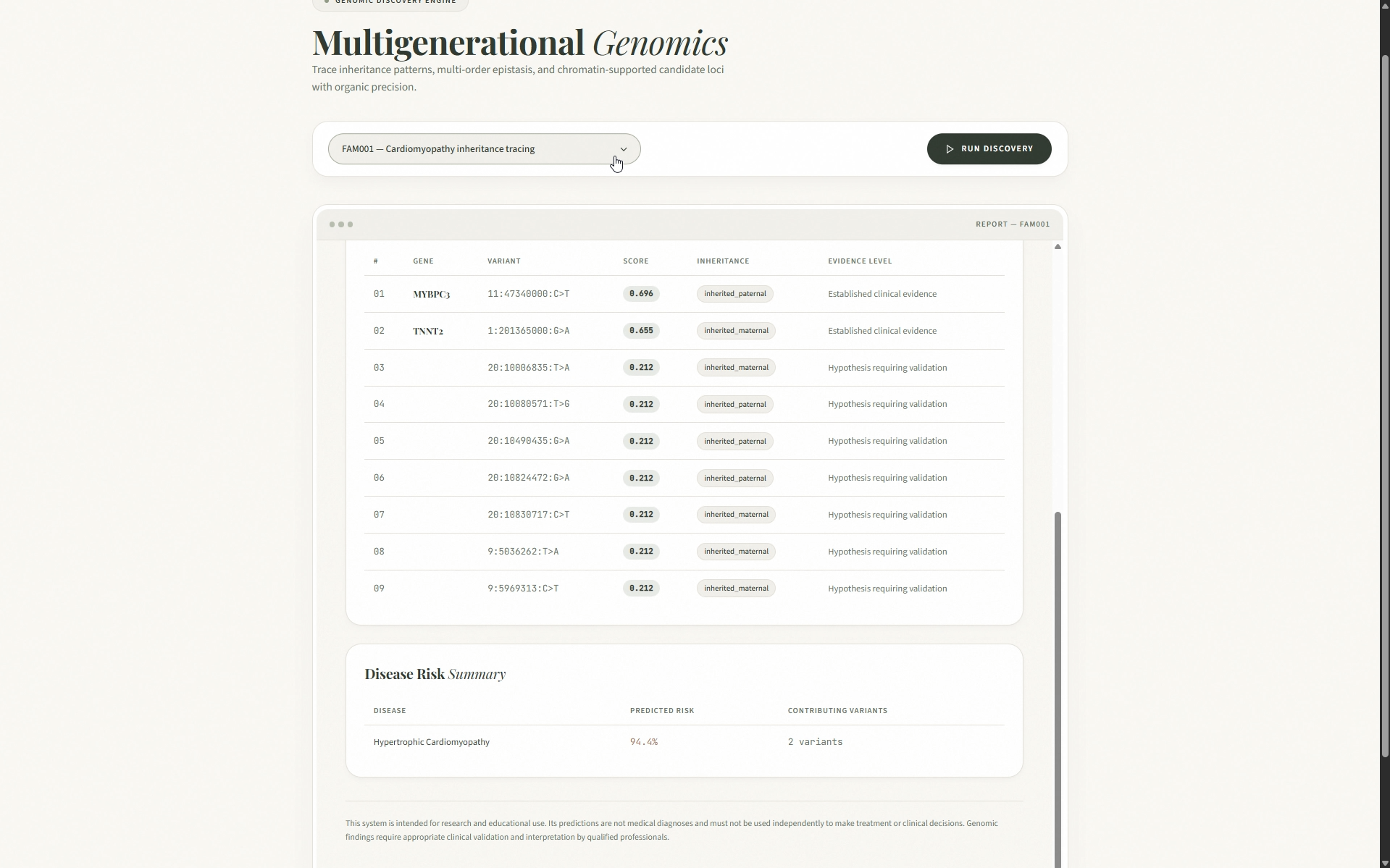
- An explainable Candidate Score that decomposes why each finding is prioritized.
- A four-tier evidence framework separating established evidence from computational hypotheses.
The system demonstrates three major discovery modes:
- Inheritance: identifies signals whose significance becomes clearer through family transmission.
- Epistasis: evaluates whether combinations of multiple genes provide additional predictive information.
- Chromatin: connects regulatory variants to potential distant gene targets through structured genomic context.
The classifier achieves approximately 0.64 AUROC on the synthetic benchmark.
8. AI Tools, Pre-Existing Code, APIs, Datasets, and Third-Party Assets
AI Tools
Claude was used as an AI pair programmer for:
- Code generation and review.
- Documentation.
The application itself does not use an LLM to generate genomic claims. Analysis and scoring are performed using explicit statistical, graph-based, and machine-learning methods.
Pre-Existing Code
No pre-existing project or application code was used as the foundation.
APIs
The application does not require authenticated third-party APIs or API keys.
Dataset
The project uses the ACMG Secondary Findings v2.0 gene panel as its real reference gene dataset.
The example family variants and training cohort are synthetic.
Third-Party Assets
The project uses standard open-source Python libraries listed in requirements.txt. The frontend and report styling were created specifically for Nexome.
9. Team and Contributions
Sharanya R - Individual Contributor
Did the ideation, designed the system architecture, and built the end-to-end genomic analysis pipeline.
10. Known Limitations, Risks, Privacy Concerns, and Future Improvements
Limitations and Risks
- Variant-level data in the examples is synthetic.
- Chromatin trajectories are simulated.
- Gene coordinates should be independently verified for real research use.
- The classifier is trained on synthetic data.
- Epistasis results indicate statistical association, not proven biological mechanism.
- This is a research prototype, not a clinical diagnostic system.
Future Improvements
- Integrate real ClinVar, gnomAD, VEP, and chromatin datasets instead of synthetic variant-level annotations.
- Train and validate the models on larger real-world family cohorts.
- Improve epistasis and chromatin models with larger datasets and trainable graph-based approaches.
- Add secure clinical workflows, authentication, and audit logging for real-world deployment.
Built With
- css
- fastapi
- html
- javascript
- networkx
- numpy
- pandas
- pydantic
- pytest
- python
- pyyaml
- scikit-learn
- scipy
- uvicorn
- vanilla

Log in or sign up for Devpost to join the conversation.