-
-
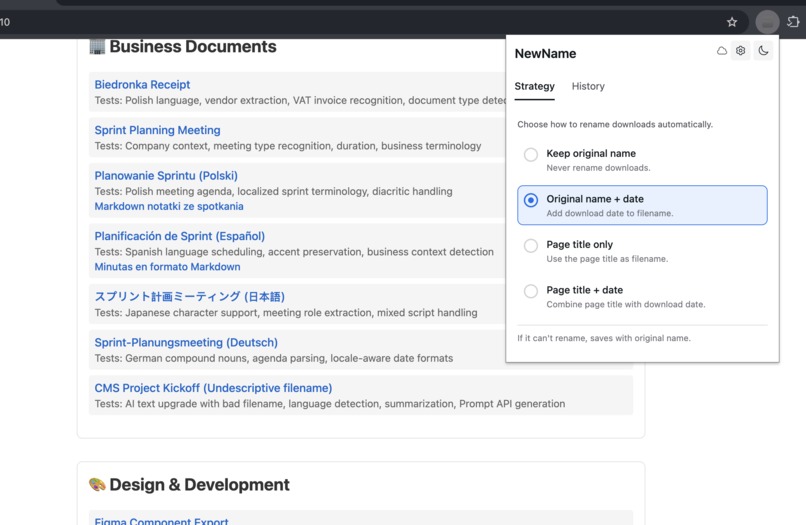
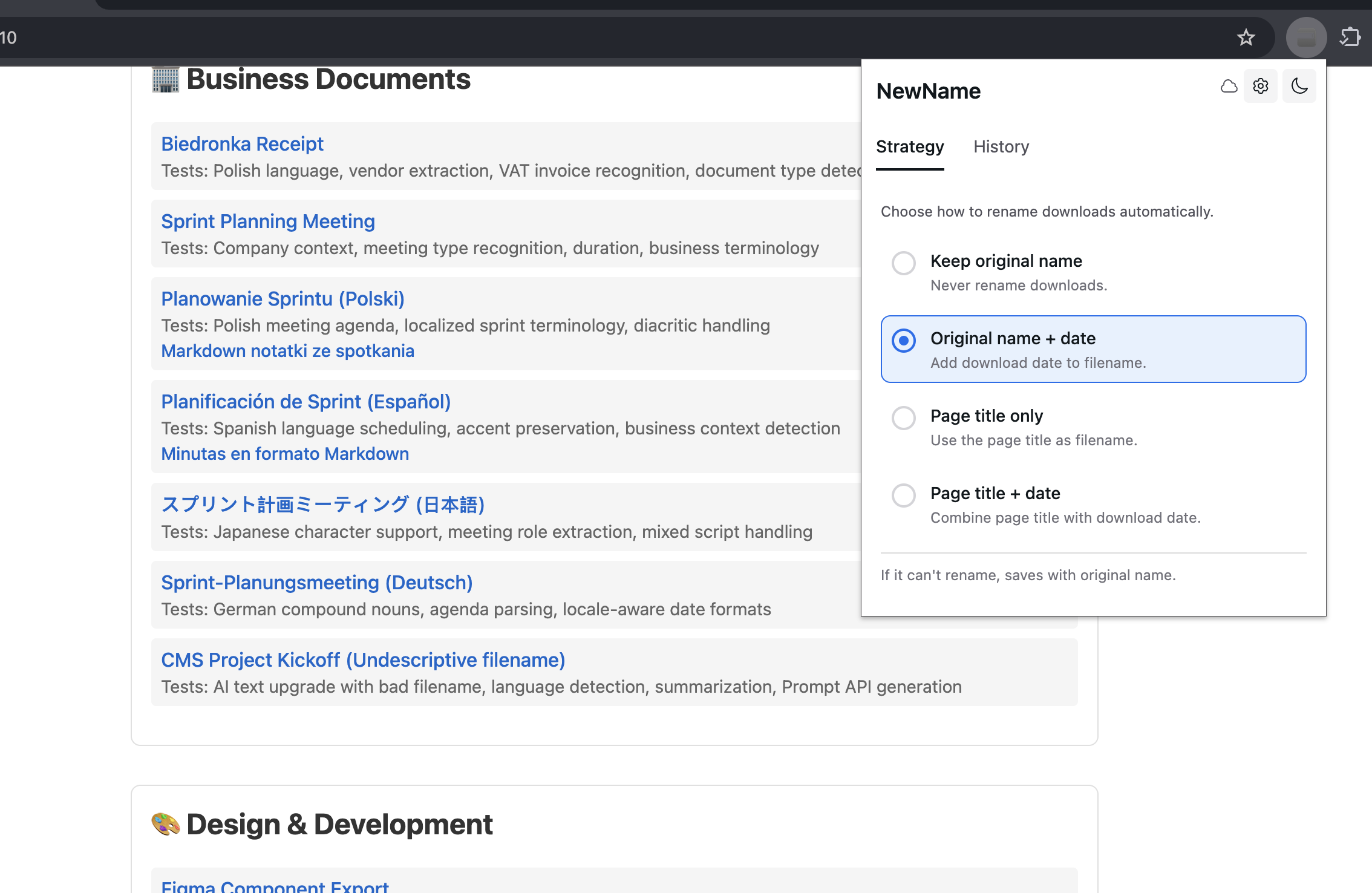
Screen with download strategies (used for deterministic instant renaming)
-
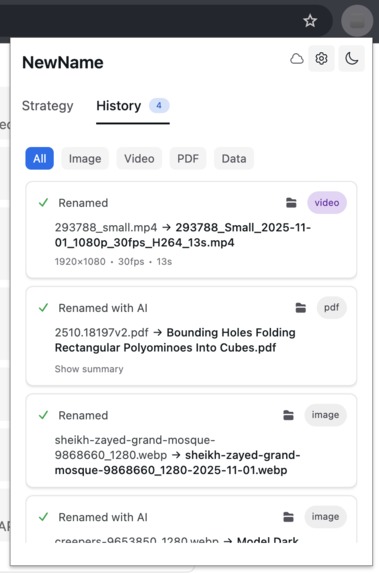
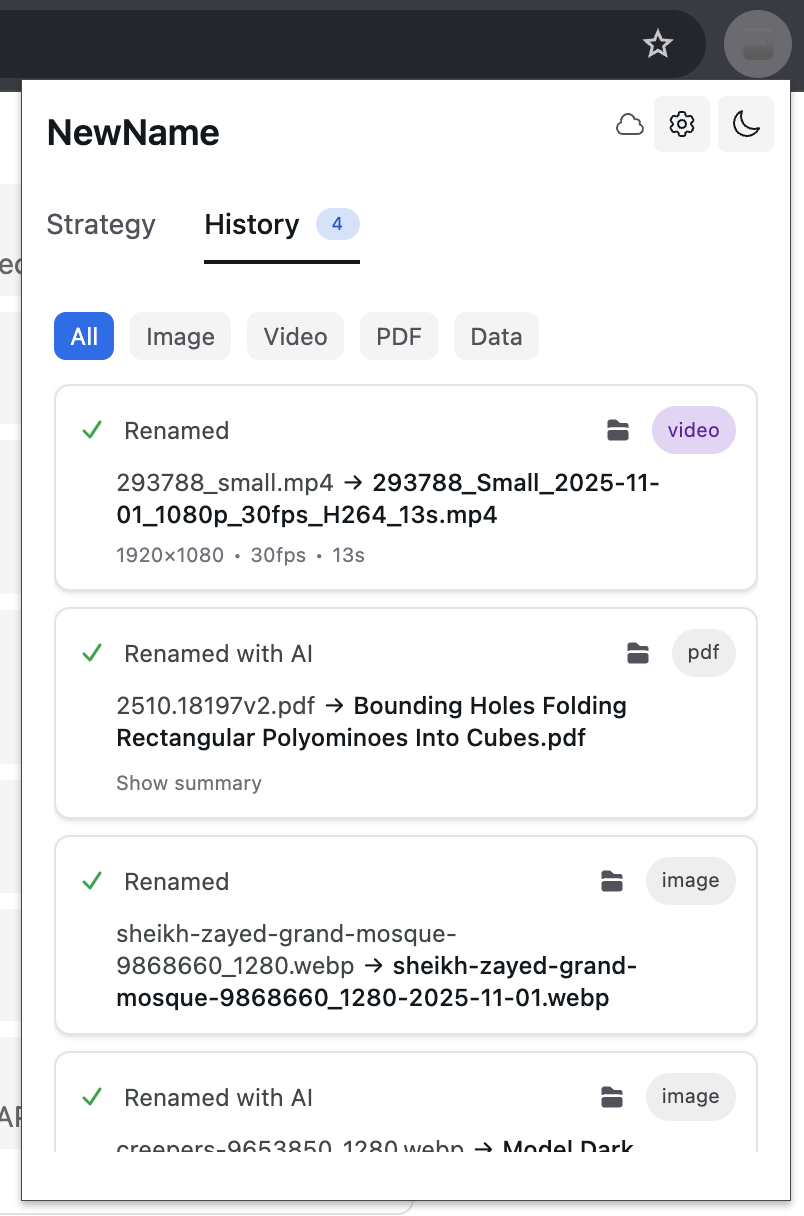
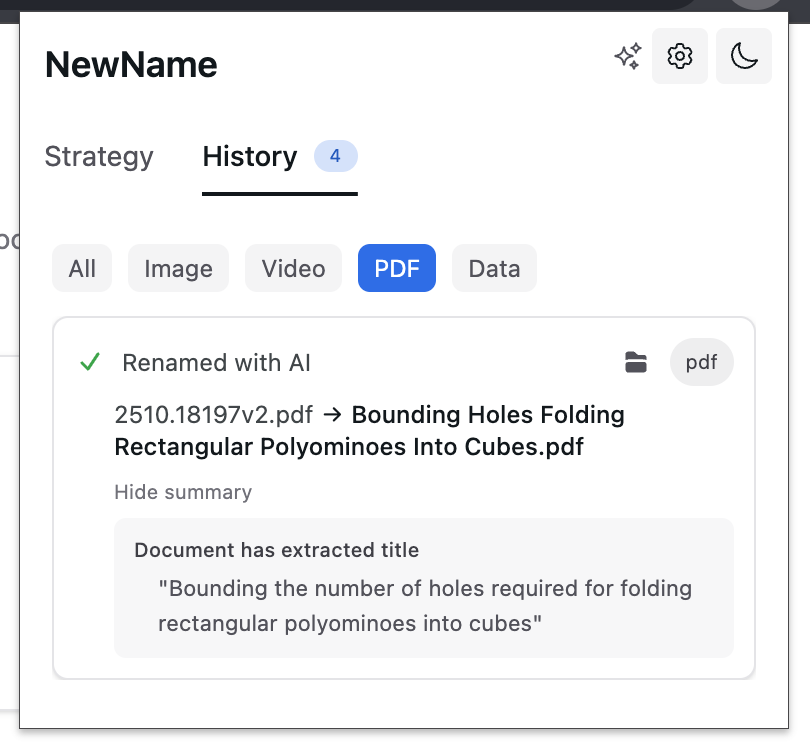
History downloads, to easily see what was saved deterministically, what was renamed with AI
-
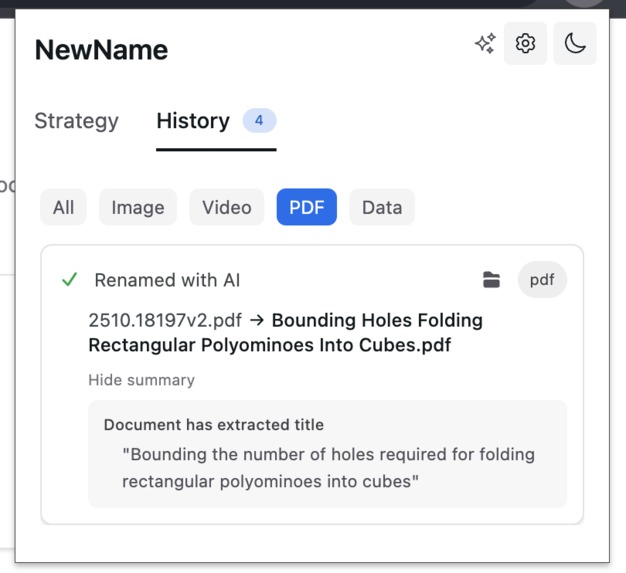
For some files types the reasoning, and summary is available
-
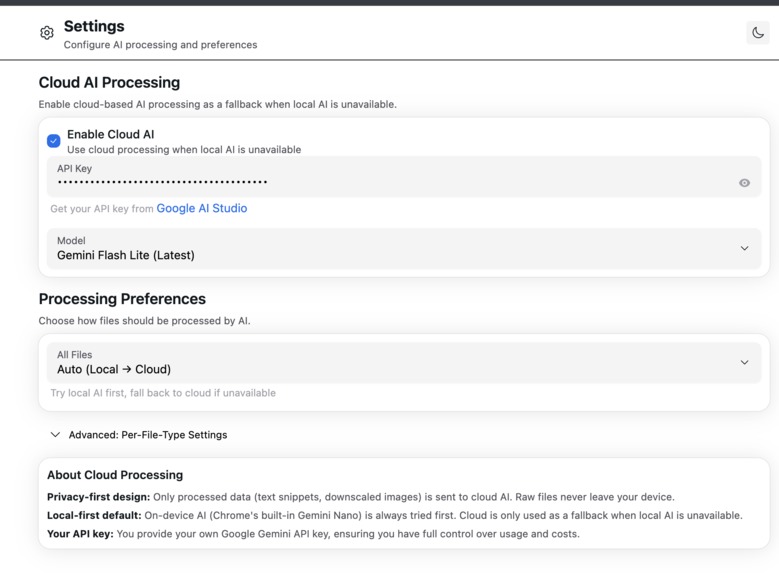
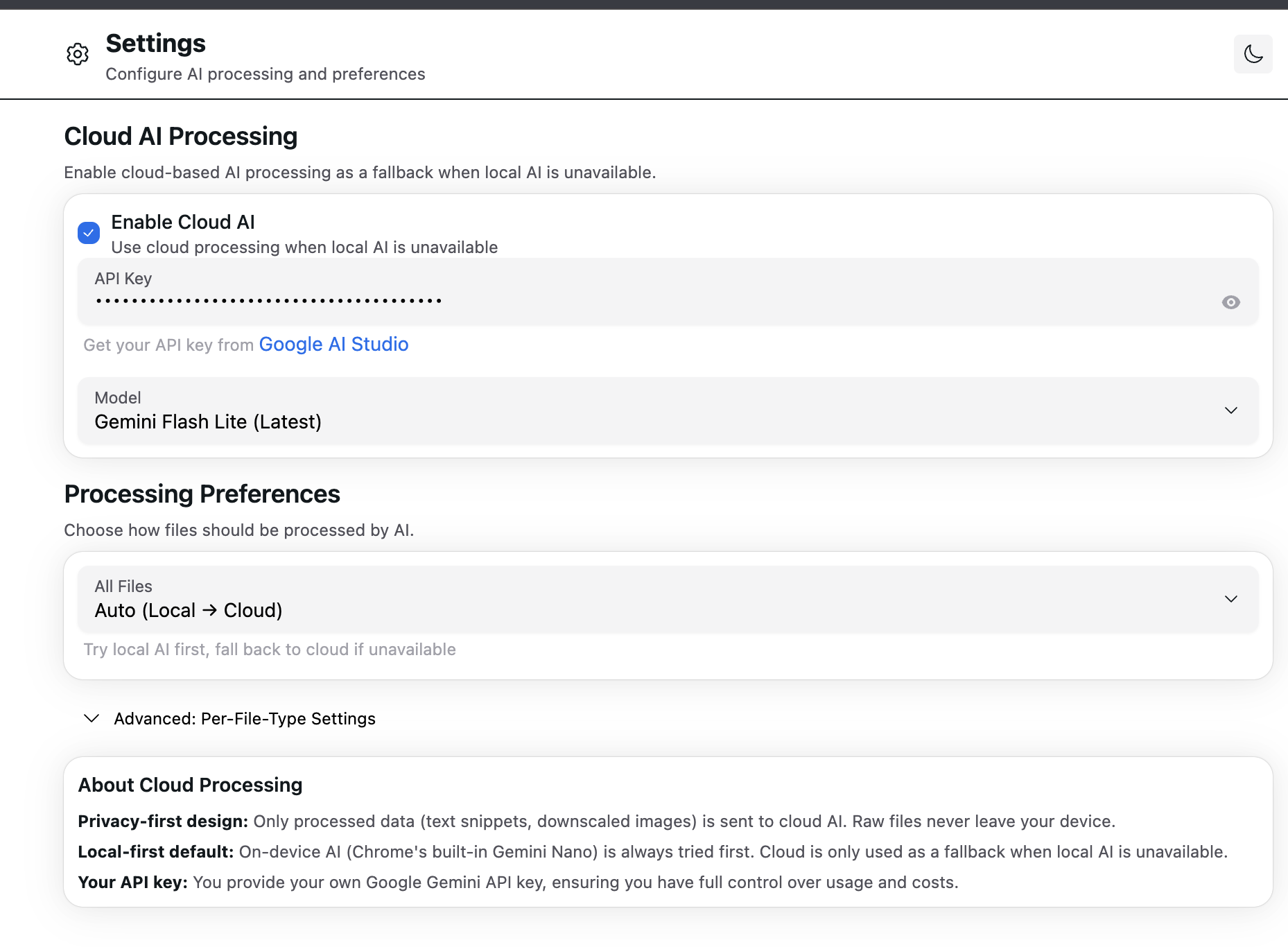
Settings to use local or cloud AI
-
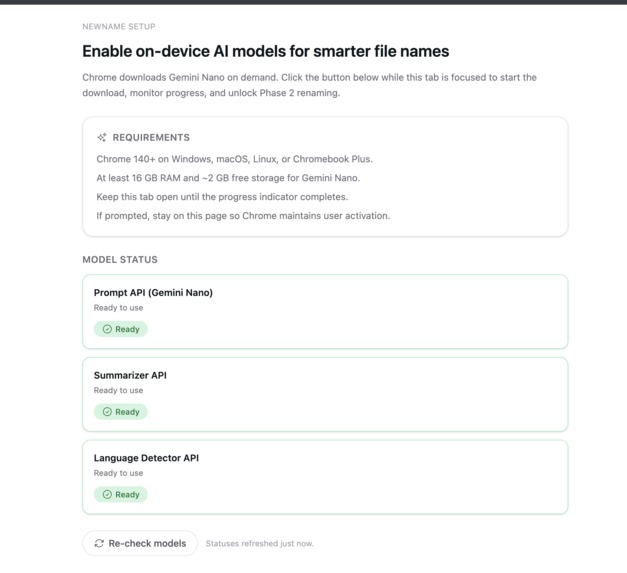
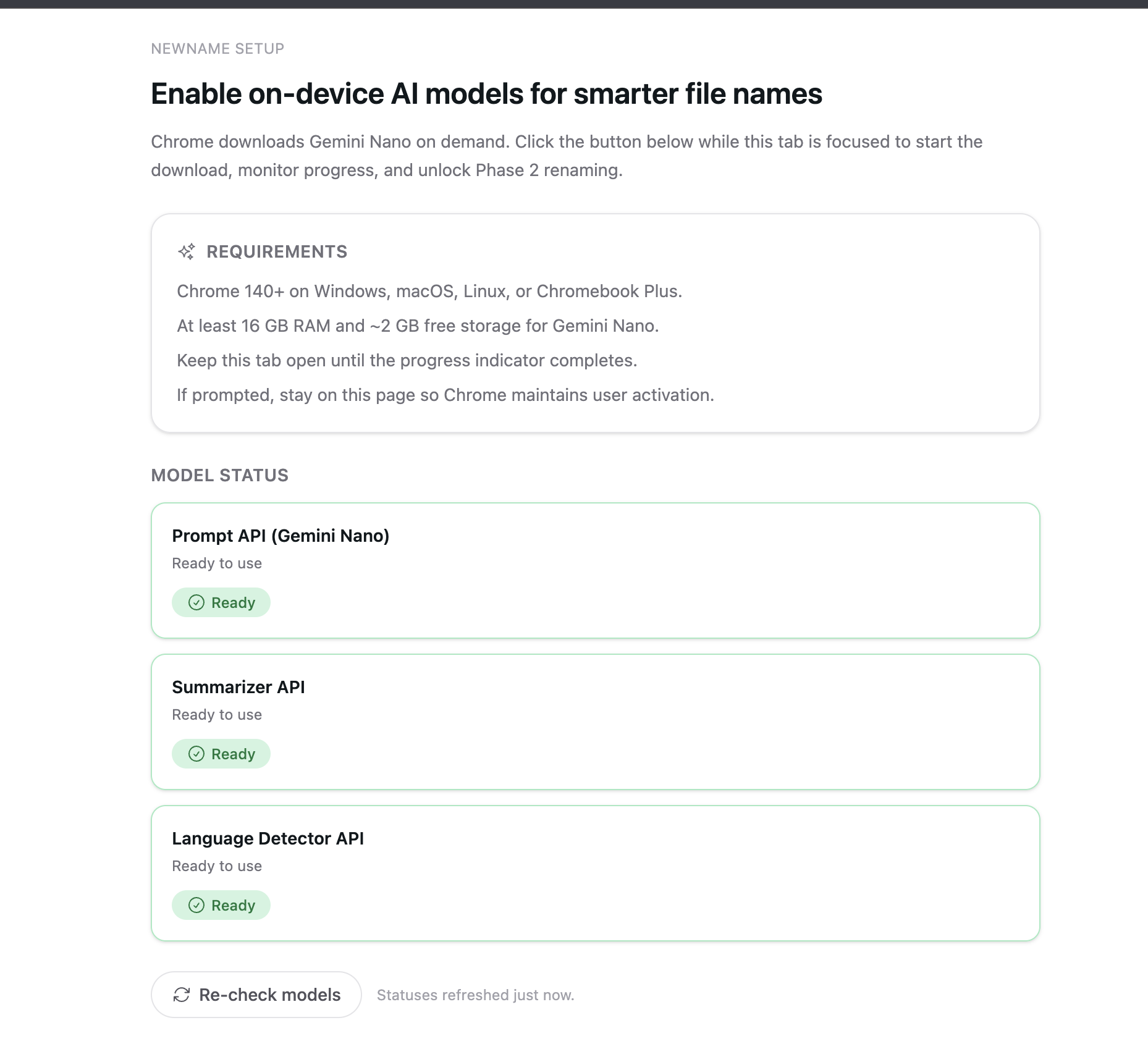
Local AI models setup screen
-
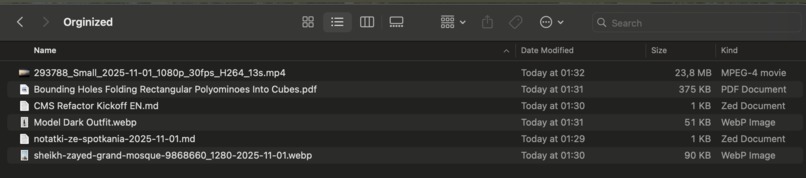
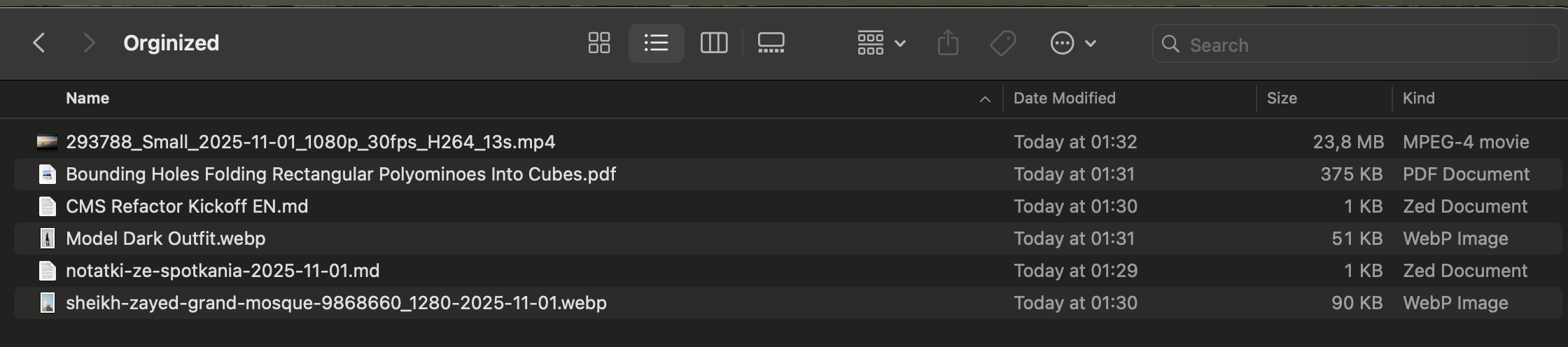
Automatically renamed and organized in folder files
NewName — AI-Powered Downloads Organization and Renaming for Chrome
Inspiration
As a researcher and developer, I download dozens of academic papers, invoices, and screenshots daily. arXiv papers come with cryptic identifiers like 2301.07041v2.pdf, receipts arrive as document(7).pdf, and screenshots become Screenshot_2024_01_15_at_3.42.18_PM.png. After wasting countless hours manually renaming files just to find them later, I realized this wasn't just my problem—it's a universal pain point affecting students, knowledge workers, and professionals everywhere.
I wanted to build something that would automatically understand what a file contains and give it a meaningful name—without sending my private documents to the cloud. When I discovered Chrome's built-in Gemini Nano, I saw an opportunity to create a privacy-first solution that processes everything locally on the user's device.
What it does
NewName is a Chrome extension that intelligently transforms messy download filenames into clear, human-readable names using multi-modal AI analysis:
- Two-Phase Renaming Pipeline:
- Phase 1 (Instant Baseline): Deterministic strategies using page context, dates, and metadata—executes in
<120ms - Phase 2 (Contextual Upgrade): Deep AI analysis of file content for enhanced naming
- Phase 1 (Instant Baseline): Deterministic strategies using page context, dates, and metadata—executes in
- Multi-Modal Intelligence:
- PDFs: Extracts titles from text or uses MuPDF + vision AI for scanned documents
- Images: Analyzes content or subjects, reads EXIF metadata, performs OCR on screenshots
- Media files: Parses metadata (codecs, resolution, duration) via MediaInfo.js WASM
- Privacy-First Architecture:
- Local AI by default: Chrome's built-in Gemini Nano (Prompt API, Summarizer API, Language Detector)
- Smart cloud fallback: Opt-in Google Gemini with data minimization (only text snippets, never raw files)
- Post-Download File Management:
- One-click Upgrade using File System Access API
- Complete rename history
- In-page toast confirmations with preview and edit options
Example transformations:
2301.07041v2.pdf→Attention Is All You Need - Transformer Architecture - 2023-01-15.pdfIMG_20240815_143052.jpg→Sunset - Tatra Mountains - Morskie Oko - 2024-08-15.jpginvoice_final_v3.pdf→Biedronka - Invoice - 2025-03-04.pdf
How we built it
Tech Stack:
- Framework: WXT (modern WebExtension framework with React 19)
- AI Integration:
- Chrome Built-in AI APIs (Prompt, Summarizer, Language Detector)
- Google Gemini via AI SDK (cloud fallback)
- Custom AI router with smart provider selection
- WASM Libraries:
- MediaInfo.js for media analysis
- MuPDF for PDF rendering and OCR support
- Storage: IndexedDB (idb-keyval) for file handles + WXT Storage for settings
- Architecture: Offscreen documents for heavy AI/WASM processing, @webext-core/messaging for type-safe IPC
- Build: TypeScript (strict mode), Biome (linting), Vitest + Playwright (testing)
Key Implementation Challenges
Chrome AI Model Management:
Built a complete onboarding flow with diagnostics for Gemini Nano setup, handling model downloads (~2GB), and graceful fallbacks when models aren't available.Offscreen Document Orchestration:
Created isolated execution contexts for AI processing to avoid blocking the service worker, with careful message passing and state synchronization.File System Access API Integration:
Implemented reliable post-download renaming with retry logic, conflict resolution, and atomic move operations—all while handling edge cases like files in use.Multi-Modal Content Analysis:
- PDF Strategy: Text-first extraction with PDF.js, falling back to MuPDF rasterization + vision AI for scanned documents
- Image Pipeline: Content description, EXIF parsing, OCR for screenshots
- Streaming Range Fetches: Partial content downloads (first 1–5 PDF pages, initial image bytes) to avoid re-downloading entire files
- PDF Strategy: Text-first extraction with PDF.js, falling back to MuPDF rasterization + vision AI for scanned documents
Structured AI Output:
Used Prompt API's JSON schema constraints to guarantee safe filenames (proper character validation, length limits, single extension dot).
Challenges we ran into
1. Chrome AI in WXT Development Mode
WXT creates a separate Chrome profile for bun run dev, which doesn't inherit flags or AI models from the main browser. I had to:
- Document a complete setup flow for developers (
docs/wxt-chrome-ai-setup.md) - Build comprehensive diagnostics to detect missing flags, hardware requirements, and Optimization Guide issues
- Create fallback paths when AI isn't available during development
2. AI Model User Activation Requirements
Chrome's Prompt API requires user activation (click/keyboard interaction) to initiate model downloads. This created UX challenges:
- Built a dedicated AI setup page with clear CTAs and progress tracking
- Implemented step-by-step onboarding: folder permissions → AI setup
- Added retry logic for activation errors with helpful guidance
3. PDF Text Extraction Reliability
Not all PDFs are created equal:
- Born-digital PDFs: straightforward text extraction with PDF.js
- Scanned documents: required MuPDF WASM integration for rasterization + vision AI
- Hybrid PDFs: needed heuristics to detect low-text scenarios and switch strategies
- Solution: Image-first approach, to understand text and visual parts in the same time
4. Performance Budgets
Set strict p95 targets:
- Instant Baseline:
<120ms(deterministic strategies) - Contextual Upgrade:
<60sfor PDFs,<60sfor images - Achieved through lazy WASM loading, offscreen processing, range-based partial fetching, and aggressive caching
5. Filename Safety Guarantees
Different OSes have different reserved names and character restrictions:
- Built a hardened filename policy enforcing safe characters (
-_A-Za-z0-9 .) - Single dot before extension enforcement
- Windows reserved name detection (CON, PRN, etc.)
- Length truncation with intelligent word boundary preservation
Accomplishments that we're proud of
✅ Complete Privacy-First AI Pipeline:
Successfully integrated Chrome's built-in Gemini Nano with seamless cloud fallback—all while maintaining user privacy through on-device processing and data minimization.
✅ Multi-Modal Content Understanding:
Built working pipelines for PDFs (text + vision), images (content + EXIF), and media files (metadata parsing)—each with specialized strategies.
✅ Production-Ready Architecture:
Implemented proper domain-driven design, comprehensive error handling, retry logic, and graceful degradation—this isn't a prototype, it's a maintainable production extension.
✅ Developer Experience:
Created extensive documentation (CLAUDE.md, PRDs, setup guides), structured codebase with clear separation of concerns, and comprehensive tooling (bun run verify runs lint + typecheck + build in one command), good setup to vibe-code with AI.
✅ User-Centric Design:
Every decision was made with real use cases in mind—from auto-apply countdown timers to undo operations to processing preference toggles.
✅ AI Model Diagnostics:
Built a complete troubleshooting system that identifies specific Chrome AI issues (missing flags, hardware requirements, profile state) with actionable fix instructions.
What we learned
Technical Insights
- Chrome Built-in AI is powerful but nuanced: Model availability detection, user activation requirements, and structured output constraints require careful handling.
- Offscreen documents are essential for heavy workloads: Moving AI processing and WASM execution to isolated contexts keeps the service worker responsive and prevents timeout issues.
- File System Access API unlocks new possibilities: Being able to rename files post-download opens up workflows that weren't possible before—but requires careful permission management and user education.
- TypeScript discriminated unions + zod = rock-solid messaging: Type-safe IPC between contexts prevented entire classes of bugs during development.
Product Insights
- Privacy matters deeply: Users want AI-powered tools but are rightfully concerned about sending files to the cloud. Local-first with explicit opt-in cloud fallback is the right approach.
- Onboarding is critical: Getting users to grant folder permissions and set up AI models requires clear value communication and step-by-step guidance.
- Deterministic strategies build trust: Starting with simple, predictable renaming (Phase 1) before offering AI upgrades (Phase 2) gives users confidence in the system.
What's next for NewName
Immediate Roadmap (v1.1)
- Advanced File Type Support:
- Audio files (podcast transcription, meeting classification)
- Archive analysis (inspect manifest for better naming)
- Code files (language detection, project context)
- Bulk Folder Organization:
- Select any folder and analyze/rename all existing files
- Batch preview with rollback support
- Smart folder structure suggestions
- Enhanced AI Capabilities:
- Multi-file context analysis (detect series, maintain naming patterns)
- Learning from user edits and preferences
- Custom AI prompt templates
Long-Term Vision (v2.0+)
- Cross-Platform Expansion:
- Firefox support via WebExtensions API
- Desktop helper app (file watcher + local LLM integration)
- Team & Enterprise Features:
- Organization-wide naming standards
- Settings sync across devices
- Per-folder/per-project rules
- Cloud Storage Integration:
- Direct integration with Google Drive, Dropbox, OneDrive
- Rename files already in cloud storage
- Sync naming rules across all devices
- Advanced Customization:
- Visual template builder with drag-and-drop
- Conditional logic (if PDF → include author; if image → include resolution)
- Custom separators and metadata placement
The ultimate goal: Make file organization completely effortless, so users never have to think about renaming files again, while maintaining complete privacy and control over their data.
Built solo by Yuriy Babyak for the Google AI Hackathon demonstrating what's possible with Chrome's built-in AI when combined with thoughtful UX and privacy-first architecture. 🚀
Built With
- languagedetectorapi
- mediainfo.js
- mupdf.js
- promptapi
- react
- sdk-vercel-ai
- summarizerapi
- tailwind
- typescript
- wxt

Log in or sign up for Devpost to join the conversation.