-
-
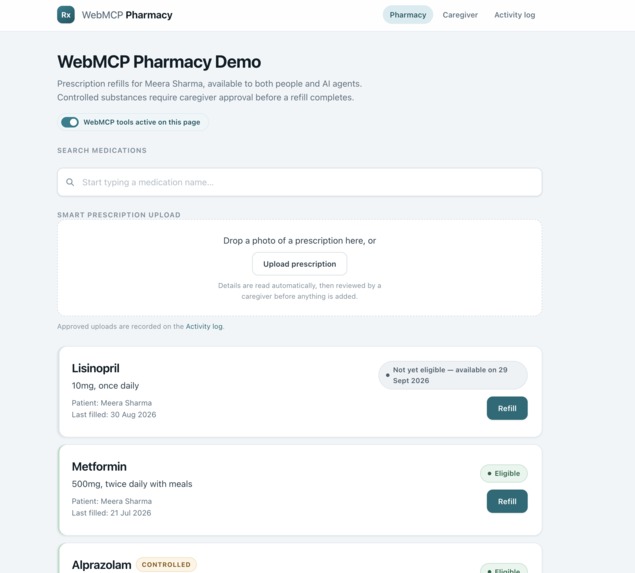
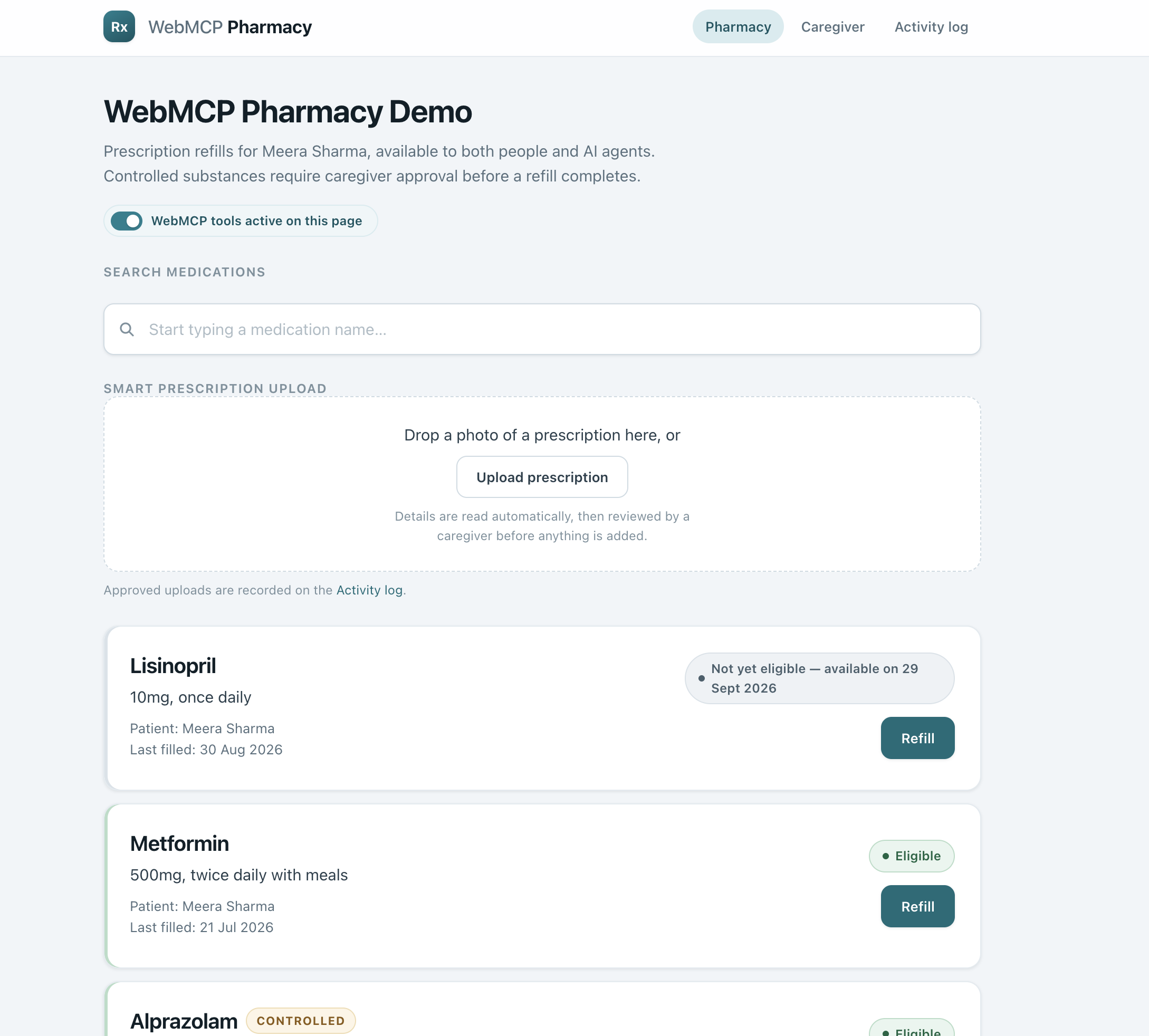
The pharmacy page — medications, refill status, and a smart prescription upload box, all exposed to agents via WebMCP tools.
-
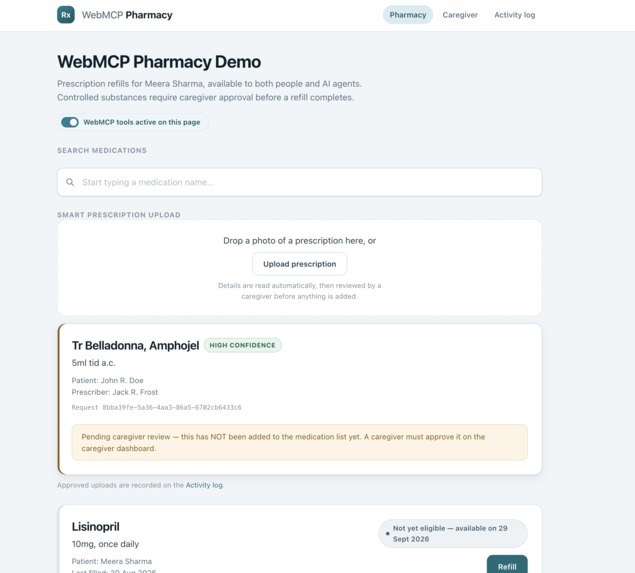
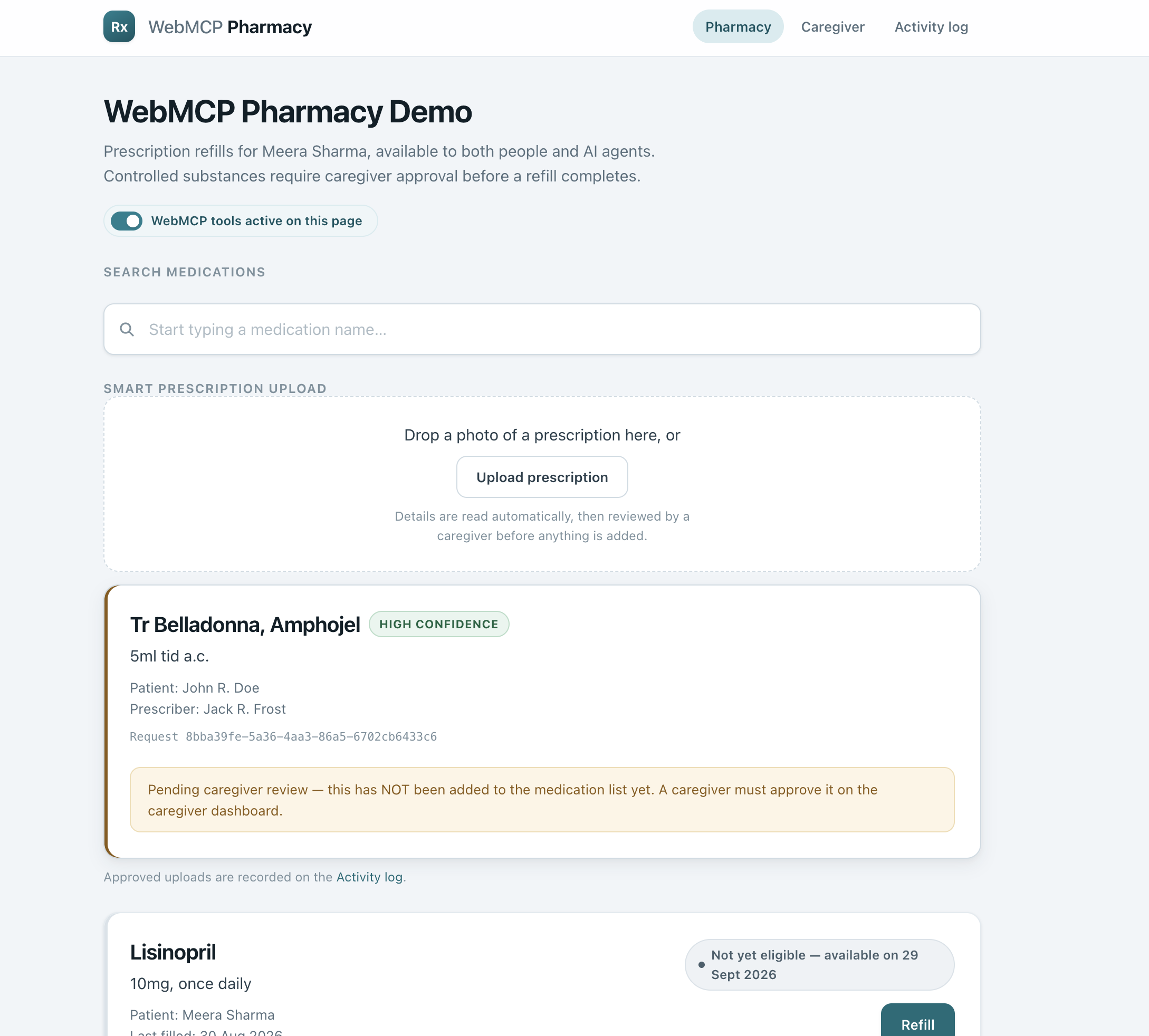
An uploaded prescription photo, read automatically by AI vision and held for caregiver review before anything is added
-
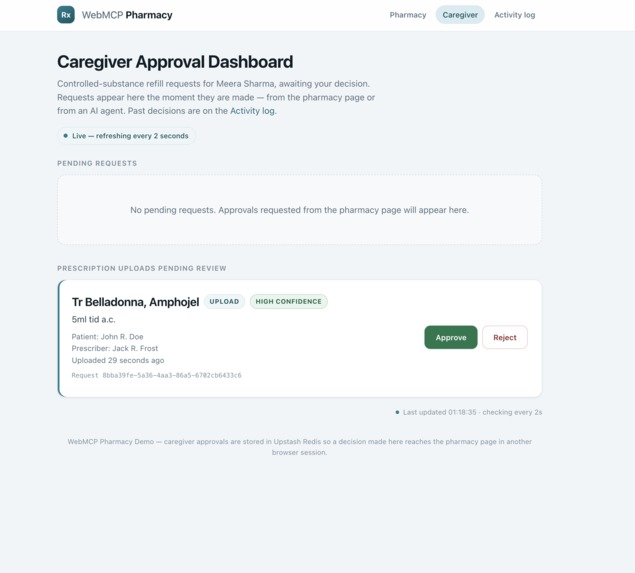
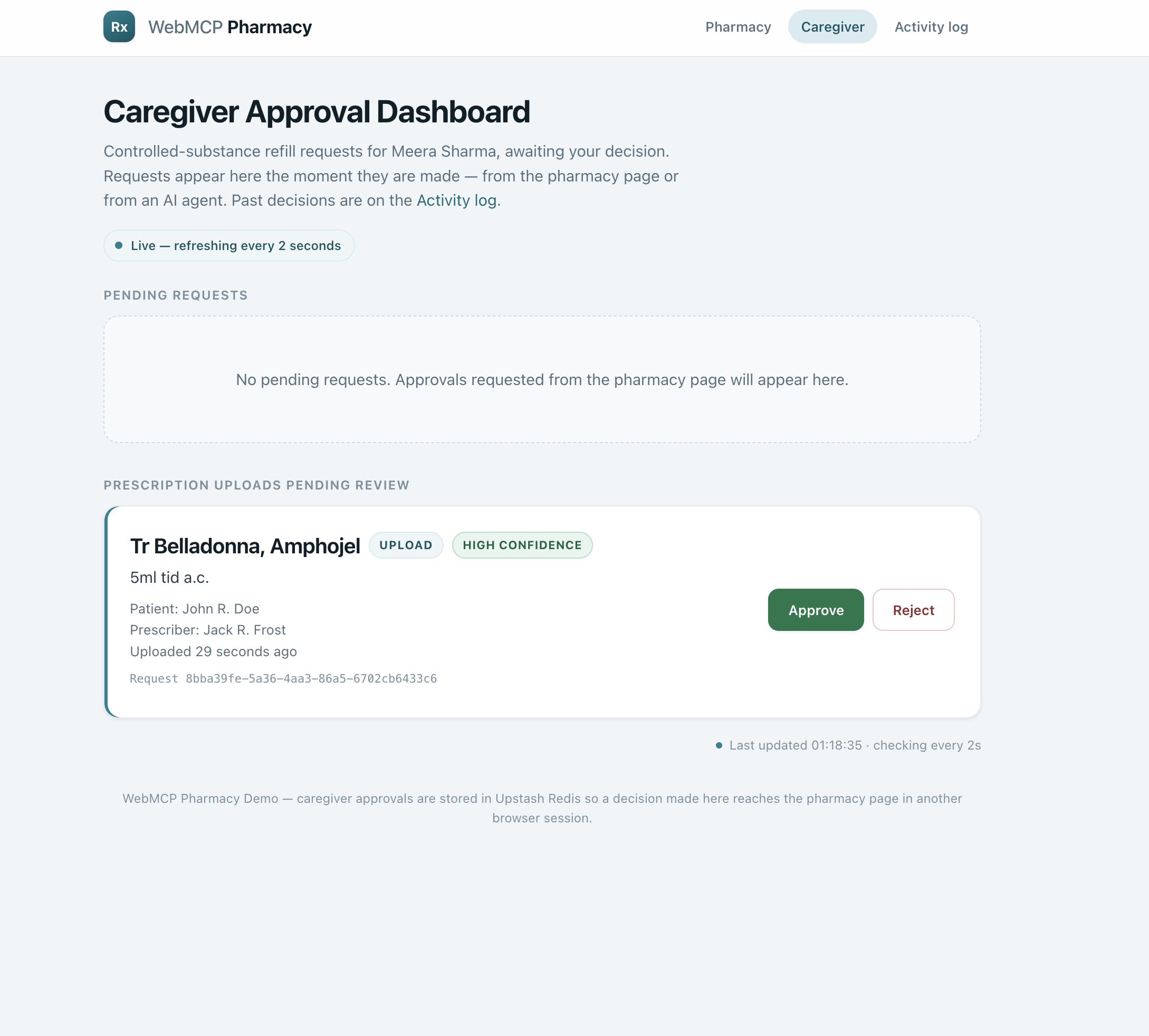
Every sensitive action — a controlled-substance refill or an AI-read prescription — waits here for a real person's approval
-
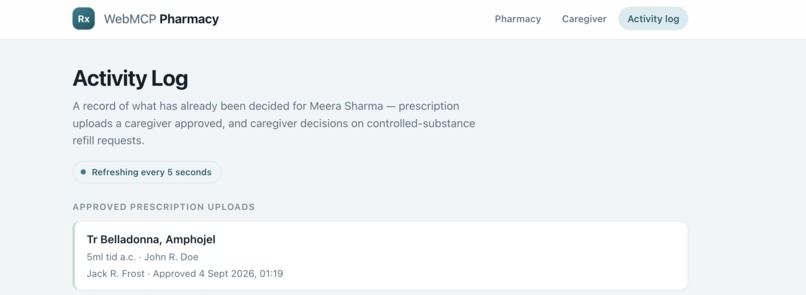
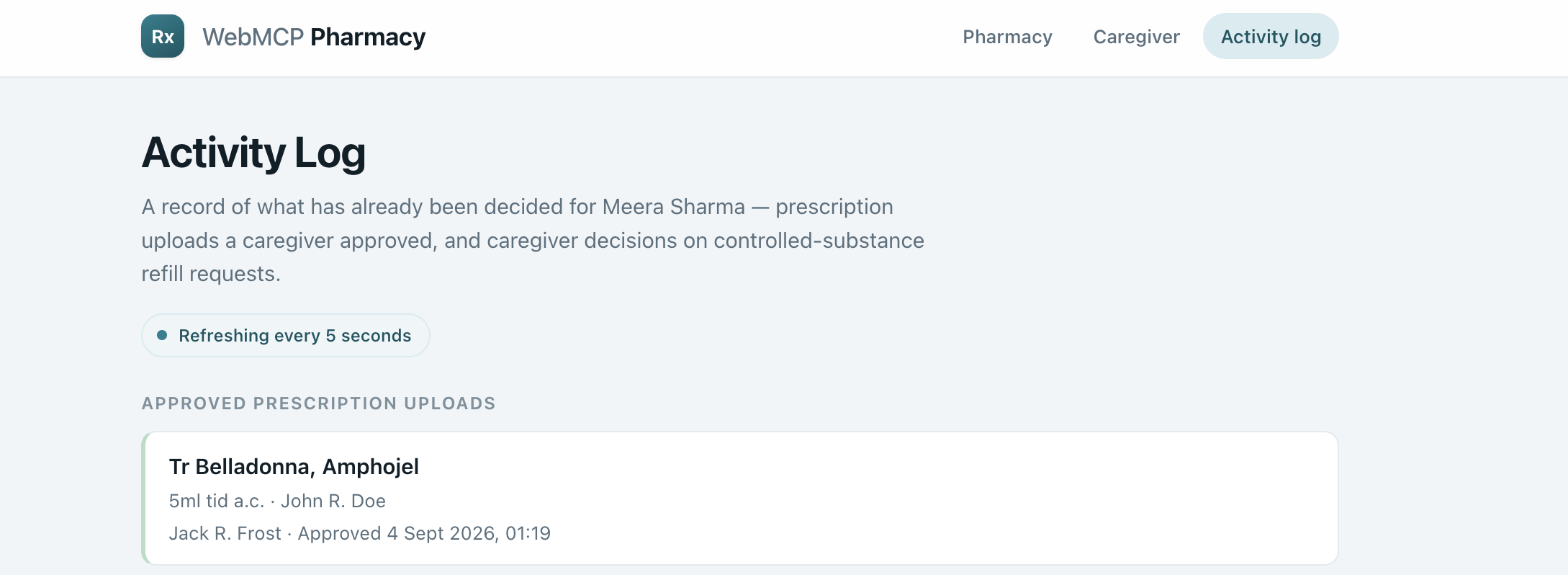
A live record of every decision made, whether by a caregiver clicking Approve or an agent calling a tool
Inspiration
Now there is somewhere an adult child who holds onto the phone at a pharmacy trying to refill their mother’s prescription for blood pressure medicine before the weekend. Elsewhere a caregiver tries to figure out whether the two medications his parent is taking can be taken together, but the only person who would know about that is a pharmacist at work behind a desk.
This project came into existence when the question popped up in our mind: what if an AI could really help with that? Not impersonating a customer clicking through the website but rather being trusted in doing something which is a responsibility of a regular person.
The reality is, most of existing AI agents are not trustworthy when comes to such kind of jobs. They browse the websites like a tourist browsing the menu without knowing the language — guessing, clicking wrong links, and sometimes making serious mistakes. For the healthcare sector, "occasionally wrong" means something different than just a rounding error. It's the wrong medication!
This is what WebMCP was designed to overcome.
What it does
WebMCP Pharmacy is a demonstration site designed to showcase the capabilities of WebMCP in a practical and high-pressure situation — a simulated pharmacy rather than a real one, based on the needs of managing prescription medication for an elderly parent (Meera Sharma) for her family members.
This is a simulated scenario on purpose, as it is relatively simple to simulate an agent clicking a button, and quite hard to simulate an agent taking action that matters. This demo, therefore, showcases twelve WebMCP tools over three pages – from searching for medications, checking for refills, identifying possible drug interactions, to even reading a photo of a prescription using artificial vision – demonstrating an agent taking precise action like a human would do.
However, there was also much more to show than mere capacity. In order to make precision with no control mechanisms a real thing, we created a proof of concept for a human in the loop system. Each critical operation – restocking the controlled substance, confirming the prescription from an AI-driven source – requires approval from a real person via an operational interface based on real architecture. Agent suggests. Human approves. Every approval is logged. This is not a mere illustration of how oversight could be implemented – this is a real-life implementation.
Finally, we created something that the competition didn’t ask for at all: a side-by-side comparison mode (?webmcp=on / ?webmcp=off) that would enable anyone to confirm empirically rather than take our word for it the difference between an agent guessing what to do in an interface and an agent using a functional tool – on the exact same website, with the exact same amount of friction, but different tool access.
How we built it
Plain HTML, plain JavaScript, and document.modelContext.registerTool(). Plain because the narrative we wanted to tell wasn’t about how sophisticated the framework could be, but rather about what happens when an application decided to speak in an agent’s language instead of having agents mimic humans.
The reality of the underlying infrastructure, though: Upstash Redis for the caregiver-approval queue so two different browser tabs — the agent’s tab and the human’s tab — can communicate in real time. Google’s Gemini Vision model for interpreting prescriptions. And Vercel serverless functions to bring it all together. No mockups here, just live infrastructure being called out by each and every tool in this demo.
Challenges we ran into
The most difficult issue was not a technical one, but rather a philosophical one: how could we show that the tool was better, and not just faster? In the beginning, we fell into the trap of measuring "who clicks through the UI quicker" — and soon understood that this was the wrong question, as chat interfaces incur costs regardless of what lies under the hood. What made the difference was that we found a question, the answer to which could not possibly be guessed: Does this pharmacy's database indicate that there is a problem with those two drugs together? With access to tools, an agent could get the perfect response instantly, drawing from actual data. Without it, they could not know this — since such data was never supposed to be scraped and only requested properly.
We also had to confront an uncomfortable design issue: if an agent is capable of approving a prescription on behalf of a caregiver, who is really in charge? Our solution was to make the capability clear, rather than ambiguous — all caregiver-facing tools are described as features which, when used in production, will only ever be accessible to an authenticated caregiver's session.
Accomplishments that we're proud of
Everything you see in the demo is genuine, not a simulation. Caregiver consent form is no mere illustration, it is built on live Redis backend that truly enables the coordination between two browser windows in real time, exactly as in real-life applications. Prescription image upload functionality truly invokes the vision model and pulls out structured data from the actual photograph. Finally, the ?webmcp=on/?webmcp=off contrast is no mere demonstration, it is exactly the same website, exactly the same level of friction, only with access to tools as the only variable, so you don't need to trust us, you can check it yourself.
We are especially proud of the fact that there are 12 tools spread across three pages, not just one, showing that WebMCP is good to go even for multi-page apps.
Actually, what we feel the most pride in is the amount of knowledge we acquired during this work, there were no pre-existing answers for us in this project. There were some non-typical issues we had to face: dealing with a depreciated version of Gemini we were using in the project while debugging the 404 to the actual answer of the API; the caregiver dashboard that failed to display the requests in progress because of mismatching the Redis key which required tracing the issue from the server side, and not the browser one; understanding that our "on vs off" comparison didn't make any sense since there was nothing in common between two modes until we rebuilt the friction and made it the same in both of them.
In addition, there was another thing we have learned. The implementation of the mechanism of building the trust to the agentic system is not a separate thing, which you just implement after you've finished your product. The determination of which actions the agent can perform independently and which need a human's interference affected the development process from the very beginning.
What we learned
The future of the agentic web is not in agents becoming increasingly adept at impersonating humans. Rather, it's in websites improving their ability to tell agents the truth about their capabilities — and, perhaps more importantly, what they must never be able to do on their own.
What's next for WebMCP Pharmacy
A backend that is real, meaning that a verified prescription will update the actual medical record, not some dummy entry for a demonstration log. Authentication, meaning that all caregiver tools can only be accessed by an authenticated caregiver. And finally, hopefully, more pharmacies, portals, and health care applications built on that principle.
Built With
- css
- gemini
- html
- javascript
- upstash-redis
- vercel
- vercel-serverless-functions
- webmcp


Log in or sign up for Devpost to join the conversation.