Inspiration
NeuroWatch was inspired by a simple question: what if creators could debug a video before posting it the same way engineers debug code?
Most editing advice is vague: “make it punchier,” “tighten the hook,” “add more energy.” But creators actually make decisions at the level of seconds: where to cut, what to move earlier, when attention drops, and which moment deserves to become the hook. We wanted to build a tool that turns those decisions into a visual, timestamped workflow.
The neuroscience angle came from the idea that attention is not just a social metric. Before likes, comments, watch time, or retention graphs, there is a biological response to stimulus: motion, brightness, sound, contrast, speech, and novelty. NeuroWatch explores that layer by visualizing a predicted brain-response timeline and cortical heatmap for a video clip.
The goal is not to claim that we can literally read minds from a video. Instead, NeuroWatch is a creator-facing prototype for neuroscience-shaped editing signals: a way to see where a clip may feel stimulating, where it may go stale, and how those signals map onto brain regions associated with vision, motion, and audio.
What It Does
NeuroWatch lets a user upload a short video and produces:
- A playable video preview.
- A predicted engagement timeline over time.
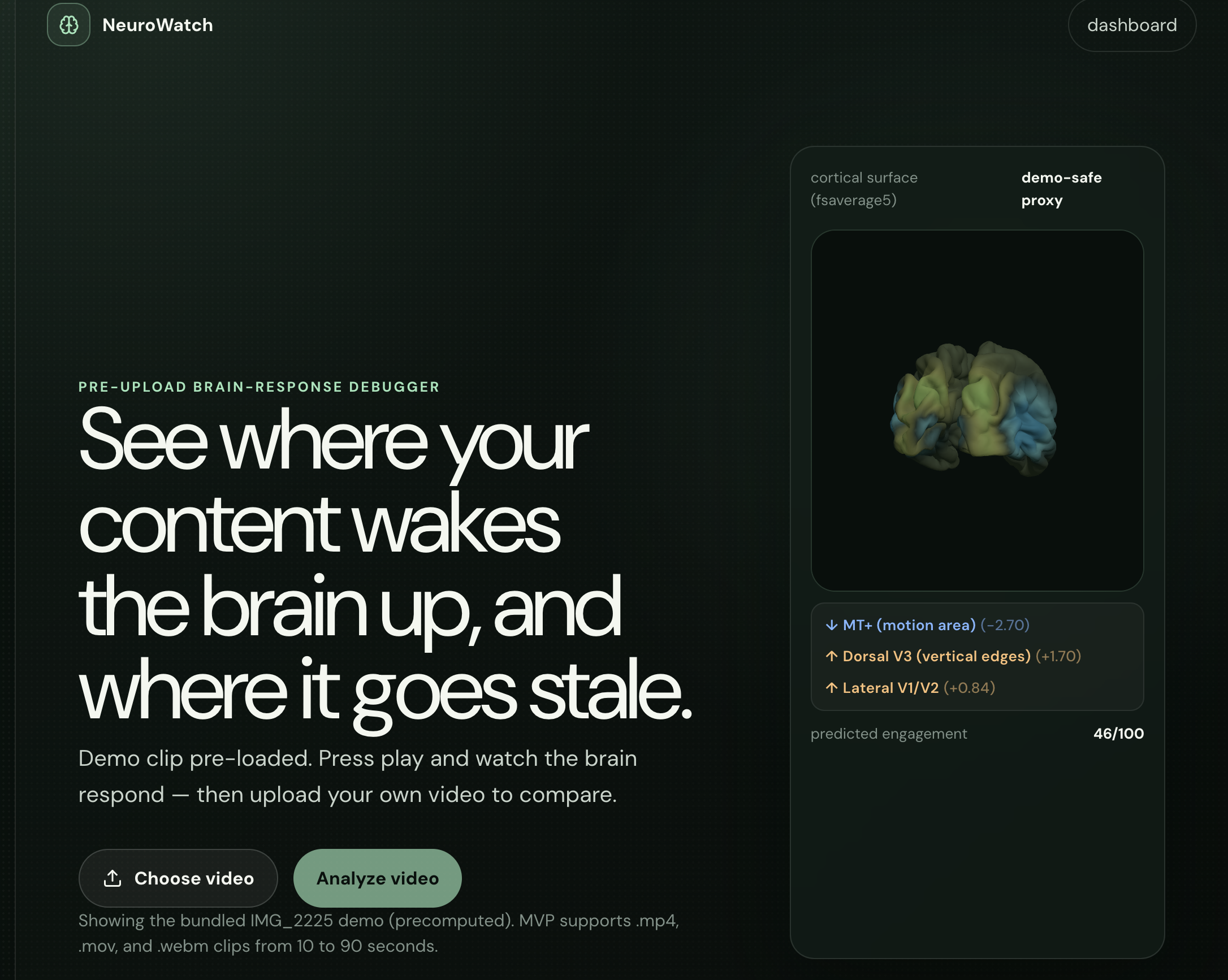
- A 3D cortical surface heatmap showing changing brain-response patterns.
- Region captions such as visual cortex, motion area, foveal V1, and auditory cortex.
- Creator-focused feedback including hook score, stale sections, top moments, and suggested edits.
- Timestamped notes so the user can jump directly to the moments that need attention.
Instead of giving one generic score, the app breaks the video into time windows and shows how the predicted response changes throughout the clip. In simplified form, each timestep has a response vector:
$$ r_t = [r_{visual}, r_{motion}, r_{audio}, r_{contrast}, ...] $$
Those region-level responses are projected onto a cortical surface so the user can see both when the signal changes and where the signal appears on the brain model.
How We Built It
The project has a React frontend and a FastAPI backend.
The frontend is built with:
- React
- TypeScript
- Vite
- Three.js for the 3D brain surface
- Recharts for the engagement timeline
- Custom CSS for the NeuroWatch studio interface
The backend is built with:
- FastAPI
- Python
- NumPy
- ffmpeg-based video/audio feature extraction
- A pre-exported
fsaverage5cortical mesh - Optional TRIBE v2 integration for real model inference
The 3D brain visualizer uses a real cortical surface mesh based on fsaverage5. The backend sends compressed activation arrays to the frontend, and the frontend decodes them into Float32Array values. Each vertex is colored with a diverging colormap, mapping negative and positive z-scores into cool and warm colors.
For the fast interactive path, NeuroWatch extracts features from the actual uploaded video:
- Luminance
- Contrast
- Center-vs-surround brightness
- Frame-to-frame motion
- Horizontal and vertical gradients
- Audio loudness
These features are normalized and projected onto broad anatomical regions. For example, motion is mapped toward MT+, audio loudness toward auditory cortex, and center-weighted visual changes toward foveal V1.
A simplified version of the scoring process is:
$$ z_i = \frac{x_i - \mu_x}{\sigma_x + \epsilon} $$
where (x_i) is a feature value at a timestep, (\mu_x) is the mean, and (\sigma_x) is the standard deviation. The final engagement proxy is derived from the average magnitude of regional activations:
$$ E_t = \frac{1}{N}\sum_{i=1}^{N} |z_{t,i}| $$
This creates a fast, deterministic proxy that responds to the actual pixels and audio in the video.
The Neuroscience Component
The most exciting part of NeuroWatch is the brain-response visualization. We wanted the app to feel different from a normal analytics dashboard. Instead of only showing bars and line charts, NeuroWatch shows the creator a changing cortical surface.
The model is intentionally framed as a predicted response, not a medical claim. The prototype uses neuroscience-inspired mappings between stimulus features and broad cortical areas:
- Visual brightness and contrast influence visual cortex regions.
- Motion influences MT+, a region associated with motion processing.
- Audio intensity influences auditory cortex.
- Center-weighted visual changes influence foveal visual areas.
This gives creators a new language for editing. Instead of saying “this section feels boring,” the app can say: “the predicted response drops here, the visual/motion signal is low, and this section may need a cut, zoom, caption, or sound change.”
Challenges We Faced
One major challenge was performance.
The real TRIBE v2 model is heavy. It can use transcription, audio features, video embeddings, text features, and a large regression model to produce cortical predictions. Running that locally on an M-series Mac can take many minutes for a short clip. That is not acceptable for a creator workflow where the user expects quick feedback.
To solve this, we built a fast video-driven proxy path. It does not replace the full model, but it makes the app usable in real time. The backend can still support real TRIBE inference through a TRIBE_REAL=1 mode or a remote GPU server, but the default experience is fast enough for demos and iteration.
Another challenge was rendering the brain correctly. The cortical mesh uses real anatomical coordinates, so camera distance, fog, vertex coloring, and scale all mattered. At one point the Three.js scene was technically rendering, but the fog density was so high that the brain was completely hidden. Fixing that required understanding the mesh scale and adjusting the fog relative to the camera distance.
We also had to handle compressed activation data efficiently. Sending raw vertex activations for thousands of vertices over many timesteps can get large quickly, so the backend compresses float arrays and the frontend decodes them before rendering.
Finally, we had to make the interface feel useful to creators. A brain heatmap is interesting, but it is not enough on its own. We needed to translate the signal into editing actions: where to jump, what to cut, what to move earlier, and where stale sections begin.
What We Learned
We learned that building an AI or neuroscience product is not only about the model. The product has to explain itself clearly.
If we say “brain response,” users may assume medical-grade neuroscience. If we say “engagement score,” users may assume it predicts virality. The right framing is somewhere in between: NeuroWatch gives neuroscience-shaped editing signals from video and audio features, with optional support for heavier model inference.
We also learned how important latency is. A result that takes 30 minutes may be impressive technically, but it changes the product from an interactive editor into a batch-processing tool. For creators, fast feedback is everything.
Most importantly, we learned that visualizing model output on a brain surface makes the experience feel more tangible. It turns abstract feature values into something users can explore, scrub, and understand.
Accomplishments
We are proud that NeuroWatch combines several difficult pieces into one working prototype:
- Video upload and playback
- Fast backend analysis
- Cortical surface rendering
- Timeline synchronization
- Timestamped creator feedback
- Brain-region captions
- Optional path toward full TRIBE v2 inference
The app is not just a static demo. Users can upload a clip, play it, scrub the video, and watch the predicted brain response change over time.
What’s Next
The next step is to connect NeuroWatch to a GPU-backed inference server so the full TRIBE v2 model can run quickly enough for real use. We also want to improve the scientific grounding of the proxy path by calibrating it against real model outputs or public neural response datasets.
Future improvements could include:
- Exporting an edit decision list.
- Comparing two cuts side by side.
- Showing uncertainty for each prediction.
- Adding more detailed brain-region explanations.
- Supporting creator-specific goals, such as hooks, ads, educational videos, or short-form comedy.
- Building a “before and after” workflow where users upload a revised edit and compare brain-response changes.
Ultimately, NeuroWatch is a prototype for a new kind of creative tool: one that treats editing as a feedback loop between media, attention, and the brain.

Log in or sign up for Devpost to join the conversation.