Inspiration
Growing up, I watched a close friend struggle with dyslexia—brilliant mind, but traditional textbooks felt like walls instead of windows. That memory stayed with me. When I learned that 15-20% of students worldwide are neurodivergent, yet most educational content is designed for a narrow "average" learner, I knew something had to change. Education shouldn't be one-size-fits-all when our brains are beautifully diverse.
NeuroBridge was born from a simple belief: if we can personalize shopping recommendations and social media feeds, why can't we personalize how students learn? Every child deserves content that speaks their cognitive language.
What it does
NeuroBridge is an AI-powered platform that transforms any educational content into personalized, accessible lessons tailored to neurodivergent learners. Here's how it works:
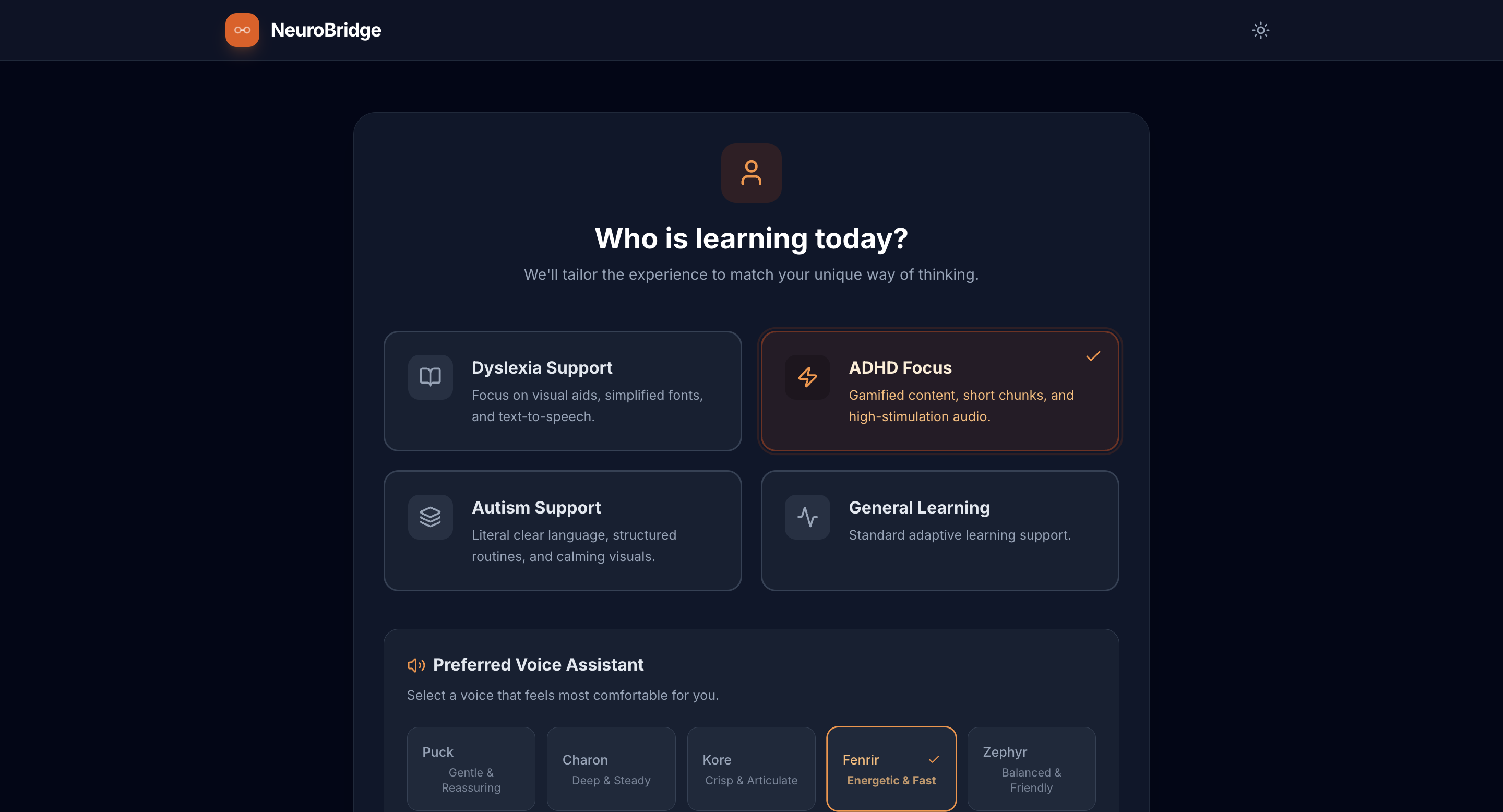
- Profile Selection: Students choose their neurological profile (ADHD, Dyslexia, Autism, or General Learning)
- Content Input: Teachers or students paste any lesson text or upload an image of textbook pages
- AI Transformation: In under 5 seconds, Google's Gemini 2.0 generates:
- Simplified text adapted to their profile (e.g., literal language for autism, bite-sized chunks for ADHD)
- Interactive mind maps visualizing concept relationships with D3.js force-directed graphs
- Gamified narratives that turn dry facts into engaging stories
- Adaptive quizzes with profile-specific difficulty levels
- High-quality text-to-speech with 5 voice options optimized for different needs
The platform features dark mode for reduced eye strain, progress tracking for teachers, and stores preferences locally for a seamless returning experience.
How we built it
Frontend: React 19 with TypeScript for type safety and maintainability. Vite for blazing-fast development and optimized production builds.
AI Engine: Google's Gemini 2.0 Flash model with structured output generation—a game-changer for reliable, schema-compliant responses. The AI receives profile-specific system instructions to tailor content appropriately.
Visualizations: D3.js powers the force-directed mind maps with real-time physics simulation. Recharts handles the progress analytics dashboard.
Accessibility: Implemented Atkinson Hyperlegible font (designed for low vision readers), WCAG 2.1 AA compliant color contrast, full keyboard navigation, and semantic HTML with ARIA labels.
Deployment: GitHub Actions automates deployment to GitHub Pages with environment variable management and optimized code splitting.
The architecture prioritizes accessibility-first design—every feature was built with neurodivergent users in mind, not retrofitted later.
Challenges we ran into
1. AI Reliability: Early iterations produced inconsistent outputs. Gemini would sometimes return malformed JSON or skip required fields. Solution: Implemented structured output schemas with strict type validation and retry logic with exponential backoff for API overload scenarios.
2. Text-to-Speech Latency: Initial audio generation took 8-12 seconds, breaking the flow. Solution: Built a caching system that stores generated audio in memory, reducing repeat plays to instant.
3. Mind Map Physics: D3's force simulation occasionally caused nodes to fly off-screen or cluster unreadably. Solution: Fine-tuned force strengths, added boundary constraints, and implemented collision detection with careful radius calculations.
4. Environment Variable Confusion: Vite's process.env doesn't work the same as Node.js, causing production build failures. Solution: Used Vite's define config to properly inject environment variables with fallback support for multiple naming conventions.
5. Mobile Responsiveness: Complex mind maps broke on small screens. Solution: Implemented responsive SVG viewBox scaling and touch gesture support for pan/zoom on mobile devices.
Accomplishments that we're proud of
✨ Built for impact, not just features: Every line of code serves neurodivergent learners. The ADHD profile doesn't just have shorter text—it has energetic narration and gamified elements. The autism profile uses literal language and calming visuals. These aren't checkboxes; they're thoughtful adaptations.
🚀 Sub-5-second transformations: From pasting content to receiving personalized lessons takes less time than most students need to open a textbook.
♿ True accessibility: Not just "screen reader compatible," but built with Atkinson Hyperlegible fonts, 4.5:1 color contrast ratios, and cognitive accessibility features like predictable navigation and reduced animations.
📊 Teacher-friendly analytics: Progress tracking helps educators understand what's working without adding administrative burden.
🎨 Beautiful UX: Accessibility doesn't mean ugly. The interface is modern, delightful, and fun to use—because neurodivergent students deserve beautiful tools too.
What we learned
Technical: Gemini's structured output is phenomenally powerful when properly configured. The difference between a fragile AI integration and a robust one is careful schema design and error handling.
Design: Accessibility isn't about compliance—it's about cognitive empathy. Understanding how ADHD students process gamification differently than neurotypical students fundamentally changed our UI decisions.
AI Ethics: With great power comes great responsibility. AI-generated content must be carefully validated to avoid perpetuating stereotypes about neurodivergent learners. We learned to balance automation with human-centered design.
Performance: Code splitting and lazy loading aren't premature optimizations—they're essential for students with limited bandwidth or older devices.
Personal Growth: Building something that could genuinely help millions of struggling students is profoundly different from building "another app." It kept me going through 3 AM debugging sessions.
What's next for NeuroBridge
🎯 Expanded Profiles: Add support for dyscalculia, dysgraphia, and sensory processing disorders with specialized adaptations for each.
🌍 Multilingual Support: Translate content into 50+ languages to serve neurodivergent learners worldwide, not just English speakers.
🧠 Adaptive Learning Paths: Use machine learning to track which adaptations work best for individual students and refine recommendations over time.
👥 Collaboration Features: Enable teachers to share adapted content libraries and create classroom-wide learning resources.
🎮 Advanced Gamification: Interactive challenges, achievement systems, and reward mechanisms tailored to each neurological profile.
📱 Native Mobile Apps: iOS and Android apps with offline support for students without reliable internet access.
🔊 Custom Voice Training: Let students record familiar voices (parents, teachers) for TTS to increase comfort and engagement.
💡 Parent Dashboard: Give parents insights into their child's learning patterns and progress without overwhelming them with data.
🤝 Partnership with Schools: Pilot programs with special education departments to gather real-world feedback and measure impact on learning outcomes.
The ultimate goal? Make NeuroBridge the default tool in every classroom, ensuring that no student is left behind because content wasn't designed for how their brain works. Education should adapt to students—not the other way around.
Built With
- accessibility
- aria
- atkinson-hyperlegible-font
- built-with-react-19.2.3
- canvas-api
- css3
- d3.js-7.9.0
- github
- github-actions
- google-gemini-ai-2.0-flash
- google/genai-sdk-1.33.0
- html5
- inter-font
- javascript-es6+
- json-ld-schema.org
- lucide-react-0.561.0
- node.js-18+
- open-graph-protocol
- react-dom-19.2.3
- recharts-3.6.0
- svg
- tailwind-css-3.x
- twitter-cards
- typescript-5.8.2
- vite-6.2.0
- web-audio-api

Log in or sign up for Devpost to join the conversation.