-
-
Neuro Alert
-
FAST
-
Start Page
-
Screen Walkthrough
-
Screen Walkthrough
-
Screen Walkthrough
Inspiration
Strokes rank among the top leading causes of death and disability worldwide affecting individuals of all ages and backgrounds. Yet there is still a dire need for increased accessibility and awareness to ensure swift recognition and emergency response as some groups are more prone to being affected. Early action and education are imperative in improving patient outcomes and mitigating the debilitating effects of this medical emergency.
We are deeply committed to addressing this challenge because like many others, we too have witnessed the devastating long-term impact strokes have on our loved ones and their families. Our aim is to bridge the gap between recognition and response, empowering communities to take proactive steps for a better quality of life. Integrating artificial intelligence into healthcare has immense potential to revolutionize existing, traditional practices. Although MRI and CT scans can help identify strokes, these methods are far too expensive, time-consuming, inconvenient, limited and pose a risk to radiation exposure which may not be suitable for everyone. We wanted to explore whether artificial intelligence can make healthcare more efficient, accessible, affordable and responsive to those in need.
What it does
Neuro Alert is an AI-powered companion for rapid stroke symptom detection and emergency response. Equipped with real-time alerts and location services, NeuroAlert streamlines the process for timely intervention and urgent care.
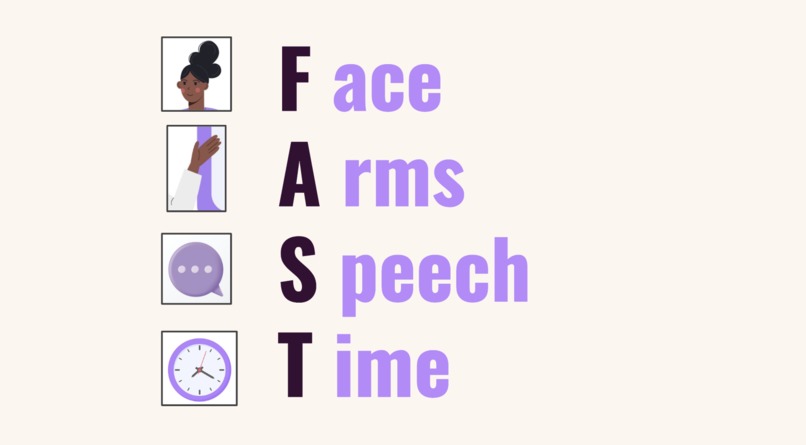
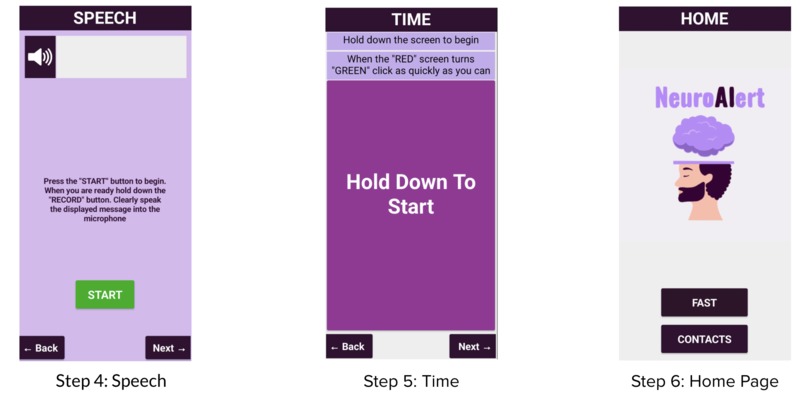
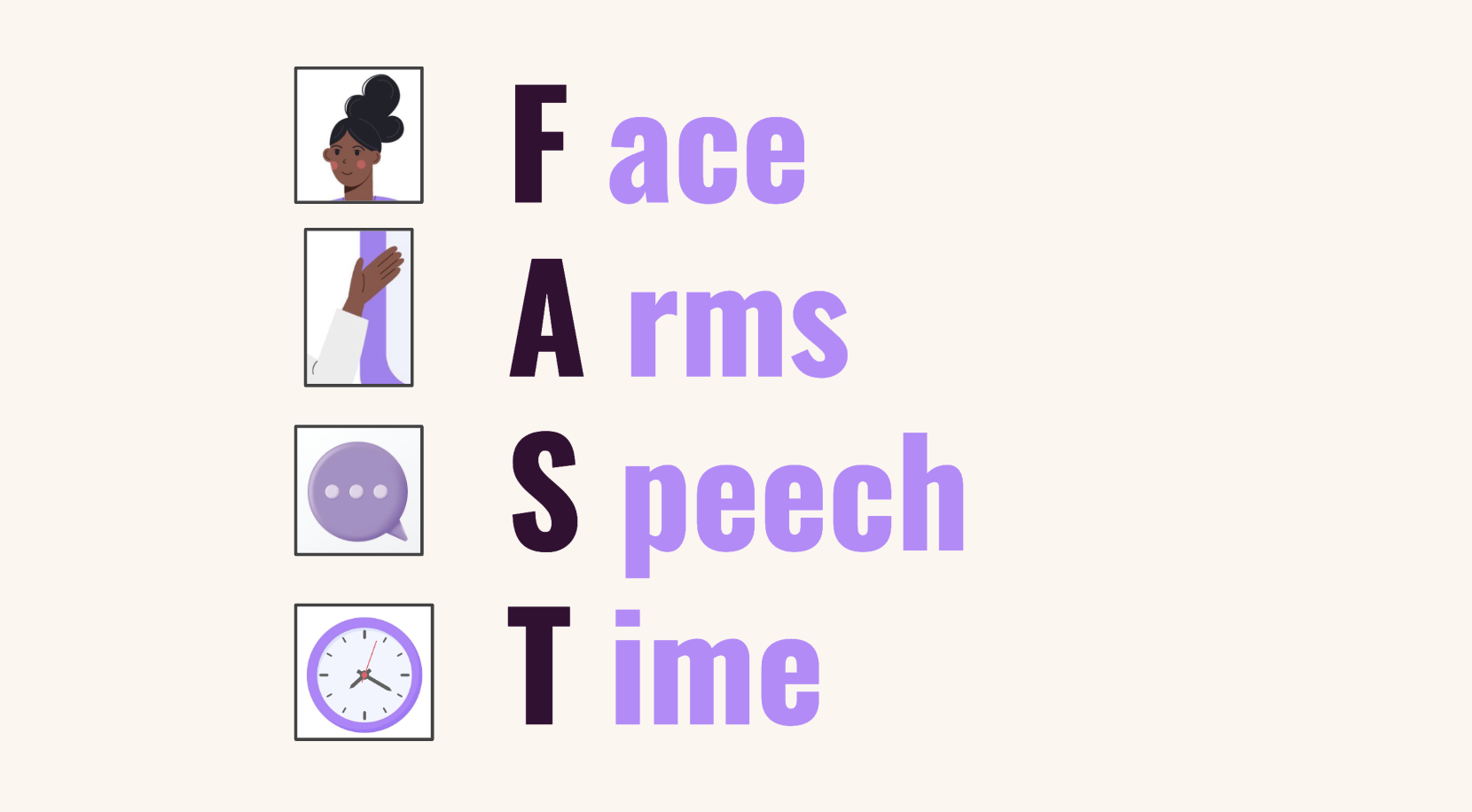
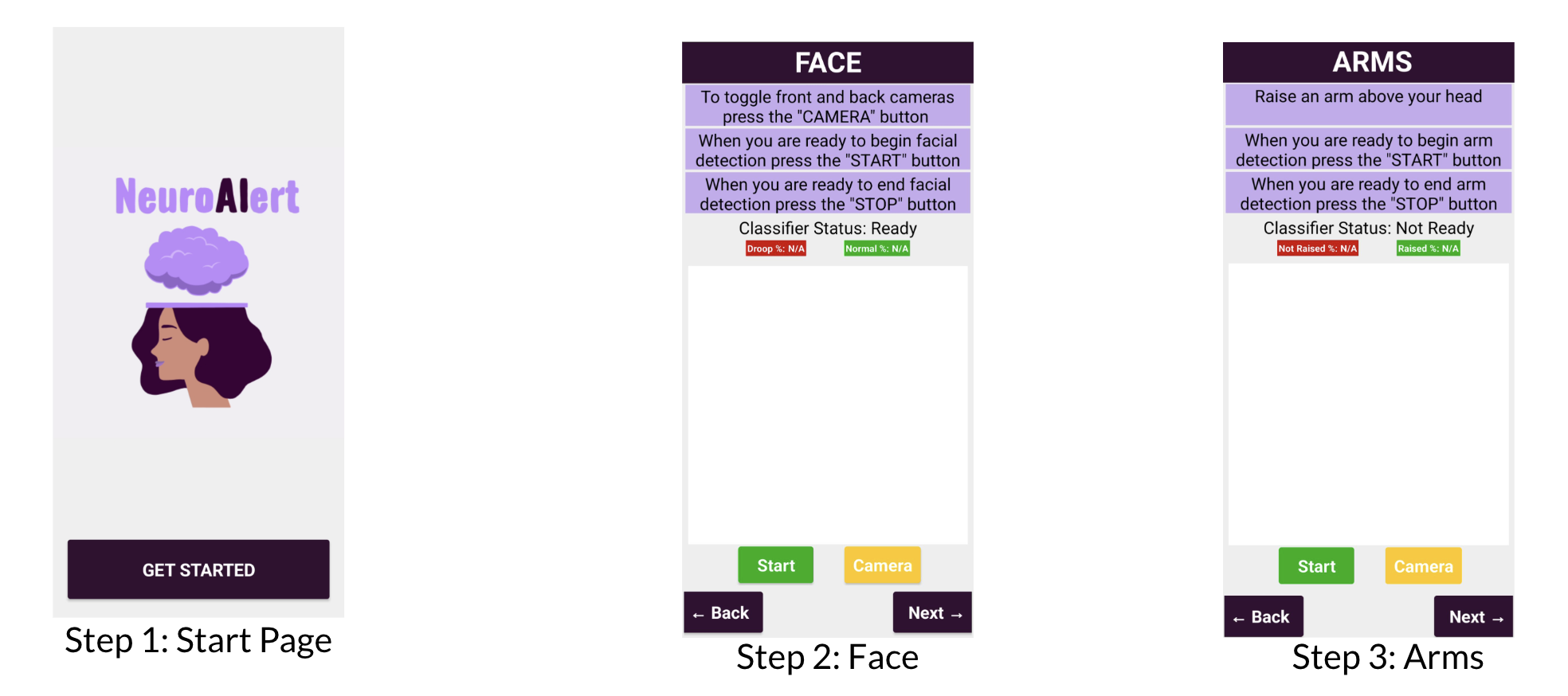
By adopting the widely recognized FAST protocol - Face, Arms, Speech, Time - our app guides users through a quick series of tests to evaluate potential symptoms. To begin, new users are guided through FAST. Their results are saved and serve as the control variable for future use. Our app ensures accessibility by providing clear spoken instructions on each page.
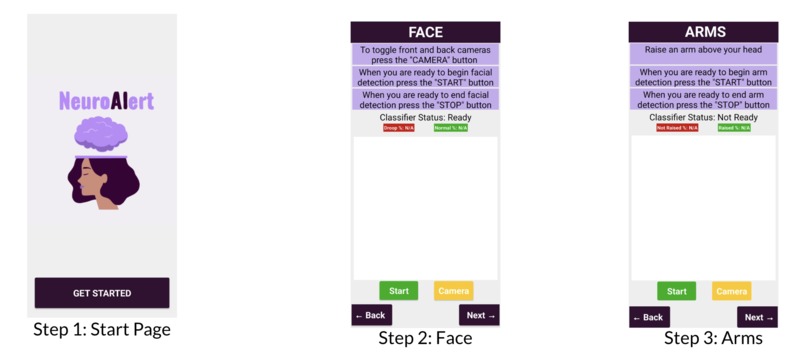
Screens:
F(ace) Utilizes machine learning algorithms to recognize signs of facial drooping or asymmetry. By evaluating facial landmarks, the system can detect and score unevenness or muscle weakness in the face
A(rms) Utilizes machine learning algorithms to monitor any signs of weakness or motor impairment. Arm paralysis or weakness that affects one side of the body especially is a key symptom of stroke
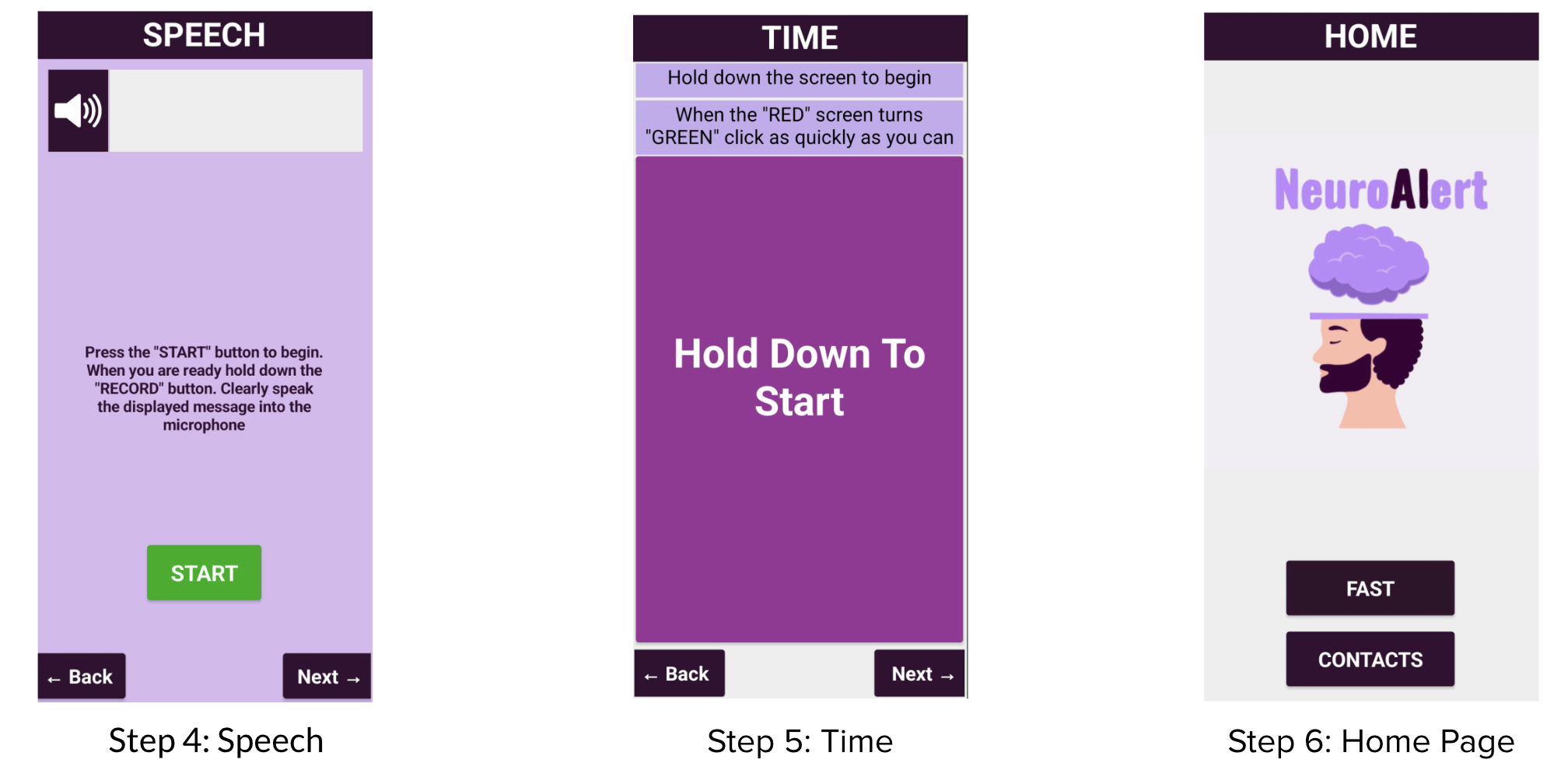
S(peech) Utilizes both speech-to-text and text-to-speech technologies to assess for speech coherency. This screen asks the user to repeat a simple sentence, then checks their spoken response for any signs of slurring, confusion or errors. Through informative sentence generation, this screen aims to simultaneously educate users about stroke prevention
T(ime) This screen measures the speed at which the user can respond to visual stimulus. This provides further insight on cognitive processing speed and fine motor coordination as delayed responses could potentially indicate impairment
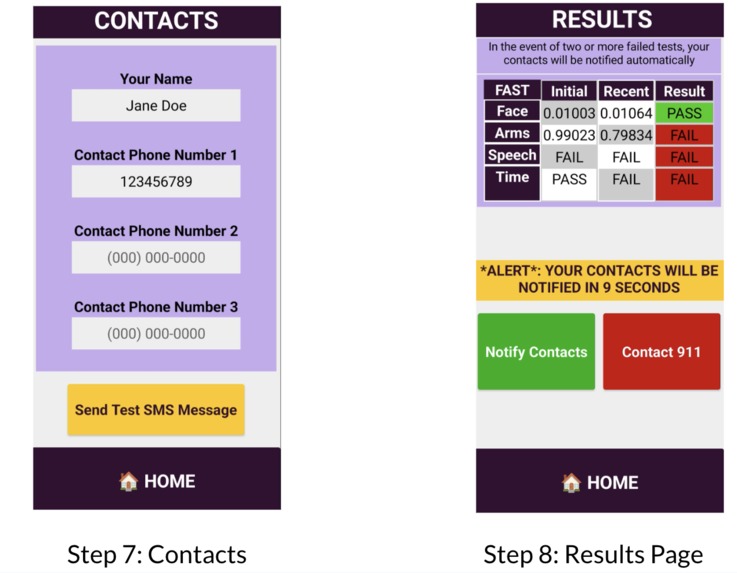
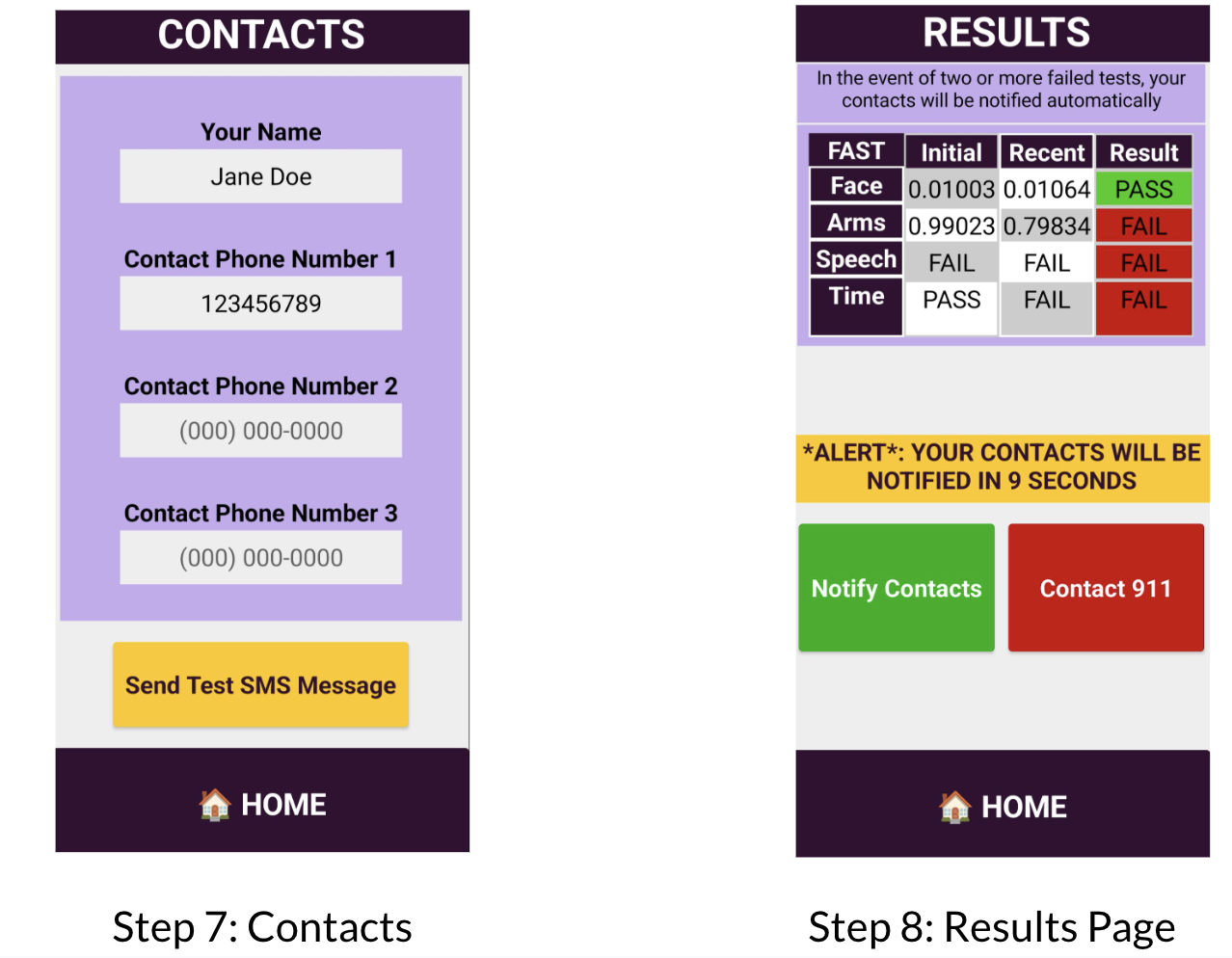
The app records the user's test performances, processes the results, compares them with the existing control variable and then makes an intelligent decision about whether emergency services and contacts are needed. If the tests show significant deviation from the baseline, indicating possible stroke symptoms, the app makes immediate arrangements for medical assistance dispatched with the user's location. As the user's test performances are recorded, it can also serve to show improvements on the user's road to recovery and rehabilitation following the event of a stroke.
How we built it
This application is a minimum viable product (MVP) prototype built using MIT App Inventor and its integrated tools such as machine learning models, text-to-speech and speech-to-text features. The image recognition model was trained using a combination of our own generated dataset and publicly available data sourced online and compiled into our own repository. By leveraging both custom and external datasets, our aim was to enhance accuracy and the robustness of the machine learning models despite its limited capacity.
Challenges we ran into
Ethical Considerations: The ethical considerations for our app primarily revolve around its limitations and intended use. Ethically, we must ensure and reinforce users understand the app’s role as a tool for awareness, prevention and early detection rather than a substitute for diagnosis by a qualified medical practitioner. To ensure accuracy of our stroke detection algorithms, we had to balance sensitivity to minimize false positives or negatives. This proved to be difficult due to limitations on how robust we could make our image recognition models. We prioritized user privacy by storing data locally, avoiding cloud uploads and refraining from training our models with user data
Limitations of Using a Low-Code Tool: While MIT App Inventor proved to be a powerful tool for rapid prototyping and learning, it did come with limitations, especially when it came to working with large datasets for real-time image recognition and advanced functionalities. Originally our initial ideas involved more advanced functionality such as integrating with smart watches and wearables for automatic rather than manual anomaly detection. These devices, equipped with ECG monitors, can detect atrial fibrillation (AFib) - an irregular and rapid heart rhythm that significantly increases the risk of ischemic strokes - as well as detect abnormalities in the P-wave, Q-wave, and QRS/QT duration. These measures relate to the timing and strength of ventricular contractions and can signal inefficient blood flow or the potential for clot formation, both of which are major risk factors for stroke. The big advantage of using existing smartwatches and wearables is their cost-effectiveness. Smartwatches and wearables are already widely accessible and affordable making them a practical solution for monitoring precursors to stroke. We can leverage these readily available consumer devices to capture data on a small-scale for daily use and suggest users to seek their health care practitioner when abnormalities that would have otherwise gone unnoticed are detected. Additionally, the platform's processing power did hold us back from training our image recognition model with a larger dataset for greater precision and accuracy. Hence, some features we envisioned required a higher level of customization and testing which were not feasible given the constraints of App Inventor's pre-built components despite it's convenience and existing assets. In the future given more time, we would like to explore using Health Kit and Care Kit provided by Apple's Swift framework for better integration into existing technologies.
Accomplishments that we're proud of
Bridging the Gap Between Technology and Accessible Healthcare: Our most meaningful accomplishment is the potential real-world impact our app can have on raising awareness, prevention and accessibility. Although there is much left to explore and develop, we are proud of our novel and creative contribution to the growing field of health-tech and hope that it can inspire further research and advancements. It was remarkable to see our ideas come to life even on a small scale with limited resources, and we can only imagine how much more sophisticated our product can get with deeper learning and implementation.
What we learned
Balancing Accuracy and Sensitivity We learned that building machine learning models for health-related applications is a delicate balance. While we wanted our app to be highly sensitive to early stroke symptoms, we also had to minimize false positives and false negatives. Ensuring that the app did not create unnecessary panic or missed a critical stroke symptom is vital. We learned the importance of refining and retraining models to strike the right balance between sensitivity and specificity
Ethics and Impact of Early Intervention on Health Outcomes: As we developed this app, we kept the ethics in health technology in mind. Privacy, accuracy, and responsible use of AI are not just regulatory concerns; they are key to building a community of trust and ensuring the app delivers real value. We learned how important it is to be transparent with users about the system's limitations and its role as an early detection and awareness tool, rather than a replacement for professional medical advice. This reinforced our commitment to user privacy and ensuring that health data is handled with care
What's next for Neuro Alert
More Language Support for Accessibility: Healthcare transcends all barriers and should be a right to all. We want to ensure that those who would benefit from our services are supported despite their geographic location, cultural and language barriers. We would like to offer Neuro Alert in different languages to ensure it's accessibility across various demographics thus bringing awareness, education and healthcare to all.
Comprehensive Solution: Additionally, we would like to offer post-stroke rehabilitation features through our app. This would include games inspired by cognitive therapy to improve memory, problem-solving, attention and speech-language therapy inspired exercises to further aid recovery.
Advanced Models and Integration into Existing Technology: We would like to experiment with more tailored and robust services to create a more intricate solution as mentioned previously.
Instructions to Access Project:
Download the .aia from the google drive link below
Go to https://appinventor.mit.edu/ -> Click "Create Apps!" on the top left -> Login
Brings you to your Projects Dashboard. Now drag the .aia file you downloaded earlier and wait a few seconds for the project to appear on your dashboard
Click on the Project. You can navigate the different screens to view the frontend. Locate the green bar at the top of the screen. Beside the bold Neuro_Alert title, you should see a drop down menu labelled Screen1 that lets you navigate different screens
To view the source code, locate the green bar at the top of the screen as you did previously. On the right-hand side, you should see a button labelled Blocks beside Designer. This brings you to the code blocks. Navigate through each screen as detailed in step 4 to view the code used to built each screen. If you see a small blue "?" circle on a code block, click on it to view our documentation and comments

Log in or sign up for Devpost to join the conversation.