Background
The motivation why we build this application is we believe that AI play a big role in the automation tasks. Our team have built a successful network incident automation platform which save 2 million dollars for our company per year by providing self-healing automation in the network incident area.
In this project we want step into AI-assisted incident operations system that turns alarms, email reports, and operator input into structured tickets, triage decisions, workflow execution, and auditable human-review checkpoints.
It is a strong fit for the idea because the challenge is not just to build a chat experience. It is to build an agent that can work through real business operations: handling messy inputs, applying workflow logic, using tools safely, and involving humans when the risk is too high for full automation.
That is exactly the direction behind Network Incident Agent.
Why we built this
In network operations, one of the hardest decisions is not simply identifying that something is wrong. The harder question is if we need dispatch field engineer to fix a network issue or we can fix it through remote session or in a different way.
When a branch loses power, a fibre link degrades, a site raises an equipment alarm, or severe weather affects connectivity, operators often have to act quickly with incomplete information:
Is the incident real or stale? Can it be resolved remotely? Should it be escalated immediately? Does it justify a truck roll? … These decisions are expensive, time-sensitive, and often spread across inboxes, tickets, monitoring tools, and notes. We built Network Agent to reduce that friction and create one operational system that moves from incident intake to triage, playbook execution, and dispatch recommendation with visibility and control.
What problem are we solving?
The project is focused on some practical operations problems:
whether a physical-layer incident can be handled remotely or needs field intervention? if Alarm is incident or not? is that possible a incident can self-healing? enable operator to build function by modify workflow or playbook rather wait for develop spend months to develop new feature receive incident from different resources not only ticketing system AI check email history decede if alarm email is incident or not … There are many incidents categories such as:
power loss fibre degradation access failures equipment alarms weather-related outages unstable site conditions packet loss or degraded transport … These incidents rarely arrive in a clean format. They come through alarms, email reports, or fragmented operator context. So instead of building a general support bot, we built an autopilot-style agent for network incident operations.
The system is designed to:
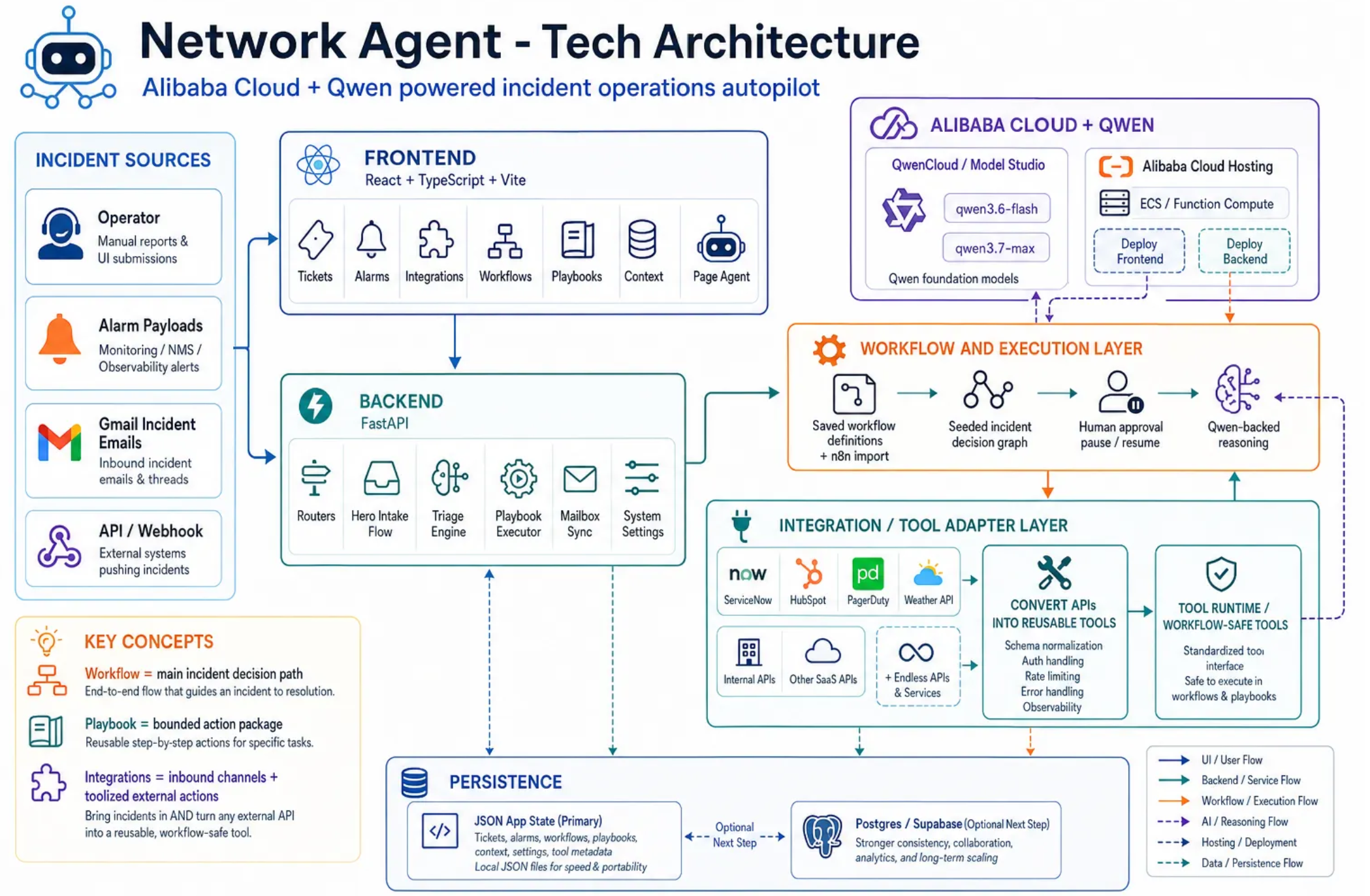
ingest incidents from alarms, Gmail, manual entry, and API-style flows normalize them into internal incident tickets run triage workflows execute controlled playbooks pause for human approval when needed preserve an auditable operational trail from intake to outcome
What we built Network Agent is an AI workflow platform for physical-layer network incident intake, triage, and dispatch decision support.
What makes it different is that it is not just a chatbot over tickets. It combines:
built-in ticketing alarm-driven intake Gmail-driven incident conversion editable workflow execution playbook planning with tool boundaries human approval pause/resume an in-product Page Agent for operator assistance support n8n workflow upload Product Highlight
- Integration Layer
Basically, the goal behind this integration layer is we can enrich as many endpoint or system as possible and convert the available APIs into AI ready to use tool and keep enriching update or incident from different resources.
- Tickets
ticket page This is where inbound incidents become internal. Operators can review severity, source, site, category, workflow history, comments, triage steps, and final recommendations. The ticket view also reflects approval checkpoints and activity history, which makes the operational story visible and auditable.
The data source can be other racketing system like ServiceNow, Pageduty, Gmail, Outlook and so on.
- Workflows The Workflows page is where the product becomes more than a static demo.
Operators can create and edit graph-based workflows, and the backend can execute saved workflow definitions during triage. The system also supports n8n JSON import, which makes it easy to bootstrap or demonstrate workflow structures without forcing everything to be hand-built from scratch.
This means workflows are not only visual. They now participate in runtime incident handling.
- Playbooks The Playbooks page defines reusable operational procedures.
This is one of the most important parts of the system because the agent does not act with unrestricted freedom. Instead, Qwen interprets a playbook prompt, generates a structured plan, and selects only from the tools allowed for that playbook.
That makes the agent more controlled, auditable, and closer to a production-style operations assistant rather than an open-ended chatbot.
- Context The Context page helps connect tickets, workflows, playbooks, and integrations into a broader operational graph.
Incidents do not happen in isolation. Operators need surrounding context to understand dependencies, repeated patterns, and what has already happened across the system.
- Network Agent Another highlight of the project is the built-in Agent.
Instead of sending users to a separate AI tool, the Page Agent lives inside the product and works in the same operational context as the operator. It can summarize ticket state, guide next steps, and help users navigate the workflow already happening in the app.
This build-in agent can also do hands on task for users even if they have zero-knowledge about this product. User can ask build-in agent to do operations for them.
- Email-driven incident intake One of the most practical updates in the current version is the Gmail incident flow.
The product now supports demo-friendly mailbox intake where an email with the right incident language can be converted into a ticket. Subject lines matter here. Terms like outage, offline, power loss, fibre, device down, packet loss, or equipment alarm help the system recognize the email as an incident.
That makes the workflow easy to demonstrate:
Connect Gmail from the Integrations page. Send an incident-style email to the connected inbox. Refresh inboxes from the Tickets page. Watch the message convert into an internal incident ticket. This gives the project a very tangible agentic story: a messy human email becomes structured operational work.
- Human-in-the-loop design Human approval is a first-class concept in the platform.
Not every incident should be resolved fully automatically. In real operations, some cases have conflicting evidence, unclear severity, or meaningful business risk. In those moments, the right system is not the one that always acts by itself. It is the one that knows when to pause and ask for review.
That is why the workflow supports human_decision_required, and why the backend can pause and resume the same triage run rather than starting over after a reviewer steps in.
This was a deliberate design choice and an important fit for the Autopilot Agent track.
Tech stack
We chose a stack that was fast to build with, but structured enough to support a credible architecture.
Frontend: React + TypeScript + Vite Backend: FastAPI Workflow orchestration: LangGraph LLM integration: Qwencloud endpoint Persistence: JSON-first local persistence, with Postgres/Supabase as a next step Deployment: Docker Compose This gave us a clean split between the operator-facing console and the backend orchestration layer. FastAPI defines the API boundaries cleanly, while LangGraph helps model triage and human-interrupt flows explicitly.
How we use Qwen
We use Qwen as the reasoning layer across the product, not just as a chat model.
- Incident intake, filtering, and enrichment When incident data arrives from sources such as email, alarms, or APIs, Qwen helps review the content, interpret whether it is relevant to incident operations, and enrich the intake with more structured understanding.
Depending on the input, that can include:
identifying whether the message is likely a real incident helping distinguish operational signals from noise extracting or clarifying context such as site, customer, severity, and likely issue type supporting the conversion from messy inbound text into a more usable internal incident record This is especially important for email-driven intake, where messages can be incomplete, inconsistent, or written in a very human way.
- Workflow reasoning and decision support Qwen supports the broader workflow by reasoning over ticket and incident context as the system moves through triage and decision-making.
That can include:
summarizing the situation identifying risks or missing context suggesting next checks supporting operational recommendations helping the system decide when to continue, escalate, or ask for human review This makes Qwen part of the operational decision layer, rather than just a text generator attached to the UI.
- Playbook planning For playbooks, Qwen interprets the prompt and generates a structured execution plan.
That plan can include:
summaries operator-facing comments ordered steps tool calls tool arguments This is where the system moves beyond simple response generation into more constrained, execution-aware planning.
- In-product operator assistance The Page Agent uses the same backend provider setup to support ticket-aware assistance directly inside the application.
Because it is grounded in live product state such as tickets, workflows, playbooks, and system context, it behaves more like an operational copilot than a standalone chat assistant.
If you want, I can also rewrite the surrounding paragraph so this section flows better inside the full blog post instead of only replacing these bullets.
Why Qwen fits this use case We needed a model that could handle more than casual chat. This project depends on:
structured output context-heavy incident interpretation multi-step reasoning operational summarization controlled tool planning operator-safe responses That made Qwen a strong fit for the project, especially in scenarios where the model has to reason over incomplete and sometimes conflicting infrastructure signals.
Press enter or click to view image in full size
qwen stats Live demo The live app is available at www.agentautomation.top
Conclusion This project is our attempt to show what an autopilot agent can look like in a real incident operations environment.
For network teams, the value of AI is not just generating text. It is helping people make faster, safer, and more consistent decisions under pressure, and even deliver new features within minutes through agent.
By combining FastAPI, React, LangGraph, and Qwen, we built a system that can take inbound alarms and emails, convert them into internal incidents, run triage, execute controlled playbooks, and support auditable outcomes such as remote resolution, escalation, or field dispatch. And field dispatch is a heavy lifting for network company.
The live app is available at www.agentautomation.top feel free to playaroud with it.


Log in or sign up for Devpost to join the conversation.