Inspiration
Moving into your first unfurnished place is exciting right up until you price it up. Most of us had either just done it or are about to: a fixed lump of savings or student loan, a move-in date, and a bare room. You buy a bed, a wardrobe and a desk, and only afterwards find out the wardrobe doors hit the bed, the desk blocks the radiator, and the money ran out before the chair.
Room planners already exist, and so do budgeting apps, but none of them answer the questions a first-time mover actually has: Will it fit? Can I afford it this month? And what will it really cost me once I sell it on when I move out? BNY's challenge asked for a financial tool nobody has seen before, solving one real problem for one specific user. Ours is the first-time mover, and the problem is that you can't see your space and your money at the same time.
What it does
NestEgg turns an empty room into a furnishable 3D model, then helps you furnish it within your budget.
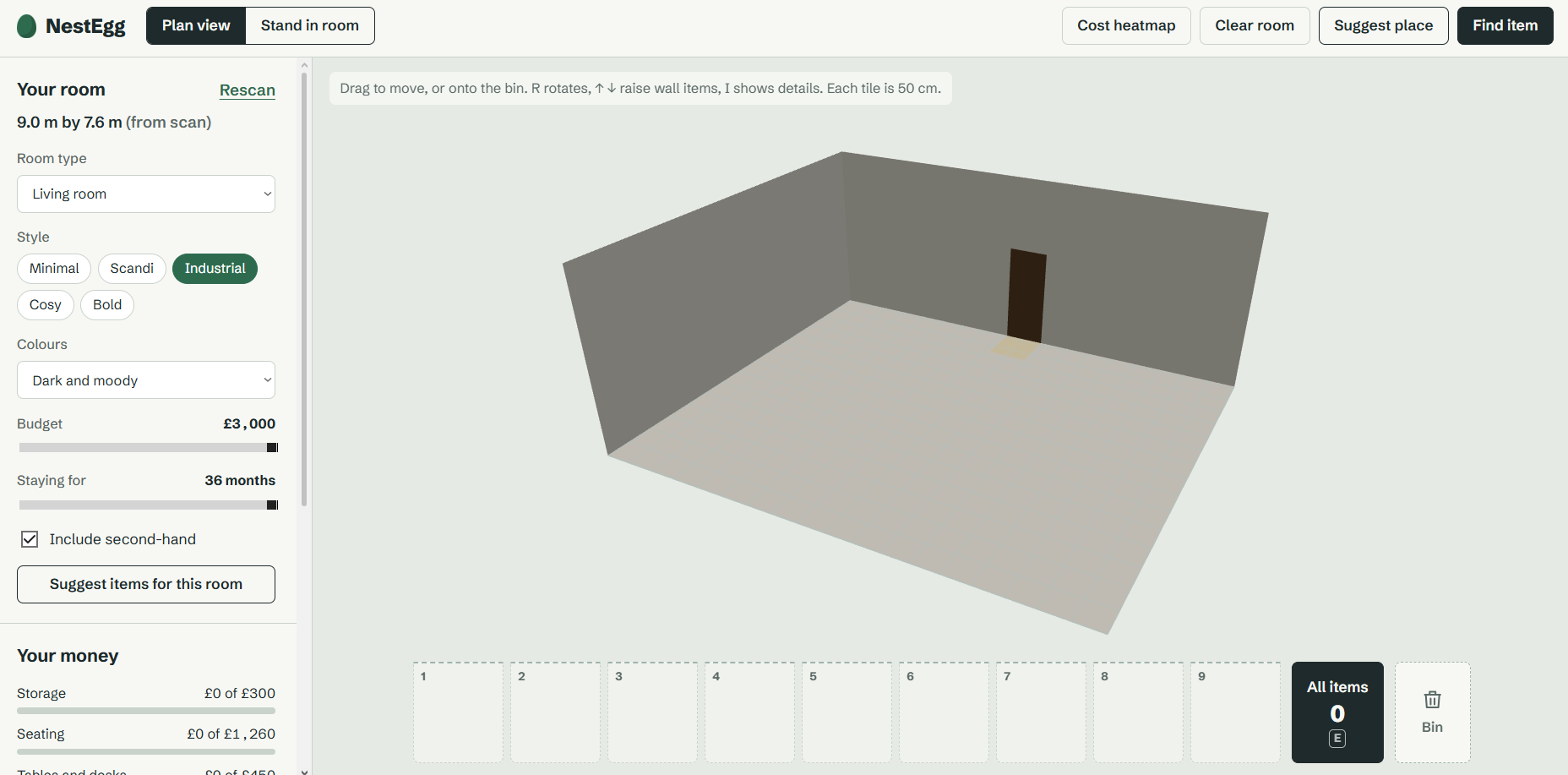
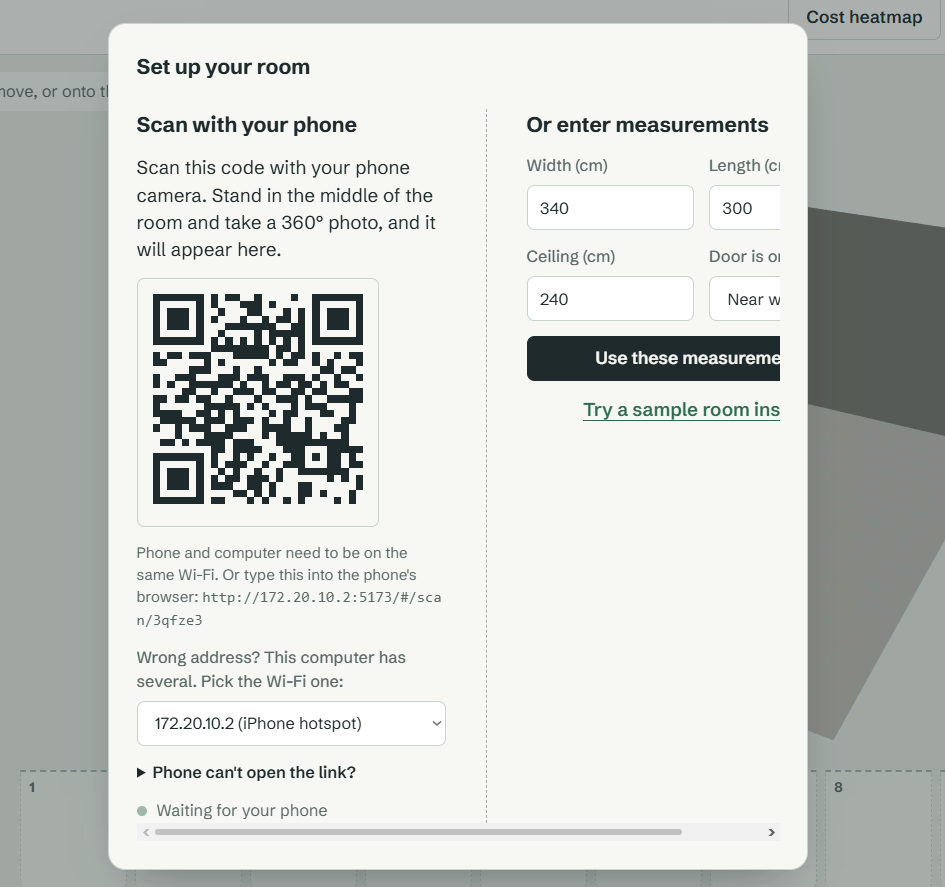
- Scan your room. Scan a QR code on your laptop with your phone, stand in the middle of the room and take a 360° photo. NestEgg estimates the room's real dimensions and it appears on the laptop. You can also type measurements in.
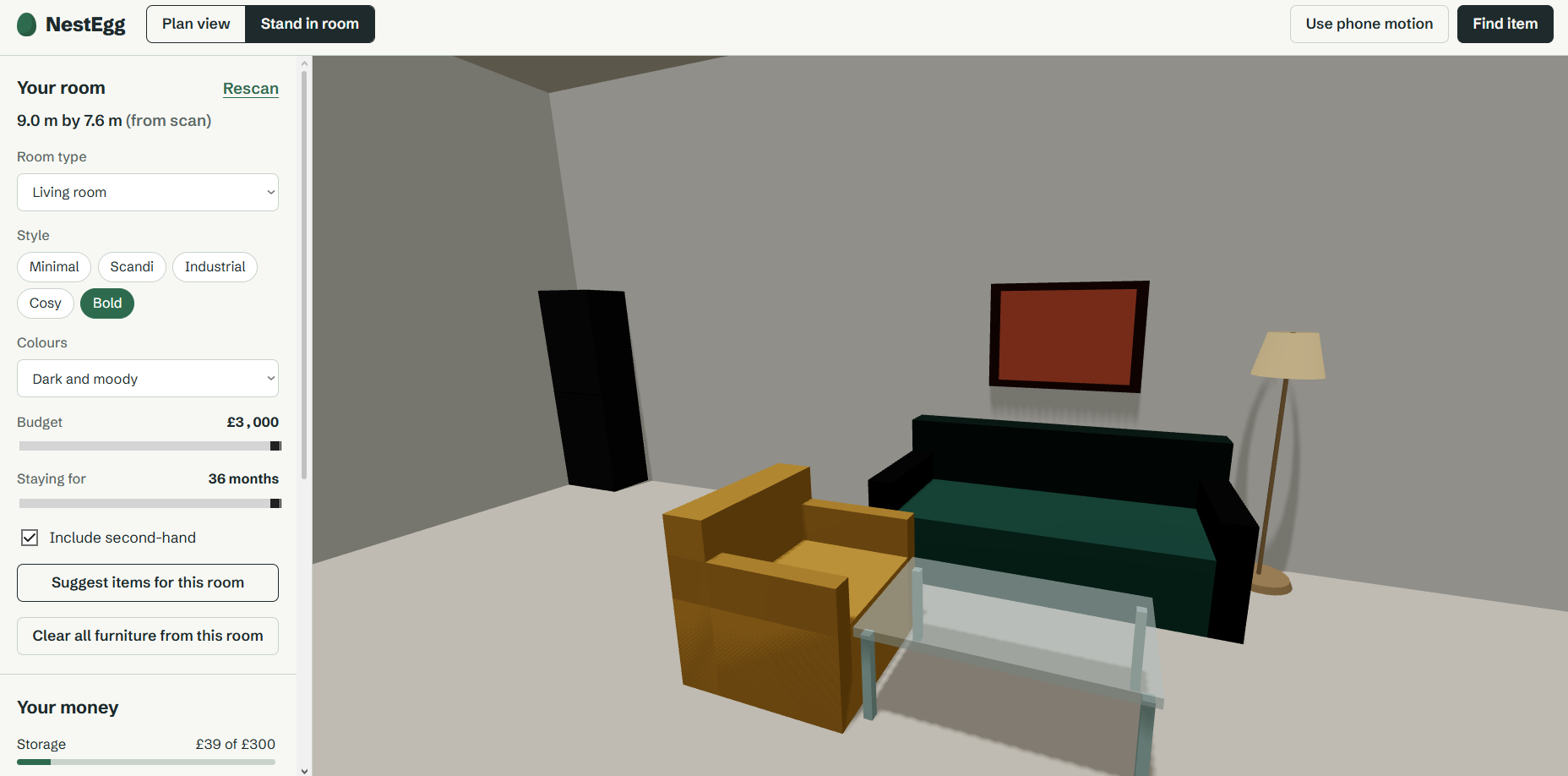
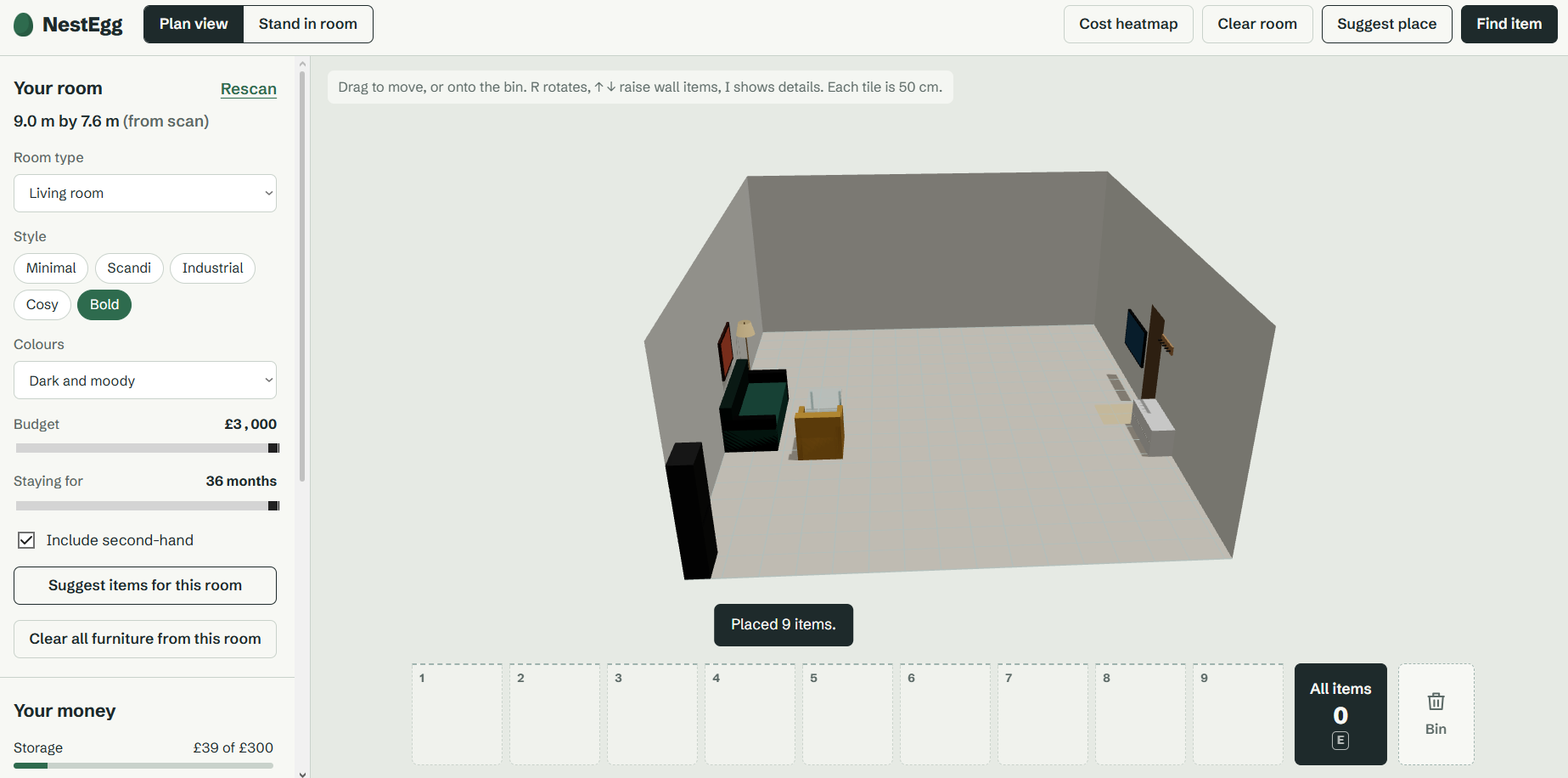
- Furnish it in 3D. The room sits on a 50 cm tile grid that matches its real size. Drag items from a 9-slot hotbar into the room; they snap into place and can't overlap. Wall-mounted items like TVs, pictures and shelves can be raised and lowered. Switch to first-person view to stand in the room and look around.
- Let it suggest and arrange. Set your room type, style, colours and budget, and NestEgg picks items that fit. Suggest place lays them out like a person would: chairs face desks, the coffee table sits in front of the sofa, the TV goes on the opposite wall, and wardrobe doors and drawers keep room to open.
- See the real cost. Every item shows its price, its estimated resale value when you move out, and the difference: what it actually costs you. A cheap new item often costs more than a better second-hand one, because the second-hand one has already lost most of its value.
- Budget envelopes. Your budget is split into envelopes (sleep, storage, seating and so on) that turn red when overspent, or you can set a budget for each item type yourself. Select an item and NestEgg suggests cheaper options that fit the same spot, swapped in with one click.
- Plan when to buy. Enter your savings, monthly income, rent and bills, payday and a safety buffer. NestEgg schedules your purchases, essentials first, so your balance never drops below the buffer, and tells you the date you'll be fully furnished.
- Add anything from a shop. Paste any product listing and NestEgg turns it into a real-sized item with its own resale estimate, ready to place in your room.
How we built it
Frontend: React with Three.js (through React Three Fiber) for the 3D room, Zustand for state, and Recharts for the cashflow chart. It runs as a website, so the phone and the laptop use the same app: the phone for scanning, the laptop for planning. Pairing works through a QR code tied to a session, so there are no logins.
Room scanning: a FastAPI backend in Python runs HorizonNet, a deep learning model that predicts a room's corners from one 360° panorama. We turn the predicted floor corners into real distances using the height the phone was held at. A floor corner seen at an angle $\varphi$ below the horizon, from a camera at height $h$, is a horizontal distance
$$d = \frac{h}{\tan(-\varphi)}$$
away. We then align the corners to the room's main wall direction and fit a rectangle. HorizonNet's predicted floor-to-ceiling ratio gives the ceiling height.
Layout engine: every kind of furniture has properties: whether it goes against a wall, in the open, or hung up; what it belongs with; and how much space it needs. Doors need roughly their own width to swing, so a cabinet of width $w$ with $n = \lceil w / 60 \rceil$ doors keeps $\tfrac{w}{n} + 10$ cm clear in front; drawers of depth $d$ keep $0.75d + 30$ cm. Collision checks are fully 3D, so a picture can hang above a bed but nothing passes through anything else, the ceiling or the doorway. Suggest place tries the biggest item against each wall and keeps the layout with the fewest problems.
Finance logic: resale value depends on how long you stay. For an item with price $P$ that typically recovers a share $r$ of its price after a year, we estimate its value after $m$ months as
$$V(m) = \begin{cases} P\left(r + 0.35(1-r)\left(1 - \frac{m}{12}\right)\right) & m \le 12 \ P \, r \cdot 0.85^{(m-12)/12} & m > 12 \end{cases}$$
and the real cost is $P - V(m)$. The purchase plan simulates your balance from payday to payday and buys in priority order, while the balance stays above your buffer.
n8n: an n8n workflow powers Add from a shop listing. A webhook receives the pasted text; Claude extracts the category, price, dimensions (converting units) and build quality; then a code step adds NestEgg's finance estimates (lifespan, resale rate, priority) before returning a finished product. If n8n is unavailable, the backend falls back to a simple parser so the app never breaks.
Challenges we ran into
- Getting a true 360° photo. HorizonNet needs a full spherical panorama with the floor and ceiling visible all the way round. A phone's normal panorama mode only captures a horizontal strip, so we had to use a sphere-capture app and handle photos in the wrong shape gracefully.
- Running a research model. HorizonNet's pretrained weights had moved from Google Drive to Hugging Face, newer versions of torchvision rejected how the code requested its backbone weights, and it assumed an NVIDIA GPU. We fixed each in turn and run it on the CPU.
- Phone to laptop networking. Our QR codes pointed at addresses the phone couldn't reach. University Wi-Fi isolates devices, and our dev server was running inside WSL, on its own private network behind Windows. We built a
npm run doctorcommand that checks the laptop's addresses, servers, WSL setup and firewall, and tells you exactly what to fix. - Long scans on a phone. On a CPU, measuring a room can take a minute, and phones drop connections that are held open that long. We moved the analysis into a background job that the phone and laptop check on.
- Making auto-layout sensible. Avoiding overlaps was easy; producing layouts a person would accept was not. Placing items greedily blocked desks behind beds in small rooms, so we added furniture relationships, clearance zones, and a search over which wall the biggest item goes on.
Accomplishments that we're proud of
- A complete loop from a 360° photo on a phone to a furnishable 3D room on a laptop, with real dimensions.
- A layout engine that understands furniture: doors and drawers keep space to open, chairs face desks, and pictures hang above sofas. Our test rooms come out with no overlaps and no blocked doors or walkways.
- Making money visible in the room itself, through the cost heatmap, envelopes that turn red, and the "real cost after resale" figure, rather than a spreadsheet next to it.
- A purchase plan that answers when you can afford something, not just whether.
What we learned
- The total price is the wrong number for someone who will move again within a year. What you lose when you leave matters more, and that changes which items are the best deal.
- Research models are only part of the work. Most of the effort went into getting the right weights, library versions, input format and hardware.
- Networking between devices is where demos break. Having a script that diagnoses problems saved us hours.
- Simple, explainable rules (clearance zones, priority tiers, envelopes) produced better results and were easier to trust than anything opaque.
What's next for NestEgg
- Live product data: retailer and second-hand marketplace feeds through n8n, with resale estimates based on real resale prices instead of category averages.
- Price tracking: alerts when something on your plan drops in price, and reminders on payday for the next purchase phase.
- Shared houses: split the cost of shared rooms between housemates, and track who owns what when the tenancy ends.
- Better scanning: irregular rooms using HorizonNet's full corner outline, windows and radiators, and the scan photo projected onto the walls so you see your real room.
- More rooms at once: plan a whole flat with one budget across every room.
