SimuTutor: An AI-Powered Interactive STEM Simulation Lab
Inspiration
Many students struggle with STEM subjects not because the concepts are impossible, but because they are often taught through static formulas and abstract explanations. For example, projectile motion, pendulum motion, and electric fields are all highly visual concepts, but students usually encounter them first as equations in a textbook.
SimuTutor was inspired by a simple idea: students should be able to learn STEM by experimenting, observing, failing, adjusting, and receiving guidance. Instead of memorizing formulas passively, learners can manipulate parameters, watch the simulation respond in real time, and receive adaptive explanations that connect the visual result back to the underlying science.
What it does
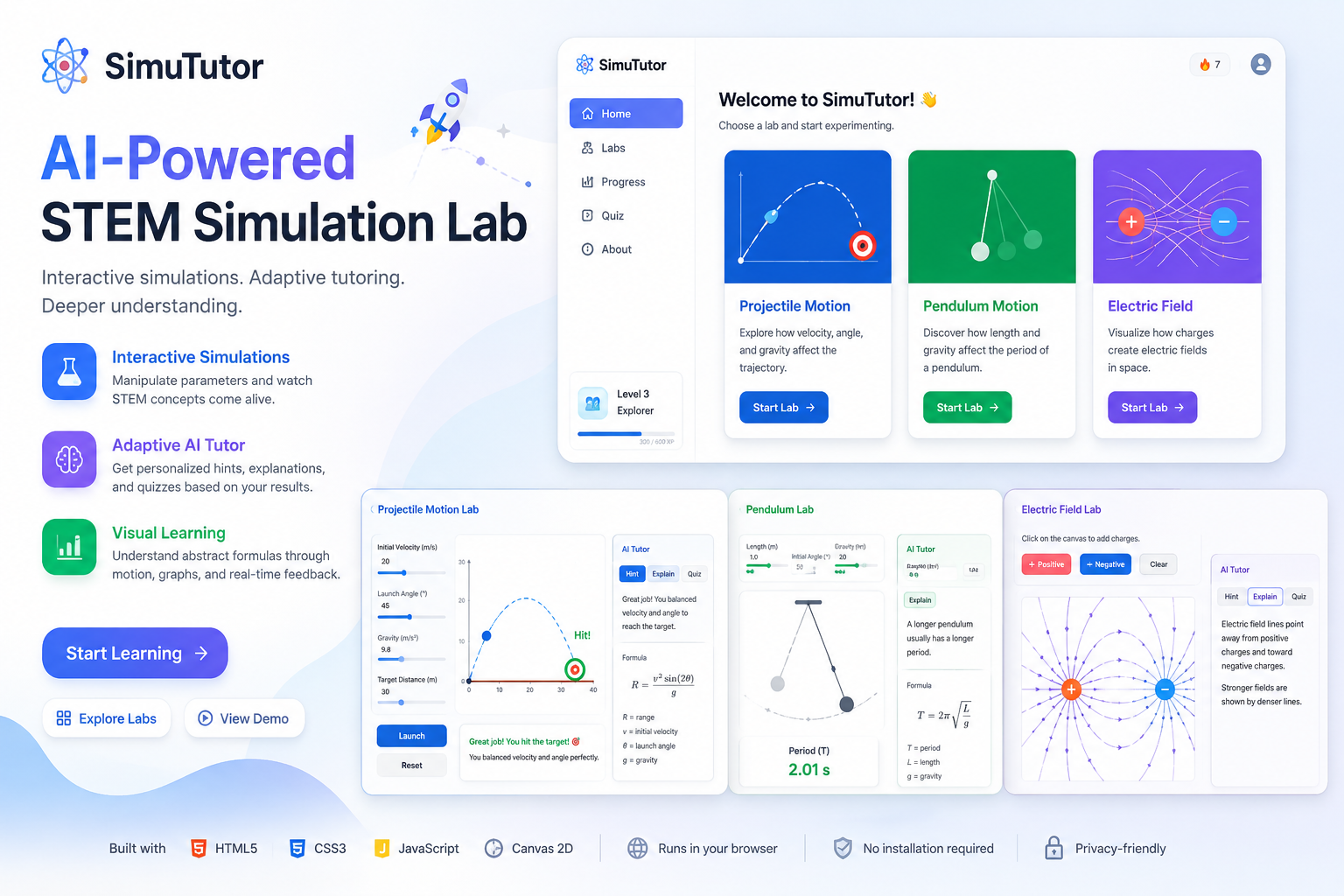
SimuTutor is an interactive web-based STEM simulation lab built with HTML5, CSS3, JavaScript, and Canvas 2D. It currently includes three learning modules:
Projectile Motion Lab
Students can adjust initial velocity, launch angle, gravity, and target distance. The simulation visualizes the projectile trajectory on Canvas and checks whether the projectile reaches the target. The lab is based on the projectile range relationship:
$$ R = \frac{v^2 \sin(2\theta)}{g} $$
After each attempt, the AI tutor gives adaptive feedback. If the projectile lands too short, the tutor suggests increasing velocity or moving the launch angle closer to 45 degrees. If it goes too far, the tutor recommends reducing velocity or adjusting the angle. The lab also tracks attempts and hits using browser storage.
Pendulum Lab
Students can change pendulum length, initial angle, and gravity. The Canvas animation updates in real time and displays the estimated period:
$$ T = 2\pi\sqrt{\frac{L}{g}} $$
The AI tutor explains how length and gravity affect the swing period. This helps students understand that a longer pendulum generally swings more slowly, while stronger gravity makes the period shorter.
Electric Field Lab
Students can place positive and negative charges directly on the Canvas. The simulation draws electric field vectors across the field area. The direction and strength of the arrows update as charges are added or removed.
The tutor explains that electric field vectors point away from positive charges and toward negative charges, while also encouraging students to compare simple and complex charge configurations.
How we built it
SimuTutor was built as a fully browser-based project using:
- HTML5 for page structure and semantic layout
- CSS3 for responsive design, cards, control panels, and visual styling
- JavaScript for simulation logic, UI interaction, and tutoring behavior
- Canvas 2D for real-time physics visualization
- LocalStorage for saving simple progress data such as projectile attempts and hits
The project is organized into separate pages and scripts:
index.htmlintroduces the projectlabs.htmllets users choose a simulation labprojectile.html,pendulum.html, andelectric-field.htmlcontain the three STEM labsprojectile.js,pendulum.js, andelectricField.jshandle the simulation logicaiTutor.jscontains the adaptive tutoring enginestorage.jsstores lightweight user progress in the browser
Instead of relying on an external AI API, SimuTutor uses a lightweight rule-based AI tutoring engine. The engine analyzes the current simulation state and generates contextual hints, explanations, misconception feedback, and quiz prompts. This makes the prototype fast, private, reliable, and easy to run without any backend or API key.
Challenges we faced
One challenge was translating real STEM formulas into interactive visual behavior. For example, projectile motion uses physical variables such as velocity, angle, and gravity, but these values must also be mapped clearly onto Canvas coordinates so that the animation feels intuitive.
Another challenge was designing adaptive feedback that felt educational rather than random. The tutor needed to respond differently when a projectile landed too short, too far, or near the target. This required building simple diagnostic logic around the simulation results.
We also had to balance technical depth with usability. The project needed to show real physics and interactive Canvas rendering, but the interface still had to remain simple enough for beginner students to use.
What we learned
Through this project, we learned how to connect STEM formulas with real-time visual simulations. We also learned how Canvas 2D can be used not only for graphics, but also as an educational medium for explaining motion, fields, and mathematical relationships.
We also learned that AI in education does not always need to be a large external model. Even a small tutoring engine can provide meaningful learning support if it is grounded in the student’s actions and the current simulation state.
Accomplishments that we are proud of
We are proud that SimuTutor is fully interactive and runs directly in the browser. Users can change parameters, launch simulations, place charges, observe real-time results, and receive adaptive tutoring feedback without installing anything.
We are also proud of combining three different STEM topics into one consistent learning experience: projectile motion, pendulum motion, and electric fields.
What is next for SimuTutor
In the future, SimuTutor could be expanded with more STEM labs, such as circuits, waves, chemical reactions, and calculus visualization. We also plan to add optional large-language-model support for more natural explanations, a teacher dashboard for classroom use, and accessibility features such as narration, keyboard navigation, and simplified reading modes.
Our long-term goal is to turn SimuTutor into a lightweight, accessible, and interactive STEM learning platform where students can learn by doing instead of only memorizing.
Built With
- canvas-2d
- css3
- github
- html5
- javascript


Log in or sign up for Devpost to join the conversation.