NeoControl - Hands-Free Laptop Control
Inspiration
The inspiration behind NeoControl came from the increasing need for hands-free accessibility in computing. Whether for people with disabilities, gamers looking for a futuristic experience, or professionals wanting a more efficient way to interact with their devices, we envisioned a system that uses computer vision and speech recognition to enable seamless laptop control.
The rise of AI-driven interaction, coupled with the convenience of voice commands and gesture-based inputs, made us wonder: Why rely on a keyboard and mouse when we can interact with our devices more naturally?
What it does
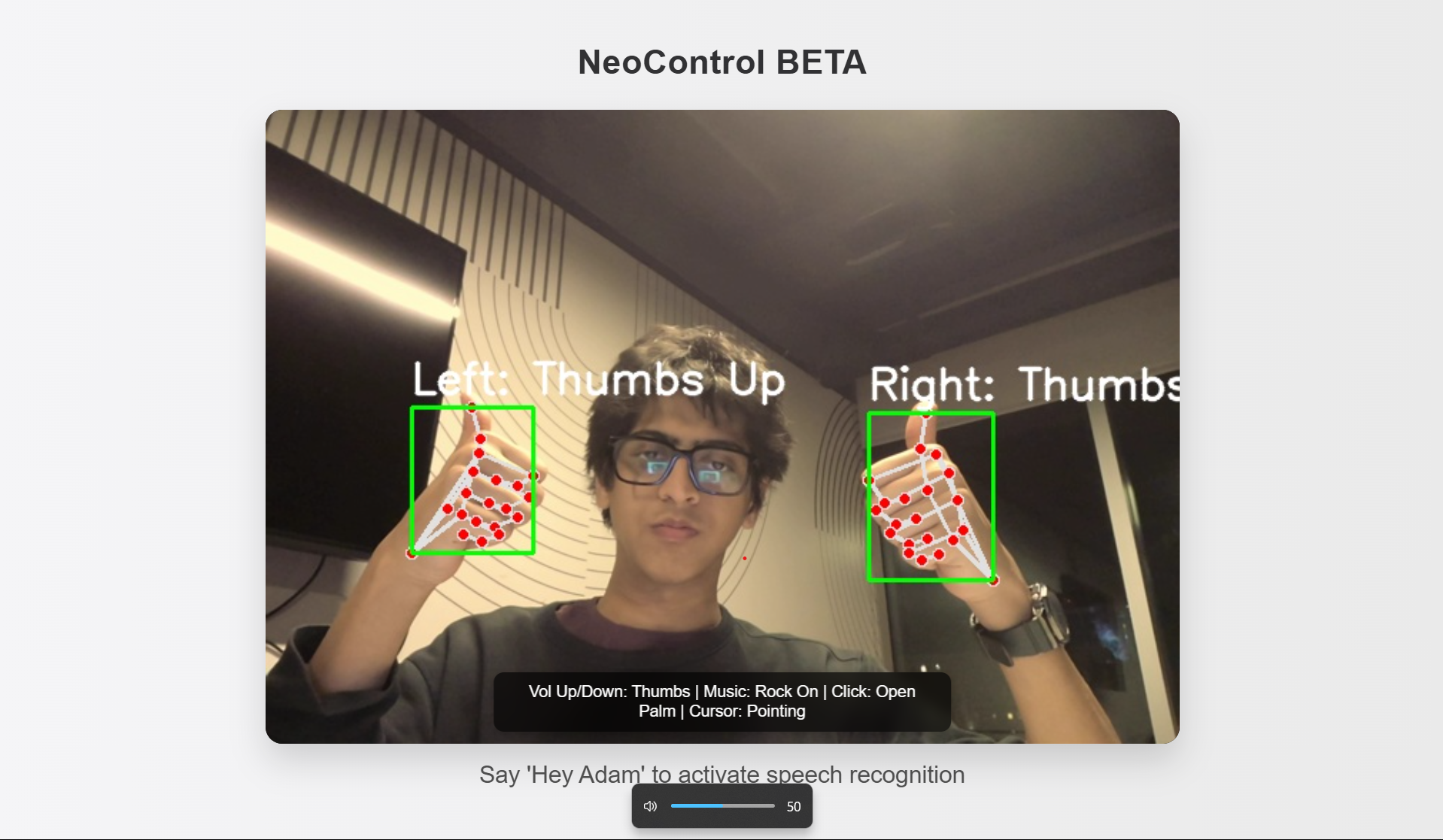
NeoControl allows users to control their laptop without a keyboard or mouse using hand gestures and voice commands.
Hand Gestures
- Move cursor → Pointing gesture
- Click & Hold → Open palm
- Scroll → "Peace Sign" with left hand and Swipe up/down
- Volume Control → Thumbs up/down
- Media Playback → "Rock on" sign (play/pause music)
Voice Commands
- Say "Command" to activate speech recognition
- Dictate text and send it to an active window
- Open and control applications
NeoControl integrates computer vision, machine learning, and natural language processing to create a seamless hands-free computing experience.
How we built it
Backend
- Python + OpenCV + MediaPipe for real-time hand gesture tracking
- FastAPI + Websockets to serve the video feed using buffers and process gestures
- SpeechRecognition + Vosk + Audio Processing for voice commands
Frontend (Web App)
- React.js + Tailwind CSS for a modern UI
- Integrated WebSockets for real-time gesture updates
- Smooth animations and a clean interface for usability
AI & Data Processing
- Pre-trained gesture detection models fine-tuned using TensorFlow
Challenges we ran into
Real-time Hand Gesture Tracking 🖐️
- Ensuring low latency and high detection accuracy in different lighting conditions was tough.
- Solution: Used MediaPipe Hand Landmark Dynamics, optimized frame rate, and applied smoothing algorithms for multi-frame accuracy.
- Ensuring low latency and high detection accuracy in different lighting conditions was tough.
Accurate Speech Recognition 🎙️
- Background noise interference affected command recognition.
- Solution: Integrated Custom offline speech-to-text using Google Speech with noise filtering.
- Background noise interference affected command recognition.
Synchronizing Gestures & Voice Commands ⚡
- Ensuring gestures and voice commands work together smoothly.
- Solution: Implemented event listeners and WebSocket communication between backend and frontend.
- Ensuring gestures and voice commands work together smoothly.
Cross-Platform Compatibility 💻
- Making sure it works on Windows, macOS, and Linux.
- Solution: Used OS-specific automation tools (PyAutoGUI, AppleScript for macOS).
- Making sure it works on Windows, macOS, and Linux.
Accomplishments that we're proud of
✅ Successfully built a fully functional prototype with smooth gesture and voice control
✅ Achieved real-time cursor movement with <50ms latency
✅ Integrated AI-powered hand tracking for multi-hand support
✅ Designed an intuitive UI that makes hands-free navigation easy
✅ Ensured accessibility for users who rely on alternative input methods
What we learned
🔹 Optimizing computer vision models for real-time performance
🔹 How to integrate WebSockets for fast communication between frontend & backend
🔹 Improving user experience in AI-powered interfaces
🔹 Handling multi-modal inputs (voice + gestures) efficiently
🔹 Cross-platform support for hands-free interaction
What's next for NeoControl
🚀 Enhanced Gesture Customization – Allow users to train custom gestures for unique commands
🚀 AI-Powered Predictive Assistance – Auto-suggest gestures based on usage patterns
🚀 Eye-Tracking Support – Navigate using eye movements + gestures
🚀 Bluetooth/Wi-Fi Remote Mode – Control your laptop from a phone or smart glasses
🚀 Integration with Smart Home Devices – Use gestures & voice to control lights, music, etc.
With NeoControl, we’re pushing the boundaries of hands-free computing and accessibility. This is just the beginning! 🔥💡
Built With
- amazon-web-services
- api;
- css;
- ec2;
- firebase
- firebase;
- firestore;
- flask;
- hands;
- html;
- javascript;
- linux;
- macos;
- mediapipe
- opencv;
- postgresql;
- pyautogui;
- python;
- react.js;
- speechrecognition
- tailwind
- tensorflow.js;
- vosk
- webrtc
- websockets;
- windows;


Log in or sign up for Devpost to join the conversation.