Inspiration 💡
The advent of the 𝐂𝐨𝐯𝐢𝐝-𝟏𝟗 has turned all of our lives upsides down. Currently, the fear of the third wave has imposed lockdown in several countries. Changes in social dynamics due to local restrictions immensely impacted human behavior and are making humans lethargic. With this everything has drastically shifted to a digital era, i.e everything has kind of shifted to online.
The web is for everyone. All too often, insufficient attention is paid to the needs of non-disabled older users online, who comprise a distinct but sizable subset of web accessibility use cases and exist on that, occasionally blurred boundary between conventional accessibility and general usability. Old people face a lot of difficulties navigating and surfing through the web. Data shows that they struggle with their vision now more than ever, especially with the onset of computers and mobile phones. Age also brings in the curse of forgetting to take medicines at the right time.
We believe that with the power of AI, this can be solved if proceeded creatively. Thus we made Neoage!
What it does 🤔
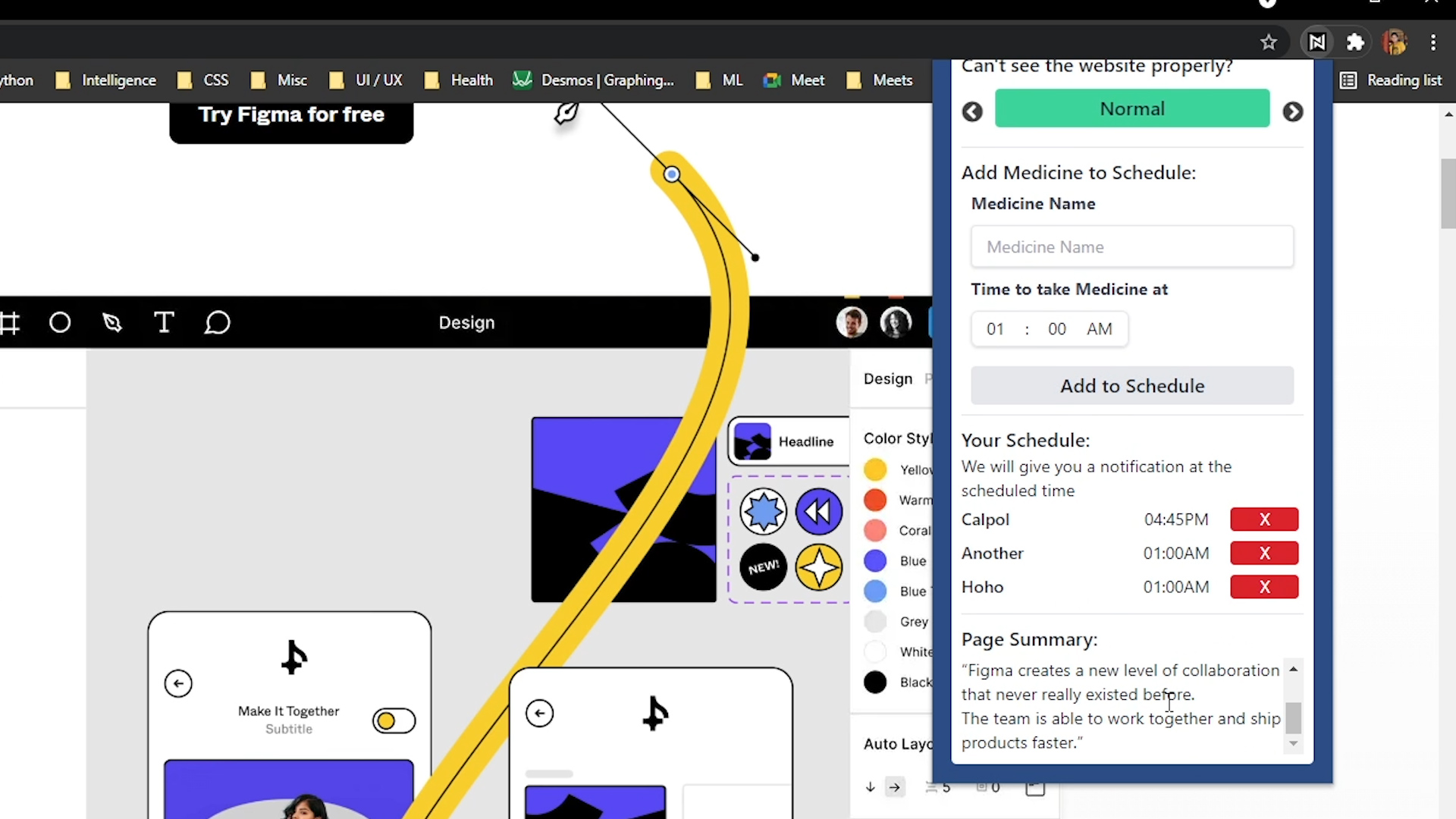
Neoage is a modern tool which helps our grandpas and grannies walk through internet like a pro, helping them remember to take medicines in time, all packaged as a Chrome Extension. We do take care of people who have eye conditions like Protanopia, Tritanomaly, and so on. In order to protect our eyes and to save us the trouble of reading the complete webpage, we summarize any webpage's contents and show it in the extension itself. Users will be able to add in medication or remove them anytime they want.
How we built it ⚙️
Neoage is crafted with ❤️. It's primarily built with Javascript (vanilla), HTML & Tailwind CSS. We had to do extensive research on different types of color-blindness and jot their individual characteristics and properties. And not to mention, we hid some easter-eggs inside the project! 😉
It's a mixture of various modules with independent characteristics. We leveraged a LSTM-CNN to create the document summerizer & deployed it as an API to process on links extracted from the active tab.
Challenges we ran into 😤
A lot! As I previously mentioned, the whole execution was done from scratch, even the advent of idea in our mind literally came during the opening ceremony from Sandipan. Initially, ideated the whole project & then divided the same into two chunks. Sandipan was primarily working on the Chrome extension & Pratyay was working on building the POC's ML part. We faced most challenges while we were integrating the modules into one. Apart from bugs, Sandipan faced a lot of issue in figuring out an alternative method to inject scripts directly to the active tab, and Pratyay faced major issues in building the summarizer model & then deploy it as an API. Also, it was a bit difficult for us to collaborate in a virtual setting but we somehow managed to finish the project on time.
Conclusion : To be honest, Chrome Extensions are a pure mess!
Design
We were heavily inspired by the revised version of Double Diamond design process developed by UK Research Council, which not only includes visual design, but a full-fledged research cycle in which you must discover and define your problem before tackling your solution.
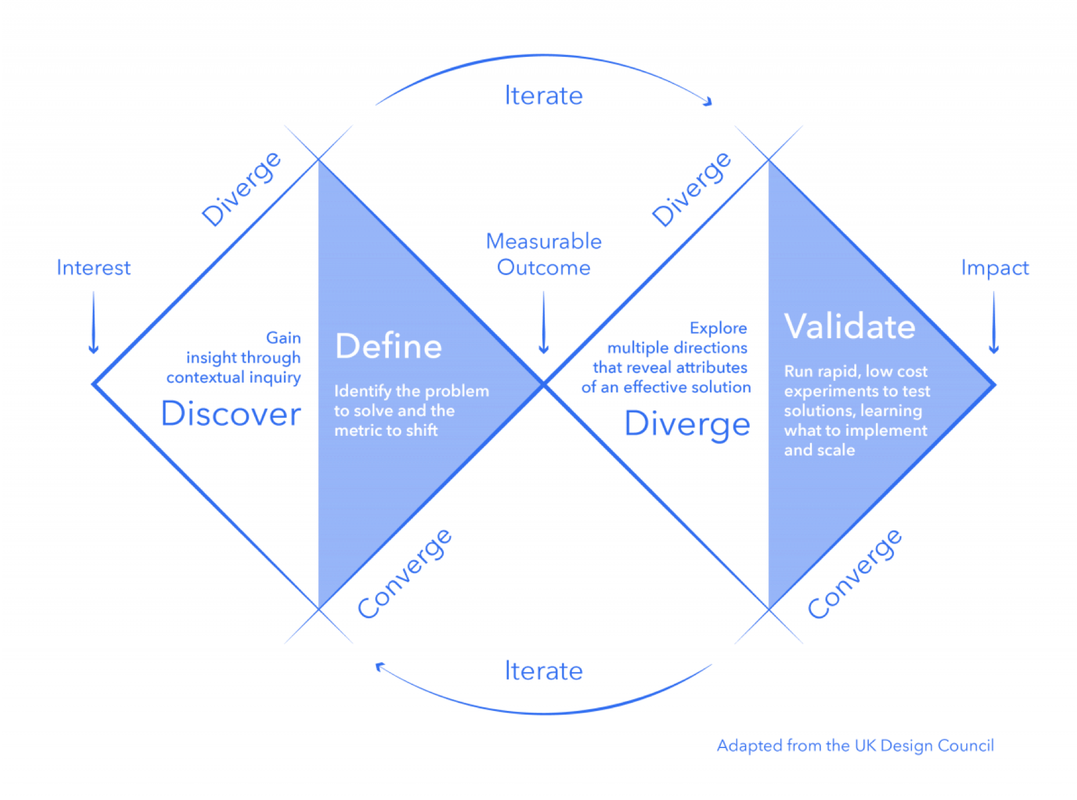
- Discover: a deep dive into the problem we are trying to solve.
- Define: synthesizing the information from the discovery phase into a problem definition.
- Develop: think up solutions to the problem.
- Deliver: pick the best solution and build that.
This time went for the exotic Gradient UI. We utilized design tools like Figma & Photoshop to prototype our designs before doing any coding. Through this, we are able to get iterative feedback so that we spend less time re-writing code.
Research 📚
- Methods for Improving WCAG standard for websites, Researchgate : https://bit.ly/3nmR8qA
- Web Accessibility for Adults, Researchgate : https://bit.ly/38YfA9t
- Attempt to Provide Web Accessibility for Low vision and Color Deficient People, Researchgate : https://bit.ly/3z2R55y
- Web Accessibility for the Low Vision User, Researchgate : https://bit.ly/3tC0b7X
- Meeting the Needs of Ageing Web Users, WCAG : https://www.w3.org/WAI/older-users
- Learning Opinion Summarizers by Selecting Informative Reviews, ArXiv : https://bit.ly/3npVjC7
- Learning to Summarize Long Texts with Memory Compression and Transfer, ArXiv : https://bit.ly/3karaEV
♣ Datasets :- Recompiled from several sources.
♣ Articles :-
- How Web Accessibility affects Healthcare, BOiA : https://bit.ly/3laaNHy
- Less than 1% websites follow WCAG guidelines : https://bit.ly/3C625AQ
- Vision decline in Adults affects the ability to see Color, RebuildyourVision : https://bit.ly/392F996
- Vision issues for Adults, AOA : https://bit.ly/3EaWriD
- Impact of COVID-19 and lockdown on mental health of children and adolescents, ncbi.nlm.nih.gov : https://bit.ly/2XH5gA1
- Understanding the needs of Accessibility for Elders/Adults, Forbes : https://bit.ly/2Vzlfj0
CREDITS
- Design Resources : Freepik
- Icons : Icons8
Takeways
Accomplishments that we're proud of ✨
We are proud of finishing the project on time which seemed like a tough task as we started working on it quite late due to other commitments and were also able to add most of the features that we envisioned for the app during ideation. Moreover, we learned a lot about new web technologies and libraries that we could incorporate into our project to meet our unique needs. And as always, working overnight was pretty fun! :)
What we learned 🙌
A lot of things, both summed up in technical & non-technical sides. For technical part, we faced a lot of serious issues in forms of errors as we were integrating modules inside the Chrome Extension. Handling CORS and other bugs was also a big challenge. We also gave our level best to make the UI/UX look solid which helped us learn more about different design-centric approaches! Not to mention, Stackoverflow was the gem for us while we're troubleshooting some complicated issues late-night.
What's next for Neoage 🚀
We just really want this project to create a real positive impact on humanity. We are also planning to integrate some cosmetic features into the extension to make the UI look more attractive & intuitive. With that said, the font used can be auto toggled between the native (Montserrat) & Open-Dyslexic. And last but not least, creating a Firefox extension for the same is also on the list.
Note — Please make sure that your spec has at least 8gb's of RAM & standard VGA memory to have a seamless experience!
Built With
- chrome
- css
- html
- javascript
- peerjs
- tailwind-css
- tensorflow
- vuejs


Log in or sign up for Devpost to join the conversation.