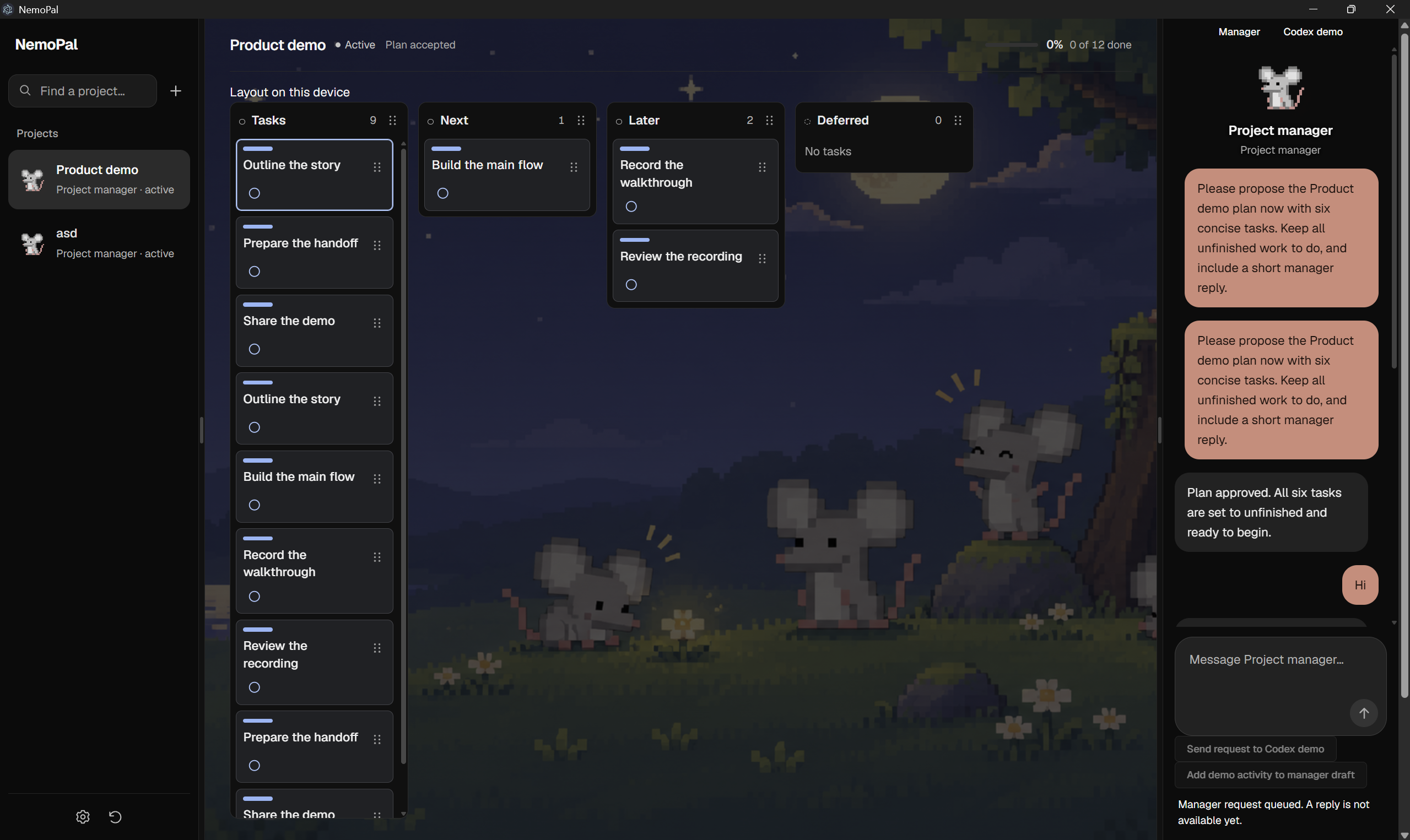
NemoPal
Inspiration
I've been using AI coding tools like Codex to build projects, and I've noticed something frustrating. Coding has become much faster, but keeping track of everything is still a mess.
I might spend hours working with an AI agent, then have to go back through conversations to remember what was finished, what the blockers are, and what I should work on next.
I wanted something that could keep track of all that for me. I also liked the idea of having a little desktop pet that was actually useful.
That's how NemoPal started.
What it does
NemoPal is a personal AI project manager that lives on your desktop as a small animated pet.
You create a project, explain what you're working on, and NemoPal builds a visual dashboard showing your tasks, progress, and next steps.
It can connect to any harness via an MCP server and follow your coding progress. Instead of manually updating a checklist every time you finish something, NemoPal uses those updates to help keep your project organized.
The pet can also check in with you. For example, if you've finished building your app but haven't recorded your demo, NemoPal might ask, "Have you recorded your demo video yet?"
It remembers your answers, so you don't have to keep explaining the same things.
How I built it
I designed NemoPal around Electron, React, and TypeScript for the desktop application, with Node.js and PostgreSQL for storing project information.
NVIDIA Nemotron is the AI project manager. It interprets project requirements, progress updates, and helps decide what information should appear on the dashboard.
One of the main technical ideas is a read-only connection to Codex. This allows NemoPal to observe selected conversations without interfering with the coding agent.
Since I only have 24 hours for the hackathon, I split the development into parallel workstreams and agents covering the AI backend, desktop integration, and interface.
Challenges I faced
The biggest challenge has been figuring out how NemoPal can understand what you're doing without requiring you to manually report everything.
Reading coding conversations is more complicated than it sounds. Different tools store their conversations differently, and MCP connections don't automatically provide access to chat history.
Another challenge is making sure NemoPal understands the difference between an AI agent saying something is finished and having actual evidence that it works.
I also spent a lot of time working on the interface. My first designs were too crowded and complicated. I wanted someone opening NemoPal for the first time to understand their project's progress immediately, without having to read through a wall of text.
What I learned
Working on NemoPal has helped me understand how to connect AI models with real applications while keeping user permissions and project information organized.
I've also learned that making an AI assistant genuinely helpful requires more than giving it a chat interface. It needs to understand what's happening, remember previous decisions, and know when to ask for input.
What's next
I'd also like to add synchronization between computers, phone reminders, and more customizable desktop pets.
My goal is to make NemoPal something people can leave running while they work, knowing that their projects are being kept organized in the background.
