-
-
Architecture
-
Project
Inspiration
Every year, 1.8 million+ students in India appear for NEET — the single-window medical entrance exam. Most come from small towns where quality coaching is expensive or unavailable. They rely on NCERT textbooks and YouTube, but when a doubt strikes at 11 PM while solving past-year papers, there's no one to explain why option (C) is correct and option (A) is a common trap.
We saw an opportunity: Gemini's multimodal capabilities (vision + text + multilingual generation) are a perfect fit for building an always-available, exam-focused tutor that understands printed questions, speaks the student's language, and grounds every answer in NCERT textbook content — not generic internet knowledge.
What it does
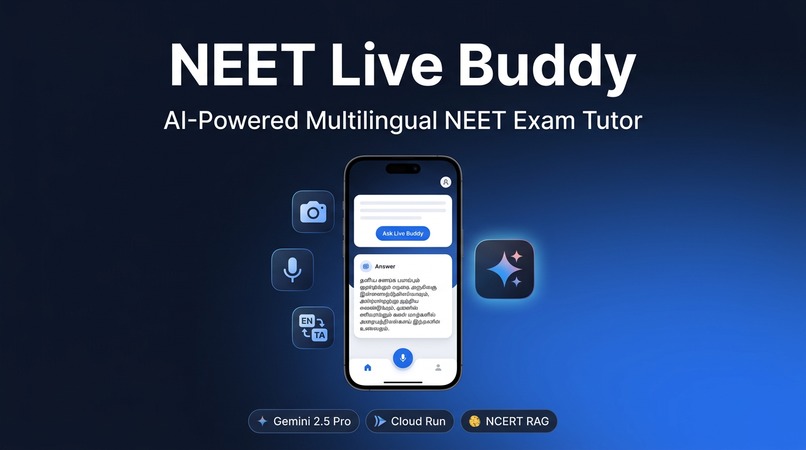
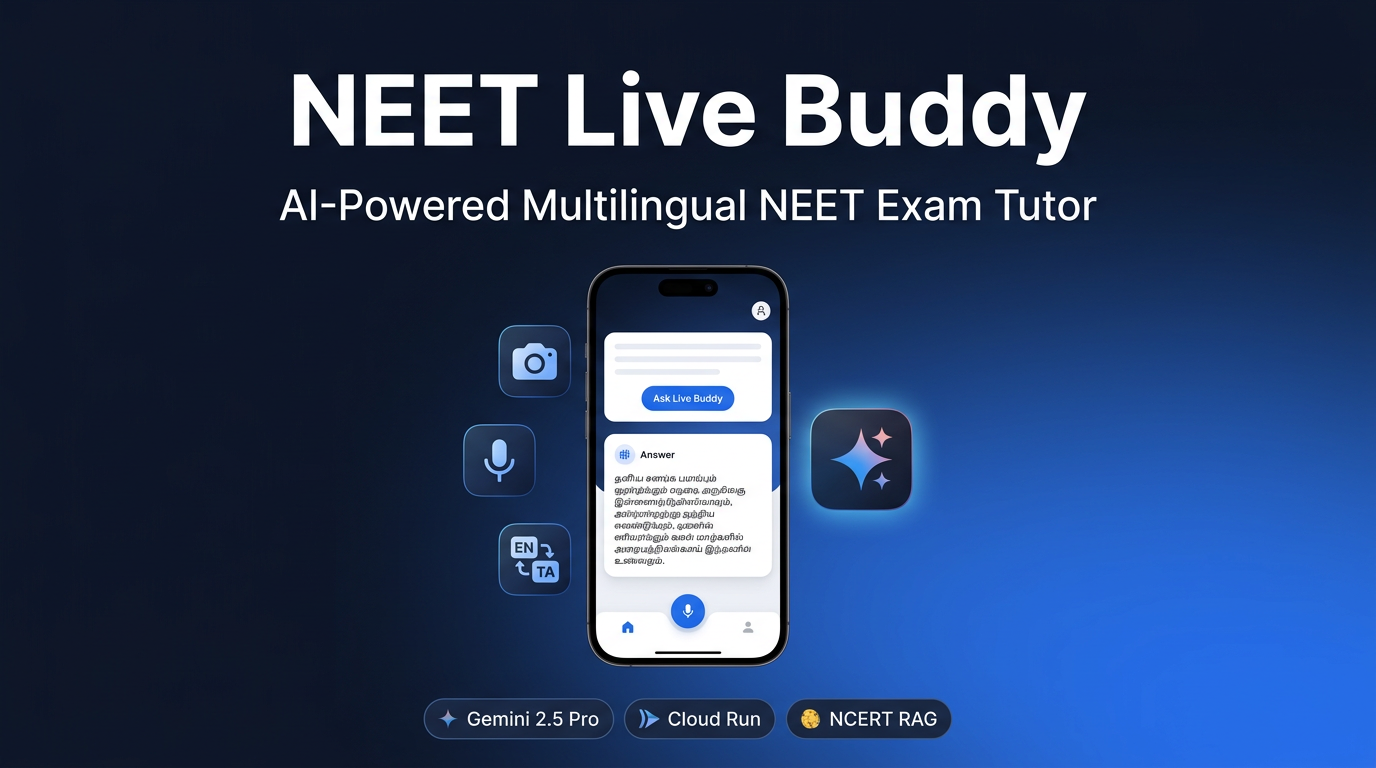
NEET Live Buddy is a mobile-first AI tutor that gives students three ways to ask:
- Scan — Point your camera at any printed NEET question (including diagrams and chemical structures). Gemini Vision reads the image and explains the answer.
- Speak — Tap the microphone and ask your doubt in Tamil, Hindi, or English. The app transcribes your speech, sends it to Gemini, and reads the answer back aloud.
- Type — Enter a question manually for a quick lookup.
Every response includes:
- Detailed NEET answer-key style explanation — like Allen/Shiksha answer keys
- Option-by-option analysis — why each MCQ option is correct or incorrect
- NCERT chapter reference and difficulty rating
- Revision card — concept, key point, common trap, and a practice MCQ
- Voice output — the answer spoken aloud in the student's language
All answers are grounded through RAG over 1,600+ embedded chunks from NCERT Physics, Chemistry, and Biology textbooks — so the tutor doesn't hallucinate, it cites the actual textbook.
How we built it
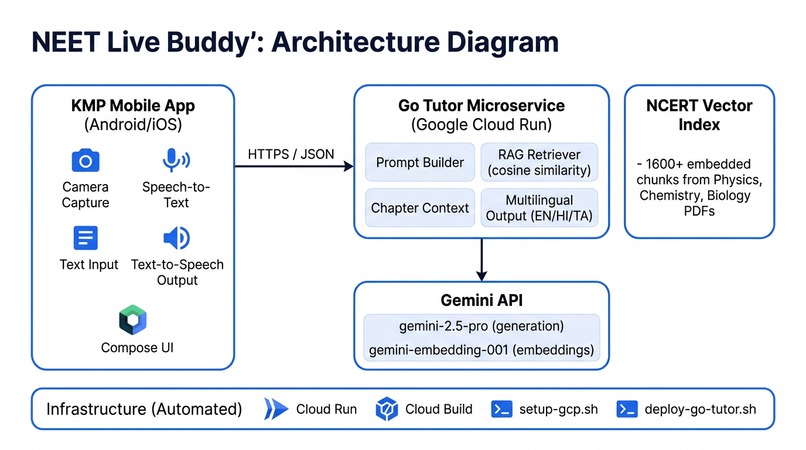
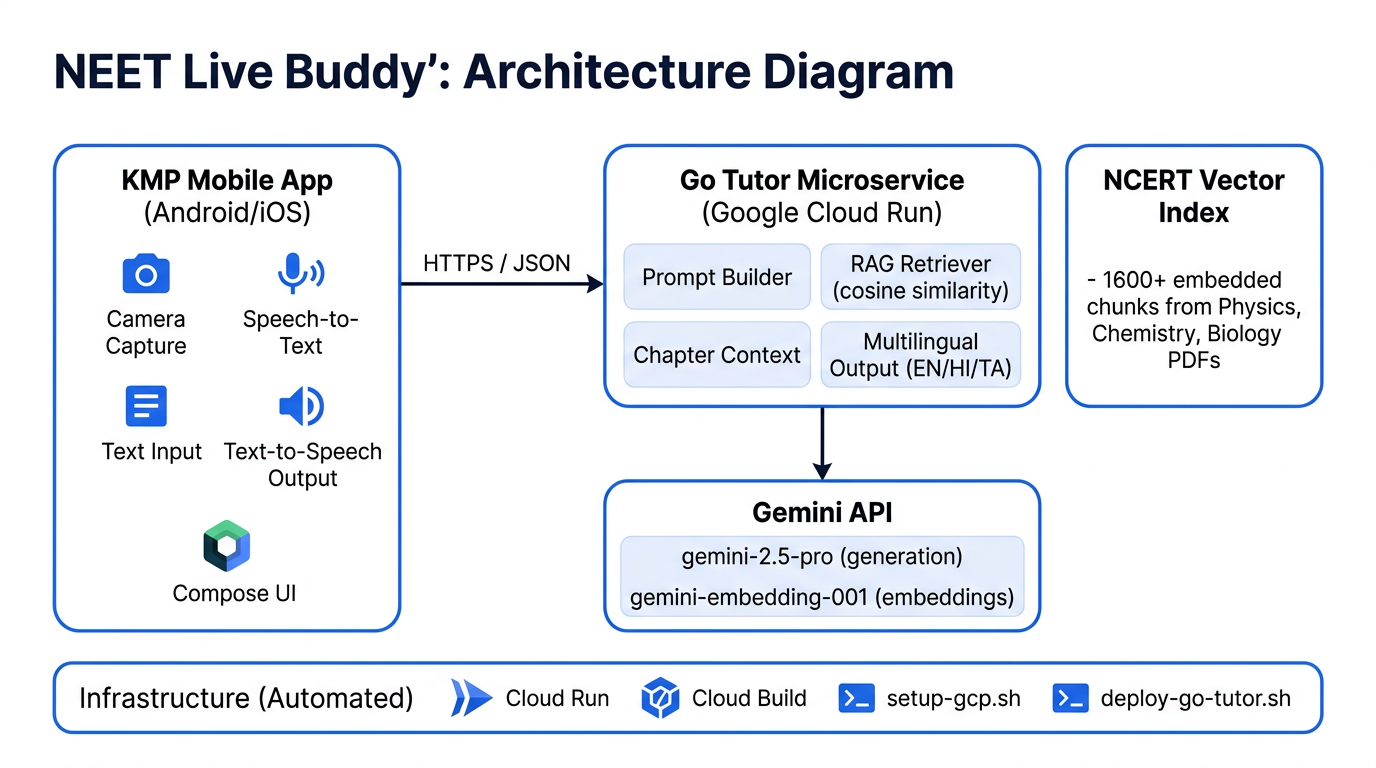
Mobile App — Kotlin Multiplatform with Compose Multiplatform for shared UI. Android-specific integrations for CameraX (image capture with compression), SpeechRecognizer (voice input in ta-IN, hi-IN, en-IN), and TextToSpeech (voice output). Ktor for HTTP communication with the backend.
Backend — A Go microservice that orchestrates everything:
- Receives multimodal requests (text + base64 image + language preference)
- Performs RAG: embeds the query via
gemini-embedding-001, does cosine-similarity search over the NCERT vector index, and injects the top-K chunks into the prompt - Builds a detailed system prompt with NCERT chapter context, localization terms, confusion-level policies, and the NEET answer-key output schema
- Calls
gemini-2.5-prowith multimodal input (text + inline image) to generate structured JSON - Returns a rich response: answer, options analysis, difficulty, NCERT reference, and revision card
RAG Pipeline — Python script that extracts text from NCERT PDFs using PyPDF, chunks with overlap, generates embeddings via gemini-embedding-001, and stores them as a JSONL vector index. The index (1,600+ chunks) is baked into the Docker image for fast startup.
Infrastructure — Fully automated with bash scripts:
setup-gcp.shenables Cloud Run, Cloud Build, and Artifact Registrydeploy-go-tutor.shbuilds the Docker image via Cloud Build and deploys to Cloud Run- Zero manual GCP console clicks — everything is scriptable and reproducible
Challenges we ran into
Camera image size vs. API timeout — Our first camera captures were 12MP (5MB+ as base64), causing Gemini API calls to timeout at 30 seconds. We had to add image resizing (max 1024px), lower capture resolution via CameraX ResolutionSelector, and increase timeouts to 90s. This took several iterations to get right.
Model availability — We started with gemini-2.0-flash which returned "no longer available to new users." Then gemini-2.5-flash-preview-04-17 returned "not found." We had to discover that gemini-2.5-flash (and later gemini-2.5-pro) were the correct stable model names.
Embedding model name changes — The NCERT vectorization initially failed with 404 errors because text-embedding-004 was outdated. Switching to gemini-embedding-001 fixed it.
PDF processing at scale — Some NCERT PDFs had corrupted/compressed pages that crashed PyPDF with LimitReachedError. We added try-except guards to gracefully skip problematic pages and continue indexing.
Android runtime permissions — Declaring camera and microphone permissions in the manifest isn't enough on Android 6+. The camera silently failed (10-second reopen loop) and speech input did nothing until we added runtime permission requests via Accompanist Permissions.
KMP build tooling — Kotlin Multiplatform with Compose required precise alignment of JVM targets (Java 17 vs Kotlin 21 mismatch), fully qualified Activity class names in the manifest, and the correct Kotlin Compose compiler plugin for Kotlin 2.x.
Accomplishments that we're proud of
- True multimodal interaction — Camera scan, voice input, and text all work end-to-end in a single app, hitting a real cloud backend
- Trilingual support that actually works — Gemini generates fluent, technically accurate Tamil and Hindi explanations with correct scientific terminology
- NCERT RAG grounding — 1,600+ chunks from real textbooks means the tutor gives exam-relevant answers, not generic AI responses
- NEET answer-key format — Option-by-option analysis with correct/incorrect explanations, just like coaching institute answer keys
- Fully automated cloud deployment — One script to go from code to live Cloud Run endpoint, with the vector index baked in
- Built from scratch in a weekend — Go backend, KMP mobile app, Python RAG pipeline, infrastructure scripts, and content — all working together
Link URL GitHub Repository : https://github.com/YOUR_USERNAME/neet-live-buddy (update after push) Live API Health Check: https://neet-live-buddy-go-tutor-1092451837072.asia-south1.run.app Try the API (curl): curl -X POST https://neet-live-buddy-go-tutor-1092451837072.asia-south1.run.app/tutor -H "Content-Type: application/json" -d '{"prompt":"What is mitosis?","language":"tamil","subjectHint":"biology"}'
What we learned
- Gemini's multilingual generation is remarkably good — Tamil and Hindi outputs are fluent and use correct scientific terms, especially when you provide a localization reference in the prompt
- Structured JSON output from LLMs is reliable — With a clear schema in the prompt, Gemini consistently returns parseable JSON with all required fields
- RAG makes a massive difference for domain-specific apps — Without NCERT grounding, answers were generic. With RAG, they cite specific chapters and feel like an expert tutor
- Image preprocessing is critical for vision APIs — You can't just send a raw 12MP camera capture. Resizing and compression are essential for latency
- Go + Cloud Run is an excellent production stack — Sub-2-second cold starts, tiny binary size, generous free tier, and straightforward deployment
- KMP is ready for real apps — Compose Multiplatform with platform-specific CameraX and SpeechRecognizer integrations works well, though build tooling requires careful version alignment
What's next for NEET Live Buddy
- Live conversation mode — Use Gemini's streaming API for real-time back-and-forth tutoring instead of single question-answer
- Doubt history and progress tracking — Store sessions in Firestore so students can review past doubts and track weak topics
- Chapter-wise practice mode — Generate NEET-style MCQs from NCERT content for targeted revision
- Handwriting recognition — Let students photograph handwritten solutions and get feedback on their working
- iOS release — The KMP app already has iOS target stubs; completing the camera and speech integrations for iOS
- Offline mode — Cache frequently asked topics and revision cards for areas with poor connectivity
- Integration with NEET previous year papers — Auto-detect the year and question number when scanning a printed paper
- Community features — Let students share difficult questions and see how the AI explains them


Log in or sign up for Devpost to join the conversation.